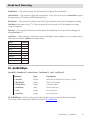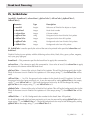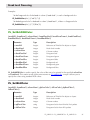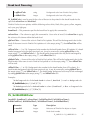
1
Break Level Processing
Using Break Headers
The ability to configure break headers is identical to that of break footers including:
■■
all calculations: sum, average, min, max, count, and break value
■■
a callback for the break function (one callback for all break headers)
■■
full style (font, size, style) control for each cell within the break
■■
horizontal and vertical line/divider control
■■
foreground and background colors for each cell within the break
■■
variable height breaks
Break headers can be configured using six commands: PL_SetBkHText, PL_SetBkHFunc, PL_SetBkHStyle,
PL_SetBkHColor, PL_SetBkHHeight, and PL_SetBkHColOpt. These commands are identical in syntax to
the break footer commands.
PL_SetBrkColOpt can be called to print horizontal lines at the top of a cell with a break footer. With
break headers, the equivalent command PL_SetBkHColOpt will print lines at the bottom of a cell within
the break header.
Just as with break footers, break headers will only be printed if the command to set the break text,
PL_SetBkHText, has been called for a particular break level.
Break headers can be configured to be fixed or variable height and have full background color control
as is now available with break footers.
Using Break Levels When Printing Records
A few limitations are present when printing records using PrintList Pro.
Please read the section Using Break Level Calculations With Fields for more information.
Using Break Headers - Using Break Levels When Printing Records
86