1
User’s manual. Accelerometer. Applicability.
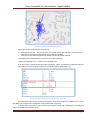
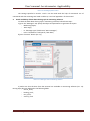
Picture 4. Coordinates crowding during stops
Parameters of the accelerometer settings are:
1. Operating threshold – the acceleration size above which the vibration corresponding to
operation of the engine or movement of the vehicle is defined.
2. Time after a stop of the vehicle during which coordinates will be updated.
To configure these parameters it is necessary to do the following:
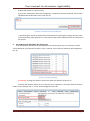
а) go to the “Settings” tab -> “Track” of the Configurator;
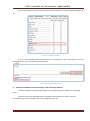
б) in the section "Accelerometer operation threshold" specify a threshold of operation and the
time after the vehicle stops, during which coordinates will be updated (Pic. 5).
Picture 5. Accelerometer parameters setting in the “Track” tab
Recommended value of the operation threshold– from 40 and above proceeding from a ratio
that 600 units correspond to acceleration of 1g (acceleration of gravity).
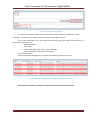
If the operation threshold size is set correctly the object during stop is displayed in the following
way in the monitoring software (Pic.6).
SPA “GalileoSky” LLC
Page 4