1
Owner’s Manual
Hookup Diagrams
SPEAKER
MODE
FEEDBACK
DESTROYER
MAIN
LIMIT
PA
SPEAKER
MODE
FEEDBACK
DESTROYER
1
DJ
2
3
SOLO
SIG/OL
GAIN
2
3
LOGO
HOLD TO
CLEAR
4
U
ON
OFF
ON
SIG/OL
GAIN
R
SOLO
L
MIC
MAX
LINE
ON
OFF
LOGO
HOLD TO
CLEAR
4
U
LINE
OFF
DJ
MON
ON
MAIN
LIMIT
PA
MON
1
MIC
OFF
MAX
CH 1
MIX
SIG/OL
GAIN
GAIN
U
U
LINE
MIC
OFF
SIG/OL
MAX
LINE
R
L
MIC
OFF
MAX
SPEAKER
MODE
FEEDBACK
DESTROYER
MAIN
LIMIT
PA
POWER
1
DJ
2
MON
3
ON
OFF
ON
ON
OFF
SOLO
LOGO
HOLD TO
CLEAR
4
POWER CONSUMPTION 160W
SIG/OL
GAIN
U
L
U
MIC
OFF
R
SIG/OL
GAIN
LINE
MAX
LINE
MIC
OFF
MAX
UE- -RISQUE
NUMB
ER
SERIAL
ATTENRISK DO NOT
OF
OPEN
ELECTRIC
TION:
1kHz
100Hz
20Hz
CHOCNE PAS SHOCK
OUVRIR
ELECTRIQ
DE
WARN
ES
MOD
1kHz
KER
SPEA
100Hz
SOLO
MON
DJ
20Hz
PA
R
ON
MIC
HOLD
CLEARTO
MAX
U
GAIN SIG/OL
FEED
DEST BACK
ROYE
1
2
4
3
LINE
MIC
MAX
U
SPEA
MODKER
E
GAIN SIG/OL
DJ
PA
MON
LI
SOLO
POWE
R
ON
20kHz
SHOCK, ING:
DO NOT TO
MOISTURE
AVERTIS. DO EXPOSEREDUCE THE
NOT THIS RISK
OU DE SEMENT
REMOVE EQUIPMENOF
PLUIE CHOC
FIRE
OU À ÉLECTRIQU: POUR COVER. T TO OR ELECTRIC
RAIN
L'HUMIDIT E, RÉDUIRE
NE
LES RISQUES OR
É. NE PAS EXPOSER
PAS
RETIRER CET D'INCENDI
APPAREIL
REVISILE COUVERCL À E
E. LA
20kHz
ON
OFF
LOGO
R
LIMIT
MAIN
L
ON
CH 1
MIX
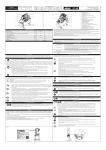
SRMv3 loudspeakers are the perfect tool for singer-songwriters touring the local coffee shops.
Bring your favorite axe and mic, SRMv3 loudspeakers and cables and power cords.
In this example, a dynamic microphone is connected to the channel 1 input of an SRM350v3
loudspeaker, used for monitoring purposes. Be sure that the gain knob is set to “mic” in order to
get an extra boost for the mic. If anything other than a microphone is attached to a channel input,
make sure the gain knob is set to anything other than “mic” [“line” is a safe bet]. From there,
adjust the gain as described on page 10.
Now grab your axe and plug it directly into the channel 2 input. Or if you use effects, connect
the guitar to the effects input and another cable from the effects output to the channel 2 input.
Set the channel two gain knob to “line”.
An SRM450v3 loudspeaker will be used for the main PA. Simply connect a cable from the SRM350v3
loudspeaker’s THRU jack to the SRM450v3 loudspeaker’s channel 1 input [gain knob set to “line”].
Also, make sure the Ch 1/Mix switch is down on the main SRM350v3, as well, so a mix of the
vocals and guitar is relayed to the PA.
For the output, you will want to set a speaker mode, described in detail on page 11. For this type of
setup, PA works well for the main SRM450v3. However, don’t count out the soloist mode! It has a nice
low cut and a brilliant high end. Select the monitor mode for the SRM350v3 monitor. Lastly, you can ring
out before you play, utilizing the SRMv3’s feedback destroyer [page 11] or just let it kill the feedback
while playing.
Small Coffee Shop
Owner’s Manual
5