1
Setup Utility Guide
OPOS Driver
Rev. 2.11
http://www.bixolon.com
OPOS Driver
■ Table of Contents
1. Instruction ...................................................................................................................... 3
2. BIXOLON OPOS Setup .................................................................................................. 4
2-1 POSPrinter Registration ............................................................................................. 4
2-2 CashDrawer Registration ............................................................................................ 7
2-3 LineDisplay Registration ............................................................................................. 9
2-4 MSR Registration...................................................................................................... 10
Rev. 2.11
-2-
OPOS Driver
1. Instruction
This is a manual about how to register and configure POSPrinter, LineDisplay, MSR
produced by BIXOLON with BIXOLON OPOS Driver.
Further Source
OLE for Retail POS committee available from http://monroecs.com/opos.htm
Driver Update from http://www.bixolon.com
We at BIXOLON maintain ongoing efforts to enhance and upgrade the functions and
quality of all our products. In following, product specifications and/or user manual content
may be changed without prior notice.
Rev. 2.11
-3-
OPOS Driver
2. BIXOLON OPOS Setup
After BIXOLON OPOS Driver installation execute “BIXOLON OPOS Setup” to register or
configure LineDisplay or POSPrinter, “BIXOLON OPOS Setup” that is located in “.
Start>Program>BIXOLON OPOS Driver>OPOS SETUP UTILITY”
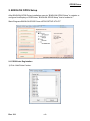
2-1 POSPrinter Registration
1) Click “Add Printer” button.
Rev. 2.11
-4-
OPOS Driver
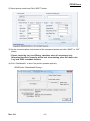
2) Select printer model and Clink “NEXT” button.
3) Set the communication environment of the connected printer and clink “SAVE” or “OK”
button.
* Please check the 'Log' and 'Binary' checkbox when it's necessary only.
Otherwise Hard Drive capacity will be lack of containing other files due to the
'Log' and 'PRN' checkbox function.
4) Clink “Checkhealth” to see if the printer operates properly.
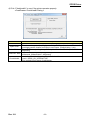
<POSPrinter CheckHealth Dialog >
Rev. 2.11
-5-
OPOS Driver
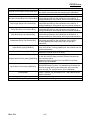
Item
Logical Device Name (LDN) [Edit Box]
Port [Drop List
Combo Box]
Bits per second [Drop List Combo Box]
But Length [Drop List Combo Box]
Parity Bits [Drop List Combo Box]
Stop Bits [Drop List Combo Box]
Handshake [Drop List Combo Box]
Input Buffer (byte) [Edit Box]
Output Buffer (byte) [Edit Box]
Output Interval Time (msec) [Edit Box]
Input Sleep Time (msec) [Edit Box]
CheckHealth
Apply or OK [Button]
Cancel[Button]
Rev. 2.11
Description
New Logical Device Names can be modified by typing
the name in the box and then pressing the OK button.
Port setting.
Baud rate setting for the COM port. This setting will be
restricted according to the limitations of the device. If
using parallel port, this control can not set and reference.
Bit length setting for the COM port. This setting will be
restricted according to the limitations of the device. If
using parallel port, this control can not set and reference.
Parity setting for the COM port. This setting will be
restricted according to the limitations of the device. If
using parallel port, this control can not set and reference.
Stop bit setting for the COM port. This setting will be
restricted according to the limitations of the device. If
using parallel port, this control can not set and reference.
Handshake setting for the COM port. This setting will be
restricted according to the limitations of the device.
If using parallel port, this control can not set and
reference.
Input buffer size for the COM port. Valid size must be
from 32 to 8192. If using parallel port, this control can not
set and reference.
Output buffer size for the COM and LPT port.
Valid size must be from 32 to 4096.
Sets the interval between retries (amount of time passed
to the Win 32 API Sleep function) if there has been an
error during output.
Valid time value must be from 0 to 9999. For a slave
device, this is disabled.
Sets an interval to be set (amount of time passed to the
Win32 API Sleep function : not assistance) to cause the
Device to sleep during input Valid time value must be
from 0 to 99. For a slave device, this is disabled.
Invoke the CheckHealth method for this device with
Level = OPOS_CH_INTERACTIVE. This method inform
status of printer.
Save current settings and exit.
Discard current settings and exit.
-6-
OPOS Driver
2-2 CashDrawer Registration
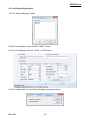
1) Clink “Add CashDrawer” button.
2) Select the printer connected to Cashdrawer among the registered printers.
3) Set up CashDrawer and click “SAVE” or “OK” button.
Rev. 2.11
-7-
OPOS Driver
4) Click “Checkhealth” to see if the printer operates properly.
<CashDrawer CheckHealth Dialog >
Item
Description
Pin Number
Pin Number of drawer kick connector outputting signals. (Default Value : Pin 2)
This shows the symbol(Low/High) status when the drawer is closed. The status
Open Level
(Low.High) can be chosen from Open Level Frame. (Default Value : Low)
Pulse ON Time outputting the specified pin in Connector Pin No.(Default Value :
Pulse ON time
100[msec])
Pulse OFF Time outputting the specified pin in Connector Pin No. The unit is
Pulse OFF time
millisecond. (Default Value : 400[msec])
Invoke the CheckHealth method for this device with
CheckHealth
Level = OPOS_CH_INTERACTIVE.
This method inform status of cashdrawer.
Rev. 2.11
-8-
OPOS Driver
2-3 LineDisplay Registration
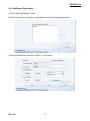
1) Clink “Add LineDisplay” button.
2) Select LineDisplay model and click “NEXT” button.
3) Set up LineDisplay and click “SAVE” or “OK” button.
4) Click “Checkhealth” to see if the Linedisplay operates properly.
Rev. 2.11
-9-
OPOS Driver
2-4 MSR Registration
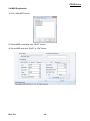
1) Clink “Add MSR” button.
2) Select MSR model and click “NEXT” button.
3) Set up MSR and click “SAVE” or “OK” button.
Rev. 2.11
- 10 -
OPOS Driver
4) Click “Checkhealth” to see if the data is entered correctly.
* if the system has more ports than the default port range of BIXOLON OPOS
Driver Setup Utility, click “Port Range” button and set the port range.
* If you select the port that the system doesn’t have, the device won’t operate.
Rev. 2.11
- 11 -