1
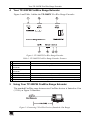
Using Your TP-300FW FireWire Range Extender
5.1 Connecting 2 FireWire Devices via 2 TP-300FW Units
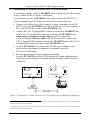
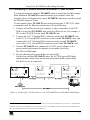
You can interconnect a pair of TP-300FW units to extend the FireWire range
to up to 100m (300ft), as Figure 3 illustrates:
To interconnect a pair of TP-300FW units using twisted pair UTP/CAT 5
cable (commonly used for Ethernet connections), do the following:
1. Connect a FireWire device (for example, a video camcorder) to the FW
PORT on the first TP-300FW unit, and a FireWire device (for example, a
PC) to the FW PORT on the second TP-300FW unit.
2. Connect the CAT 5 Straight RJ45 connector on the first TP-300FW unit
to the CAT 5 Crossed RJ45 connector on the second TP-300FW unit,
when using a straight pin to pin cable with RJ-45 connectors1.
If you are using a crossover cable with RJ-45 connectors, connect the
CAT 5 Straight RJ45 connector on the first TP-300FW unit to the CAT 5
Straight RJ45 connector on the second TP-300FW unit2.
3. On each TP-300FW unit, connect the 12V DC power adapter to the
power socket and connect the adapter to the mains electricity.
The ON red LED lights.
4. Be sure that the power on each device is turned ON.
On each TP-300FW unit, the ACTIVE green LED lights indicating that a
cable from an external powered and fully functioning FireWire device is
connected.
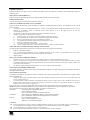
Figure 3: Connecting 2 FireWire Devices via 2 TP-300FW Units (Extended 100m Range)
1 Alternatively, connect the CAT 5 Crossed RJ45 connector on the first TP-300FW unit to the CAT 5 Straight RJ45
connector on the second TP-300FW unit
2 Alternatively, connect the CAT 5 Crossed RJ45 connector on the first TP-300FW unit to the CAT 5 Crossed RJ45
connector on the second TP-300FW unit
4
KRAMER: SIMPLE CREATIVE TECHNOLOGY