1
LMM Designs User Manual Multiflow – 2
PROGRAMMING THE LMM
ENTERING THE PROGRAMMING MODE.
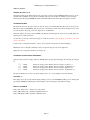
Press the SHIFT key on the infra-red controller, followed by the CODE Key. ‘CODE ****’ will be displayed. A
four digit code can now be entered. On each press of a key the ‘*’ will change to ‘+’ in sequence from left to right.
When all four ‘*’ have been set the code is automatically checked. If the display shows ‘WRONG CODE’ then try
again making sure that you are entering the correct code, as each instrument has a different code setting. If a mistake
is made during setting, then use the CLEAR key and try again.
If you are sure that the code is correct and the instrument still shows WRONG CODE then it is probable that the
batteries need changing in the hand held remote control.
If you press the ALTER key by mistake the display will revert to normal after approx. 20 seconds. Pressing the keys will have the same effect. Pressing any other key will reset the timer allowing sufficient time to enter each digit
of code.
THE CODE NUMBER
The code number for each instrument is taken from the last 4 digits of the serial number. The serial number can be
found on the front page of this manual, on the rear of the instrument, and is also displayed when the instrument is first
powered up, and finally by entering the Front panel Test routine.
For complete security it is recommended that the remote controller should be kept in a safe and secure place.
UNABLE TO ENTER A CODE?
1) Enabling and Disabling the Infra-red hand held keypad.
The infra-red keypad will work with any LMM unit and therefore it may be necessary to disable this function on one
unit where they are in close proximity. To LOCK OUT the infrared keyboard you must enter the Front Panel Test
Routine and select N for the ENABLE IR control. Once locked out, the infra-red keypad is totally inactive on that
particular unit and the lock LED will be lit in the lower square panel. With the REMOTE OFF the displays may still
be viewed by means of the front panel keys. To restore operation of the infra-red keyboard use the Front Panel Test
Routine and select Y to the ENABLE IR menu.
2) Automatic LOCK OUT
In some cases the instrument itself will inhibit the ALTER key as it may be performing a sequence of events that can
not be interrupted, i.e BATCHING. Please see the special instructions if applicable .
UNABLE TO USE THE KEYS or KEY BOUNCE
If you are experiencing key bounce or you are unable to use the keys then there is probably interference with
the infra-red remote control. Problems may occur when trying to operate the unit in direct sunlight; or using
sodium lights etc. If there are problems then please contact your supplier.
Page 8