1
Contents
1
Introduction
1
2
2.1
2.2
2.3
3
Getting Started
Achieving the Best Performance
Safety Instructions
Recycling Kramer Products
Overview
2
2
2
3
4
4
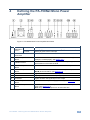
Defining the PA-150Net Mono Power Amplifier
5
5
5.1
5.2
5.3
5.4
6
6.1
6.2
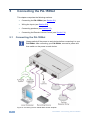
Connecting the PA-150Net
Connecting the PA-150Net
Wiring the Inputs
Connecting Speakers
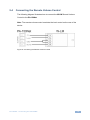
Connecting the Remote Volume Control
Operating the PA-150Net
Indicators
Setting the Priority Switch
6
6
7
9
11
12
12
12
7
Troubleshooting
13
8
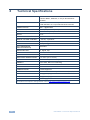
Technical Specifications
14
Figures
Figure 1: PA-150Net Mono Power Amplifier Rear Panel
Figure 2: Connecting the PA-150Net Mono Power Amplifier
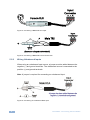
Figure 3: Connecting a Balanced XLR Input
Figure 4: Connecting a Balanced 6.5mm Phone Jack
Figure 5: Connecting an unbalanced RCA Input
Figure 6: Connecting an unbalanced 6.5mm Phone Jack
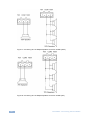
Figure 7: Connecting One or Multiple Speakers to the PA-150Net (100V)
Figure 8: Connecting One or Multiple Speakers to the PA-150Net (70V)
Figure 9: Connecting the Remote Volume Control
5
6
8
8
8
9
10
10
11
PA-150Net – Contents
i