1
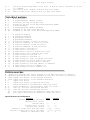
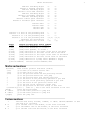
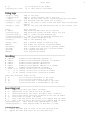
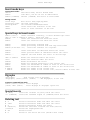
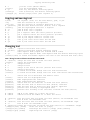
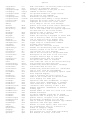
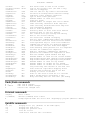
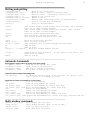
Insert mode keys
Insert mode keys
Leaving Insert mode:
<Esc>
CTRL-C
CTRL-O {command}
end Insert mode, back to Normal mode
like <Esc>, but do not use an abbreviation
execute {command} and return to Insert mode
Moving around:
cursor keys
shift-left/right
shift-up/down
<End>
<Home>
move cursor left/right/up/down
one word left/right
one screenful backward/forward
cursor after last character in the line
cursor to first character in the line
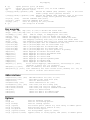
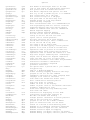
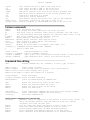
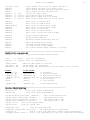
Special keys in Insert mode
CTRL-V {char}..
insert character literally, or enter decimal byte value
<NL> or <CR> or CTRL-M or CTRL-J
begin new line
CTRL-E
insert the character from below the cursor
CTRL-Y
insert the character from above the cursor
CTRL-A
insert previously inserted text
CTRL-@
insert previously inserted text and stop Insert mode
CTRL-R {0-9a-z%#:.-="}
insert the contents of a register
CTRL-N
CTRL-P
CTRL-X ...
insert next match of identifier before the cursor
insert previous match of identifier before the cursor
complete the word before the cursor in various ways
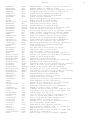
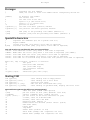
<BS> or CTRL-H
<Del>
CTRL-W
CTRL-U
CTRL-T
CTRL-D
0 CTRL-D
^ CTRL-D
delete
delete
delete
delete
insert
delete
delete
delete
the character before the cursor
the character under the cursor
word before the cursor
all entered characters in the current line
one shiftwidth of indent in front of the current line
one shiftwidth of indent in front of the current line
all indent in the current line
all indent in the current line, restore indent in next line
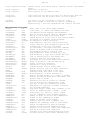
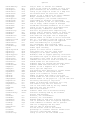
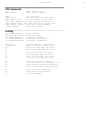
Digraphs
:dig[raphs]
show current list of digraphs
:dig[raphs] {char1}{char2} {number} ... add digraph(s) to the list
In Insert or Command-line mode:
CTRL-K {char1} {char2} enter digraph
{char1} <BS> {char2}
enter digraph if 'digraph' option set
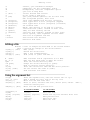
Special inserts
:r [file]
:r! {command}
insert the contents of [file] below the cursor
insert the standard output of {command} below the cursor
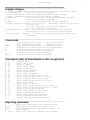
Deleting text
N x
N <Del>
N X
N d{motion}
{visual}d
N dd
N D
delete
delete
delete
delete
delete
delete
delete
N characters under and after the cursor
N characters under and after the cursor
N characters before the cursor
the text that is moved over with {motion}
the highlighted text
N lines
to the end of the line (and N-1 more lines)
5