1
PzDB User Manual
Version 1.1
New: Removes Deleted Items
During Library import, PzDB now scans for, and removes deleted Library content from your
database. (This step is optional, the Importer runs faster without it.)
New: Category Filters, Keyword Filters and Library Filters (“One-at-a-Time” View)
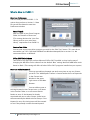
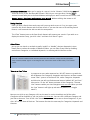
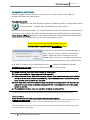
In response to users who requested an “All-Off” button to go with the
All-On Buttons for Categories, Keywords and Libraries, we have created a
new “Filter” system. In the Search Tab, under Categories, Keywords and
Libraries you will now find two new buttons labeled “All” and “One.”
Like version 1.0 the “All” button activates all the Categories. The new
“One”
button enables you view Categories one at a time. When you click the
“One” button it will light up red and stay down (It‟s a “toggle switch”.)
Now you can click on any Category (click on the word or on the checkbox) and all the other
Categories will be disabled, so you can look at just that one. You can click a different Category and
just look at that one. Turn off the “One” button and you can look at two or three Categories, or just
click “All” to turn them all back on. The buttons function the same way for Keywords and Libraries.
New: Add All Search Results to Group
In addition to adding any Item to a Group, or all Items in one Folder to a Group, you can add all the
Items in the Current Search Results to a Group at once. The new “Add Search Results to Group” is
under the Search Button. Please be careful, this action cannot be undone.
New: Search within Search Results
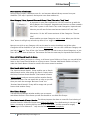
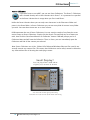
The “Previous Search Results” Group enables you to Search
within Search results. After doing any Search, simply select
the Group “Previous Search Results” (the browser contents
will not change) and you can now perform another Search
within those Items. You can repeat this as often as you like.
Once you reach the message “No Items Found” the
“Previous Search Results” Group will be empty and you will
have to load another Group.
New: Library Manager
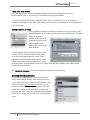
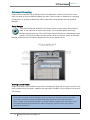
The New Library Manager window enables you to rename
and delete Libraries. In the future you will also be able to sort them like Groups.
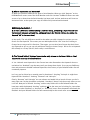
New: Faster Import of Large Libraries. The Library Importer has been re-tuned for fast indexing of
massive Libraries. PzDB now Groups Items 35% to 50% faster, Cross Referencing is now up to 30%
faster, rescanning an existing Library can be up to 90% faster, and the sometimes lengthy
“Preparing to Cross Reference…” step now has been eliminated completely.
5 © 2009 Rocketship Technologies LLC.