1
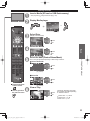
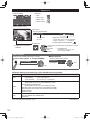
Music view
[Music thumbnail]
Media player
My Music_1
[Features]
Music
My Music_2
Select
SUB MENU
Play Folder
● Play folder
● Drive select
● Media select
Folders
My Music_3
SD memory card
OK
Info
RETURN
Drive select
Media select
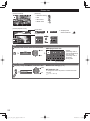
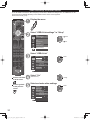
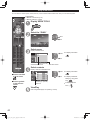
[Music playback screen]
Navigation area
AAAAAA
BBBBBBB
XXXXXXX
Forward
Play/Pause
Stop
Reverse
RETURN
00:00.05 / 00:00.49
RETURN
Artist name
Album name
Song name
● To display/hide Guide and Banner
Elapsed time of current song
* Counter may not work correctly with
DLNA feature.
In this case “--:--:--”is displayed.
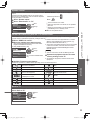
Select “Music options” in “Setup SUB MENU”
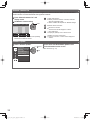
■ Repeat playback
Set play repeat function (Off/Repeat Folder/One
song)
Setup SUB MENU
Music options
Music options
Other settings in Media player
Display “Menu”
On
Repeat playback
■ Adjust the Picture and Audio
Picture
1/2
Reset to defaults
Vivid
Picture mode
Select the item
select
Picture
Audio
VIERA Link
OK
Contrast
0
Brightness
0
Color
0
Tint
0
Sharpness
0
select
adjust
example: Picture menu
Picture menu/Audio menu
(p. 45-46)
■ Use VIERA Link function
select
VIERA Link control
Recorder
Set
select
Using Media player
next
Menu
Basic
Music options
SUB
MENU
• Forward/Reverse
Five level of 1 to 5 (x2, x5, x,30,
x70, x100) are available.
change
Speaker output
TV
Back to TV
VIERA Link menu (p. 32)
27
tc_p42_46_50_x3_eng_0597-1.indb 27
2011/01/13 18:47:33