1
■ Chapter 1 getting to know the basics
Touch Pad
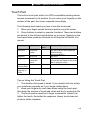
The built-in touch pad, which is a PS/2-compatible pointing device,
senses movement on its surface. As you move your fingertip on the
surface of the pad, the cursor responds accordingly.
The following items teach you how to use the touch pad:
1. Move your finger across the touch pad to move the cursor.
2. Press buttons to select or execute functions. These two buttons
are similar to the left and right buttons on a mouse. Tapping on the
touch pad twice produces is similar to clicking the left button of a
mouse.
Function
Left Button
Execution
Click twice
quickly
Selection
Drag
Click once
Click and hold
to drag the
cursor
Access
Context Menu
Move One
Page Up or
Down
Right
Button
Equivalent Tapping Action
Tap twice (at the same speed as
double-clicking
the mouse button)
Tap once
Tap twice quickly and on the
second tap hold finger to the touch
pad to drag the cursor
Click once
Tips on Using the Touch Pad:
1. The double-click speed is timed. If you double-click too slowly,
your notebook responds as if you single-clicked twice.
2. Keep your fingers dry and clean when using the touch pad.
Also keep the surface of touch pad clean and dry to prolong its life.
3. The touch pad is sensitive to finger movements. Hence, the
lighter the touch, the better the response. Heavy touch does not
produce better response.
1-19