1
User manual
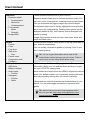
Installing and removing batteries
The unit comes with two battery cartridges. You can use any standard or rechargeable batteries in
the cartridge.
How to remove the battery cartridge from the unit:
1. Open the door of the battery compartment
2. Slide the battery cartridge over the two knobs holding it, by pushing it in the opposite
direction
3. Lift he battery cartridge and move it outward but keep it as level as possible. Extensive
angle gets the cartridge stuck
TIP: To save your fingernails you might want to use a small coin to get the batteries off the cartridge.
How to insert the battery cartridge to the unit:
1. The cartridge goes in so that the metal power outlets of the cartridge touch the metal
power inlets of the unit first.
2. Slide the cartridge in keeping it as level as possible.
3. When the metal parts of the cartridge and LCDVFE touch, push the other end of the cartridge down so that the cartridge will go over the two plastic knobs locking the cartridge
in place.
Working with external power
The unit takes in a wide range of external power from 4 up to 17 volts. Any power source within
that voltage range can be used. As a last resort, the unit can even be powered up via USB port.
We have included a standard D-Tap cable so you can use the power off your camera/rig batteries.
Connecting the cables
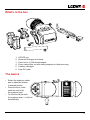
There are 3 cable connections underneath the device: 2 standard-sized HDMI connections and 1
mini-USB. HDMI has a full loop trough (including audio).
The inner HDMI connection (closer to the power input on the side) is HDMI signal IN, while the
other one is OUT. HDMI OUT outputs clean signal without any image processing features seen on
the device. USB port is used for connectivity to PC/Mac LCDVFE Manager. This is for working with
presets, software updates and servicing.
TIP: To save your fingernails you might want to use a small coin to get the batteries off the cartridge
6