1
User manual
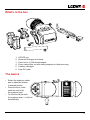
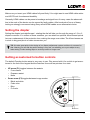
• Forward arrow toggles composition aids on and off
• Back arrow toggles Economy mode (screen brightness) between high-brightness and lowbrightness settings
• Centre button (looking glass) toggles zoom in/out. Note that focus and exposure assist features continue to work while zoomed in. When you zoom during recording you get 1:1 pixels
for 1080 output and 2X zoom for sub Full HD signals.
• Power button switched the device on and off
• Menu button toggles menu on/off
• Red LED indicator light stays illuminated when unit is in stand-by mode
TIP: The Economy mode switch for dimming brightness is a handy feature to change the brightness level when opening or closing the flip with just one press of the button.
TIP: Did you know that you can also move and recall the zoom position? Just move the zoom
marker around with arrow buttons.
Software features in the menus
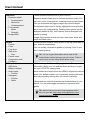
General
• Suspend when blank
• Power down when blank
• Power down when idle
This section deals with power options. Set things up properly
and avoid unwanted power drain and maximize your battery
life.
• Suspend when black - set the time until the unit goes to
standby mode when there is no signal
• Power down when blank - set the time when the unit
switches itself off when there is no signal
• Power down when idle - sets the time when the unit
switches itself off when you have not pressed any buttons
on it (although it might have running signal)
The red indicator LED stays on when unit is in stand-by
mode.
TIP: The difference between standby and power-off
modes is that from standby mode the unit can wake itself
up when it detects signal (for example when camera is
turned back on). However, standby mode uses some
battery while power-off mode does not.
8