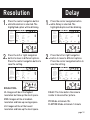
1
Setting Date
1.
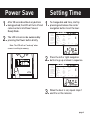
Press the center navigation button
after setting the minute to change the
Day.
Time/Date
Location
Trigger
Flextime
PIR Mode
PIR Active
PIR Sense
Picture
Resolution
Delay
2.
page 7
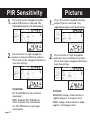
Flextime
P2
Video
Day
Med
Wide
Med
1m
PIR Mode
P1
Still
24Hr
Hi
Regular
Hi
15s
30s
Flextime
P2
Video
Day
Med
Wide
Med
1m
1.
Night
Lo
Lo
2m
5m
10m
2.
Both
Interval
Night
Lo
Lo
2m
5m
3.
PIR Mode
P1
Still
24Hr
Hi
Regular
Hi
15s
30s
Flextime
P2
Video
Day
Med
Wide
Med
1m
Both
Interval
Night
Lo
Lo
2m
5m
10m
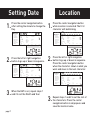
Press the left or right navigation
button to go up or down in sequence.
Open
Press the center navigation button
when the character shown is what you
want and move to the next character.
Time/Date
Location
Trigger
Flextime
PIR Mode
PIR Active
PIR Sense
Picture
Resolution
Delay
10m
When the DAY is set, repeat steps 1
Open
and 2 to set the Month and Year.
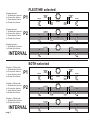
Press the center navigation button
while Location is selected. The first
character will be blinking.
Time/Date
Location
Trigger
Flextime
PIR Mode
PIR Active
PIR Sense
Picture
Resolution
Delay
Both
Interval
Press the left or right navigation
button to go up or down in sequence.
Open
Time/Date
Location
Trigger
Flextime
PIR Mode
PIR Active
PIR Sense
Picture
Resolution
Delay
3.
PIR Mode
P1
Still
24Hr
Hi
Regular
Hi
15s
30s
Location
PIR Mode
P1
Still
24Hr
Hi
Regular
Hi
15s
30s
Flextime
P2
Video
Day
Med
Wide
Med
1m
Both
Interval
Night
Lo
Lo
2m
5m
10m
Repeat steps 1 and 2 to set the rest of
the characters. Press the center
Open
navigation button to skip spaces and
save the location name.