1
1
4
Getting Started
quick tips to help reduce possible errors and improve your use of the camera. In
addition, we will try to put it all together for you with some real-life scenarios. This
will be especially helpful for novice and intermediate users.
For beginners and those who wish to use the camera immediately, the
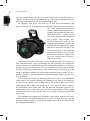
Panasonic GH2 has an Intelligent Auto (iA) Mode for both still pictures and videos.
This mode determines the camera
settings needed to get quality results.
For those coming from the point-andshoot crowd, this is a great way to
start. If you already have the battery
and memory card installed, turn
on the camera and switch on the
Intelligent Auto Mode by moving the
mode dial to the bright red iA setting
(top of the camera on the right). The
iA icon will display in the lower left
corner of the display screen. All you
need to do is find your subject and
press the shutter-release button. It
really is that simple.
A helpful progression for learning to use this camera is to take advantage of its
most automatic modes, and as you develop your skills, gradually start to adjust the
camera yourself. For example, the power of Intelligent Auto Mode is its ability to
identify the type of scene you are viewing and provide the best camera settings
to capture the image. Unfortunately, scene identification is imperfect, so if the
camera’s intelligent software fails to correctly identify the type of scene, it uses a
generic setting that should still capture a technically good image—just not necessarily the best.
You can help your camera by identifying the subject from a set of predefined
scene modes. This requires rotating the mode dial away from iA and matching
an icon to the subject you’re photographing. This prevents the camera from
misidentifying the subject and providing less than optimal camera settings.
The predefined scene modes have icons for daytime and evening portraits, as
well as scenic, sports events, baby, pet, and close-up photographs. These modes
automatically fine-tune the focusing, exposure, and light sensitivity for obtaining
the picture.
The Intelligent Auto Mode and predefined scene modes control the camera
settings for you and therefore need the least amount of input from you. You will
find these modes valuable, and will create better pictures than you would using
the Intelligent Auto Mode.