1
Safety Function: Door Monitoring
The system has individual reset buttons for resetting of faults and safety outputs.
The reset buttons and the contactor feedback circuit are all wired to the POINT Guard I/O 1734-IB8S module in this
example. This is not required for functional safety. These three inputs could be wired to a standard input module.
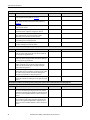
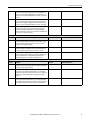
Electrical Schematic
24V DC
Safety Reset
11
12
21
22
Fault Reset
10
11
14
15
12
13
16
17
COM
COM
COM
COM
T0
T1
T2
T3M
33
34
1734-IB8S
24V DC Common
00
01
04
05
02
03
06
07
COM
COM
COM
COM
COM
COM
COM
COM
1734-OB8S
Configuration
The Compact GuardLogix controller is configured by using RSLogix™ 5000 software, version 17 or later. You must create a
new project and add the I/O modules. Then, configure the I/O modules for the correct input and output types. A detailed
description of each step is beyond the scope of this document. Knowledge of the RSLogix 5000 programming environment
is assumed.
Configure the Controller and Add I/O Modules
Follow these steps to configure the controller and to add I/O modules.
6
Rockwell Automation Publication SAFETY-AT060C-EN-P - December 2014