1
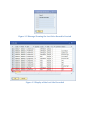
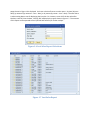
popup shown in Figure 1.6 is displayed. You have a choice of how to sort the report – by item (by item –
date), by customer (by customer – item – date), or by reason (by reason – item – date). The next choice
is what starting date to use for displaying the lost sales. For instance, to see all of the lost sales after
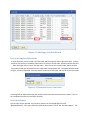
October, enter 10/31 as the date. Clicking ‘OK’ will display the report shown in Figure 1.7. The contents
of this report can be exported to Excel (normal SAP function) for further analysis.
Figure 1.6 Lost Sales Report Selections
Figure 1.7 Lost Sales Report