1
35
User’s Manual STN-1000
FUNCTION
FUNCTION PIANO
PIANOKEY
KEYCONTROLS
CONTROLS
VARIOUS MIDI SETUPS
Arius PIANO
SUZUKI
PIANO
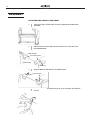
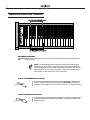
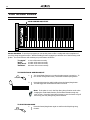
1.
Output
to an external
sound generator
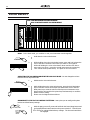
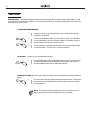
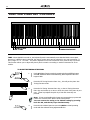
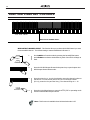
- MIDI keyboards transmit note
FUNCTION
PIANO
KEY
CONTROLS
and velocity, or touch response, information via the MIDI Out connector.
If the MIDI Out terminal of the keyboard is connected to the MIDI In
terminal of a tone generator (tone generators usually offer 128 different
voices), piano sound module or another external device, it will respond
precisely to the notes played on the original transmitting keyboard, in this
Arius piano.
case your Suzuki
MIDI
OUT
MIDI
IN
TONE GENERATOR
C1
C2
C6
C7
MIDI INPUT
CHANNEL
SELECT
instruments at once. This provides
a thick,
layered
multi-instrument
MIDI
OUTPUT
CHANNEL
SELECT
sound.
MIDI
OUT
MIDI
MIDI PIANO
PIANO
MIDI
IN
C5
PIANO TOUCH
TRANSPOSE
TRANSMIT PROGRAM CHANGE ON/OFF
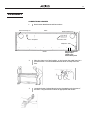
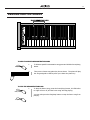
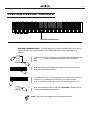
Piano to Piano -TUNING
By connecting this
Suzuki
Arius piano to another keyboard in
DUET PIANO LESSON MODE
MULTI
MODE ON/OFF
the same matter as described aboveTIMBRAL
you will essentially
be playing two
2.
SUZUKI
PIANO
Arius PIANO
C3 D3 E3 F3 G3 A3 B3 C4
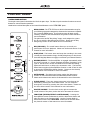
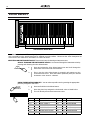
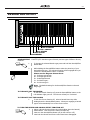
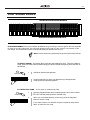
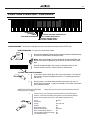
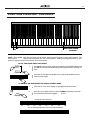
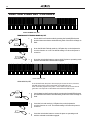
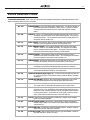
FUNCTION MODE - The Function mode gives you access to these other features of the HP-3 piano.
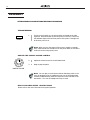
3. FUNCTION
Output MODE
from an-external
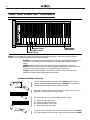
- Connect
the MIDI In terminal of
To enterMIDI
into device
the Function
Mode:
the
F piano and the MIDI Out terminal of an external device. Data generU
other device
passed
through button
the piano’s
sound
delivery button simultane
Press is
the
Reverb/Effect
and the
Metronome
REVERB/ ated on the1.
N
EFFECT
C
system.
The LED’s for both buttons will begin to flash.
SUZUKI
PIANO
Arius PIANO
MIDI
IN
MIDI
OUT
EXTERNAL DEVICE
METRONOME
T
I
O
N
Note: When the HP-3 is in Function Mode with both Reverb/Effect
Metronome button Led’s flashing, there will be no sound from the pi
keys.
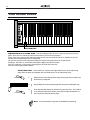
4.
Arius PIANO
SUZUKI
PIANO
MIDI IN
MIDI
OUT
MIDI IN
MIDI
OUT
COMPUTER
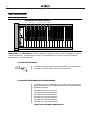
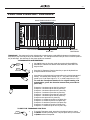
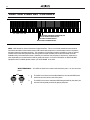
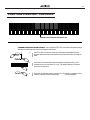
Connect with
- Although
thepiano
HP-3 offers
builttoinchange
recorder,
2. a Computer
Press the
designated
key orakeys
the value for the
the same type of musical
information
is described
above
selected
function. transfer
See the that
various
Functions
listed above.
can be used for more sophisticated MIDI sequence recording using an
external sequencer or computer. These devices can be used to record
TO EXIT
MIDI THE
data FUNCTION
received fromMODE
the piano. You can transmit your performance to
a computer1.to utilizeTothe
advanced
recording,
exit
the Function
Modecomposing
press the and
Voiceediting
Select button. The Rev
available
from
computer
software.
MIDI
music
stored
on
the
computer
Effect
button
will
stop
flashing
but
remain
on.
The Metronome butt
VOICE SELECT
can be played back will
through
your instrument
turn off.
2.
Play the piano, you should hear the piano notes play with your se
lected function engaged. It may be necessary to increase or decr
your selected function.
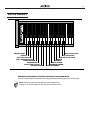
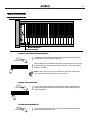
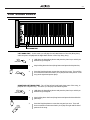
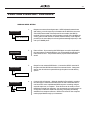
RESETTING TO DEFAULT SETTINGS - When the power is turned on, these functions are alwa
set to the default settings.
1.
DEMO/SONG
REVERB/
EFFECT
At any time you can easily put the piano back to its default factory
settings. Hold down the Demo/Song button and the Reverb/Effects
button and the piano will reset to the default settings35
below.
Touch
Transpose
Tuning
Normal
0
A4=440.0Hz