1
a.
b.
c.
d.
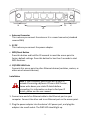
a. Antenna Connector
This is where you connect the antenna. It is a round connector (standard
reverse SMA)
b. 5V DC
This is where you connect the power adapter.
c. WPS/Reset Button
Press this button and hold for 20 seconds to reset the access point to
factory default settings. Press this button for less than 5 seconds to start
WPS functions.
d. 10/100M LAN Ports
Connects this access point to other Ethernet devices (switches, routers, or
other wired network devices)
Installation
Note: If your computer goes online with a static IP,
instead of receiving a dynamic IP from a DHCP server,
please write down your static IP details before
proceeding. For information on how to find your IP
details, please see the user manual.
1. Connect one end of an Ethernet cable to the Ethernet port on your
computer. Connect the other end to an Ethernet port on the access point.
2. Plug the power adapter into the device’s 5V power port, and plug the
adapter into a wall socket. The PWR LED should light up.
3