1
Access Point Mode
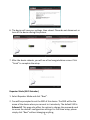
1. Select Access Point Mode and click “Next”.
2. You will be prompted to set the SSID of this access point. The SSID will be
the name of the access point when you connect to it wirelessly. The default
SSID is Edimax AP. This page also offers the option to change the password
used to access the device’s configuration settings. For first time setup,
please simply click “Next” without changing anything.
3. You will now be prompted to set up a wireless encryption password. You
have the option of using no security encryption, or selecting the WEP or
WPA pre-shared key encryption schemes. It is recommended that you set
up an encryption method, though, for security reasons.
4. Y
6