1
3. Insert the Edimax CD into your computer’s CD drive. When the AutoPlay
screen appears, select “Run Autorun.exe.”
Note: If a popup window appears asking “Do you want
to allow the following program to make changes to this
computer”, please click “Yes” to continue.
4. Click on “Setup Utility” in the main menu, then select “English” to continue.
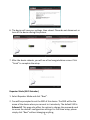
5. The setup wizard will search for the access point. When it has successfully
found the device, click “Next” to continue.
4