1
Page 19 of 24 Form 0164C 2825 03/29/07
Superchips Inc.
Section B – (F.A.Q) Frequently Asked Questions
A. Blank Display Screen when plugged into vehicle
Solution: Your diagnostic port may share power with the radio/cluster/underhood lamp fuse.
Please check the owner manual & replace if bad.
If a blown fuse is not found, check the pin connectors in your vehicle diagnostic connector.
Make sure that none of these pins have been pushed out of the connector body.
(Note: Typically not all pins are present in this connector)
If still no resolution, plug your FLASHPAQ Tuner into another vehicle. If the FLASHPAQ Tuner
powers up, your car has something wrong with either the pins/wiring harness or there is still a
blown fuse in that circuit of the vehicle.
If your FLASHPAQ Tuner fails to power up on a second GM vehicle, call Superchips Customer
Service at 407-585-7000 to ask for a Return Authorization (RA) to send the FLASHPAQ Tuner
in for inspection.
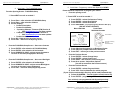
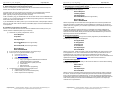
B. FLASHPAQ ‘Tuner Requires an Update’
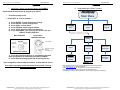
Solution: Your FLASHPAQ Tuner does not have the calibration files necessary to tune your
vehicle; therefore a database update may be necessary.
1)
Write down any screen prompted text, such as
Tuner Requires
an Update...
Call Superchips!
Use Code #E-XX (XX=a two digit number)
Or
2)
3)
4)
Page 20 of 24 Form 0164C 2825 03/29/07
C. Vehicle Requires a Factory (Dealer) Update
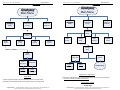
If your FLASHPAQ Tuner has found your vehicle box code and it is problematic to tune, the
following messages will be displayed:
Vehicle Requires
a Factory Update
Call Superchips!
Use Code #E-XX (XX=a two digit number)
Record this File
Name: XXXXXXXXXX
Solution: Superchips has found that some stock applications have numerous problems that
have been fixed with an updated stock program available from a dealer for your vehicle. An
update of the stock program in your vehicle is required before your FLASHPAQ Tuner may be
used on your vehicle.
You may call Superchips Customer Service for confirmation that a dealer updated file is
available and instructions about how to have the stock files for your vehicle updated. Write
down both the Code number (#E-XX) and the File Name XXXXXXXXXX and give this to the
Superchips customer service representative.
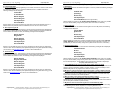
D. Unsupported application
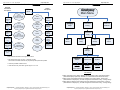
If your particular vehicle or engine type is not currently supported by the FLASHPAQ Tuner,
the following error messages will be displayed:
This application
is unsupported
Use Code #T-XX (XX=a two digit number)
currently! Call
us if incorrect.
Record this File
Name: XXXXXXXXXX
Call Superchips!
Use Code #E-36
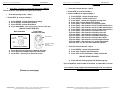
If you have internet access follow below, if not skip to step 4
From any PC running Windows 98SE or higher
a. Connect to the internet
b. Go to www.flashpaq.com
c. Click on “existing customers” link.
d. Follow on screen prompts
i. Plug in your supplied FLASHPAQ to PC USB cable
ii. Install software drivers, as prompted
iii. Run the application to update your tuner
iv. Close Internet
v. Disconnect tuner
vi. Return to vehicle for programming
Call Superchips customer service and request a RA #
a. Superchips will issue a RA#
b. Please include your Proof Of Purchase (POP)
c. Return ship the tuner to Superchips
Superchips Inc.
1790 East Airport Blvd., Sanford, FL. 32773 (407) 585-7000 http://www.Flashpaq.com
Superchip & Superchips are registered trademarks of Superchips, Inc.
Superchips Inc.
Section B – (F.A.Q) Frequently Asked Questions
Solution: Check year, model and engine to verify the FLASHPAQ Tuner being used is correct
for the application. If not, return it to the dealer from which it was purchased for the correct
FLASHPAQ Tuner. If the vehicle is correct for the FLASHPAQ Tuner being used, call
Superchips Customer Service at 407-585-7000 to discuss your issue. Your FLASHPAQ can be
updated via the internet at www.flashpaq.com rather than be returned for service.
E. Non-Stock File Application
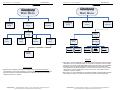
If the FLASHPAQ Tuner has checked your file and cannot match it to a stock file the following
messages will be displayed:
Vehicle File is
Not Stock...
Call Superchips!
Use Code #E-43
Solution: This may be because another programmer has been previously used to reprogram
the vehicle. The vehicle computer must be reprogrammed with a valid stock program before
trying to use the Superchips FLASHPAQ Tuner. You may call Superchips Customer Service
for instructions about how to have the stock files for your vehicle updated. Write down both the
Code number (#E-XX) and the File Name XXXXXXXXXX and give this to the Superchips
customer service representative.
Superchips Inc.
1790 East Airport Blvd., Sanford, FL. 32773 (407) 585-7000 http://www.Flashpaq.com
Superchip & Superchips are registered trademarks of Superchips, Inc.