1
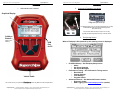
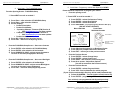
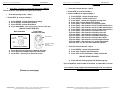
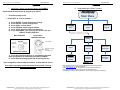
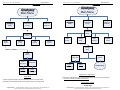
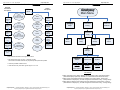
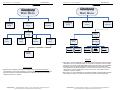
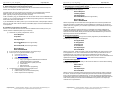
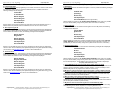
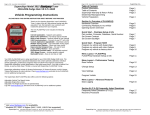
Page 7 of 24 Form 0164C 2825 03/29/07 Superchips Inc. Section A – Overview of FLASHPAQ 4. Quick Start – The FLASHPAQ Setup 5. Quick Start – Program my vehicle with Superchips NOW!!! From the Opening Screen - FLASHPAQ Setup *** Press NEXT to scroll as needed *** Please follow the steps below to program your vehicle 1) 2) 3) 4) Press ENTER – selects Performance Tuning Press ENTER – selects Read Vehicle Press ENTER – selects Read Stock Follow ON SCREEN – Turn Vehicle Ignition Switch to Run (On) (DO NOT START VEHICLE!!) Most 1999-2006 Push button 2005-2006 Corvette Press to Start Press for Accessory, Run (on), Press to turn Off From the FLASHPAQ Setup Screen – Set screen Contrast 1) Press ENTER – after selection of FLASHPAQ Setup 2) Press ENTER – after selection of Set Contrast 3) Press DOWN/UP & SAVE – adjusts screen Contrast to increase or decrease (text/graphics darkness) From the opening screen *** Press NEXT to scroll as needed *** 1) Press Enter – after selection of FLASHPAQ Setup 2) Press Enter – after selection of About 3) Screen Displays: • Product Description • Product Part Number • “Operating Software” Firmware (F/W) Version # Visit www.flashpaq.com for latest updates • Calibration (Tuning File) Database Version # Visit www.flashpaq.com for latest updates • Product Serial Number 4) Press OK – Returns to the previous Screen 5) Press EXIT – Returns to the Opening Screen Superchips Inc. Page 8 of 24 Form 0164C 2825 03/29/07 Section A – Overview of FLASHPAQ 1) Press OK when the ignition is on, Reading will start 2) Press OK when prompted Stock Files are Saved 3) Press EXIT – returns you to the previous screen 1) 2) 3) 4) From the FLASHPAQ Setup Screen – Set screen Backlight 1) Press ENTER – after selection of Set Backlight 2) Press DOWN/UP & SAVE – adjusts screen Backlight to increase or decrease (screen brightness) 3) Press EXIT – returns to Flashpaq opening screen From the Previous Screen Press ENTER – selects Change Setup Press ENTER – selects Power Level Press SAVE – after selection of the tuning level Press No to answer “Adjust User Options” (You will be returned to the Previous screen) From the Previous Screen 1) Press ENTER – selects Program Vehicle 2) Press YES – final confirmation for vehicle program (If your vehicle needs multiple files they will be loaded automatically) 3) Follow ON SCREEN – Turn the ignition off and remove key 4) Press ENTER – programming confirmation will occur Your vehicle is now programmed with Superchips tuning! You may now start your vehicle. Superchips Inc. 1790 East Airport Blvd., Sanford, FL. 32773 (407) 585-7000 http://www.Flashpaq.com Superchip & Superchips are registered trademarks of Superchips, Inc. Superchips Inc. 1790 East Airport Blvd., Sanford, FL. 32773 (407) 585-7000 http://www.Flashpaq.com Superchip & Superchips are registered trademarks of Superchips, Inc.