1
On the Playback screen, press
> Use as ringtone.
For details about using the Music application, see Music.
Adjusting the Device's Volume Settings
Adjust your device's volume settings to suit your needs and your
environment.
1. Press
>
> Settings > Sound > Volume.
2. Adjust each volume level.
●
●
●
●
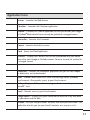
Ringtone: Changes the volume of your call ringtones and
notifications (if applicable).
Media: Changes the volume of your music, videos and other
media.
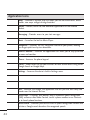
Alarm: Changes the volume of your alarms.
Notification: If you deselect the checkmark (below the
Alarm volume bar), you will be able to set this volume level.
This is the volume of the ringtone when you receive a
notification.
3. Tap OK.
91