1
Switch Outlets
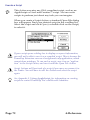
This Action turns on or off one or more outlets on your PowerKey. Each switchable outlet appears in the Action Editor. The
same Action can turn some outlets on and others off.
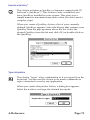
If your computer is plugged into one of PowerKey Pro’s switched
outlets, that outlet will not be settable in the Switch Outlets Action
Editor. To switch the computer’s outlet, use the Start Up Computer
and Shut Down Computer Actions described below.
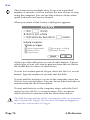
Each outlet is accompanied by a pop-up menu with four
options. Selecting “On” turns the outlet on. Selecting “Off”
turns the outlet off. Selecting “Toggle” switches the outlet; if it
is currently on, turn it off; if it is off, turn it on. Selecting “No
Change” leaves the outlet in its current state.
Each outlet also has a delay; you can use delays to cause some
outlets to be turned on before others. This is primarily useful
when starting up or shutting down the system. See the Start
Up Computer and Shut Down Computer Actions described
below.
Start Up Computer
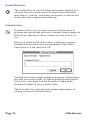
This Action is similar to the Switch Outlets Action, but also
turns on your computer. Each switchable outlet appears in the
Action Editor, and can be controlled as described in the Switch
Outlets Action above.
4: Reference
Page 69