1
Camera Leveling Cables (black cables)
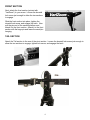
Select the appropriate black cable according to the mode guide on
page 2. At the camera platform, slide the quick-release pin
through the eye of the turnbuckle on the selected cable.
Run the other end of the cable to the Pan/Tilt base and slide its
quick-release pin through the cable eye.
.
Counterweighting and Mounting Remote Head & Camera
Slide the weight bar through the hole at the back end of the tail section. There is a notch in the center
of the weight bar. Use the stainless steel thumbscrew at the back end of the tail section to engage
this notch and prevent the weight bar from accidentally sliding out when adding or removing weights.
Run all video and remote cables and loosen the tilt brakeGradually add weight until the crane just
begins to float. Using the aid of a helper or stand to hold the crane arm up, mount your remote head
and camera securely.
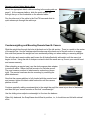
When attaching a remote head, use the dual-purpose plate adapter
to work with either 100mm half-ball mounts or a flat-base mount.
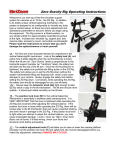
The most common method of attachment is underslung (shown
right). The remote head can also be overslung by reversing the
plate attachment.
Now that the camera platform is fully loaded with the remote head
and camera, tighten the black cable turnbuckle until the camera
platform is level.
Continue gradually adding counterweights to the weight bar until the crane is just short of balanced,
and then add your remote controls as the final “counterweight.”
Use the sliding micro-adjust counterweight to fine tune the balance.
When fully balanced, the SnapCrane should float in position, i.e., it should rise and fall with minimal
effort.
5