1
Development Guide
BONITA WORKFLOW
Bonita Workflow
Bonita Workflow
Development Guide
BSOA Workflow v3.0
Software
January 2007
Copyright Bull SAS
Table of Contents
Chapter 1.
Overview................................................................................................. 11
1.1
Role of Designer ..............................................................................................................................12
1.2
Role of Developer ...........................................................................................................................12
Chapter 2.
Process Console Activities .................................................................... 13
2.1
How To Launch the Workflow Editor (ProEd)..............................................................................13
2.2
Importing an XPDL File Into the Bonita Engine...........................................................................14
2.3
Deleting Process Models................................................................................................................14
Chapter 3.
Using the ProEd Workflow Process Editor ............................................. 15
3.1
ProEd Overview ...............................................................................................................................15
3.2
Versioning Support in ProEd ..........................................................................................................15
3.3
Starting ProEd and ProEd Modes of Operation.........................................................................16
3.3.1
Connected Mode ................................................................................................................16
3.3.2
Offline Mode .........................................................................................................................16
3.4
Quickstart..........................................................................................................................................17
3.4.1
Creating a New Workflow Project ....................................................................................17
3.4.2
Interface Overview ..............................................................................................................20
3.4.3
Load/Save/SaveAs/Delete Projects .................................................................................31
3.4.4
Defining Workflow Process Project Properties.................................................................34
3.4.5
Adding Participants .............................................................................................................35
3.4.6
Creating and Defining Activities .......................................................................................39
3.4.7
Creating Attributes...............................................................................................................43
3.4.8
Adding Hooks........................................................................................................................45
3.4.9
Adding Action Connectors ................................................................................................47
3.5
Importing a XPDL Project into the Workflow Engine.................................................................55
Chapter 4.
XForm Editor............................................................................................ 57
4.1
Introduction ......................................................................................................................................57
4.1.1
XForms Overview ..................................................................................................................57
4.1.2
XForm Editor Overview ........................................................................................................59
4.1.3
XForm Synchronization ........................................................................................................62
4.1.4
Starting XForm Editor ............................................................................................................63
4.2
XForm Editor Quick Start.................................................................................................................64
4.2.1
Customize the XForm Within the Main Window..............................................................64
4.2.2
Customize an Input XForm Control ...................................................................................65
4.2.3
Customize an Enumeration XForm Control .....................................................................66
4.2.4
Look and Feel Window........................................................................................................67
4.2.5
Source View Window...........................................................................................................68
iii
4.3
Menus ................................................................................................................................................69
4.3.1
File Menu ................................................................................................................................69
4.3.2
View Menu.............................................................................................................................69
4.3.3
View Help ...............................................................................................................................69
4.4
Toolbars .............................................................................................................................................69
4.4.1
Tools Toolbar..........................................................................................................................69
4.4.2
Editing Toolbar ......................................................................................................................70
4.5
Main XForm Window.......................................................................................................................71
4.6
Input Properties................................................................................................................................72
4.7
Enumeration Properties ..................................................................................................................73
4.7.1
Static Enumeration ...............................................................................................................73
4.7.2
Dynamic Enumeration.........................................................................................................75
4.8
String and Integer Constraints ......................................................................................................75
4.8.1
String Constraint....................................................................................................................76
4.8.2
Integer Constraint.................................................................................................................77
4.9
Required/Relevant/Readonly Condition Dialogs .....................................................................78
Chapter 5.
iv
Hooks ...................................................................................................... 79
5.1
Introduction to Hooks .....................................................................................................................79
5.2
Process Hooks...................................................................................................................................79
5.3
Activity Hooks...................................................................................................................................80
5.3.1
« Console-Driven Hook » Execution Time Scale ..............................................................81
5.3.2
« Application-Driven Hook » Execution Time Scale........................................................82
5.3.3
Out-of-Timescale Hooks ......................................................................................................82
5.4
Hooks Capabilities...........................................................................................................................82
5.4.1
Workflow-Related Hook Actions ........................................................................................83
5.4.2
Java-Environment-Related Hook Actions........................................................................83
5.5
Hooks Logic ......................................................................................................................................84
5.5.1
Fault Management ..............................................................................................................84
5.5.2
Activity/Hooks and Transactions .......................................................................................86
5.6
Writing a Hook..................................................................................................................................86
5.7
Hooks-Specific Operations ............................................................................................................87
5.8
Caveat Regarding Activity Deadline .........................................................................................88
5.9
Use Case ...........................................................................................................................................88
5.9.1
A Simple Hook .......................................................................................................................88
5.9.2
A More Complex Hook........................................................................................................88
5.9.3
Set-Deadline Hook ...............................................................................................................90
5.10
Practical Steps for Hooks Usage...................................................................................................91
5.10.1 Hook Loading, Compiling, and Deployment..................................................................91
5.10.2 Hooks Interface.....................................................................................................................91
Bonita Workflow - Development Guide
Chapter 6.
ProEd Action Connectors ...................................................................... 93
6.1
Introduction ......................................................................................................................................93
6.2
Notational Conventions.................................................................................................................93
6.3
File Structure .....................................................................................................................................94
6.3.1
Directory Hierarchy ..............................................................................................................94
6.3.2
Action Class Files...................................................................................................................95
6.4
Creating a Simple Action Class....................................................................................................96
6.4.1
Requirements ........................................................................................................................96
6.4.2
Workflow Client Jar ..............................................................................................................96
6.4.3
Generating the Class...........................................................................................................97
6.5
Creating an Action Class for a Web Service .............................................................................98
6.6
Deploying an Action Class ............................................................................................................99
6.7
Template Files.................................................................................................................................100
6.8
Template Selection .......................................................................................................................100
6.8.1
begin … end Template Tags ............................................................................................100
6.8.2
Comments ...........................................................................................................................101
6.8.3
Accessing Activity Attributes............................................................................................101
6.8.4
Debugging...........................................................................................................................103
6.8.5
Template Tag Reference ..................................................................................................103
6.9
Property Files...................................................................................................................................105
6.9.1
Location ...............................................................................................................................105
6.9.2
Contents...............................................................................................................................106
6.9.3
Configuration Options .......................................................................................................106
6.9.4
Parameter Names ..............................................................................................................106
6.9.5
Parameter Description ......................................................................................................107
6.9.6
Parameter Value Options .................................................................................................108
Chapter 7.
Mappers and Initiator Mappers .......................................................... 109
7.1
Introduction ....................................................................................................................................109
7.2
Writing a Mapper ..........................................................................................................................109
7.2.1
Mapper Types: LDAP, Custom, and Properties.............................................................110
7.2.2
Practical Steps for Using Custom Mappers ...................................................................111
7.2.3
Example of a Mapper .......................................................................................................111
7.3
Writing an Initiator Mapper .........................................................................................................112
7.3.1
Initiator Mapper types: Custom and LDAP....................................................................112
7.3.2
Practical Steps To Use Custom Initiator Mappers.........................................................113
7.3.3
Example of an Initiator Mapper.......................................................................................114
v
Chapter 8.
vi
Performer Assignment ......................................................................... 115
8.1
Introduction ....................................................................................................................................115
8.2
Performer Assignment Types: Custom and Properties ...........................................................116
8.2.1
Callback Performer Assignment......................................................................................116
8.2.2
Properties Performer Assignment.....................................................................................116
8.3
Practical Steps for Using Callback Performer Assignments...................................................117
8.3.1
Performer Assignment – Loading, Compiling, And Deploying ..................................117
8.3.2
Example of a Performer Assignment ..............................................................................118
Bonita Workflow - Development Guide
List of Figures
Figure 3-1.
Figure 3-2.
Figure 3-3.
Figure 3-4.
Figure 3-5.
Figure 3-6.
Figure 3-7.
Figure 3-8.
Figure 3-9.
Figure 3-10.
Figure 3-11.
Figure 3-12.
Figure 3-13.
Figure 3-14.
Figure 3-15.
Figure 3-16.
Figure 3-17.
Figure 3-18.
Figure 3-19.
Figure 3-20.
Figure 3-21.
Figure 3-22.
Figure 3-23.
Figure 4-1.
Figure 4-2.
Figure 4-3.
Figure 4-4.
Figure 4-5.
Figure 4-6.
Figure 4-7.
Figure 4-8.
Figure 4-9.
Figure 4-10.
Figure 4-11.
Figure 4-12.
Figure 4-13.
Figure 4-14.
Figure 4-15.
Figure 4-16.
Figure 4-17.
Figure 4-18.
Figure 5-1.
Figure 5-2.
Figure 6-1.
Creating a New Workflow Project ......................................................................................17
ProEd Display for New Project .............................................................................................19
ProEd File Menu.....................................................................................................................20
ProEd Edit menu ....................................................................................................................21
ProEd Window Menu ............................................................................................................21
ProEd Participant View .........................................................................................................22
ProEd Activity View...............................................................................................................22
ProEd Process Menu .............................................................................................................23
ProEd Main toolbar ...............................................................................................................24
Projects View.........................................................................................................................26
Activity View .........................................................................................................................26
Participant View....................................................................................................................30
Open File Dialog ...................................................................................................................31
Save File Dialog ....................................................................................................................32
ProEd Add Participant Window ...........................................................................................36
Add Participant Search Window.........................................................................................37
New Participant Window......................................................................................................38
Attribute Menu ......................................................................................................................43
Add Hook Window................................................................................................................45
ProEd - Add Action Dialog ..................................................................................................48
Iterations and Transitions Graph .........................................................................................51
Add Condition Window........................................................................................................52
Modifying Transition or Iteration Properties .......................................................................53
XML Flux Example.................................................................................................................59
Generated XForm Example (1 of 2) ...................................................................................60
Generated Language File (English Example) ...................................................................62
Launching XForm Editor from Project/Activity Properties Window .................................63
XForm Editor Main Panel......................................................................................................64
Input XForm Control Dialog .................................................................................................65
Enumeration XForm Control Dialog ....................................................................................66
XformEditor Demonstration Display Window .....................................................................67
XformEditor Source View Window ......................................................................................68
XformEditor Tools Toolbar ....................................................................................................69
XformEditor Editing Toolbar .................................................................................................70
XformEditorDemo Window...................................................................................................71
Input Properties Window ......................................................................................................73
Static Enumeration Dialog ...................................................................................................74
Dynamic Enumeration Dialog .............................................................................................75
String Constraints Dialog......................................................................................................76
Integer Constraints Dialog ...................................................................................................77
Relevant Condition Dialog ..................................................................................................78
Console-Driven Hooks Timescale.......................................................................................81
Application-Driven Hooks Time Scale ...............................................................................82
Action Directory File Hierarchy ...........................................................................................94
List of Tables
vii
Table 3-1.
Table 3-2.
Table 3-3.
Table 5-1.
Table 5-2.
Table 5-3.
viii
Description of Workflow Toolbar Design Tools........................................................................25
Description of Activity View Graph Symbols ..........................................................................27
Description of Condition Parameters ......................................................................................52
Process Name in Workflow and ProEd Context......................................................................79
Hooks Names .............................................................................................................................80
Hooks Metadata ........................................................................................................................87
Bonita Workflow - Development Guide
Preface
This guide describes which facilities the Process Console provides to users via the
Designer and Developer function.
ix
x
Bonita Workflow - Development Guide
Chapter 1. Overview
This document describes the design and development process for the Bonita
Workflow engine. Although design and development activities may be
performed by a single individual, they require the use of separate tools, and
therefore are described as two separate roles.
The information in this document is organized as follows:
FOR THE DESIGNER
•
Process Console Activities
Refer to Chapter 2.
•
The ProEd Workflow Process Editor
Refer to Chapter 3.
•
XForm Editor
Refer to Chapter 4.
FOR THE DEVELOPER
•
Hooks
Refer to Chapter 5.
•
ProEd Action Connectors
Refer to Chapter 6.
•
Mappers and Initiator Mappers
Refer to Chapter 7.
•
Performer Assignment
Refer to Chapter 8.
Chapter 1. Overview
11
1.1
Role of Designer
This guide provides the designer with the information necessary to be able to:
1.2
•
Access Process Management to create or modify Process Models using the
ProEd Workflow editor.
•
Manage Bonita Process Models: import XPDL files.
Role of Developer
At different points during the Workflow process, Bonita Workflow process models
may call external Java classes to perform specific tasks.
These Java classes are divided into four categories, according to the task they
are to perform during a Workflow process. The four types of Java classes that can
be involved in a Workflow process are:
−
Hooks and Action Connectors: triggering automatic actions at specific
moments during the process or during an activity.
−
Mappers: specifying the person(s) corresponding to a specific role.
−
Initiator Mapper: specifying the person(s) allowed to start the process.
−
Performer assignment: refining the assignment of a Participant to an
activity.
This guide provides the developer with the information necessary to:
12
•
Add hooks, action connectors, mappers, initiator mappers, and performer
assignment entities, to a Workflow process definition.
•
Compile and deploy those entities in the Bonita Workflow environment
(where those entities are Java classes).
Bonita Workflow - Development Guide
Chapter 2. Process Console Activities
This chapter describes how to perform the following activities using the process
console:
•
Launch ProEd
•
Import and XPDL file into the Bonita engine
•
Delete process models
For a complete description of the Process Console and how to access it, refer to
Chapter 2 of the Bonita User’s Guide.
2.1
How To Launch the Workflow Editor (ProEd)
Select the following path in the Navigational Tree (Left Panel): Designer → Process
management → WorkFlow Editor (ProEd).
Warning:
The Java Web Start (JWS) must be installed on the computer being used in order
to run ProEd. See the Sun website for information about downloading and
installing Java Web Start.
JWS proceeds with downloading, caching and launching the ProEd application.
When the ProEd link is selected for the first time, the needed files are downloaded
to the user’s computer. The user's Java Web Start local settings and configuration
determine where the files are downloaded to, and if ProEd is available for
execution without the network connection. The downloaded files are cached on
the user's computer so that subsequent downloads are not necessary unless new
revisions are available.
After starting ProEd the process can then be defined following the provided
documentation and the definition saved as an XPDL file.
Chapter 2. Process Console Activities
13
2.2
Importing an XPDL File Into the Bonita Engine
Select the following path in the Navigational Tree (Left Panel): Designer → Process
management → Import XPDL.
The “Import XPDL” form is displayed in the core panel.
2.3
•
Select the XPDL file by using the “Browse” button.
•
Click the “Import” button to import the XPDL process definition into the Bonita
Workflow engine.
Deleting Process Models
Select the following path in the Navigational Tree (Left Panel): Designer → Process
Management → Process models.
The Process models list is displayed in the core panel.
The last column of the table, named “Action”, contains a “delete” link for each
process of the list.
Click this “delete” link to delete the process (this operation is successful if no
instance of this process is still in running state).
14
Bonita Workflow - Development Guide
Chapter 3. Using the ProEd Workflow Process Editor
3.1
ProEd Overview
ProEd (Process Editor), is a Java program used to define Workflow models. The
ProEd tool helps in the creation, updates, and visualization of Workflow processes.
The ProEd graphics-based tool allows the user to visually describe a Workflow
process using standard BPMN (Business Process Modeling Notation)
graphic notation. All elements of the Workflow can be displayed, such as
activities, transitions, iterations, etc. Values for performers, mappers, hooks, etc.
can be set at the project or activity level as necessary. Finally, the Workflow
process can be saved using the XPDL standard notation.
The XPDL file can be saved locally on the computer workstation or in a file
repository. The file repository provides a shared Workflow storage location residing
on the server.
3.2
Versioning Support in ProEd
ProEd now supports versioning of the Workflow process. Each Workflow process
contains an inherent attribute that describes its version. XForm files are created
and stored on the server in a repository organized by project version. Therefore,
there can now be separate versions of a Workflow project, each accompanied
by a distinct set of XForms.
The version consists of a major version number and a minor version number, and is
represented in the conventional decimal notation of MajorVersion.MinorVersion.
A new Workflow project is created with an initial version of 1.0. If an existing
Workflow project that does not contain version information is opened, it will be
given a version of 1.0.
Whenever the SaveAs operation is performed, the option is presented to
increment either the major version or the minor version by one. Saving a Workflow
project to a new file in this manner is the only way to change the version number.
When the version is changed via this SaveAs mechanism, the currently existing
XForms will be duplicated for the new version. Subsequently, the XPDL and Xforms
of the prior version can be modified independently from the XPDL and Xforms for
the new version.
There is no special format requirement for the name of a Workflow process’s XPDL
file; however, the following format is recommended and will be proposed in the
dialogs whenever a new file name is required:
WorkflowProcessName_version.xpdl
For example:
MedicalWorkflow_1.0.xpdl
Chapter 3. Using the ProEd Workflow Process Editor
15
3.3
Starting ProEd and ProEd Modes of Operation
For details about starting ProEd, refer to Section 2.1 of this guide.
ProEd uses two modes of operation: "Connected", and "Offline". The default is for
ProEd to automatically try establishing a connection to the server enabling the
"Connected" functionality. If this connection cannot be established, then ProEd
reverts to the "Offline" mode. The current operation mode is indicated in the ProEd
status bar. If a username is displayed, the "Connected" mode is then in use.
These operation modes are described in the following sections.
3.3.1
Connected Mode
In "Connected" mode, ProEd has access to information from server-side
databases regarding various resources available to the Workflow engine. These
resources are displayed to the user in the appropriate dialog boxes, usually in the
form of a selection combo-box, or list. This simplifies the Workflow creation process
because the user does not have to remember and enter the values for these
resources.
The "Connected" mode is available if ProEd is started from the Java WebStart link,
and if the currently logged-on user information can be obtained. In some cases,
the user authentication may prevent ProEd from accessing the server. This is the
case if LDAP authentication has been configured, in which case ProEd presents a
logon dialog box allowing the user to enter the correct user name and password.
The following resources are available in connected mode:
3.3.2
•
the currently defined and deployed hooks
•
the currently defined and deployed action connectors
•
the currently defined and deployed mappers
•
the currently defined and deployed performers assignments
•
the currently defined participants and LDAP search capability (if LDAP is
configured)
•
the XPDL files repository
•
the XForm Editor
Offline Mode
If ProEd cannot establish a connection to the server, then "Offline" mode is used.
In "Offline" mode, the above resources cannot be retrieved from the server. In
that case, the user may manually enter the appropriate values; those values are
validated at the time the Workflow is imported using the Process console.
16
Bonita Workflow - Development Guide
3.4
3.4.1
Quickstart
Creating a New Workflow Project
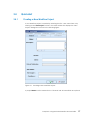
A new Workflow project is created by selecting the File → New menu item or by
clicking on the "New Project" button in the main toolbar. This displays the "New
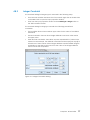
Project" dialog box as shown in the following figure.
Figure 3-1. Creating a New Workflow Project
A project Name must be entered in the "General" tab. All other fields are optional.
Chapter 3. Using the ProEd Workflow Process Editor
17
Field Descriptions
•
Name: Assigned name of the project
•
Description: enter more information about
the Process.
•
Version: This is a read-only field that displays the version information of the
current Workflow Process. New Workflow Processes will be created with a
version of 1.0.
•
Author: enter the name of the Workflow Process model Designer.
•
State of Publication: select the appropriate state of publication, depending
on thee specific Workflow design progress.
•
Role initiator: this selection specifies which users are authorized to start the
Workflow Process from the Bonita Workflow process console.
The Workflow Process appears in the Bonita Workflow Process console only for
users specified in this section.
•
Role mapper: select the appropriate type of mapper:
•
−
LDAP: select "LDAP" to specify a group of users defined
in the LDAP user directory.
−
Custom: select Custom to call a Java class (hero.initiatorMapper), listing
specific users.
ClassName:
−
For an LDAP mapper: select the group of users allowed to start the
Workflow Process.
−
For a Custom mapper:
−
If present, this field displays the list of implemented hero.initiatorMapper
Java classes (specifying a list of users allowed to start the Process). Select
the appropriate Java class.
−
If the Java Mapper class is not yet implemented, type the Java
classname to call.
Note:
The Java Mapper class must be created on the server with exactly the same
name as before Workflow Process deployment.
18
Bonita Workflow - Development Guide
Projects
View
Figure 3-2.
W orkflow
Toolbar
Menus &
Main Toolbar
Graph
View
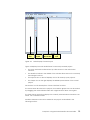
ProEd Display for New Project
Figure 4-2 displays the main ProEd frame for the newly created project.
•
The menu and main toolbar at the top allow access to the main ProEd
functions.
•
The Workflow toolbar in the middle of the window allows access to commonly
used design functions.
•
The Projects view on the left displays a list of all currently open projects.
•
The Graph view on the right displays the BPMN representation of the current
project.
See Section 3.4.2 for descriptions of these interface functions.
The screen area devoted to the projects view and the graph view can be resized
by dragging the vertical divider either left or right between these two regions.
The status bar at the bottom displays the currently selected element and the user
name, if in connected mode.
Workflow elements can now be added to the project as described in the
following sections.
Chapter 3. Using the ProEd Workflow Process Editor
19
3.4.2
Interface Overview
MENUS
File Menu
Figure 3-3. ProEd File Menu
20
•
New: creates a new project. The New Project window appears (see "Creating
a New Workflow Project").
•
Open: opens a XPDL file containing process definition(s).
•
Close the project: closes the current project.
•
Save: saves the current process definition into a XPDL file.
•
Save as: saves the current process into a XPDL file, after defining a new
filename and location and/or incrementing the version.
•
Save all: saves all currently opened projects.
•
Page Format: defines page layout for printing.
•
Print preview: previews the graph corresponding to the currently selected
process with the defined Page Format.
•
Print: prints the graph corresponding to the currently selected process.
•
Export as jpeg: exports the current graph as a JPEG image file.
•
Quit: exits ProEd.
Bonita Workflow - Development Guide
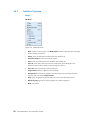
Edit Menu
Figure 3-4. ProEd Edit menu
•
Delete: deletes the element selected on the graph view.
Window Menu
Figure 3-5. ProEd Window Menu
•
Real size: reverts to the original size of the graph view (after zooming in or
out).
•
Zoom: select a value to zoom in or out on the graph view.
•
Grid: display (or does not display) a grid on the graph.
Chapter 3. Using the ProEd Workflow Process Editor
21
•
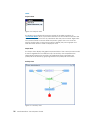
Participant view: organizes the graph of the Workflow process by Participants
as shown below.
Figure 3-6. ProEd Participant View
•
Activity view: organizes the graph of the Workflow process by Activities as
shown below.
Figure 3-7. ProEd Activity View
22
Bonita Workflow - Development Guide
Process Menu
Figure 3-8. ProEd Process Menu
•
Properties: displays the properties of the process.
•
Activities: displays all basic activities of the process.
•
Route activities: displays all route activities of the process.
•
Block activities: displays all block activities of the process.
•
Sub-process: displays all sub-processes of the process.
•
Transitions: displays all transitions of the process.
•
Iterations: displays all iterations of the process.
•
Participants: displays all participants of the process.
•
Hooks: displays all hooks of the process.
•
Attributes: displays all attributes of the process.
Configuration Menu
•
Interface:
−
Change language: change the language of the application (French,
English, default see “INTERNATIONALIZATION” in Section 3.4.9).
−
Change color: change the color of the main window and of all dialog
boxes and menus...
−
Change look & feel: change the look & feel of the application. This allows
a user to select how the process window is represented.
Chapter 3. Using the ProEd Workflow Process Editor
23
Help Menu
•
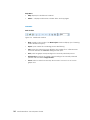
Help: displays the ProEd User's Manual.
•
About…: displays ProEd version, release date, and copyrights.
TOOLBARS
Main Toolbar
Figure 3-9. ProEd Main toolbar
24
•
New: creates a new project. The New Project window displays (see "Creating
a New Workflow Project").
•
Open: open a XPDL file containing process definition(s).
•
Save: saves the current process definition into a XPDL file. If a filename has
not been defined, the "save as" dialog box will open.
•
Print: prints the graph corresponding to the currently selected process.
•
Print preview: previews the graph corresponding to the currently selected
process with the defined Page Format.
•
Zoom: select a value from the drop down menu to zoom in or out on the
graph view.
Bonita Workflow - Development Guide
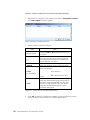
Workflow Toolbar
The Workflow Toolbar groups all Workflow design tools for easy access:
Button
Description
Cursor: sets the pointer to its standard use.
Add Basic Activity: creates a basic Activity (the smallest unit of
work). See: "Creating and Defining Activities".
Add Route Activity: creates a route Activity (synchronization
Activity with complex transitional conditions). See: "Creating
and Defining Activities".
Add Block Activity: creates a set of Activities. See: "Creating
and Defining Activities".
Add Sub-Process: creates a complete Workflow Process model
as an Activity. See: "Creating and Defining Activities".
Add End Activity: creates an End Activity, which is the process
end point which will terminate a Workflow instance when it is
reached.
Add Transition: adds a Transition between two Activities. See:
"CREATING AND DEFINING TRANSITIONS AND ITERATIONS”.
Add Iteration: adds an iteration between two Activities. See:
"CREATING AND DEFINING TRANSITIONS AND ITERATIONS”.
Table 3-1.
Description of Workflow Toolbar Design Tools
Chapter 3. Using the ProEd Workflow Process Editor
25
VIEWS
Projects View
Figure 3-10. Projects View
The Projects View displays all processes present in the XPDL repository (in
"Connected Mode") and / or processes that the user has created or opened. The
version of the process is shown in parenthesis after the process name. Right-click
on a process name to access either the process’ graph view or to close the
project. Double-click on the process name to display the process graph view.
Click the black arrows to hide or display this view.
Graph View
The Graph View displays the graphic representation of the current process model.
It can be organized in two different ways. The Activity View emphasizes the
relationships between the activities. The Participant View emphasizes the
participant involvement by grouping activities into participant swim lanes.
Activity View
Figure 3-11. Activity View
26
Bonita Workflow - Development Guide
Symbols
Description
Basic activities are shown by blue rounded rectangles
- automatic or manual start and various participants
Route activities are shown by green diamonds
- always automatic start and the SYSTEM participant
Block Activities are shown by violet rounded rectangles
- always automatic start and the SYSTEM participant
Subflow activities are fat blue rectangles with a
squared plus icon
- always automatic start and the SYSTEM participant
The end activity is shown by a red rounded square with
a stop sign
- always automatic start and the SYSTEM participant
Ordinary transitions are shown by solid black arrows
Transitions that have a condition are shown by dashed
green arrows
Iterations are shown by solid, curved blue arrows
- an iteration may also curve back to the same
activity it started from
The gear symbol indicates an activity that has the
automatic start mode
Table 3-2.
Description of Activity View Graph Symbols
Chapter 3. Using the ProEd Workflow Process Editor
27
To add an activity (Basic activity, route, Block activity, Subflow or End activity):
•
In the Workflow toolbar, click on the activity button.
•
The cursor changes to indicate the selected activity type.
•
Click in the activity view at the location where the activity is to be added.
•
The activity will be added at the specified location
•
The activity's dialog opens to enter the activity name and other activity
properties
(except for the end activity, which has no properties or dialog)
•
ProEd automatically changes back to the select mode, indicated by an
arrow cursor.
To add a transition:
•
In the Workflow toolbar, click on the transition button
•
The cursor changes to a cross and arrow.
•
In the activity view, drag from the source activity to the target activity
•
A transition is added between the two activities
•
The transition's dialog opens to enter the transition name and other transition
properties
•
ProEd remains in the add transition mode, indicated by a cross and arrow
cursor, and additional transitions may be added.
To add an iteration:
•
In the Workflow toolbar, click on the iteration button
•
The cursor changes to a cross and arrow.
•
In the activity view, drag from the source activity to the target activity or
Click on an activity that is both the source and target
•
An iteration is added either between the two activities or looping back to the
single activity
•
The iteration dialog opens to enter the iteration name and other iteration
properties.
•
ProEd remains in the add iteration mode, indicated by a cross and arrow
cursor, and additional iterations may be added.
To delete an activity, transition, or iteration:
If ProEd is not in the select mode, indicated by an arrow cursor, press the top
button in the Workflow toolbar to enter the select mode.
28
•
Select the desired (i.e. activity or transition) item by single clicking on it.
•
Handles appear on the selected item to indicate its selection.
•
Press the [Delete] key on the keyboard, or right click on the desired item,
select Delete from the context menu, and answer Yes to the deletion
confirmation dialog.
Bonita Workflow - Development Guide
To reposition an activity:
•
Drag the activity to the desired location.
•
Transitions and iterations also move to remain attached to the activity in the
new location.
To reposition a transition or iteration line:
The end points of a transition or iteration are fixed on the source and target
activities; however the line that connects them may be re-positioned to avoid
obstacles or un-clutter the diagram.
•
Right click on the desired line or line segment.
•
Select Add a Point.
•
A new handle is added in the middle of the selected line or line segment.
•
The new handle may be dragged to re-position the line.
To modify the properties of an activity, transition, or iteration:
•
Double click on the item.
(does not apply to block, or subflow activities)
•
Right click on the item and select Properties from the context menu.
•
The end activity has no properties that can be modified.
To access the items contained in a block or subflow activity:
•
Double click on the activity.
•
A new graph window opens, showing the contents of the block or subflow.
•
The contents of a subflow activity may not be edited in the new graph
window, but editing contents of a block activity is allowed.
•
An end activity is not permitted in a block activity, but is permitted in a
subflow.
Chapter 3. Using the ProEd Workflow Process Editor
29
Participant View
The majority of the Activity View discussion in the previous section also applies to
the Participant View.
Figure 3-12. Participant View
The Participant View differs from the Activity View in the following ways:
30
•
The activities are grouped by participant into "swim lanes".
•
The SYSTEM participant lane is shown at the top of the diagram, with the other
participants following in alphabetical order.
•
Dragging a basic activity from one participant lane into another changes the
activity's participant, and modifies the start mode as necessary to maintain
compatibility.
•
Block, route, subflow, and end activities must use the SYSTEM participant, so
ProEd does not allow them to be dragged out of the SYSYEM lane.
•
Activities are automatically re-positioned when it is necessary to place them
in the proper participant lane, when two activities overlap, or when a
participant view position has not been established for the activity.
•
When participants are added or deleted, the resulting position of some of the
existing participant lanes may change. The activities in these lanes are
automatically re-positioned to move them into the new lane position, and the
user may desire to re-arrange them in a more harmonious manner.
Bonita Workflow - Development Guide
3.4.3
Load/Save/SaveAs/Delete Projects
The "file chooser" window is used to load, save, and delete the XPDL files
corresponding to ProEd projects. It is accessed in the following ways:
•
File → Open menu selection or "Open" toolbar button
•
File → Save menu selection or "Save" toolbar button
•
File → SaveAs menu selection
•
"Open File" button in the Sub-Process dialog box.
Figure 3-13. Open File Dialog
The text on the "OK" button will change to "Open" based on the operational
context.
To open an existing file:
Use the combo box at the top of the dialog box to navigate to the desired
directory. In "Connected" mode, the "WorkflowRepository" top-level directory
entry is also available to allow selecting a file from the repository. After selecting
the desired directory, select the desired file and click the "OK" button.
To save to the original file:
Doing “Save” on an existing project will save the project back into the original file
without using a dialog. If this is a new project, doing “Save” will bring up the
SaveAs Dialog to allow the initial file to be specified.
Chapter 3. Using the ProEd Workflow Process Editor
31
To delete an existing file:
This dialog box also allows the user to delete any XPDL file. Navigate to the file as
above. When a XPDL file is selected, the "Delete" button at the right is enabled.
Pressing the "Delete" button causes a dialog box to appear to confirm the intent
to delete an existing file.
Note:
Note that the "Delete" button within ProEd can also be used to delete files
contained in the repository.
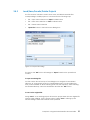
Figure 3-14. Save File Dialog
To save to an existing file:
When doing "SaveAs", it is possible to select an existing file to overwrite. Navigate
to the file as shown in Figure 4-13, select an existing file and click the "Save"
button. A dialog box appears to confirm the intent to overwrite the existing file.
32
•
The Version field shows the existing version of the Workflow Project.
•
The upper Version button increments the minor version number in the saved
file, as shown on the button.
•
The lower Version button increments the major version number in the saved
file, as shown on the button.
Bonita Workflow - Development Guide
To save to a new version:
Using SaveAs to save an existing project into a new file with a new version is the
only way to change the version. It is possible to increment the major version or
the minor version number only by one.
The version is a property of a ProEd Workflow Project, and is not dependent on
the file name of the project's XPDL file.
Although it is not required, the recommended format for a ProEd XPDL file name
is:
ProjectName_version.xpdl
For example:
Medical Workflow_1.0.xpdl
When either of the Version buttons is used to increment the major or the minor
version, a file name of this format will be automatically proposed.
Caution:
Note that attempting to "SaveAs
SaveAs"
SaveAs and selecting a file that is currently in use
results in an error dialog box.
To save to a new file:
The "SaveAs" menu allows saving a project to a new file. Navigate to the desired
directory as described above. Type a new file name in the "File Name" text box
and click the "Save" button.
To save to an existing file:
When doing “SaveAs”, it is possible to select an existing file to overwrite. Navigate
to the file as described above and select an existing file and click the “Save”
button. A dialog will appear to confirm the overwrite.
Caution:
Note that attempting to "SaveAs
SaveAs"
SaveAs and selecting a file that is currently in use
results in an error dialog box.
Chapter 3. Using the ProEd Workflow Process Editor
33
3.4.4
Defining Workflow Process Project Properties
A Workflow Process Model is composed of the following:
Activities, Participants,
Participants, Transitions or Iterations between Activities
Process and Activity Attributes and Forms,
Process and Activity Hooks
To define the Process Model Properties:
•
Right-click the background in the Graph view and select Properties in the
popup menu.
•
Or select Process → Properties in the menus.
The Workflow project dialog is divided into seven tabs:
34
•
General tab: this tab is filled at creation time (as described in Section 3.4.1
"Creating a New Workflow Project")
•
Activity tab: displays the list of all Activities included in this Workflow Process
model. To add an activity, refer to Section 3.4.6.
•
Participants tab: displays the list of Participants defined for the entire Workflow
Process model and available for all Activities. Participants can be added,
edited or deleted:
−
Add button: click to involve a Participant in the Workflow Process model
(see Section 3.4.5).
−
Edit button: click to modify the selected Participant.
−
Delete button: click to delete the selected Participant.
•
Transitions tab: displays the list of Transitions involved in the Workflow project.
To add a Transition, see Section 3.4.9.
•
Iterations tab: displays the list of iterations involved in the Workflow project. To
add an iteration, see Section 3.4.9.
•
Attributes tab: defines the Process Attributes used for the Process instantiation
and propagated to all Activities in the project. Attributes can be added,
edited or deleted:
−
Add button: adds a new Attribute at Process level: see Section 3.4.7.
−
Edit button: modifies the selected Attribute.
−
Delete button: deletes the selected Attribute.
−
Edit XForm button: click to design the instantiation Form with the
Attributes at Process level added. It will be disabled if ProEd is not in the
connected mode. Refer to Chapter 4, “XForm Editor” for further details.
Bonita Workflow - Development Guide
•
•
3.4.5
Hooks tab: This tab allows the definition of Process level Hooks (if needed).
Process level hooks are instantiation hook and termination hook. Hooks can
be added, edited or deleted:
−
Add button: adds a new Hook at the Process level: see Section 3.4.8.
−
Edit button: modify the selected Hook.
−
Delete button: deletes the selected Hook.
Actions tab: This tab allows the definition of Process level Action Connectors
(if needed). Process level Action Connectors can be configured for the
onInstatntiation and onTerminater events. Action Connectors can be added,
edited or deleted:
−
Add button: adds a new Action Connector at the Process level (see
Section 3.4.9, “Adding Action Connectors”)
−
Edit button: modify the selected Action Connector.
−
Delete button: deletes the selected Action Connector.
Adding Participants
Participants can be added at Process level or at Activity level. Whether a
Participant is added to the whole project or only to a specific Activity, the
participant becomes a Process model Participant and can be thus used for any
other Activity created within the project (there is no need to add the Participant
again to the project).
To add Participants:
•
At the Process level: right click in the Project window, select Participants tab,
and click the "Add" button.
•
At the Activity level: in the Activity window, General tab, click the "New
Participant" button.
Chapter 3. Using the ProEd Workflow Process Editor
35
CHOOSING AN EXISTING PARTICIPANT
Click the "Existing participants" checkbox in the "Add Participants" window to add
an existing Participant: to choose the appropriate Participant, search the LDAP
data or filter it.
Figure 3-15. ProEd Add Participant Window
Note:
The "Existing participants" checkbox is unavailable if no connection to the server is
available.
36
Bonita Workflow - Development Guide
LDAP Search
Click the "LDAP Search" button: the "Participant Search" window appears:
Figure 3-16. Add Participant Search Window
Enter data in the "Value" field to search participants. The User Directory can be
searched on the following attributes:
−
User ID
−
Common Name
−
Surname
−
Given Name
Then, click the "OK" button.
The search results appear in the "Select participant" area.
The Mapper Type field in the Mapper area (at the bottom of the window) displays
"LDAP".
Filter Search
Browse the "Filter" drop down menu to filter participants by type (Role, Human,
Organizational Unit or System).
The filter results appear in the "Select participant" area.
In the "Select participant" area, select the desired Participant (Role, Person,
Organization or System).
Click "OK" to add the Participant in the Workflow Process model (Process level) or
as the performer of an Activity (Activity level).
Chapter 3. Using the ProEd Workflow Process Editor
37
CHOOSING A NEW PARTICIPANT
ProEd offers the capability of addng a Participant that does not exist in the user
directory but must be integrated in the Workflow Process Model.
In the "Add Participants" window:
1.
Check the "New participant" checkbox.
2.
Fill in the fields in the "New Participant" area as follows:
−
Name: type the name of the new Participant. The name must be typed
according to the user directory typographical rules.
−
Type: select the type of Participant to be created:
•
Role: a group of users
•
Human: a specific person
•
Organizational Unit: an organization
•
System: for automated Activities. The action is automatically
performed, depending on the Activity Java class called (Hook).
Figure 3-17. New Participant Window
38
Bonita Workflow - Development Guide
3.
If the Role or Organizational Unit Participant type is selected, supply a runtime
Mapper in the Mapper area to allow the role-to-person association:
−
In the "Type" field:
•
•
•
−
Select LDAP to specify a group of users not yet created in the LDAP
user directory. (In this case, the new Participant must be created in
the user directory before deploying the Workflow Process).
Select Properties to call the initiator of the project.
Select Custom to call a java class (hero.initiatorMapper) that
specifies a list of users.
In the "Class Name" field:
•
•
•
For LDAP mapper (connected mode only): the field is unavailable.
The group of users (role or organizational unit) will be picked in the
user directory.
For Properties mapper: the field is unavailable. The initiator of the
Process will be selected (the person who starts the Process).
For Custom mapper:
If any, this field displays the list of available hero.mapper Java classes
that call a specific list of users. Select the appropriate Java class.
If the Java class is not yet implemented, type the classname to be
called.
Click OK to add the new Participant in the Workflow Process model (Process level)
or as the performer of an Activity (Activity level).
3.4.6
Creating and Defining Activities
Five types of activities are available within ProEd:
•
Basic Activity: the smallest unit of work in a Workflow process. The majority of
Activities are basic.
•
Route Activity: a flow control point or switch Activity used for synchronization
and complex transitional conditions. This type of Activity does not contain
Hooks.
•
Block Activity: set of Activities grouped to simplify the creation and
understanding of the Workflow process.
•
Sub-process: complete separate Workflow Process model set as an Activity of
the current Workflow Process model. This type of Activity allows simplifying the
graph of the Workflow Process model, or to reuse an existing Workflow
Process model.
•
End Activity: The process end point that terminates a Workflow instance when
it is reached.
Chapter 3. Using the ProEd Workflow Process Editor
39
To create an activity:
1.
In the Workflow toolbar, click the Activity button: the pointer takes the shape
of the Activity symbol.
2.
Position the pointer on the graph view and click: the Activity creation window
appears.
3.
Fill in the "General" tab of the "New Activity" window as detailed in the
following:
−
Name: type the Activity name. Name must be unique.
−
Type: this field displays the type of Activity selected (i.e. Basic).
−
Start Mode: select the start mode of the Activity:
•
•
−
Automatic: the Activity is automatically performed by the system,
depending on the Activity Java class called (Hook).
Type of Join: this field specifies under what input condition the Activity
becomes ready:
•
•
AND (default value): the Activity becomes ready only if all incoming
transitional conditions are executed (synchronization between
preceding Activities).
XOR: the Activity becomes ready if one incoming input transitional
condition is executed.
−
Description: enter information about the Activity.
−
Performer (manual Basic Activity only): this list allows assigning a
performer (human, role or an organization) for the Activity being created.
Click the "Add Participant" button and see Section 3.4.5 "Adding
Participants".
−
Performer assignment (manual Basic Activity only): this area allows the
choice of the performer to be refined or deferred. The performer is
determined at run time, depending on the value of an attribute, or by
calling a java class:
•
•
40
Manual: a performer is required to start the Activity.
Property: this list displays all Attributes of the Activity. The performer is
determined at run time according to the value of the selected
Attribute.
Callback:
If specified, this list displays the deployed java classes for performer
assignment. The performer is determined at run time by calling the
selected java class.
If the Java class is not implemented yet, type the classname to be
called (remember to create the Java Class with exactly the same
name before deploying the Workflow process).
Bonita Workflow - Development Guide
−
Deadline area: click the "Add" button to add a deadline:
•
•
Condition:
Time (relative time in days and hours): the deadline is set at the end
of the elapsed time (from the Activity starting time) entered.
Date (fixed date): the deadline is set at the selected date and time.
Click the Calendar button to select a fixed date.
Exception (mandatory field):
If any, this field displays the list of deployed Java classes that defines
the action to execute if the deadline is missed. Select the
appropriate Java class.
If the Java class is not implemented yet, type the classname to be
called (remember to create the Java Class with exactly the same
name before deploying the Workflow process).
BLOCK ACTIVITIES
After creating a block activity, the elements grouped in it must be defined.
1.
In the graph view, right-click the Block Activity to be defined and select "Edit":
the graph window of the Block Activity appears.
2.
Design the Activities in the Block Activity graph window:
−
Create and define Activities: see Section 3.4.6, "Creating and Defining
Activities".
Note that a Block Activity graph may not contain an End Activity.
−
- Create and define Transitions and/or Iterations between Activities: see
Section3.4.9.
3.
Close the Block Activity graph window.
4.
Define the properties of the Block Activity as explained in Section 3.4.6.
Chapter 3. Using the ProEd Workflow Process Editor
41
DEFINING ACTIVITY PROPERTIES
In the graph window, right-click the Activity to define and select "Properties": the
Activity window appears.
Define the Activity as follows:
•
General tab: this tab is filled at creation time: see "Creating and Defining
Activities".
•
Attributes tab: attributes can be added, edited or deleted (see Section 4.4.7
"Creating Attributes"):
Add button: adds a new Attribute to the Activity.
−
Edit button: modifies the selected Attribute.
−
Delete button: deletes the selected Attribute.
−
Edit XForm button: designs a Form for the Activity level Attributes: refer to
the XForm documentation for further details.
The activity must have been created before its XForm can be edited.
Therefore, when creating a new activity, this button will be disabled until
the OK button of the General tab has been pressed to initially create the
activity. The button will also be disabled if ProEd is not in the connected
mode.
−
Inherited Attributes area: displays the names of all the inherited Attributes:
•
Attributes defined at the Process level
•
Attributes propagated to this Activity (from other Activities)
•
Activity tab (Block and Sub-process Activities only): displays the list of all
Activities included in the Activity.
•
Participants tab (Sub-process Activity only): displays the list of all Participants
involved in the Sub-process Activity (see Section 3.4.5, "Adding Participants").
•
Transitions tab (Block and Sub-process Activities only): displays the list of all
Transitions included in the Activity (see below, “Creating and Defining
Transitions and Iterations”).
•
Iterations tab (Block and Sub-process Activities only): displays the list of all
iterations included in the Block Activity (see below, “Creating and Defining
Transitions and Iterations”).
•
Hooks tab: defines the Activity level Hooks. Hooks can be added, edited or
deleted (see Section 3.4.8, “Adding Hooks”):
•
42
−
−
Add button: click to add a new Hook to the Activity.
−
Edit button: click to modify the selected Hook.
−
Delete button: click to delete the selected Hook.
Actions tab: defines the Activity level Action Connectors. Action Connectors
can be added, edited or deleted (see Section 3.4.9, “Adding Action
Connectors”):
−
Add button: click to add a new Action Connector to the Activity.
−
Edit button: click to modify the selected Action Connector.
−
Delete button: click to delete the selected Action Connector.
Bonita Workflow - Development Guide
DELETING AN ACTIVITY
3.4.7
•
Select an Activity in the graph view using the pointer.
•
Right-click the Activity and select "Delete".
•
Alternatively, click the "Delete" button in the menu or press the "delete" key.
•
In the confirmation dialog box click "OK" to confirm deletion.
Creating Attributes
Attributes can be created at the Process level or at the Activity level.
Attributes can be:
•
String type
•
Static enumeration type, where the enumeration values are set during
Attribute creation
•
Dynamic enumeration type, where the enumeration values are set
dynamically, by means of a Hook.
To add Process Attributes to the Workflow process model or to a specific Activity,
do one of the following:
•
At the Process level: in the Project view, Attributes tab, click the Add button.
•
At the Activity level: in the Activity window, Attributes tab, click the Add
button.
Figure 3-18. Attribute Menu
Chapter 3. Using the ProEd Workflow Process Editor
43
•
In the "Attribute" window fill in the following fields:
−
Name (mandatory field): type a unique name for the Attribute ($$, ||,
and the space character are not allowed).
−
Description: enter a short description for the Attribute.
−
Propagation (Activity level Attributes only, for Process level Hooks, the
Attribute is automatically propagated): Select one of the following
checkboxes:
•
•
−
No: the Attribute is created for the current Activity only and is not
propagated to any subsequent Activity.
Type: select one of the following types of Attribute:
•
•
•
−
Yes: the Attribute will be available for all subsequent Activities.
Character String: a character or an integer string.
Static Enumeration: list of values. Click the Add button to add a
value.
Dynamic Enumeration: list of values. Click the Add button to add a
value.
Note that the designer can still define explicit values, as an aid during
development.
Initial value:
•
•
For String attributes: type an initial value for the Attribute.
For Enumeration: the list contains the values defined for the
enumeration. Select the desired initial value that will be presented to
the user.
Designing Forms
Once attributes are designed for an activity or for the entire Workflow Process,
standard XForms can be designed using the XForms Editor. Refer to Chapter 4,
”XForm Editor,” for more information about how to design forms.
44
Bonita Workflow - Development Guide
3.4.8
Adding Hooks
Hooks are Java procedures that can be added to Process or Activity execution.
To add a Hook:
•
At the Process level: in the Project window, Hooks tab, click the Add button.
•
At the Activity level: in the Activity window, Hooks tab, click the Add button.
The "Add Hook" window is displayed.
Figure 3-19. Add Hook Window
Notes:
Process call points are unavailable for Activity Hooks.
Activity call points are unavailable for Process Hooks (as is the case in the Process
Hook window above).
Chapter 3. Using the ProEd Workflow Process Editor
45
To fill in the Add Hook window:
•
Call point section:
−
For Internal Forms (Activity level hooks):
•
•
•
•
onTerminate (rollback if failed): the Hook is called just after the action
has been executed by the user. If an error occurs, the user has to
perform the action again.
onCancel: the Hook is executed just after the Activity is cancelled by
the user.
For custom applications: the call points listed here are used for specific
types of Workflow only, and are not implemented at this time.
−
For process hooks:
•
46
onTerminate: the Hook is called just after the action is executed by
the user. If an error occurs, the Form is not returned to the user.
−
•
•
onReady: the Hook is called when the Activity starts (i.e. when the
Activity Form is available to the user on the Bonita Workflow Process
Console).
onInstantiate: the Hook is called just after the Process is started by a
user from the Bonita Workflow Process Console.
onTerminate: the Hook is called just after the Process has completely
executed.
Choose a hook section:
−
If available, this field displays the list of deployed Hooks available for use
by the Activity or Process. Select a Hook from the list.
−
If the Java class is not yet implemented, type the Java classname to call
(remember to create the Java Class with exactly the same name before
deploying the Workflow process).
Bonita Workflow - Development Guide
3.4.9
Adding Action Connectors
Action Connectors are sometimes referred to as action classes, actions, or
connectors.
The action dialog allows for the selection/configuration of an action class to be
used for a process or activity. An action class is a simple user-generated Java
class that is deployed on the server and performs some useful function.
ProEd creates a HookScript entry in the xpdl that it generates. This is sometimes
referred to as an InterHook. This HookScript is sort of a wrapper that invokes the
desired functionality of the specified action class, passing it information form the
activity and passing back return values. It is created from a user configurable
template and is based on the activity context, the action class, and the settings
selected in the Add Action dialog.
In addition, there is a user-configurable properties file, which is associated with
each action class and provides additional information to ProEd. This allows it to
enhance the user interface by providing such things as: meaningful parameter
names, parameter descriptions, and pre-defined lists of parameter value options.
Note that this dialog interacts heavily with the server to obtain the various
parameters and options that it presents. Therefore, unlike the hook dialog, it can
only be used effectively while in the connected mode.
To add an Action Connector:
•
At the Process level: in the Project window, select the Actions tab, then click
the Add button.
•
At the Activity level: in the Activity window, select the Actions tab, then click
the Add button.
The action dialog is shown in the following figure.
Chapter 3. Using the ProEd Workflow Process Editor
47
Figure 3-20. ProEd - Add Action Dialog
The action dialog contains the following elements:
48
•
Event - selects the event that triggers the action.
•
Type - selects the action type. This is a general category classification that
allows similar actions to be grouped together.
•
Action - selects the particular action. This corresponds to a Java class that
implements the functionality of the action (the action class). It contains one
or more functions that may be called by an action event, however a
particular action event may call only one function in one action class.
•
Action Parameters - The items in this box specify how this action event will
access the functionality in the action class.
•
Function - selects the action class function that will be called.
•
Parameters list - the input and output parameters of the selected function.
•
Radio buttons - select the value type that will be applied to the parameter
that is selected in the parameter list.
Bonita Workflow - Development Guide
The Event combo box will contain one or more of the following events,
dependent on the context of the action:
•
onReady - The action is called when an activity becomes ready. It would be
useful to send information to the user responsible to execute it the activity.
•
onTerminate - The action is called just after the activity has terminated.
•
onTerminate (rollback) - The action is called just before the activity
terminates.
•
onCancel - The action is called before canceling an activity.
•
onStart - The action is called just before the activity starts.
•
onInstantiate - The action is called when the process is instantiated.
•
onTerminate - The action is called when the process is terminated.
Parameter List
If the function has a return value, it will be listed first, with a name of "Return" (in
English). The return name will be localized to the appropriate text depending on
the language selected.
The fields within an entry in the list are separated by colons ( : )
•
The first entry is the parameter name. If a more specific parameter name is
not specified in the properties file associated with the action class, the
parameter names will default to p1,p2,…
•
The second entry is the parameter type. (String, int, float, …)
•
The third entry is the value type. This describes what kind of value is assigned
to the parameter. It will be one of:
−
null
−
fixed
− attribute
A Return parameter can only have the attribute type.
•
•
The fourth entry is the value. For a Return parameter, this is the name of the
attribute that the return value will be assigned to. For an input parameter this
will be:
−
Blank if the value type is null
−
The actual value that will be used for the parameter if the value type is
fixed
−
The attribute name from which the parameter value will be taken if the
value type is attribute
The fifth entry is the parameter description. This field will contain an entry only
if a description for the parameter is present in the properties file associated
with the action class.
Chapter 3. Using the ProEd Workflow Process Editor
49
Radio Buttons
50
•
Null parameter value causes the input parameter to be assigned a value of
null.
•
Fixed parameter value causes the input parameter to be assigned a specific
value. This value is specified in the box to the right of the radio button.
Depending on the optional value option specification in the properties file
associated with the action class, this box may be either a simple text box, a
combo box from which only the specified items may be selected, or a
combo box which allows the user to enter a new value as well as select from
the list. Note: when typing in new values into a combo box that allows this,
the new value is NOT entered into the parameter list until the user presses the
[Enter] key while the cursor is in the combo box.
•
Attribute parameter value causes the input parameter value to be taken form
an attribute. It is also used to specify the attribute to which a function return
value will be assigned. The attribute that is used is selected from the combo
box to the right of the radio button, which contains all the attributes available
to the activity.
Bonita Workflow - Development Guide
CREATING AND DEFINING TRANSITIONS AND ITERATIONS
A Transition is a link between two activities; it allows the flow of control to pass
from one Activity to another. Transitions can be created with or without an
associated condition. A transition that has an attached condition will be
displayed as a dotted line.
An iteration is set between two Activities and involves the repetitive execution of
one or more Workflow Activities until a condition is met. Iterations require creation
of at least one condition.
In the Workflow toolbar, click the Transition
1.
or Iteration
button.
In the graph window, click a source Activity and drag the pointer to a target
Activity without releasing the mouse button.
−
Transitions: a straight arrow links the two activities, conditions may be
added on the transition or modification of the properties of the transition
(see following section).
−
Iterations: the iteration properties window appears; fill in the fields as
described in the following section.
Figure 3-21. Iterations and Transitions Graph
2.
Modify the shape of the arrow.
−
Transitions: right-click the Transition and select "Add a point"; a new point
appears on the line, click and drag this point to change the shape of the
arrow (repeat if needed). To delete a point, right-click a point and select
"Remove a point". Note that the Activity View and Participant View have
a separate set of added points so that the path of the transition line can
be adjusted independently in each view.
−
Iterations: Iterations arrows are curved and already have a vector point;
click and drag this point to modify the shape of the arrow.
Chapter 3. Using the ProEd Workflow Process Editor
51
ADDING / EDITING CONDITIONS ON TRANSITIONS AND ITERATIONS
1.
Right-click on a transition or an iteration and select "Add/Update condition".
The "Add condition" window appears:
Figure 3-22. Add Condition Window
2.
Fill in the table as described below:
Field
Value
Op (Operator)
Define an AND or OR operator between two
conditions.
( )
Select the appropriate number of brackets
according to the number of conditions set
for the Transition / Iteration.
Attribute
Select the Attribute from the drop down list.
Select an operator:
= "is equal to"
Comp
(Comparator)
!= "is different from" (not
equal)
Value
Table 3-3.
3.
52
Select the desired value that corresponds to
the above Attribute selected from the drop
down list. A user-defined value can also be
entered if the selected Attribute is of the
Character String type.
Description of Condition Parameters
Click "OK" to create or update the condition: iterations appear as a blue
arrow, transitions with conditions as a dotted green arrow.
Bonita Workflow - Development Guide
MODIFYING THE PROPERTIES OF A TRANSITION OR AN ITERATION
1.
Right-click a Transition or Iteration arrow and select Properties.
The Transition or Iteration window appears:
Figure 3-23. Modifying Transition or Iteration Properties
2.
3.
Fill-in the window:
−
Name (Transition only): type the name of the Transition.
−
Source: the name of the source Activity.
−
Target: the name of the target Activity.
−
Description: enter a description of the transition.
−
Condition: enter information in this table as explained in Section 4.3.11
"ADDING / EDITING CONDITIONS ON TRANSITIONS AND ITERATIONS"
Click "OK" to update
Chapter 3. Using the ProEd Workflow Process Editor
53
INTERNATIONALIZATION
ProEd can be customized to display all static text in different languages. The base
product supports English and French. All static text is contained in languagespecific property files. A new language-specific property file can be created by
starting with one of the existing property files and customizing it. At runtime, ProEd
will scan for valid language files and allow selection of any language that is
present.
Follow these steps to add a new language to ProEd:
1.
Extract a base language property file from the ProEd.jar file. There is an ant
task to assist in doing this. The build.xml file under the Workflow installation
contains a "proed-extract-lang" target. This can be used to extract any
language file already in the ProEd package that resides in the delivery. From
Bull, the package is delivered with 2 languages files, "ProEd_en.properties" for
English, and "ProEd_fr.properties" for French. The script will ask for the name of
the language file to extract. The file will be left in the current directory after
the ant task is executed.
2.
Rename this file by replacing the language code to be that for the desired
new language. For example, if ProEd_en.properties (English) was extracted in
step 1, and a new Spanish version is to be built, rename the file to ProEd_es
.properties
3.
Within the file, for each property ending in ".text", replace the property value
with the language specific translation of the current value.
4.
Save the modified property file specifying a name "ProEd_xx.properties",
where "xx" is the java standard language code. (not necessary if the file was
already renamed in step 2)
5.
Add the new property file to the package. An ant task is provided to assist this
step. With the new language property file in the current directory, run the
target "proed-add-lang". This will ask for the name of the language file that
will be added to the ProEd package. The ant task will add the file, as well as
resign the jar files needed. No other steps are necessary by the user.
When ProEd is executed, the presence of the new language file is detected at
runtime. When the "Change language" dialog is used, all languages found,
including those added by the above steps, will be displayed in the list for
selection as the target language for all ProEd panels and dialogs.
Note:
If a new version of Workflow is installed, the above steps must be repeated.
54
Bonita Workflow - Development Guide
3.5
Importing a XPDL Project into the Workflow Engine
Before importing the process:
•
Close the project in ProEd.
•
Make sure all Participants called during the process are created in the User
directory (requires a Bonita Workflow Process Console Administrator profile).
•
Check that all the Java classes (hooks and mappers) called during the
process are implemented on the server.
To make the newly created process available to authorized users, refer to the
"Importing an XPDL File Into the Bonita Engine,” Section 2.2.
Chapter 3. Using the ProEd Workflow Process Editor
55
56
Bonita Workflow - Development Guide
Chapter 4. XForm Editor
The purpose of this Chapter is to provide the user with basic information about
XForm Editor and XForms.
4.1
4.1.1
Introduction
XForms Overview
"Forms are an important part of the Web, and they continue to be the primary
means for enabling interactive Web applications. Web applications and
electronic commerce solutions have sparked the demand for better Web forms
with richer interactions. XForms 1.0 is the response to this demand, and provides a
new platform-independent markup language for online interaction between a
person (through an XForms Processor) and another, usually remote, agent. XForms
are the successor to HTML forms, and benefit from the lessons learned from HTML
forms."
The following are the primary benefits:
•
XForms improves the user's experience.
•
XForms has been designed to allow many things to be checked by the
browser, such as types of fields being filled in, if a particular field is required, or
if one date is more current than another. This reduces the need for round trips
to the server or for extensive script-based solutions. It also improves the user's
experience by providing immediate feedback to what is being filled in.
•
It is XML, and it can submit XML.
•
XForms is properly integrated into XML: it is in XML, the data it collects in the
form is XML, it can load external XML documents as initial data and can
submit the results as XML. By including the user in the XML pipeline, end-toend XML right up to the user's desktop is available.
•
It combines existing XML technologies.
•
Rather than reinventing the wheel, XForms uses a number of existing XML
technologies, such as XPath for addressing and calculating values, and XML
Schema for defining data types. This has a dual benefit: ease of learning for
people who already know these technologies, and the ability for
implementors to use off-the-shelf components to build their systems.
•
It is device independent.
•
The same form can be delivered without change to a traditional browser, a
PDA, a mobile phone, a voice browser, and even some more exotic
emerging clients, such as an Instant Messenger. This greatly eases the task of
providing forms to a wide audience, since forms only need to be authored
once.
•
It is easier to author complicated forms.
Chapter 4. XForm Editor
57
•
Because XForms uses declarative markup to declare properties of values and
to build relationships between values, it is much easier for the author to
create complicated, adaptable, forms, without having to resort to scripting.
•
It is internationalized.
•
Because the data submitted is XML, it is properly internationalized.
•
It is accessible.
•
XForms has been designed so that it will work equally well with accessible
technologies (for instance, magnified browsers for visually-impaired users) as
with traditional visual browsers.
XForms can do everything that HTML Forms can do, and then some. In particular,
XForms makes it possible to:
58
•
Check data values while they are being typed in by the user.
•
Indicate that certain fields are required, and that the form cannot be
submitted without these fields.
•
Submit forms data as XML.
•
Integrate with Web services, for example by using SOAP and XML RPC.
•
Submit the same form to different servers (for example, a search string to
different search engines).
•
Save and restore values to and from a file.
•
Use the result of a submit as input to a further form.
•
Get the initial data for a form from an external document.
•
Calculate submitted values from other values.
•
Constrain values in certain ways, such as requiring them to be in a certain
range.
•
Build 'shopping basket' and 'wizard' style forms without having to resort to
scripting.
Bonita Workflow - Development Guide
4.1.2
XForm Editor Overview
XForm Editor allows an existing XForm document to be edited or a new XForm
document to be built from an xml data flux. Moreover, XForm Editor provides the
capability of internationalizing XForms by choosing desired languages. To build
new XForms, XForm Editor analizes data obtained from a generic xml flux and
creates corresponding XForm elements, joining to each one a bind element
containing its properties. Inside each element's label is a reference to the
corresponding label id, which allows the corresponding label name to be found
in the language files.
XML FLUX EXAMPLE
<process>
<name>XformEditorDemo</name>
<Version>1.0</Version>
<properties>
<property id="Id">
<value/>
<type>input</type>
</property>
<property id="ProductName">
<value/>
<type>input</type>
</property>
<property id="Description">
<value/>
<type>input</type>
</property>
<property id="Type">
<value>solid</value>
<type>select</type>
<possible-values>
<possible>solid</possible>
<possible>liquid</possible>
<possible>gaz</possible>
</possible-values>
</property>
<property id="Custumer">
<value>Carrefour</value>
<type>selectd</type>
<possible-values>
<possible>Carrefour</possible>
<possible>Casino</possible>
</possible-values>
</property>
<property id="stock">
<value/>
<type>input</type>
</property>
</properties>
</process>
Figure 4-1. XML Flux Example
Chapter 4. XForm Editor
59
GENERATED XFORM EXAMPLE
<html xmlns="http://www.w3.org/2002/06/xhtml2"
xmlns:xf="http://www.w3.org/2002/xforms"
xmlns:xsd="http://www.w3.org/2001/XMLSchema"
xmlns:xsi="http://www.w3.org/2001/XMLSchema-instance">
<head>
<title>XForm</title>
<xf:model id="model">
<xf:instance id="instance" src="contextobject:$instance"/>
<xf:instance id="lang" src="contextobject:$lang"/>
<xf:submission action="" id="bValider" method="post"
replace="all"/>
<xf:bind constraint="" id="b Id"
nodeset="properties/property[@id='Id']/value"
readonly="false()" relevant="true()" required="true()"
type="integer"/>
<xf:bind constraint="" id="b ProductName"
nodeset="properties/property[@id='ProductName']/value"
readonly="false()" relevant="true()"
required="(//properties/property[@id='Type']/value
!= 'solid')" type="string"/>
<xf:bind constraint="" id="b Description"
nodeset="properties/property[@id='Description']/value"
readonly="false()" relevant="true()" required="false()"
type="string"/>
<xf:bind constraint="" id="b Type"
nodeset="properties/property[@id='Type']/value"
readonly="false()" relevant="true()" required="true()"
type="string"/>
<xf:bind constraint="" id="b Custumer"
nodeset="properties/property[@id='Custumer']/value"
readonly="false()" relevant="true()" required="true()"
type="string"/>
<xf:bind constraint="" id="b stock"
nodeset="properties/property[@id='stock']/value"
readonly="false()" relevant="true()" required="false()"
type="integer"/>
</xf:model>
</head>
<body>
<xf:group appearance="full">
<xf:label id="projectname"
ref="instance('lang')/string[@id='XformEditorDemo']"/>
<xf:input bind="b Id" content="no" extattr="project" id="Id">
<xf:label
ref="instance('lang')/string[@id='Id']"/>
<xf:alert
ref="instance('lang')/string[@id='alert']"/>
</xf:input>
<xf:input bind="b ProductName" content="no" extattr="project"
id="ProductName">
<xf:label
ref="instance('lang')/string[@id='ProductName']"/>
<xf:alert
ref="instance('lang')/string[@id='alert']"/>
</xf:input>
Figure 4-2. Generated XForm Example (1 of 2)
60
Bonita Workflow - Development Guide
<xf:textarea bind="b Description" content="no"
extattr="project" id="Description">
<xf:label
ref="instance('lang')/string[@id='Description']"/>
<xf:alert
ref="instance('lang')/string[@id='alert']"/>
</xf:textarea>
<xf:select1 appearance="full" bind="b Type" content="no"
extattr="project" id="Type">
<xf:label
ref="instance('lang')/string[@id='Type']"/>
<xf:alert
ref="instance('lang')/string[@id='alert']"/>
<xf:itemset
nodeset="instance('lang')
/possible-values[@id='Type']/possible">
<xf:label ref="."/>
<xf:value ref="@id"/>
</xf:itemset>
</xf:select1>
<xf:select appearance="minimal" bind="b Custumer"
content="no" extattr="project" id="Custumer">
<xf:label
ref="instance('lang')/string[@id='Custumer']"/>
<xf:alert
ref="instance('lang')/string[@id='alert']"/>
<xf:itemset nodeset="../possible-values/possible">
<xf:label ref="."/>
<xf:value ref="."/>
</xf:itemset>
</xf:select>
<xf:submit submission="bValider">
<xf:label
ref="instance('lang')/string[@id='submit']"/>
</xf:submit>
<xf:input bind="b stock" content="no" extattr="project"
id="stock">
<xf:label
ref="instance('lang')/string[@id='stock']"/>
<xf:alert
ref="instance('lang')/string[@id='alert']"/>
</xf:input>
</xf:group>
</body>
</html>
Figure 5-2.
Generated XForm Example (2 of 2)
Chapter 4. XForm Editor
61
GENERATED LANGUAGE FILE (ENGLISH EXAMPLE)
<strings>
<string id="XformEditorDemo">XformEditor Demonstration </string>
<string id="alert">Error : fill in this field</string>
<string id="Id">Identifier of the product</string>
<string id="ProductName">ProductName</string>
<string id="Description">Description of the product</string>
<possible-values id="Type">
<possible id="solid">solid_toto</possible>
<possible id="liquid">liquid</possible>
<possible id="gaz">gaz</possible>
</possible-values>
<string id="Type">Type</string>
<string id="Custumer">External Custumers </string>
<string id="stock">Number of products in the stock</string>
<string id="submit">Submit</string>
</strings>
Figure 4-3. Generated Language File (English Example)
4.1.3
XForm Synchronization
The data that describes the Workflow process per se is stored in the Workflow
XPDL file. The data that describes the XForms Workflow process is stored in various
XForm files. These different aspects of the process must be kept in synchronization
to ensure that they are describing the same thing.
When the Workflow process is edited in a manner that affects the XForms, such as
adding or deleting attributes, the XForm files are not immediately modified to
reflect these changes. Rather, the changes are queued within ProEd, and will be
performed en masse when the user saves the Workflow process XPDL.
Consequently, the XPDL and XForm files will describe the same revisions of the
Workflow process, even if the user quits ProEd without saving some of the
changes.
When an XForm is edited, the XPDL for the Workflow process must be updated to
reflect the current Workflow data present in ProEd. Therefore, when the user
selects the [Edit XForm] button in one of the Attribute dialog tabs, ProEd will inform
the user that it must save the XPDL file. If the user declines, the XForm Editor will
not be invoked. If the user agrees, the XPDL and any queued XForm changes will
be saved, ensuring that the XForm data that is about to be edited is synchronized
with the current state of the Workflow project.
62
Bonita Workflow - Development Guide
4.1.4
Starting XForm Editor
XForm Editor is included with the ProEd Workflow editor. The ProEd application
provides an xml data flux, the desired languages, and the URL of the servlet that
will provide existing XForm files and save new or modified XForms.
To launch the XForm Editor, from the Project/Activity properties window click the
"Edit XForm" button in the "Attributes" tab, as shown in the following figure.
Figure 4-4. Launching XForm Editor from Project/Activity Properties Window
Chapter 4. XForm Editor
63
4.2
XForm Editor Quick Start
4.2.1
Customize the XForm Within the Main Window
After starting the XForm Editor, the following main panel will display.
Figure 4-5. XForm Editor Main Panel
Use the editing toolbar to:
•
move up and down a selected component (stock that will be defined with a
readonly attribute has been set after the submit component).
•
to change a selected INPUT component to TEXTAREA (such as Description).
•
to switch the selected select type component from select1 (single selection)
to select (multiple selection)
A complete description of menu can be found here.
A complete description of toolbars can be found here
64
Bonita Workflow - Development Guide
4.2.2
Customize an Input XForm Control
This dialog can be accessed in the following ways:
•
From the main starting panel, right click on the selected INPUT component.
•
From the main starting panel, double click on the selected INPUT component.
Figure 4-6. Input XForm Control Dialog
Following customization can be performed:
•
Localization in three languages.
•
Select the datatype of the attribute.
•
Select for the property: Required, Relevant, Readonly: "yes" or "no" or
condition
A complete description of Input properties can be found here.
•
Add a constraint on the attribute. It provides the capability of definining a set
of rules that must be satisfied. It can involve other attributes of the form.
A complete description of Input constraint can be found here.
Chapter 4. XForm Editor
65
4.2.3
Customize an Enumeration XForm Control
This dialog can be accessed in the following ways:
•
From the main starting panel, right click on the selected ENUMERATION
component.
•
From the main starting panel, double click on the selected ENUMERATION
component.
Figure 4-7. Enumeration XForm Control Dialog
The following customization can be performed:
66
•
Localization in three languages.
•
Select for the property: Required, Relevant, Readonly: "yes" or "no" or
condition. If condition is selected, it provides the capability of defining a set
of rules that must be satisfied. It can involve other attributes of the form.
A complete description of Input properties can be found here.
A complete description of how to edit a condition can be found here.
•
Select the Appearance.
A complete description of Input Appearance can be found here.
Bonita Workflow - Development Guide
4.2.4
Look and Feel Window
After saving the XForm (Save button of the XForm Editor), click on the "View Xform
look&feel" button on the first toolbar.
A default navigator window opens that displays the generated XForm look and
feel, as shown in the following figure. It simulates exactly the look and feel of the
form that will be displayed within the process console.
A complete description of the toolbars can be found here.
Figure 4-8. XformEditor Demonstration Display Window
Chapter 4. XForm Editor
67
4.2.5
Source View Window
Click on the "View document XML" button on the first toolbar. A window opens in
which the generated XForm source is displayed. All modifications performed
within XForm Editor are reflected immediately in the displayed source code (there
is no need to save the XForm).
A complete description of the toolbars can be found here.
Figure 4-9. XformEditor Source View Window
68
Bonita Workflow - Development Guide
4.3
4.3.1
4.3.2
4.3.3
4.4
Menus
File Menu
•
Save: save current XForm files on the server.
•
Exit: quit the XForm Editor.
View Menu
•
View Document XML: open a window to display the XForm document (xhtml
file).
•
View look&feel: open a web browser to display the form that will be seen in
the process console.
View Help
•
Help: help for the user (online documentation).
•
About: description of XformEditor software (version...).
Toolbars
There are two toolbars with icons:
4.4.1
•
Tools toolbar: this toolbar provides a pallete of icons to access some tool
functions.
•
Editing toolbar: this toolbar provides a pallete of icons for edit functions in the
main window.
Tools Toolbar
Figure 4-10. XformEditor Tools Toolbar
•
Save: save current XForm files on the server.
•
View Document XML: open a window to display the XForm document (xhtml
file).
•
View look&feel: open a web browser to display the form that will be seen in
the process console.
•
Help: open a window to browse the online documentation for the tool.
Chapter 4. XForm Editor
69
4.4.2
Editing Toolbar
Figure 4-11. XformEditor Editing Toolbar
•
move to the top: move the selected component to the top.
•
move up: move the selected component up one.
•
move down: move the selected component down one.
•
move to the bottom: move the selected component to the bottom.
•
change input or textarea: switch the selected component from input to
textarea XForms Form control or the opposite.
•
change select: switch the selected input type component from input to
secret XForms Form control or the opposite.
•
multiple select: switch the selected select type component from select1
(single selection) to select (multiple selection) XForms Form control or the
opposite.
When the form has focus, the following keys can be used to manipulate the form
and its individual components:
70
•
delete: delete the selected component(s).
•
up: select the previous component.
•
down: select the next component.
•
home: select the first component.
•
end: select the last component.
•
shift-up: select the previous component and the current component.
•
shift-down: select the next component and the current component.
•
shift-home: select all components from the current component to the first
component, inclusive.
•
shift-end: select all components from the current component to the last
component, inclusive.
•
control-up: move the selected component(s) up one.
•
control-down: move the selected component(s) down one.
•
control-home: move the selected component(s) to the top.
•
control-end: move the selected component(s) to the bottom.
Bonita Workflow - Development Guide
4.5
Main XForm Window
This window below the two toolbars (described in chapter 4) shows the XForms
Form control that represents the properties defined in the process or in the activity
element within ProEd editor. The following options are available from this window:
•
Change the main type of XForms Form control by selecting the component
and clicking on the three icons to the right of the edit toolbar (chapter 4).
•
Change the order of the components with the edit toolbar.
•
Open the property window of a component.
The id and the main type of each XForms Form control is displayed. The submit
component has no id.
The window name is the name of the process or the activity from which
XformEditor has been opened.
Figure 4-12. XformEditorDemo Window
The property window of a component can be accessed in the following ways:
•
right click or
•
left double click
on the box containing the type of the component.
Chapter 4. XForm Editor
71
4.6
Input Properties
This input properties window can be accessed from the Main XForm window.
The characteistics of an input form control can be managed from this window.
The following characteristics are defined:
•
Label: (lang1, lang2, lang3): this label displayed in the form can be localized
in three languages.
•
Data type: this feature provides the ability to give a value type. The browser
can then check that the values match the required type. The following types
can be defined within the XForm editor :
−
−
−
−
−
72
String: is defined in standard XML Schema. A string with whitespace
characters replaced by the space character.
Integer: is defined in standard XML Schema. It is a positive or negative
number without fraction digits (The ·value space· of integer is the infinite
set {...,-2,-1,0,1,2,...})
Date ISO: is defined in standard XML schema as date. Format examples:
2002-10-10, 2002-10-10-05:00
Date dd/mm/yyyy: is a specific French format defined in a custom
shema. Format example: 10/10/2002
Time: is defined in standard XML schema. Format example: 12:34:29.8
(hh:mm:ss.sss)
•
Required: describes whether or not a value must be supplied before the form
is submitted.
If 'Yes' is selected, this attribute will be mandatory. If 'No' is selected, the
attribute will not be mandatory. To make the attribute mandatory only in
some cases, select 'Condition', which causes the 'Edit condition' link to
appear to the right of the selection box. This provides access to the condition
panel.
•
Relevant: allows this form control to be disabled. If this property is set to false,
the Workflow attribute is unavailable to the user.
If 'Yes' is selected, this attribute will be visible in the form. If 'No' is selected, the
attribute will not appear in the form. To make the attribute visible only in some
cases, select 'Condition', which causes the 'Edit condition' link to appear to
the right of the selection box. This gives access to the condition panel.
•
Readonly: describes whether or not the value is restricted from changing.
If 'Yes' is selected, the user will be able to enter a value in the form. If 'No' is
selected, the attribute will be read-only. To make the attribute read-only only
in some cases, select 'Condition', which causes the 'Edit condition' link to
appear to the right of the selection box. This provides access to the condition
panel.
•
Constraints: press this button to display the constraints dialog to edit
constraints for the attributes.
Bonita Workflow - Development Guide
Figure 4-13. Input Properties Window
4.7
Enumeration Properties
The enumeration properties window can be accessed from the Main XForm
window.
Two types of enumerations could have been defined under ProEd: static and
dynamic enumeration. Definition windows are the same, except that localization
of the possible values is only available for static enumeration.
4.7.1
Static Enumeration
The following characteristics are defined:
•
Label (lang1, lang2, lang3): this label displayed in the form can be localized in
three languages.
•
Possible (lang1, lang2, lang3): the column 'value' shows the key value
entered into the enumeration definition of proEd. The column 'label' will be
displayed in the form based on the browser language and the performed
localization in three languages.
Warning:
When modifying a cell in the right column (label), the modification is validated
when the cell loses focus. Therefore, after modifying the last cell, it is necessary to
shift focus to another cell before clicking on the Okay button.
•
Required: describes whether or not a value must be supplied before the form
is submitted.
If 'Yes' is selected, this attribute will be mandatory. If 'No' is selected, the
attribute will not be mandatory. To make the attribute mandatory only in
some cases, select 'Condition', which causes the 'Edit condition' link to
appear to the right of the selection box. This provides access to the condition
panel.
Chapter 4. XForm Editor
73
•
Relevant: allows this form control to be disabled. If this property is set to false,
the Workflow attribute is unavailable to the user.
If 'Yes' is selected, this attribute will be visible in the form. If 'No' is selected, the
attribute will not appear in the form. To make the attribute visible only in some
cases, select 'Condition', which causes the 'Edit condition' link to appear to
the right of the selection box. This provides access to the condition panel.
•
Readonly: describes whether or not the value is restricted from changing.
If 'Yes' is selected, the user will be able to enter a value in the form. If 'No' is
selected, the attribute will be read-only. To make the attribute read-only only
in some cases, select 'Condition', which causes the 'Edit condition' link to
appear to the right of the selection box. This provides access to the condition
panel.
•
Appearance: allows the appearance of the selection field in the form to be
selected.
For Single selection select type:
'Minimal' will result in a small drop-down menu. 'Extended' will result in a larger
selection field. 'Radio' will create a radio button for every possible value.
For Multiple selection select type:
'Minimal' will result in a small selection field. 'Extended' will result in a larger
selection field. 'Checkboxes' will create a checkbox for every possible value.
Figure 4-14. Static Enumeration Dialog
74
Bonita Workflow - Development Guide
4.7.2
Dynamic Enumeration
The same characteristics as those in the previous section, static enumeration, can
be defined (except for the localization of possibles values initially entered with
ProEd Editor, which is not allowed for dynamic enumeration).
Figure 4-15. Dynamic Enumeration Dialog
4.8
String and Integer Constraints
These specify a condition that must be satisfied for the data to be considered
valid. It allows provides the capability of including extra contraints with other
attribute values.
Chapter 4. XForm Editor
75
4.8.1
String Constraint
The constraint dialog for string type is accessed in the following ways:
•
From the main window showing the form controls, right click or double click
on INPUT to open the Input properties window.
•
Then, from Input properties window that shows Data type : String, click on the
"Edit constraint" button.
The constraint dialog for string type contains the followings pre-defined
constraints:
•
length: lower and upper limit for the string's length.
•
must [not] start with: Enter a space separated list of strings.The value of the
attribute must [not] start with one of these strings.
•
must [not] contain: Choose whether or not the value must [not] contain one
or all the specified strings. Enter a space-separated list of strings.
•
Attribute value =: Enter a space separated list of values. The value of the
attribute must be equal [not equal] to at least one of these values. Other
string attributes can be added using the combobox on the right. In this case,
this is the value of the attribute that is used for the comparison. Note that If
the string entered matches the name of an attribute, the same previous
mechanism is applied.
•
Attribute value !=: same principle as previous, but with "not equal" assertion.
•
All characters allowed: When this radio button is selected, any character is
authorized. Some sets of characters can be prohibited by checking the
checkboxes on the right or by typing them in the following input field. Be
careful not to use a prohibited character in another constraint in the right.
−
−
−
−
−
•
lower case: means character list: "abcdefghijklmnopqrstuvwxyz".
Upper case: means character list: "ABCDEFGHIJKLMNOPQRSTUVWXYZ".
Numbers: means number list: "0123456789".
Spaces: blank and tabulation characters
Accents: means character list: "àâäéèêëìîïòôöùûüç".
No character allowed: same principle as previous constraint but with opposite
assertion: No character allowed.
Figure 4-16. String Constraints Dialog
76
Bonita Workflow - Development Guide
4.8.2
Integer Constraint
The constraint dialog for integer type is accessed in the following ways:
•
From the main window that shows the form controls, right click or double click
on the INPUT cell to open the input properties window.
•
Then from the input properties window that has Data type : Integer, click on
the "Edit constraint" button.
The constraint dialog for string type contains the followings pre-defined
constraints:
•
First constraint: Enter a lower and an upper value for the value of the attribut
named: Id
•
Second constraint: Choose other integer attributes as a lower value and as
an upper value.
•
Third and forth constraints: these allow a space-separated list of values to be
entered. In the example, the attribute named Id must be equal [not equal] to
at least one of these values. Other integer attributes can be added using the
combobox on the right. In this case, this is the value of the integer attribute
that is used for the comparison.
Figure 4-17. Integer Constraints Dialog
Chapter 4. XForm Editor
77
4.9
Required/Relevant/Readonly Condition Dialogs
The Condition panel displays the current set of rules for the required, relevant, and
readonly properties. It can be accessed in the following ways:
•
From the main window that shows the form controls, right click or double click
on INPUT or ENUMERATION cell to open the properties window.
•
Then from the properties window, select 'Condition', which causes the 'Edit
condition' link to appear to the right of the selection box. This Provides access
to the condition panel as shown in the following figure.
Each row in the table represents a rule. Multiple rules are logically combined using
the Operator column. The columns are as follows:
•
Op - This column allows the selection of either "AND" or "OR" to logically
combine multiple rules.
•
"("- Multiple parenthesis levels can be used to build complex conditions.
•
Attribute - This column will display a drop down list of all attributes visible in the
form. Select the attribute desired for the rule.
•
Comp - Select either "=" or "!=" comparison for the rule.
•
Value - Select or enter the desired comparison value. If the selected attribute
for this rule is an enumeration type, then the list of valid enumeration values is
displayed in this column.
•
")"- Same as above.
Figure 4-18. Relevant Condition Dialog
To change the value of a cell in the condition table, click on the desired cell and
a text entry or a combo box will appear that will allow the appropriate value to
be entered or selected.
78
Bonita Workflow - Development Guide
Chapter 5. Hooks
5.1
Introduction to Hooks
Hooks in Bonita Workflow context are external java classes performing userdefined operations. At different moments in Workflow process execution, hooks
might be called by user request (hooks are defined mainly through the ProEd
Workflow editor). Basically, there are two hooks categories: process hooks and
activity hooks.
•
Process hooks operate on a process level (at the very beginning and the very
end of a process lifetime).
•
Activity hooks operate on an activity level (at different activity moments
described later).
Additionally, there is a simplified form of hook called an Action Connector, which
is described in Chapter 4.
Mainly, hooks are able to perform a wide array of actions involving two different
channels: « a Workflow-related channel» and what is called the « java
environment channel ».
5.2
Process Hooks
Basically, a process hook might be called at model instantiation time. The
following table shows the process name in the Workflow context and in the ProEd
context. For process hooks, the name is the same; it will be different for activities
hooks.
Table 5-1.
Process Name in Workflow and ProEd Context
Workflow
Hook Name
ProEd Hook
Name
onInstantiate onInstantiat
e
Short
Name
OI
Comment
Called at the very beginning of the
process, before the « process submit
form » is displayed to the process
initiator
Chapter 5. Hooks
79
5.3
Activity Hooks
Activity hooks may be called at different moments in the activity lifetime. Another
dependency is whether the activity is « console driven » or « activity driven » (refer
to the following table). Both of these cases are detailed later. Be sure to keep in
mind that the Workflow and ProEd hook names differ. When using the ProEd
editor, the ProEd hook name must be used to define the hook call. When
implementing the hook code, the Workflow hook name must be used. It is
possible, depending on the activity type (manual or automatic), that some hooks
might never be called.
Table 5-2.
Hooks Names
Workflow Hook
Name
ProEd Hook
Name
Short
Name
onReady
onReady
OR
X
beforeStart
onStart
BS
X
(1)
OnStart
AS
X
(1)
afterStart
Automati
c Activity
Manual
Activity
Notes
(Rollback)
beforeTerminate
onTerminate
(Rollback)
BT
X
X
afterTerminate
onTerminate
AT
X
X
OnDeadline
deadline
OD
onCancel
onCancel
OC
X
(2)
(2)
Notes:
(1) Generally not used with console-activated processes (refer to the following
discussion).
(2) Hook is not used in a « linear time scale » way (refer to the following discussion).
In Table 3-2, two of the hooks have a « Rollback » tag. This means that if an error
occurs during execution (see Section 3.5.1 to determine how to signify that an
error has occurred), all transactions performed on the Workflow level are rolled
back (e.g.: activity properties changed during the hook execution are reset to
their previous values) to the beginning state of the transaction. Be aware that no
« external » actions performed by the hook are rolled back. The Workflow engine
has no way to determine the potential effect of the actions performed in the
hook, thus it is the hook developer’s responsibility to anticipate and respond to
possible failures during hook execution.
80
Bonita Workflow - Development Guide
5.3.1
« Console-Driven Hook » Execution Time Scale
These hooks are, in fact, hooks executing within the scope of an activity started
by the Bonita Workflow Console, i.e., through a web navigator (Internet explorer,
Netscape, Opera, Mozilla…). For example, the performer of the activity logs into
the Bonita Workflow Console, clicks on the « to do » list, then clicks on an action to
perform.
When an activity is performed this way, the hook call/execution is done
according to the following time scale:
Figure 5-1. Console-Driven Hooks Timescale
The following conditions apply:
−
The onReady hook (OR) is invoked before the form is displayed to the end
user. Operations that need to be finished prior to this action should be
performed in this hook.
−
No hook execution occurs during the activity form, therefore, no hook is
performing any dynamic behavior.
−
The beforeStart (BS) and afterStart (AS) hooks may be invoked, but
generally beforeTerminate (BT) and afterTerminate (AT) hooks are
recommended.
Chapter 5. Hooks
81
5.3.2
« Application-Driven Hook » Execution Time Scale
In a « client-driven » Workflow context, (meaning without using Bonita Workflow
Console to display and exchange information), but through a java program using
the Workflow engine API to link his already existing applications, the hook
call/execution is done according to the following time scale:
Figure 5-2. Application-Driven Hooks Time Scale
In Figure 3-2, the beforeStart / afterStart (BS/AS) hooks are used to call existing
external applications; the beforeTerminate / afterTerminate (BT/AT) hooks are
used to receive the data from those applications and set the data in the
Workflow context (for example, activity or process properties).
In this context, an equivalent to the form is displayed / treated in the Workflow
engine transaction.
5.3.3
Out-of-Timescale Hooks
The onDeadline (OD) and onCancel (OC) hooks are executed (if necessary) in
the above « linear time scale ».
The onDeadline (OD) hook is triggered when the set activity deadline expires. The
deadline is set either by default (through ProEd editor) or by another
hook/external program using the Workflow API. Be sure to keep in mind that
multiple deadlines may be set within the same activity, but the same hook is
triggered. The hook has to handle multiple iterations (i.e. through an activity flag
updated within each hook iteration).
The onCancel (OC) hook is triggered when an error occurs, or if the operator
manually cancels an operation. The hook could undo actions (for example, a
hook ending in error).
In a normal case, this hook is not triggered or called by a « common user ».
5.4
Hooks Capabilities
As stated previously, hooks in Bonita Workflow Console context are external java
classes performing user-defined operations. Mainly, hooks are able to perform a
wide array of actions involving two different « channels »: « Workflow related», and
what is called a « java-related environment».
82
Bonita Workflow - Development Guide
5.4.1
Workflow-Related Hook Actions
The hook likely interacts with the Workflow engine through a dedicated API. The
most commonly performed operations are the following:
−
get a node / process property (String, dynamic or static enum)
•
methods: getNodeProperty, getProperty
−
set a node/process property (String, dynamic or static enum)
•
methods: setProperty, setNodeProperty,
setNodePropertyPossibleValues, setPropertyPossibleValues
updateNodePropertyPossibleValues, updatePropertyPossibleValues
−
get the activity / process name
•
methods: getName
−
get the process creator
•
method : getCreator
−
set deadlines
•
method : setNodeDeadlines
−
start / stop an activity
•
methods : startActivity, terminateActivity
For more detailed information about dedicated functions, see the Bonita
Workflow API document (available under BSOA_Workflow_INSTALL/doc directory).
5.4.2
Java-Environment-Related Hook Actions
Hooks are java classes, thus any «standard » java operation may be performed.
Therefore, external program calls, and some system calls, are feasible within a
hook context. Since the Bonita Workflow engine (Bonita), is deployed under the
JOnAS J2EE application server (http://jonas.objectweb.org), hooks are able to
use existing APIs to interact with externally deployed applications.
For instance, an external web service can be reached through the Axis APIs at:
(http://ws.apache.org/axis/)
Chapter 5. Hooks
83
5.5
Hooks Logic
Hooks are user-defined logic entities (java classes), which may be triggered at
defined points in the life of an activity. Those defined points are:
5.5.1
•
Before Start hook is called just before the activity starts. The Before Start hook
is not considered to be in the same transaction as the activity. The Before
Start hook is not triggered for automatic activities.
•
After Start hook is called just after the activity has started. It is considered to
be in the same transaction as the activity. The After Start hook is not triggered
for automatic activities that cannot be anticipated.
•
Cancel hook is called before canceling an activity and it is considered to be
in the same transaction as the activity.
•
Before Terminate hook is called just before the activity terminates. The Before
Terminate hook is considered to be in the same transaction as the activity.
•
After Terminate hook is called just after the activity has terminated. It is not
considered to be in the same transaction as the activity.
•
On Ready hook is called when an activity becomes ready. The OnReady
hook could be used to notify the user responsible for executing the activity
with information. The OnReady hook is not considered to be in the same
transaction as the activity.
•
On Deadline hook is called when an activity deadline expires. It is not
considered to be in the same transaction as the activity.
Fault Management
If an exception occurs during hook execution, it is propagated to the application
triggering the execution of the hook.
Consider the following scenario:
An application calls the terminate Activity statement on “Activity1”; this
triggers the execution of a before Terminate hook which raises an exception;
the exception is caught by the application.
Things may be a little bit problematic if automatic activities are used:
84
•
Imagine that the terminate Activity statement on “Activity 1” completes
normally, and that “Activity 1” has an outgoing edge towards an automatic
activity “Activity 2”.
•
“Activity 2” is started and terminated automatically in the context of the first
call related to “Activity 1”.
•
Therefore if “Activity 2” has a Before Terminate Activity hook that raises an
exception, it will interrupt the call related to “Activity 1”.
•
This means “Activity1” will not terminate (the activity stays in the executing
state) and the system throws an exception due to the “Activity2” execution
error.
Bonita Workflow - Development Guide
The above examples show two error scenarios related to transactional hook
execution. Be aware that hooks can be executed in a transactional or in a nontransactional context, depending on their types (before start, after start, …).
Transactional hooks are executed in the same transactional context as the
activity invoking the hook. Transactional hooks are: After Start, Before Terminate,
Anticipate and On Cancel hooks (see activities and transaction below).
•
Any changes performed on a transactional resource are included in the
existing transactional context.
•
Any exception raised by a Hook aborts the existing transaction, so the activity
will be re-executed later on. Furthermore, all operations executed by the
hook before the exception was raised are rolled back.
The Workflow engine also allows creation of hooks for execution without a
transactional context. In this case, Before, Start, and After Terminate hooks are
executed outside the activity transactional context.
•
It is strongly recommended that these types of hooks NOT be used to access
either Workflow APIs or other transactional APIs.
•
If one of these hooks fails during its execution, the system throws an exception
but the activity starts/terminates without rolling back any operation or
transaction.
Consider the last sample scenario as described above and change the use of the
Before Terminate hook to After Terminate hook. The execution is as follows:
•
Imagine that the terminate Activity statement on “Activity 1” completes
normally, and that “Activity 1” has an outgoing edge towards an automatic
activity “Activity 2”.
•
“Activity 2” is started and terminated automatically in the context of the first
call related to “Activity 1”.
•
Therefore, if “Activity 2” has an After Terminate Activity hook that raises an
exception, the hook does not interrupt the call related to “Activity 1”.
•
This means, “Activity1” terminates without problem, but the system throws an
exception due to the “Activity2” execution error.
Chapter 5. Hooks
85
5.5.2
Activity/Hooks and Transactions
Any change of state (i.e. startActivity, terminateActivity, cancelActivity
statements) performed against an activity is part of a transaction.
This transaction typically involves more than one activity: for example, a terminate
Activity statement performed on a father activity triggers a change of state in all
daughter activities. The Workflow engine therefore keeps transactional
consistency across activities.
The Workflow engine aborts a transaction in two cases:
•
A failure at system level (e.g. impossibility to access the Workflow database)
•
An exception not caught by a transactional hook.
When hooks are executed in a transactional context:
5.6
•
Any changes performed on a transactional resource are included in this
existing transactional context.
•
Any exception raised by the hook aborts the existing transaction.
Writing a Hook
Process and activity hooks are a java class and have to implement the
NodeHookI interface. NodeHookI is located in the package hero.hook.
Basically, a hook contains two « functional » methods, redefined in each hook
body: getMetadata() and the function related to the hook type (see « Workflow
hook name » in chapter 1.2 and 1.3).
For example the skeleton of an onReady hook could be viewed as :
package hero.hook;
import hero.interfaces.*;
public class myHookOnReady implements hero.hook.NodeHookI {
public String getMetadata() {return Constants.Nd.ONREADY;}
// Core of the hook and will process all needed actions
public void onReady(Object b,BnNodeLocal n) throws HeroHookException {
// hook code}
// Other events
public void create(Object b,BnNodeLocal n) throws HeroHookException {}
public void beforeStart(Object b,BnNodeLocal n) throws HeroHookException {}
public void afterStart(Object b,BnNodeLocal n) throws HeroHookException {}
public void beforeTerminate(Object b,BnNodeLocal n) throws HeroHookException {}
public void afterTerminate(Object b,BnNodeLocal n) throws HeroHookException {}
public void onCancel(Object b,BnNodeLocal n) throws HeroHookException {}
public void anticipate(Object b,BnNodeLocal n) throws HeroHookException {}
public void onDeadline(Object b,BnNodeLocal n) throws HeroHookException {}
}
86
Bonita Workflow - Development Guide
The getMetadata() function is more or less the « identity card » of a hook. This
function has to be redefined for each hook with the proper value as described
below:
Table 5-3.
Hooks Metadata
Workflow hook name
getmetadata value to return
onReady
Constants.Nd.ONREADY
beforeStart
Constants.Nd.BEFORESTART
afterStart
Constants.Nd.AFTERSTART
beforeTerminate
Constants.Nd.BEFORETERMINATE
afterTerminate
Constants.Nd.AFTERTERMINATE
onDeadline
Constants.Nd.ONDEADLINE
onCancel
Constants.Nd.ONCANCEL
onInstantiate
Constants.Pj.ONINSTANTIATE
onTerminate
Constants.Pj.ONTERMINATE
The function code exploits the two different channels described above to
perform the needed actions.
The parameters of the functions differ between process and activity hooks as
follows:
Activity hook parameters: Object b, BnNodeLocal n
Process hook parameters: Object b, BnProjectLocal p
The BnNodeLocal and BnProjectLocal object are the starting points of all actions
performed within the « Workflow channel ».
5.7
Hooks-Specific Operations
Prior to coding a hook, the developer should organize step by step the needed
operations and call the appropriate functions to achieve the goal. This code is
enclosed in the hook main function.
The main way to return an error signal to the Workflow, (the hook caller), is to send
a HeroHookException. The exception constructor takes a parameter string and
Workflow, upon receiving this exception, is able to deal with it by a rollback if the
hook is transactional (Rollback type hook, i.e. afterStart and beforeTerminate
hooks). The end user may also be informed that a problem occurred during the
activity treatment.
Chapter 5. Hooks
87
5.8
Caveat Regarding Activity Deadline
Contrary to what might be intuitive, the deadline of an activity must be set prior
to activity start. In fact, deadlines must be set in the previous manual activity in a
beforeTerminate hook (e.g. to set the deadline in the activity number 3, it is
necessary to invoke a hook in the beforeTerminate hook of activity 2). See
example Set Deadline Hook below for set deadline code.
5.9
Use Case
5.9.1
A Simple Hook
For this example, “Hello world” will be printed in the Workflow console
The code produced is the following.
package hero.hook;
import hero.interfaces.*;
import hero.util.HeroHookException;
public class myHookOnReady implements hero.hook.NodeHookI {
public String getMetadata() {return Constants.Nd.ONREADY;}
public void onReady(Object b,BnNodeLocal n) throws HeroHookException {
System.out.println ("Hello world");
}
// Other events
public void beforeStart(Object b,BnNodeLocal n) throws HeroHookException {}
public void afterStart(Object b,BnNodeLocal n) throws HeroHookException {}
public void beforeTerminate(Object b,BnNodeLocal n) throws HeroHookException {}
public void afterTerminate(Object b,BnNodeLocal n) throws HeroHookException {}
public void onCancel(Object b,BnNodeLocal n) throws HeroHookException {}
public void anticipate(Object b,BnNodeLocal n) throws HeroHookException {}
public void onDeadline(Object b,BnNodeLocal n) throws HeroHookException {}
}
Though very interesting, this hook is not very useful.
5.9.2
A More Complex Hook
In this case, the intent is to send an email to the process creator after registering a
person (defined in the Workflow process under the process attribute
“IUMname “attribute “searched” by the hook in the Workflow context) to the
service “SRV_02”.
Check the related functions documentation for more details on their use.
88
Bonita Workflow - Development Guide
import
import
import
import
import
import
import
import
import
import
import
import
hero.interfaces.*;
hero.interfaces.BnNodeLocal;
hero.util.HeroHookException;
hero.util.BonitaServiceLocator;
javax.naming.InitialContext;
javax.mail.Session;
javax.mail.Address;
javax.mail.Transport;
javax.mail.internet.InternetAddress
javax.mail.internet.MimeMessage;
javax.rmi.PortableRemoteObject;
java.util.*;
public class MailAcceptance implements hero.hook.NodeHookI {
public String getMetadata() {
return Constants.Nd.BEFORETERMINATE;
}
public void create(Object b,BnNodeLocal n) throws HeroHookException {}
public void beforeStart(Object b,BnNodeLocal n) throws HeroHookException {}
public void afterTerminate(Object b,BnNodeLocal n) throws HeroHookException {}
public void onCancel(Object b,BnNodeLocal n) throws HeroHookException {}
public void anticipate(Object b,BnNodeLocal n) throws HeroHookException {}
public void onDeadline(Object b,BnNodeLocal n) throws HeroHookException {}
public void afterStart(Object b, BnNodeLocal n) throws HeroHookException {}
public void onReady(Object b,BnNodeLocal n) throws HeroHookException {}
public void beforeTerminate(Object b,BnNodeLocal n) throws HeroHookException {
try {
String nodeName = n.getName();
BnProjectLocal project = n.getBnProject();
String prjName = project.getName();
ProjectSessionLocalHome prjhome = (ProjectSessionLocalHome)
ProjectSessionUtil.getLocalHome()
ProjectSessionLocal prjSession = prjhome.create();
prjSession.initProject(prjName);
BnNodePropertyValue val = prjSession.getNodeProperty(nodeName,"Email");
String mailString = val.getTheValue();
BonitaServiceLocator serviceLocator = BonitaServiceLocator.getInstance()
Session session = (Session)
serviceLocator.getMailSession(BonitaServiceLocator.Services.MAIL_SERVICE);
MimeMessage m = new MimeMessage(session);
m.setFrom();
Address[] to = new InternetAddress[] {new InternetAddress(mailString)};
m.setRecipients(javax.mail.Message.RecipientType.TO, to);
m.setSubject("Request accepted...");
setSentDate(new java.util.Date());
String content = "";
m.setContent(content,"text/plain");
// Sending email
Transport.send(m);
System.out.println("Email was successfully sent");
} catch (Exception e) {System.out.println("mail service error: "+e);e.printStackTrace();}
}
}
Chapter 5. Hooks
89
5.9.3
Set-Deadline Hook
As explained in Chapter 3.3, deadlines are set before the activity begins. The
following is an abstract of code to set a deadline on the “activity3”:
public void beforeTerminate(Object b,BnNodeLocal n) throws HeroHookException {
ProjectSession prjSession;
String projectName;
System.out.print("Entree hook ValidHOT");
// Get the project context
try{
projectName = (n.getBnProject()).getName();
ProjectSessionHome projectHome = (ProjectSessionHome)
ProjectSessionUtil.getHome();
prjSession = projectHome.create();
prjSession.initProject(projectName);
//set collection of relative deadlines
ArrayList ar2 = new ArrayList();
long relDate1 = (long)20000;
long relDate2= (long)40000;
ar2.add(new Long(relDate1));
ar2.add(new Long(relDate2));
// Set the deadline in the workflow
prjSession.setNodeRelativeDeadlines("activity3",ar2);
// Always expect the unexpected
}catch (Exception e) {}
}
90
Bonita Workflow - Development Guide
5.10
5.10.1
Practical Steps for Hooks Usage
Hook Loading, Compiling, and Deployment
Hooks are stored on the file system as standard java classes. It is necessary to load
the code that has been written into the application server. The way to do this is as
follows:
•
Create the source .java file, i.e. MyHook.java. It must be within the package
hero.hook.
•
Copy the java source file into the following directory:
$BONITA_HOME/src/resources/hooks/hero/hook
•
Go to $BONITA_HOME directory and enter: ant deployHook -DhookClass=
<name of the java source file>. For example:
ant deployHook –DhookClass=MyHook
Note:
If the java class uses user-defined libraries, include them in the $BONITA_HOME/lib
directory before compiling and deploying the hook.
5.10.2
Hooks Interface
All hooks must implement the hook interface. This interface is quite simple, with a
single method that has two parameters: an object EngineBean, which is a session
bean allowing access to the Workflow engine executive, and a BnNodeLocal
object, which is a local interface to the entity bean representing the activity
whose execution has triggered the execution of the hook.
•
It is not recommended to make direct use of the EngineBean object.
•
The BnNodeLocal object can be used to retrieve information about the
currently executing activity.
Chapter 5. Hooks
91
92
Bonita Workflow - Development Guide
Chapter 6. ProEd Action Connectors
6.1
Introduction
The action class system allows an activity in a ProEd project to execute a simple,
easily constructed Java class on the Workflow server without having to create a
full-blown hook class. This facilitates the use of existing classes that are already
able to perform some desired function, as well as accessing web services. The
terms Actions, Action Classes and Connectors have all been used to refer to this
system.
ProEd creates a HookScript entry in the generated XPDL. This is type of hook is
referred to as an InterHook. The HookScript is sort of a wrapper invoking the
desired functionality of the specified action class, passing information from the
activity and returning values. The HookScript is created from a user configurable
template and is based on the activity context, the action class, and the settings
selected in the Add Action dialog.
In addition, there is a user configurable properties file, located on the server,
associated with each action class, providing additional information to ProEd. This
allows ProEd to enhance the user interface by providing such things as
meaningful parameter names, parameter descriptions, and pre-defined lists of
parameter value options.
6.2
Notational Conventions
In the following action class discussion, symbols within angle brackets <like this>
represent text strings. To construct an actual instance of the entry being
discussed, the <string> tokens are replaced by the strings they represent. The
following <string> tokens represent specifically defined strings. The meaning of
other <string> tokens not listed here should be obvious from their names.
<type> - The action type. This is the string showing in the Type: combo box of the
ProEd Add Action dialog
<action> - The action class name (without the .class extension). This is the string in
the Action: combo box of the ProEd Add Action dialog
<function> - The particular function of the action class. This is the string in the
Function: combo box of the ProEd Add Action dialog
<parameter> - The name of the specific parameter of the particular function of
the action class. This corresponds to the first field of the parameter entry in the
Parameters: list of the ProEd Add Action dialog.
<JONAS_BASE> - The value of the server’s JONAS_BASE environment variable
Forward slashes are used as file separators
Chapter 6. ProEd Action Connectors
93
6.3
File Structure
The action class system uses three types of files:
•
Action classes - <action>.class
the java class implementing the desired business logic
•
Properties files - <action>.properties
provide additional information to ProEd, such as parameter names and
descriptions
•
Template files - <action>. template or default.template
a template for creating the HookScript entry of the <project>.xpdl file, used to
access the action class from within the Workflow server
In addition, an action class may require that other class or auxiliary files be
present.
6.3.1
Directory Hierarchy
All action class system files are located on the Workflow server, in the action
directory, located at:
<JONAS_BASE>/bonitaScripts/action/
The hierarchy for files in this directory is:
Figure 6-1. Action Directory File Hierarchy
action/
type1/
actionClass1.class
actionClass1.properties
actionClass1.template
actionClass1helper.class
actionClass2.class
actionClass2.properties
actionClass2.java
default.template
type2/
readme.txt
actionClass3.class
actionClass3.properties
default.template
94
Bonita Workflow - Development Guide
Directly under the action directory is a separate sub directory for each action
type. The action directory also contains the default template used, if a more
specific template is not found. The default template must be named
‘default.template’. Any other files located in the action directory are ignored.
Each action type directory contains the files to support one or more action
classes. If the optional ‘default.template’ file is present, this file is used as the
default template for action classes within this action type only, provided that they
do not have a template specific to the class.
6.3.2
Action Class Files
Each action class must have at least two files:
•
<action>.class – the action class java implementation class file
•
<action>.properties – the properties file for the action class.
Note:
A xxx.class file that does not have an associated xxx.properties file will not be
shown in the Action: box of the Add Activity dialog. (actionClass1Helper.class)
Each action class optionally may have an <action>.template file. If it exists, this file
is used as the template for this action class only.
Any other file is ignored by the action class system. Note, however, that some of
these other files may be used by the action class itself, and are required for
proper operation. Other files, (actionClass2.java and readme.txt) may be
included solely for informational purposes.
Chapter 6. ProEd Action Connectors
95
6.4
Creating a Simple Action Class
6.4.1
Requirements
An action class must adhere to the following requirements.
•
An action class must have a package of: action.<type>
•
All functions in an action class for use in an InterHook must be declared
public.
•
Functions must return either a String or an object. If an object is returned, its
toString() method is called to create the value assigned to the attribute.
Note:
Currently, the function may not return a primitive type. (int, float, etc). This
restriction will be removed in a future release.
6.4.2
•
The function must have simple arguments. ProEd can assign only one value to
each input parameter; therefore, complex classes that contain multiple
internal variables are not allowed as function arguments. If an existing class
with a complex argument must be used, a wrapper class must be written
which has a function with a simple argument for each of the simple variables
embedded in the complex object. The wrapper function builds the complex
object from the simple parameters and passes it to the inner function. See the
email action type for an example. The sendMail class function sendFile()
accepts a number of simple arguments and builds a complex properties
object that is passed to the MailClient class.
•
Currently, the function can have String type arguments only. Primitive types
are not allowed. This restriction will be removed in a future release.
Workflow Client Jar
In order to be useful, many action classes need to access some server
functionality. Therefore, they require adding appropriate server classes to the
classpath in order to compile successfully. Frequently, this will be the Workflow
client jar. This file may be found on the Workflow server at:
<JONAS_BASE>.lib.client.jar
96
Bonita Workflow - Development Guide
6.4.3
Generating the Class
An action class is simply a java class that meets the above requirements, and
performs some useful function in the context of the Workflow server. A simple, selfcontained class, such as the example TestOMatic class, located in the test action
type directory, may be written in Notepad and compiled in a command window
with javac. However, most useful classes require adjustment of the classpath. The
use of Eclipse is more convenient.
•
In Eclipse, create a new Java project.
•
If necessary, add the appropriate server classes to the classpath.
−
Open the Project’s properties
−
Select Java Build Path from the tree
−
Select the Libraries tabs
−
Select the [Add External JARs] button
−
Browse to the jar
−
Select [Open]
−
Select [OK]
•
In the new project, create a package for the action type to which this action
class will belong: action.<type>
•
Add a new Java class in the package named <action>.
•
Write the code for the class.
•
When the source is saved in Eclipse, it automatically generates the
<action>.class file in the same workspace directory as the <action>.java file.
•
Using any convenient editor, create the associated <action>.properties file.
•
If needed, create the associated <action>.template or default.template file.
Chapter 6. ProEd Action Connectors
97
6.5
Creating an Action Class for a Web Service
Writing an action class that accesses a web service is fairly easy using WSDL2Java
to create the stub classes necessary to access the web service. The action class,
which is a client class accessing the web service via the stubs, must be written.
98
•
Create a new Java Project in Eclipse.
•
Add the Workflow client jar to the classpath.
−
Open the Project’s properties.
−
Select Java Build Path from the tree.
−
Select the Libraries tabs.
−
Select the [Add External JARs] button.
−
Browse to JONAS_BASE/lib/client.jar.
This assumes that Eclipse is running on a machine that has the Workflow
server installed.
−
Select [Open].
−
Select [OK].
•
Get the wsdl for the web service and put it the root directory of the project in
the Eclipse workspace.
•
Generate the stub java.
−
Open a command prompt.
−
Change directory to the directory containing the xxx.wsdl.
−
Enter the following command line:
jclient org.apache.axis.wsdl.WSDL2Java xxx.wsdl –p action.<type>
•
Refresh the project. There should be a new package, action.<type>,
containing the client stubs.
•
Write a client class named <action> that accesses the desired functions in the
web service stubs. See the Currency example.
•
Using any convenient editor, create the associated <action>.properties file.
•
If needed, create the associated <action>.template or default.template file.
Bonita Workflow - Development Guide
6.6
Deploying an Action Class
To deploy an action class, that is being created for individual use, on an existing
Workflow server, do the following:
•
If it does not already exist, create an action type directory on the server:
<JONAS_BASE>/bonitaScripts/action/<type>
•
Copy the following to the action type directory:
•
−
<action>.class
−
<action>.properties
−
<action>.template (if needed)
−
default.template (if needed)
−
any required helper files
−
any documentation files
It is highly recommended to copy all the xxx.java files to the action type
directory as well. While these are not needed for the proper operation of the
action hook, they will prove useful for future maintenance.
If creating action classes as a developer to be distributed with the Workflow
distribution:
•
Add the files to the following path under the Bull Forge project Bull Service
Oriented Architecture:
jiap/jiap_BonitaAMWF/packagebuilder/modif/bonita/src/
(continuation of path->) resources/action/
The entire project is much too big to check out, so check out something
lower on the path (for example, packagebuilder).
•
If it does not already exist, create an action type directory:
packagebuilder/modif/bonita/src/resources/action/<type>/
•
Copy to the action type directory:
•
−
<action>.java
−
<action>.properties
−
<action>.template (if needed)
−
default.template (if needed)
−
any required helper files
−
any documentation files
Commit the changes.
It is important to check in the <action>.java files, NOT the <action>.class files. The
Workflow deployment script moves all of these files to the correct location on the
server compiles the <action>.java files to <action>.class files.
Chapter 6. ProEd Action Connectors
99
6.7
Template Files
A template file contains a template, or skeleton, for creating the HookScript
sections of the <project>,xpdl file produced by ProEd. This HookScript is used by
the Workflow server to access an action class and invoke its functions.
The template file is an ASCII text file containing Java source code that has
embedded template tags of the form #templateTag#, which are removed and
replaced with character strings dependent on the activity context, the action
class, and the settings selected in the Add Action dialog.
It should be noted that the #templateTags# are often shown on individual lines,
but this is not a requirement. For purposes of #templateTag# replacement, the
entire template file is considered one long string.
6.8
Template Selection
The action class is located at:
<JONAS_BASE>/bonitaScripts/action/<type>/<action>.class
If the following file is found, it is used for the template for this action class:
<JONAS_BASE>/bonitaScripts/action/<type>/<action>.template
Otherwise, the following file is found, it is used for the template for this action class:
<JONAS_BASE>/bonitaScripts/action/<type>/default.template
Otherwise, the master default template is used, located at:
<JONAS_BASE>/bonitaScripts/action/default.template
6.8.1
begin … end Template Tags
There are a number of pairs of template tags of the form:
#beginSomeCondition#
#endSomeCondition#
These tags function somewhat like curly braces in a regular programming
language. All of the text between them is removed from the template if the
condition is false. They generally can be nested, but should not be interleaved.
That is:
#beginC1#
#beginC2#
#endC2#
#endC1#
=> OK
#beginC1#
#beginC2#
#endC1#
#endC2#
=> NOT OK
100 Bonita Workflow - Development Guide
6.8.2
Comments
Template files should not use the double slash form of comments //. This is
because the parser throws out all end-of-lines before evaluating the HookScript. If
the // style of comment is used, everything from that point to the end of the
HookScript is disregarded by the parser. To include a Java comment in the
template, use /* this form */. These comments appear in the HookScript section of
the <project>.xpdl file.
A second type of comment may be included in the template file, the template
comment, of the form:
#beginTemplateComment#
Extensive
Comments #endTemplateComment#
These sections are not included in the generated HookScript . This is useful for
including large sections of documentation in the template without burdening the
generated HookScript section with a lot of useless text.
6.8.3
Accessing Activity Attributes
When the HookScript executes, all of the attributes available to the HookScript’s
action are automatically available as ordinary Java variables by the execution
environment. Their value can be read in the normal manner. However, they have
been passed by value, so, if their value is changed by simple assignment, it is
reflected in the local copy only. The value of the attribute in the activity is
unchanged.
Global attributes are those attributes initially defined at the project level.
Local attributes are those attributes initially defined in an activity.
An Object n is inherently defined in the execution environment of the HookScript.
It is very similar to the BNNodeLocal object used in a hook, although its actual
type is automatically generated, and cannot be cast to a BNNodeLocal.
Chapter 6. ProEd Action Connectors
101
The following code snippet may be used to make an assignment of a value,
myValue, to a global attribute:
import hero.interfaces.*;
try
{
BnProjectLocal project = n.getBnProject();
String prjName = project.getName();
/* Getting an instance of the ProjectSession API */
ProjectSessionHome prjhome =
(ProjectSessionHome)ProjectSessionUtil.getHome();
ProjectSession prjSession = prjhome.create();
/* Referring to the current workflow instance */
prjSession.initProject(prjName);
prjSession.setProperty("<attribute name>",myValue);
}
catch (Exception e)
{
e.printStackTrace();
}\
The following code snippet may be used to make an assignment of a value,
myValue, to a local attribute:
import hero.interfaces.*;
try
{
String nodeName = n.getName();
BnProjectLocal project = n.getBnProject();
String prjName = project.getName();
/* Getting an instance of the ProjectSession API */
ProjectSessionHome prjhome =
(ProjectSessionHome)ProjectSessionUtil.getHome();
ProjectSession prjSession = prjhome.create();
/* Referring to the current workflow instance */
prjSession.initProject(prjName);
prjSession.setNodeProperty(nodeName,"<attribute name>",myValue);
}
catch (Exception e)
{
e.printStackTrace();
}
102 Bonita Workflow - Development Guide
6.8.4
Debugging
It is frequently helpful, when developing templates and action classes, to include
a Java comment section listing all the available template tags and indicating
how they are handled. This section is carried through into the HookScript in the
<project>.xpdl file and makes it much easier to identify the template translations
that have occurred, as opposed to trying to deduce them from the actual
modified HookScript code.
6.8.5
Template Tag Reference
The following template tags are handled by ProEd at the time of this writing. The
main default template (<JONAS_BASE>/bonitaScripts/action/default.template)
always contains a template comment section describing the current template
tag set. This file is also useful as an example of how to write a template.
•
#beginTemplateComment#
#endTemplateComment#
- areas of the template between #beginTemplateComment#
and #endTemplateComment# are not included in the InterHook
script. This is intended to allow including documentation in
the template without burdening the InterHook
•
#beginMetadata#
#endMetadata#
- Reserved for future use. Areas of the template between
#beginMetadata# and #endMetadata# currently are not included
in the output InterHook
•
#beginHasReturn#
#endHasReturn#
- areas of the template between #beginHasReturn# and #endHasReturn#
are included in the output InterHook only if the target function has a return
value
•
#beginNoReturn#
#endNoReturn#
- areas of the template between #beginNoReturn# and #endNoReturn# are
included in the output InterHook only if the target function does not have a
return value.
•
#beginLocalReturn#
#endLocalReturn# |
- areas of the template between #beginLocalReturn# and
#endLocalReturn# will be included in the output InterHook only if the target
function has a return value, and it is assigned to a local attribute
Chapter 6. ProEd Action Connectors
103
•
#beginGlobalReturn#
#endGlobalReturn#
- areas of the template between #beginGlobalReturn# and
#endGlobalReturn# are included in the output InterHook only if the target
function has a return value, and it is assigned to a global attribute
•
#date# - the date the InterHook script was created
•
#time# - the time the InterHook script was created
•
#eventName# - replaced with event name
(The value in the Event: box in the Add Action dialog)
•
#actionType# - replaced with action type
(The value in the Type: box in the Add Action dialog)
•
#targetClass# - replaced with the action class
(The value in the Action: box in the Add Action dialog)
•
#targetFunction# - replaced with the target function
(The value in the Finction: box in the Add Action dialog)
•
#projectName# - replaced with the Workflow project name
•
#nodeName# - replaced with the activity name to which the the interhook
is attached
•
returnValue# - replaced by the value of the return parameter, if the target
function has a return parameter. Otherwise replaced by an empty string. (the
name of the activity parameter to which the return value should be
assigned)
•
returnValueType# - replaced by the value type of the return parameter, if the
target function has a return parameter. Otherwise replaced by an empty
string.
•
#localReturn# - replaced by true if the target function has a local return
parameter. Replaced by false if the target function has a global return
parameter, or no return parameter
•
#globalReturn# - replaced by true if the target function has a global return
parameter. Replaced by false if the target function has a local return
parameter, or no return
•
#value@<parameter name># - Replaced with the parameter value of the
parameter with the indicated name. It contents is based on the value type of
the parameter:
−
null - will be the string "null" - without the quotes
−
fixed - the string that was entered in the fixed parameter text box
of the Add Action dialog.
−
attribute - the name of the attribute selected in the parameter
combo box of the Add Action dialog
104 Bonita Workflow - Development Guide
•
6.9
#valueType@<parameter name># - Replaced with the value type of the
parameter with the indicated name. This coresponds to the Parameter Value
radio button that was selected in the Action parameters section of the Add
Action dialog. It will be one of:
−
Null
−
Fixed
−
attribute
•
#paramType@<parameter name># - Replaced with the param type of the
parameter with the indicated name. This is the type of the parameter in the
function signature.
•
#global@<parameter name># - replaced by true if the named
parameter is a global parameter. Replaced by false if the named parameter
is a local parameter
•
#local@<parameter name># - replaced by true if the named parameter is a
local parameter. Replaced by false if the named parameter is a global
parameter
•
#params# - replaced with a string containing all the input parameter values,
in order, separated by commas, ie:
#params# -> p1value,p2value,p3value
Property Files
The property file associated with an action class is a standard Java properties file.
It contains additional information about the action class that is not available by
other means. ProEd uses the property file to improve the usability of the user
interface that the Add Action dialog presents. A properties file is mandatory.
However it is permissible that it contain no entries, if none of the enhancements it
offers are desired. An action class that does not have an associated properties
file will not be presented for the user’s selection in the Action: box of the Add
Activity dialog.
6.9.1
Location
The action class is located at:
<JONAS_BASE>/bonitaScripts/action/<type>/<action>.class
The associated properties file is located at:
<JONAS_BASE>/bonitaScripts/action/<type>/<action>.properties
That is, it is located in the same directory as its associated action class, and has
the same name as the action class, only with a .properties extension.
Chapter 6. ProEd Action Connectors
105
6.9.2
Contents
There are currently definitions for property file entries that specify the following
supplemental information:
6.9.3
•
Configuration Options
•
Function parameter names
•
Function parameter description
•
List of function parameter value options
Configuration Options
If the property file contains the following entry:
hideFunctions=<any value>
The Action: combo box of the Add Action dialog is restricted to show only public
functions having a <function>.params =xxx entry in the parameter file. If this entry
is not present, the Action: box shows all public functions.
6.9.4
Parameter Names
The property file entry specifying the names of a function’s parameters is of the
form:
<function>.params = [(][ ][text ]<parameter1Name>[ ],[ ][text
]<parameter2Name>…[ ][)]
or
<function>.params = [(][ ]<parameter1Name> <parameter2Name>…[ ][)]
For the function signature:
public void send(String mailServer,
String from,
String to,
String subject,
String body) { …}
106 Bonita Workflow - Development Guide
Any of the following could be used to specify the parameter names:
send.params = (String mailServer, String from, String to, String subject,String body)
send.params = String mailServer, String from, String to, String subject,String body
send.params = mailServer, from, to,subject,body
send.params = (mailServer, from, to, subject, body)
send.params = (mailServer from to subject body)
send.params = mailServer from to subject body
This allows for either simple programmatic generation or easy manual generation
by means of simply cutting and pasting the parameter list from the function
prototype.
6.9.5
Parameter Description
The property file entry specifying the description associated with a parameter is of
the form:
<function>.<parameter>.paraminfo = <parameter description>
For example:
send.mailServer.paraminfo = The SMTP server
The parameter description may contain spaces, but must be contained on one
line.
Chapter 6. ProEd Action Connectors
107
6.9.6
Parameter Value Options
If a parameter has a specified list of value options, and the user assigns a fixed
parameter value to it in the ProEd Add Action dialog, the user is presented with
the list of options to select a value from. In order for the option string to be able to
contain any character, there is one property file entry for each option value.
The property file entry specifying a single parameter value option is of the form:
<function>.<parameter>.option<n> = <option value>
Where n is either 0,1,2,3… or 1,2,3,4…
For example:
send.mailServer.option1 = mail.earthlink.com
send.mailServer.option2 = cox.mail.west.net
The option value string may contain spaces, but must be contained on one line.
If the list of options starts with …option0, the user is only allowed to select from the
list of options presented.
If the list of options starts with …option1, the user is allowed to enter a new value,
as well as select from options in the list.
The list of options begins with the entry …option0 or …option1, and adds
option<n> by increasing n sequentially until it finds an option<n> that is not
present. Therefore for:
…option1 = red
…option2 = yellow
…option3 = green
…option5 = blue
The option list that will be presented to the user will consist of only red, yellow, and
green.
108 Bonita Workflow - Development Guide
Chapter 7. Mappers and Initiator Mappers
7.1
Introduction
Writing a mapper is very similar to writing an initiator mapper because these two
Java classes are both used to designate a person. However, they do not share
the same objective: a mapper Java class is used to designate the person(s)
corresponding to a specific user-defined role, whereas an initiator mapper Java
class is used to designate person(s) authorized to start a process.
7.2
Writing a Mapper
A mapper specifies person(s) corresponding to a specific role defined in the
Workflow process model by the process model designer. It is used to
automatically fill-in users with a group of Participants defined in the Process
model.
Three methods for filling are available (three types of mappers) depending on the
method used to retrieve the users in the information system:
•
getting groups/roles in an LDAP server (LDAP mapper)
•
calling a java class to request a database (custom mapper)
•
getting the initiator of the project instance (properties mapper)
Like other definitions of process elements, access to this functionality is performed
through the WorkflowAPI (See the Workflow API document under
BSOA_Workflow_INSTALL/doc directory).
This function is of particular interest for process instantiation in Bonita Workflow.
The auto fill of the groups occurs at the first instantiation of the project model (for
both the project model and the first instance). Thereafter, it occurs at each
instance creation.
Chapter 7. Mappers and Initiator Mappers
109
7.2.1
Mapper Types: LDAP, Custom, and Properties
LDAP MAPPER
This mapper uses the LDAP directory to retrieve users that correspond to a specific
role defined in Bonita Workflow project.
LDAP mapper specifics:
•
The location of the LDAP groups depends on the attributes: roleDN and
roleNameAttribute.
•
There is no mapping between roles/groups in the LDAP and roles in Workflow
database (same name for both bases).
•
The attribute name: uid is used to achieve the mapping between the actor
identifier in the LDAP base and the userName in the Workflw base.
•
If the group does not exist, an exception is thrown.
•
Users found in the groups must have been deployed before usage of the
mapper function. Otherwise an exception is thrown.
•
The name of the mapper is user-defined.
Limitations of this version:
•
Groups cannot be recursive. Groups’ inclusions are ignored.
•
No checking is done to determine that the distinguished names (dn) for the
users found in the groups are compatible with the LDAP tree containing the
users defined in the JOnAS LDAP realm configuration.
CUSTOM MAPPER
This allows the process developer to request use of the user’s storage base. When
this type of mapper is added, a call to a java class is performed. The name of this
mapper is the name of the called java class (ex.:
hero.mapper.CustomSeachGroup) located under
BONITA_HOME\src\resources\mappers\hero\mapper. After retrieving these
users they must be added to the project instance as well as added to the
targeted role.
PROPERTIES MAPPER
At present, this type of mapper auto fills the role with the user name of the creator
of the instance (based on the authenticated user initiating the instance). This
mapper is useful for administrative Workflow processes in order to assign the role
specified in the property to the user instantiating the process.
110 Bonita Workflow - Development Guide
7.2.2
Practical Steps for Using Custom Mappers
Mappers - loading, compiling and deploying
The Workflow engine loads and executes these classes at runtime. To add a
custom mapper, perform the following steps:
6.
Look at the sample class above and implement the custom mapper logic in
a new java file.
7.
Create a source .java file, i.e. MyMapper.java. It must be within the package
hero.mapper.
8.
Copy the java source file to the directory:
$BONITA_HOME/src/resources/mappers/hero/mapper
9.
Go to $BONITA_HOME directory and type:
ant deployMapper -DmapperClass=<name of the java source file>
For example:
ant deployMapper –DmapperClass=MyMapper
Note:
If the java class uses private libraries, include them in the $BONITA_HOME/lib
directory before compiling and deploying.
7.2.3
Example of a Mapper
The following mapper returns the “bsoa” name as the "mapped person". Of
course, external requests to data storages are likely to be used in the mapper
classes.
package hero.mapper;
import hero.util.HeroException;
import java.util.*;
public class CustomGroupMembers implements hero.mapper.RoleMapperI {
public Collection searchMembers(Object b,BnRoleLocal n,
String userName) throws HeroException {
Collection users = new ArrayList();
users.add("bsoa");
return users;
}
}
Chapter 7. Mappers and Initiator Mappers
111
7.3
Writing an Initiator Mapper
This new feature adds additional security constraints to the Workflow instantiation
operation.
By means of Initiators, the users allowed to instantiate a particular Workflow model
(by default this is all users) can be defined.
By adding this new functionality, it is possible to:
•
Access the LDAP directory to dynamically resolve the list of users allowed to
instantiate a Workflow process. This depends on the LDAP logic organization
using the default LDAP Initiator.
•
Dynamically resolves the list of users allowed to instantiate the Workflow
model depending the logic using a Custom Initiator
This functionality is accessible within the Bonita Workflow API (see
ProjectSessionBean API). The resolution of this entity is done at getModels
execution time.
7.3.1
Initiator Mapper types: Custom and LDAP
Custom Initiator Mapper
This allows the process developer to write a request employing a user-defined
algorithm for user selection. When this type of custom initiator mapper is added, a
call to a java class is performed.
LDAP Initiator Mapper:
This Initiator uses the LDAP directory to retrieve users corresponding with a specific
role defined in a Bonita Workflow project.
LDAP initiator specificities:
•
The location of the LDAP groups depends on the attributes: roleDN and
roleNameAttribute .
•
There is no mapping between roles/groups in the LDAP and roles in Workflow
database (same name for both bases).
•
The attribute name: uid is used to realize the mapping between the actor
identifier in the LDAP base and the userName in the Workflow base.
•
If the group does not exist an exception is thrown.
•
Users found in the groups must be deployed before usage of the mapper
function. Otherwise an exception is thrown.
•
The name of the initiator is user defined
112 Bonita Workflow - Development Guide
Limitations of this version:
7.3.2
•
Groups cannot be recursive. Group’s inclusions are ignored.
•
No checking that the distinguished names (dn) for the users found in the
groups are compatible with the LDAP tree containing the users defined in the
JOnAS LDAP realm configuration.
Practical Steps To Use Custom Initiator Mappers
The name of this Custom Initiators is the name of the called java class (ex.:
hero.initiatorMapper.CustomGroupMembers.java) located under
BONITA_HOME\src\resources\iniitatorMappers\hero\initiatorMapper. As
mappers and performer assignments, the custom initiators are loaded and
executed by the Workflow engine. If a custom initiator is added, perform the
following steps:
1.
Look at the sample class above and implement the initiator logic in a new
java file.
2.
Create the source .java file, i.e. MyInitiator.java. It must be within the
package hero.initiatorMapper.
3.
Copy the java source file into the directory
$BONITA_HOME/ src\resources\iniitatorMappers\hero\initiatorMapper
4.
Go to $BONITA_HOME directory and type:
ant deployInitiator -DinitiatorClass=<name of java source file>
For example:
ant deployInitiatorMapper –DinitiatorMapperClass=MyInitiator
Note:
If the java class uses private libraries, include them in the $BONITA_HOME/lib
directory before compiling and deploying.
Chapter 7. Mappers and Initiator Mappers
113
7.3.3
Example of an Initiator Mapper
The following initiator mapper example returns the “bsoa” name as the "mapped
person". Only this person is authorized to start instances of the process using this
initiator mapper. Additionally, external requests to data storages are likely to be
used in the initiator mapper classes.
package hero.initiatorMapper;
import hero.util.HeroException;
import hero.interfaces.BnProjectLocal;
import java.util.*;
public class CustomGroupMembers implements hero.initiatorMapper.InitiatorMapperI {
public Collection searchMembers(Object b,BnProjectLocal n, String userName)
throws HeroException {
ArrayList users = new ArrayList();
users.add(“bsoa”);
return users;
}
}
114 Bonita Workflow - Development Guide
Chapter 8. Performer Assignment
This feature provides a means within the Workflow engine to modify the standard
assignment rules for activities.
8.1
Introduction
This new feature allows assigning additional assignment rules other than those in
the standard Workflow model. In the standard model (oriented cooperative
Workflow), all users defined in the group associated to the activity are able to
see and execute this activity (ToDo List).
By adding this new functionality, it is possible to
•
Assign the activity to a user of a group by calling a java class in charge to do
the user selection into the user group (callback performer assignment)
•
Dynamically assign the activity to a user by using an activity property
(properties performer assignment)
When this functionality is added, the user is notified (via mail notification) that the
activity is ready to be started. The users of the groups (called role in Bonita
Workflow) associated to the activity are able to see the activity but cannot start
and terminate it.
This functionality is accessible within the Bonita Workflow API (see
ProjectSessionBean API) and through the ProEd Workflow Editor
It is also possible to assign an activity to the initiator of the instance. This requires
the use of a properties mapper (as described above).
Chapter 8. Performer Assignment
115
8.2
8.2.1
Performer Assignment Types: Custom and Properties
Callback Performer Assignment
This allows the process developer to write a request with a user-defined algorithm.
When this type of callback performer assignment is added, a call to a java class is
performed.
The name of this callback performer assignment is the name of the called java
class (ex.: hero.performerAssign.CallbackSelectActors) located under:
BONITA_HOME\src\resources\performerAssigns\hero\performerAssign.
8.2.2
Properties Performer Assignment
This allows the process developer to provide at properties performer assignment
creation time, the activity property used by the Workflow engine to assign the
activity. This activity property is defined either in a previously sequenced activity
with the property propagation, or in the targeted activity to be assigned.
116 Bonita Workflow - Development Guide
8.3
8.3.1
Practical Steps for Using Callback Performer
Assignments
Performer Assignment – Loading, Compiling, And Deploying
As mappers, callbacks are loaded and executed by the Workflow engine. If
adding a specific callback, follow these steps:
5.
Look at sample classes above and implement the performer assignment logic
in a new java file.
6.
Create the source .java file, say MyPerformer.java. It must be within the
package hero.performer.
7.
Copy the java source file into the following directory:
$BONITA_HOME/src/resources/performers/hero/performer
8.
Go to $BONITA_HOME directory and type:
ant deployPerformer -DperformerClass=<name java source file>
For example:
ant deployPerformer –DperformerClass=MyPerformer
Note:
If the java class uses private libraries, include them in the $BONITA_HOME/lib
directory before compiling and deploying
Performer assignments work in a similar way to hooks. Even if the aim of a
performer assignment seems similar to the one of mappers or initiator mappers, it
does not work in a similar way. There is no return value, and the selected person is
directly set as performer of the activity.
The "Example of a Performer Assignment" section provides an example of a
performer assignment java class.
Chapter 8. Performer Assignment
117
8.3.2
Example of a Performer Assignment
In the following performer assignment, the user “bsoa” is set as the performer of
the activity calling this custom performer assignment.
package hero.performerAssign;
import hero.interfaces.*;
public class PropertySelectActors implements hero.performerAssign.NodePerformerAssignI {
public void selectActors(Object b,BnNodeLocal n, String userName) throws HeroException
{
try {
n.setActivityPerformer("bsoa");
} catch (Exception e) {e.printStackTrace(); throw new WorkflowException
(e.getMessage());
}
}
}
118 Bonita Workflow - Development Guide
Chapter 8. Performer Assignment
119
120 Bonita Workflow - Development Guide