1
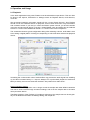
The Matrix not always replaces the mixer view, but it significantly enhances the routing capabilities and - more important - is a brilliant way to get a fast overview of all active routings. It shows
you in a glance what's going on. And since the Matrix operates monaural, it is very easy to set
up specific routings with specific gains.
28. Tips and Tricks
28.1 ASIO Direct Monitoring (Windows)
Programs that support ADM (ASIO Direct Monitoring - Samplitude, Sequoia, Cubase, Nuendo
etc.) send control commands to TotalMix. This is directly shown by TotalMix. When a fader is
moved in the ASIO host the corresponding fader in TotalMix will move too. TotalMix reflects all
ADM gain and pan changes in real-time.
But: the faders only move when the currently activated routing (the selected submix) corresponds to the routing in the ASIO host. The Matrix on the other hand will show any change, as it
shows all possible routings in one view.
28.2 Copy a Submix
TotalMix allows you to copy complete submixes to other outputs. In case a complex submix is
need with only a few changes on a different output, the whole submix can be copied to that
output. Right click with the mouse on the original submix output, means Hardware Output. In
the context menu select Copy Submix. Then right click on the new submix output, choose Paste
Submix in the context menu. Now fine tune the submix.
28.3 Delete a Submix
The easiest and quickest way to delete complex routings is by selection of the according output
channel in the mixer view by a right mouse click, and selection of the menu entry Clear Submix.
As TotalMix FX includes an unlimited undo the delete process can be undone without any problem.
28.4 Doubling the Output Signal
If a mix should be sent out via two different hardware outputs, the most elegant way is to use a
permanently activated Cue. Set up the mixdown on the routing to the Main Out, use Copy Submix to copy the final mix to the other output, then activate Cue on this other output. The output
signal, and with this the complete mixdown, will then be played back from two stereo outputs
simultaneously – the Main Out and the other Hardware Output. Even better: the faders of both
outputs are still active, so the signal level can be adjusted individually.
User's Guide Fireface UC © RME
69