1
H ow ever, internal static is not governed by any stand ard , so it should be assum ed that
internal static of the baseline system is equal to the internal static of the proposed
system if there is a proposed system that correspond s to the baseline system . If there is
no correspond ing proposed system or the internal static of the proposed system is
unknow n, use the d efault value of 1.00 in H 2O. This value is estim ated from
m anufacturers’ d ata on m any d ifferent packaged RTUs. The ASH RAE 90.1 com m ittee
m ay d ecid e to stipulate a specific allow able internal static value for baseline system s in
the future, w hich w ould obviously supersed e this value.
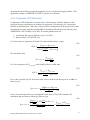
One alternate solution to using the m ethod outlined above w ould be for ASH RAE 90.1
to set a baseline allow able fan heat, for exam ple at 3% of rated capacity. In this case, w e
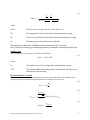
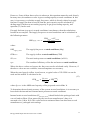
could use equation (22) to d irectly calculate COP:
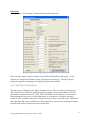
(30)
𝑄𝑡,𝑟𝑎𝑡𝑒𝑑 + 𝑄𝑓𝑎𝑛 ,𝑟𝑎𝑡𝑒𝑑
1.03 𝑄𝑡,𝑟𝑎𝑡𝑒𝑑
1.03
𝐶𝑂𝑃 =
=
=
3.413
3.413
3.413
𝐸𝐸𝑅 𝑄𝑡,𝑟𝑎𝑡𝑒𝑑 − 𝑄𝑓𝑎𝑛 ,𝑟𝑎𝑡𝑒𝑑
𝐸𝐸𝑅 𝑄𝑡,𝑟𝑎𝑡𝑒𝑑 − 0.03 𝑄𝑡,𝑟𝑎𝑡𝑒𝑑
𝐸𝐸𝑅 − 0.03
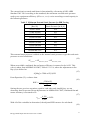
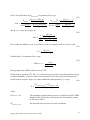
The above equation is fairly accurate relative to the com plex calculations required
otherw ise. Assum ing an internal static of 1.00 in H 2O, the d ifference is betw een -0.6% to
+3.8%.
4.6 SCHEDULE CREATOR AND EXPORTER
Intent
Energy m od elers often need to m anipulate or d eal w ith fraction al sched ule d ata outsid e
of energy m od el program s. Translating this d ata into energy m od el sched ules can be
extrem ely tim e consum ing, especially w hen d ealin g w ith 8760 d ata points. This
sched ule creator and exporter prod uces eQuest input files (.inp) or EnergyPlus input
d ata files (.id f) containing cod e language for m od eling sched ules.
D irections
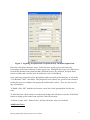
To begin, click “Create Sched ule” and select the appropriate m od eling program . A form
then appears w here the user can d efine the type of sched ule to be created . At the
m om ent, only Annual 8760 sched ules are available for EnergyPlus. Many m ore options
are available for eQuest.
4.6.1 eQuest Schedule Output
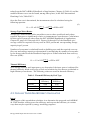
eQuest sched ules m ay be created for a single d ay, w eek or year. When the type of
sched ule is d eterm ined from the form , the appropriate input table w ill appear. The u ser
can then enter the values. Depend ing on the sched ule type, lim its are placed on the
acceptable values the u ser can enter in the table. Once d ata entry is com plete, the user
clicks “Export Sched ule” and selects the d irectory to w hich they w ould like to save the
Energy Mod el Inp u t Pre-Processor User’s Gu id e
21