1
5
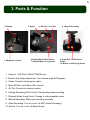
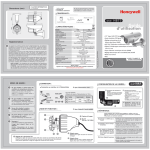
3. Parts & Function
2. Bracket
1. Megapixel Camera
3. Power
4. SD Card 5. AV Out
6. Parking Mode (Short Press)
7. Playback Mode (Long Press)
8. Manual Recording
9. Audio Rec. On/Off (Short
Press)
10. Buzzer On/Off (Long Press)
1. Camera: 1.3M Pixel 720p HD CMOS Lens
2. Bracket with Angle Adjustment: Turn camera angle 360 degrees
3. Power: Connect vehicle power cable
4. Micro SD Slot: Input Micro SD to record
5. AV Out: Connect to external monitor
6. Parking Recording (Short Press): Start parking mode recording
7. Playback Mode (Long Press): Change to video playback mode.
8. Manual Recording: Start event recording manually
9. Audio Recording: Turn on or turn off MIC (Audio Recording)
10. Buzzer: Turn on or turn off Beep Buzzer