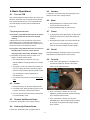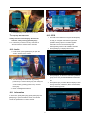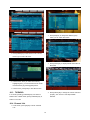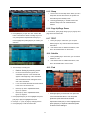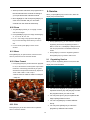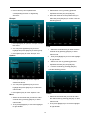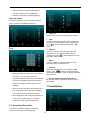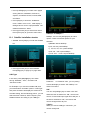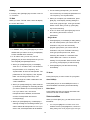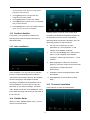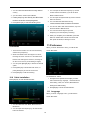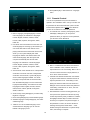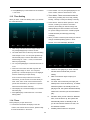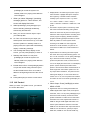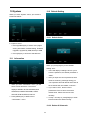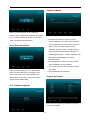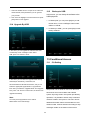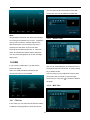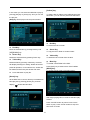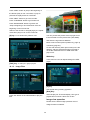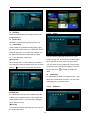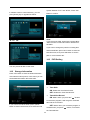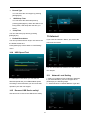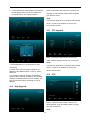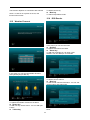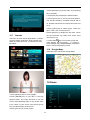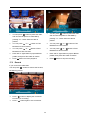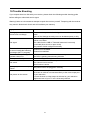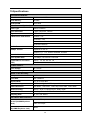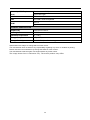
1
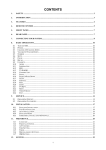
CONTENTS 1. SAFETY .............................................................................................................................................................3 2. INTRODUCTION .............................................................................................................................................3 3. FEATURES........................................................................................................................................................4 4. REMOTE CONTROL ......................................................................................................................................5 5. FRONT PANEL ................................................................................................................................................6 6. REAR PANEL ...................................................................................................................................................6 7. CONNECTING YOUR SYSTEM ...................................................................................................................7 8. BASIC OPERATIONS .....................................................................................................................................8 8.1 8.2 8.3 8.4 8.5 8.6 8.7 8.8 8.9 8.10 8.11 8.12 8.13 8.14 8.15 8.16 8.17 8.18 8.19 8.20 8.21 8.22 8.23 9. TURN ON STB...................................................................................................................................................8 POWER..............................................................................................................................................................8 CHANNEL UP/CHANNEL DOWN ........................................................................................................................8 VOLUME UP/VOLUME DOWN- ..........................................................................................................................8 NUMBER ...........................................................................................................................................................8 MUTE ...............................................................................................................................................................8 PAUSE ...............................................................................................................................................................8 RECALL ............................................................................................................................................................8 FAVORITE .........................................................................................................................................................8 AUDIO ...........................................................................................................................................................9 INFORMATION ...............................................................................................................................................9 EPG ..............................................................................................................................................................9 TV/RADIO .................................................................................................................................................10 CHANNEL LIST ............................................................................................................................................10 SLEEP ..........................................................................................................................................................11 PAGE UP/PAGE DOWN ................................................................................................................................11 TEXT .........................................................................................................................................................11 SUBTITLE ....................................................................................................................................................11 FIND ............................................................................................................................................................11 ZOOM ..........................................................................................................................................................12 MENU..........................................................................................................................................................12 VIDEO FORMAT ...........................................................................................................................................12 EXIT ............................................................................................................................................................12 SERVICE .........................................................................................................................................................12 9.1 9.2 10. 10.1 10.2 10.3 10.4 10.5 10.6 11. 11.1 11.2 11.3 11.4 11.5 11.6 11.7 12. ORGANIZING SERVICE ....................................................................................................................................12 ORGANIZING FAVOURITES ..............................................................................................................................14 INSTALLATION ............................................................................................................................................14 SATELLITE INSTALLATION SATELLITE ........................................................................................................15 FASTSCAN SATELLITE ................................................................................................................................17 AUTO INSTALLATION ..................................................................................................................................17 SATELLITE GUIDE .......................................................................................................................................17 TERRESTRIAL INSTALLATION ......................................................................................................................17 CABLE INSTALLATION ................................................................................................................................18 PREFERENCE ................................................................................................................................................18 LANGUAGE .................................................................................................................................................18 PARENTAL CONTROL ..................................................................................................................................19 TIME SETTING .............................................................................................................................................20 TIMER .........................................................................................................................................................20 A/V CONTROL ............................................................................................................................................21 MISCELLANEOUS SETTINGS ........................................................................................................................22 OSD SETTING .............................................................................................................................................22 SYSTEM ..........................................................................................................................................................23 1 12.1 INFORMATION .............................................................................................................................................23 12.2 DEFAULT SETTING ......................................................................................................................................23 12.2.1 Default Value:.........................................................................................................................................23 12.2.2 Delete All Channels: ...............................................................................................................................23 12.2.3 Save default value ...................................................................................................................................24 12.3 SOFTWARE UPGRADE ..................................................................................................................................24 12.4 UPGRADE BY USB ......................................................................................................................................25 12.5 BACKUP TO USB .........................................................................................................................................25 13. CONDITIONAL ACCESS .............................................................................................................................25 13.1 CA SETTING ....................................................................................................................................................25 14. USB ...................................................................................................................................................................26 14.1 FILE LIST.........................................................................................................................................................26 14.1.1 Record Files ............................................................................................................................................26 14.1.2 MP3 Files ................................................................................................................................................26 14.1.3 Image Files..............................................................................................................................................28 14.1.4 Video .......................................................................................................................................................29 14.1.5 Software ..................................................................................................................................................29 14.1..6 All ...........................................................................................................................................................30 14.2 STORAGE INFORMATION .................................................................................................................................30 14.3 PVR SETTING..................................................................................................................................................30 14.4 USB SPEED TEST ............................................................................................................................................31 14.5 REMOVE USB DEVICE SAFELY! ......................................................................................................................31 15. 15.1 15.2 15.3 15.4 15.5 15.6 15.7 15.8 16. INTERNET ......................................................................................................................................................31 NETWORK LOCAL SETTING .............................................................................................................................31 HTTP UPGRADE ...............................................................................................................................................32 FTP UPGRADE.................................................................................................................................................32 FTP .................................................................................................................................................................32 WEATHER FORECAST ......................................................................................................................................33 RSS READER ...................................................................................................................................................33 YOUTUBE ........................................................................................................................................................34 GOOGLE MAPS ................................................................................................................................................34 GAME ..............................................................................................................................................................34 16.1 TETRIS ............................................................................................................................................................35 16.2 SNAKE .............................................................................................................................................................35 16.3 OTHELLO.........................................................................................................................................................35 17. NEW FEATURES ...........................................................................................................................................35 17.1 EQUALIZER .....................................................................................................................................................35 17.2 TIME SHIFT .....................................................................................................................................................35 17.3 RECORD ..........................................................................................................................................................36 18. TROUBLE SHOOTING .................................................................................................................................37 19. SPECIFICATIONS .........................................................................................................................................38 2 1. SAFETY This HD Receiver has been manufactured to satisfy the international safety standards. Please read the following safety precautions carefully. MAINS SUPPLY: 100 - 240V AC 50/60Hz OVERLOADING: Do not overload wall outlet, extension cord or adapter as this may result in fire or electric shock. LIQUIDS: Keep liquids away from the HD Receiver. The apparatus should not be exposed to dripping or splashing and no objects filled with liquids, such as vases, shall be placed on the apparatus. CLEANING: Disconnect the HD Receiver from the wall outlet before cleaning .Use a light damp cloth (no solvents) to dust the HD Receiver. VENTILATION: The slots on top of the HD Receiver must be left uncovered to allow proper airflow to the unit. Do not stand the HD Receiver on soft furnishings or carpets. Do not expose the HD Receiver to direct sunlight or do not place it near a heater. Do not stack electronic equipment on top of the HD Receiver. ATTACHMENTS: Do not use any attachments that are not recommended as these may cause hazard or damage the HD Receiver. CONNECTION TO THE SATELLITE DISH LNB: Disconnect the HD Receiver from the mains before connecting or disconnecting the cable from the satellite dish. FAILURE TO DO SO CAN DAMAGE THE LNB. CONNECTION TO THE TV: Disconnect the HD Receiver from the mains before connecting or disconnecting the cable from the satellite dish. FAILURE TO DO SO CAN DAMAGE THE TV. EARTHING: The LNB cable MUST BE EARTHED to the system earth for the satellite dish. LOCATION: Place the HD Receiver indoors in order not to expose to lightening, rain or sunlight. 2. INTRODUCTION Thank you for purchasing this HD Receiver. This HD Receiver is fully compliant with the international DVB standard and thus transmits digital images, sounds, information guides and teletext directly to your TV through the satellite broadcasting. Now you can comfortably see and receive digitally transmitted music, news, movie and sports satellite broadcasts in your office or at your home. You can enjoy interesting games embedded in HD Receiver. In service search section, both the automatic service search method and the manual search mode are provided. Also it supports DiSEqC 1.0, 1.2 and USALS, enabling you to move your antenna in order to focus preferred satellite. You can save up to 6000 TV and Radio services and work around with the favorite, Lock, Delete, Move and Sort functions. The menu is very modern and supports multiple languages. All functions can be carried out using the remote control and some of the functions can also be carried out using the front panel. The HD Receiver is easy to use and adaptable for future advances. Please be aware that new software may change the functions of the HD Receiver. If you have any difficulties concerning the operation of your HD Receiver, please refer to the relevant section of this manual, including the ‘Troubleshooting’. This Manual will provide you with useful information on using this HD Receiver. 3 3. FEATURES High Definition STB decoder, Full HD 1080p output via HDMI CONAX CAS7 embedded Under 0.5 Watt Standby power consumable Hybridtuner for DVB-S2, DVB-T2/T/C S/PDIF for digital audio or Dolby digital bit stream output DiSEqC 1.0, 1.1, 1.2 ,USALS and Unicable supported USB 2.0 Host, USB-WIFI supported RJ45 for 10Mbps Ethernet interface Video Decoding: MPEG-4/H.264, MP@ML, MP@HL,MP@HL, [email protected], [email protected], XVID, DIVX Audio Decoding: LPCM,AAC-LC,HE-AAC,MP3,Dolby plus 6000 channels (TV and Radio) programs Electronic Program Guide (EPG) Subtitle supported Teletext supported by VBI insertion and software emulation PVR Ready, Recording and TimeShift Blind scan, Fast scan and LCN function Parental lock facility by channel and program event RTC(Real-Time-Clock) Full Picture In Graphic(PIG) function Multilingual menu text supported Software upgrade via USB, Http, FTP and RS232 4 4. Remote Control You can power on/off the receiver, operate on screen menu, and use a variety of hot key function. POWER To switch your receiver on from standby or standby to on. MUTE Used to enable or disable the audio NUMERIC KEYS Used to select channels or enter programming parameters TV / RADIO Receiver switches between TV and Radio mode. (ZOOM) Press key select zoom times, from X1 to X16. RECALL Return to the previous menu or status. TV/SAT Receiver switches between TV and receive mode. INFO To display channel status or various program information of current service. EPG(Electronic Program Guide) Display the Programs guide on screen when available. MENU Displays the Main Menu on the screen, or return to the previous menu or status. EXIT Cancel the user selection and return to the viewing mode from a menu. OK To select menu option, or to updated on entry. <,> KEY To adjust volume level, or to move cursor left or right in the menu. ^,v KEY To change channels, or to move cursor up or down in the menu. PAGE+/PAGETo move up the cursor to the next or previous page in the menu or channel list. ●REC Has different functions per menu. Teletext Shows teletext information of the current channel supports. Subtitle Subtitle Display. F1 In case your TV is connected through RF Modulator (UHF), select output channel number between CH21 and CH69 with up and down key. (FIND) Use to prompt find channels sort by character. TIMER Press timer key you can setup up the Standby time. V.FORMAT Press V.FORMAT button to switch the display mode among "AUTO", "480i","480p", " 576i", "576P", "720P_50","720P_60,"1080i_50"," 1080i_60" ," 1080P_50" and" 1080P_60" FAV(FAVORITE) To set receiver to the favorite server mode, display the favorite channel. FOLDER Press this button to enter the Record Manager menu directly. AUDIO(Red Key) Audio channels setup, to select audio mode; Left, Right , Stereo, Mono. OPTION(GREEN KEY) Shows NVOD information of the current channel supports. SAT Display the satellite list at normal picture. Play Mode Select the play mode in MP3 or JPEG player. 5 USB To remove the USB Hard Disk safely. TMS(Time Shift) Press this button to display Time Shift info bar. Play To play the MP3, JPEG, or Record files. Stop To stop the Time Shift, recording, or MP3/JPEG player. PAUSE Used to select the freeze function. Press once to freeze the screen picture. PAGETo start Fast Backward function. PAGE+ To start Fast Forward function. SB To start Slow Backward function. SF To start Slow Forward function / PREV/NEXT Switch to preview or next file in play mode 5. Front panel Remote Sensor: Detects infrared signal from remote control unit. POWER Indicator: while the receiver is power on and at standby mode. Signal Indicator: When receiving signal is strong, the signal indicator is lighted. Card Slot: One CA Interface for Conax. USB: USB 2.0 Host, connect to USB hard disk, or flash disk. (on the left side of the receiver) Display: (LED type) Indicates operating status of receiver. 6. Rear Panel Please refer to the diagram above for all possible connections of your receiver Do not connect the unit to the mains socket until all other connections have been connected and checked. Your configuration can vary depending on model. LNB IN 13/18V 400mA MAX: This port is to connect the coaxial cable from LNB of your Dish. RF IN: This port is to connect the coaxial cable from terrestrial antenna. S/PDIF: Digital Audio interface, connect to AV amplifier S/PDIF input terminal. HDMI: Audio and Video output socket for TV set with HDMI Input Jack only ETHERENT: This is used for internet connection. RS 232: This port is used to connect your receiver and computer through a serial cable. AV OUT: This RCA connector is used to connect TV using RCA cable. IR IN: Connect an External IR-Sensor (Infrared). DC 12V:This is used to connect an external 12V adapter. 6 7. Connecting Your System There are two ways to connect the receiver to your existing TV system. We recommend using one of the following cases for the best result: 1. If you have a high definition television set, you should use a HDMI cable for best result, Plug one end of the cable into the HDMI socket on the receiver, and the other end into the matching socket on your television. In this case, you do not have to make audio connections because the HDMI connector can output stereo audio or Dolby digital audio. 2. Connect one end of RCA cable to the AV mini jack on the back of the receiver and the other end to a AV mini jack on your TV. Finally connect the coaxial cable from the LNB to the LNB IN jack on the receiver. With External Audio / Hi-Fi System To connect any external Audio Hi-Fi system, the receiver has been provided with two RCA connectors at the back of the receiver marked with Audio L and R. Connect an RCA stereo cable from the AUDIO L, R jacks on the back of the receiver to the LINE, AUX, SPARE OR EXTRA input jacks on your Hi-Fi System. 6.1 TV with Motorized System (DiSEqC 1.2) Connect one end of your coaxial cable to the LNB IN connector on the receiver and the other end to the REC or Receiver connector on the DiSEqC 1.2 motor. Connect the coaxial cable from the LNB to the LNB connector on the DiSEqC 1.2 motor. All our receivers are designed to be DiSEqC 1.0 and DiSEqC 1.2 compatible. This allows multiple antennas to be connected to the receiver at the same time. If you have two or more fixed antennas or LNBs, then we recommend you use a DiSEqC 1.0 switch. Connect the coaxial cable from the first LNB to the LNB 1 or LNB A input connector of the DiSEqC switch. Do the same for any other LNBs that you have. Connect one end of a coaxial cable to the RF output connector of the DiSEqC switch, connect the other end to the LNB IN socket on the receiver. To the digital receiver, you can connect either a single satellite antenna directly or LNB of multi-feed equipment. 7 8.5 8. Basic Operations 8.1 Number In full screen, use numeric keys and press [OK] on the Turn on STB Remote Control Unit to change channel. First, press the [Device’s Main Power] to turn on the unit. When the STB is first used, it will play the first channel 8.6 from the default Channel List. If it’s not the STB’s first 1 use, STB will play the same channel viewed before Mute Press [MUTE] key to mute the sound and the screen will show mute OSD icon. turning off. 2 ? Frequently Asked Question 8.7 Q: The power of my STB has been turned on and not 1 Press [MUTE] key again to restore sound. Pause In playing mode, press [Pause] key, the picture will in Standby mode, but the TV screen showed be paused, but the sound of the channel will still nothing: continue. A: Make sure the TV set has been set to the correct video input (not the TV channels). For example, if you have connected the unit with the Video1 input of the TV set, the TV set has to be switched to Video1. 2 Q: The power of my STB has been turn on and not in 8.8 Press [Pause] key again, the screen’s picture will skip over to the current playing picture, and the sound of the channel will play correspondingly. Standby mode, but the TV screen showed Recall Press [RETURN] key will directly switch to the previous nothing except one box with “No Signal” image. channel that you played before current channel. A: That means the channel, which you select, is no signal. It could be several causes: 1 8.9 The channel which you select is not in your 1 allocate satellite. The simply solution is to change 2 Favorite In full screen, press [FAV] key, it will display the channel. “Favorite list” window on the left of the screen, The signal of current TV channel is too weak. You which you can watch like below. can try to change channel to other strong signal channels. If the problems still exist, please consult your local dealer or other professionals for technical service. 3 You use the Dual LNB, and you need Modify LNB Type 8.2 Power 1 Press [Power] Key can enter the Standby mode 2 In Standby mode, press [Power] Key again to call 3 User can also disconnect the device’s main power highlight by pressing [Channel Up/Channel Down] to end the Standby mode. key to select favorite Channels. back the unit and go to the previous channel 8.3 2 3 Channel Up/Channel Down In the " Favorite list " window you can move In the " Favorite list " window you can press [Left/Right] key to select favorite groups, Pressing In full screen, press [CH+/CH-] to change channel. [P-/P+] keys can implement the “Page up/Page down” function 8.4 Volume Up/Volume Down- In full screen, press [VOL+/VOL-] to adjust volume. 8 4 Press [Exit] key to exit the current window. 8.12 EPG ? Frequently Asked Question 1 Q: Why does the screen display “No Favorite The STB has an Electronic Program Guide (EPG) Channel”, after pressing [Favorite] key? to help you navigate channels through all the A: It is because you haven’t set any channels as possible viewing options. The EPG supplies information such as channel listings and “favorite channel”. Please refer to Favorite starting/ending times for all available channels. . 8.10 Audio 1 2 Press [EPG] key to display EPG screen. 3 Press [Red] key to select the channels by different In full screen, press [AUDIO] key to open the “Audio” window on the screen. group, such as by Favorite/Satellite/Provider/CAS 2 You can modify the audio track by pressing etc. [Channel Up / Channel Down] key and modify the 3 4 Press [Green] key to select different display modes audio mode by pressing [Volume Up / Volume among Now EPG, Next EPG, More and Schedule, Down] key. like the following picture: Mode: Left/Right/Stereo/Mono 8.11 Information In full screen, press [INFO] key (press [INFO] key and [RED] key) to open information screen, the window shows the parameters of current channel. 9 2 Press [Red] key to change the different group. which you can watch, like below. 5 Press [Yellow] key in EPG menu to set a record timer or go to Timer List menu. 3 Press [Green] key to display details information for EPG Now 6 In EPG menu, when you select one event by highlighting item, you can set this event to record timer list directly by pressing [REC] button. 7 In EPG menu, press [Exit] to close EPG screen. 8.13 TV/RADIO 4 Press [Yellow] key to change the current channel’s In TV mode, pressing [TV/RADIO] key can switch to property, such as FAV/ Lock/ Skip/ Delete/ Radio mode. In Radio mode, press [TV/RADIO] key to Rename. switch to TV mode. 8.14 Channel List 1 In full screen, press [OK] key to enter “Channel List”. 10 8.15 Sleep 1 This function can set sleep timer. When you set a sleep timer and the time arrives, the system will automatically enter standby mode. 2 Pressing [SLEEP] key, it will switch the mode between Sleep Timer Off /10/30/60/90/120 minutes. 8.16 Page Up/Page Down In Channel list, press [Page+/Page-] key to page up and 5 Press [Blue] key to open the “Sort” window like page down the channel list. below. There are five kinds of sorting ways. You can press [Channel Up/Channel Down] key to 8.17 TEXT move highlight and press [OK] key to confirm your 1 selection. Press [TTX] key in full screen, you can open teletext page on any channel which has teletext information. 2 If the channel has no teletext information, it will show “No Teletext Data” on the screen. 8.18 Subtitle 1 Press [Subtitle] key in full screen, you can switch subtitle on or off. 2 If the channel has no subtitle information, it will show “No subtitle Data” on the screen. 6 8.19 Find The five ways of sorting are: Default: Sorting by scanning result. FTA/$: Sort channel through free and scrambled sequence. Free channels will appear at the beginning of the channel list and scrambled channels will appear at the end of the channel list . Lock: Accumulate all locked channels and list in the end of TV Channel List. Name (A-Z): Sort in Alphabetical Order, ignore “$” symbol. Name (Z-A): Sort in Alphabetical Order, 1 ignore “$” Symbol. 7 Press [Find] key in full screen can open the “Find” window like above. You can press Press [Up/Down] key to move highlight and press [OK] key to play the highlighted channel. [Channel Up/Channel Down/Volume 8 Press [P -/ P +] key to page up and page Down. Up/Volume Down] key to move highlight and 9 Press [Exit] key to exit the channel list. press [OK] key to input the selected symbol or letter into the dialogue. 11 2 After input each character, the program list on 9. Service the left will search the channel according to When you press [Menu] key to enter menu, there will your input and list the matched channel. 3 display the picture like below: Move highlight to “OK” and press [OK] key to close “Find” window and you can select channel from the channels list directly. 8.20 Zoom 1 The [ZOOM] key allows you to magnify a certain 2 Press [ZOOM] key again, the image will enlarge by area on the images x1, x2, x4, x6, x8, x12, x16. 3 In “x2 ~ x16” image, use [Up/ Down/ left/ right] key to move the image center area you want to 1 see. 4 Press [Up/Down] key, you can select the submenu Organizing services and Organizing favorites. If In zoom mode, press [Exit] to close “Zoom” Menu Lock is “On”, it will display a dialogue box for window. user to input password. The default Password is “0000”. 8.21 Menu 2 Press [MENU] key to open the menu, exit the current Press [OK] key to enter the “Organizing Service”. Press [Menu] key to go back to main menu. menu to previous menu or close the window. 9.1 Organizing Service 8.22 Video Format 1 When you enter “Organizing Service” menu, there will Press [P/N] (white) key under Full Screen playback display the screen like below. for 1st, it will show the current system output video resolution, continuously press this key & system will switch its output video resolution by sequence “Auto->480i-> 480P-> 576i-> 576p-> 720P-50>720P-60>1080i-50>1080i-60>1080p-50 >1080p-60”. 1 You can move highlight by pressing [Channel Up/Channel Down] key and [OK] key to select the programs which you want to edit. 2 You can press [P+/P-] key to implement the Page Up/Page Down function. 3 You can use [Red] key to switch different Group. 8.23 Exit 4 Press [EXIT] key to exit the current menu to previous You can press [Green] key to select the programs by different select mode. menu or close the window. 12 5 Press color key can implement the 3 corresponding function in “Organizing Select Move icon by pressing [Channel Up/Channel Down] key and [OK] key. Services”. 4 Move the channels to the position that you want and press [OK] key to confirm. Like the Groups following picture: 1 Press [Red] key to open the “Groups” window like above. 2 Lock You can press [Up/Down] key to move 1 highlight and press [OK] key to select group. 3 Select the channels that you want to edit in channel list by pressing [OK] key or other Press [Menu] key to close “Groups” List. select mode. Options 2 Then press [Right] key to move the highlight to right toolbar. 3 Select Lock icon by pressing [Channel Up/Channel Down] key and [OK] key. 4 Lock the channel by pressing [OK] key. Like the following picture: 1 Press [Green] key to open the “Options” window like above. 2 You can press [Up/Down] key to move highlight and press [OK] key to confirm the select mode. 3 Press [Menu] key to close “Options” List. Delete Move 1 1 Select the channels that you want to edit in the channel list by pressing [OK] key or other channel list by pressing [OK] key or other select mode. select mode. 2 Select the channels that you want to edit in 2 Then press [Right] key to move the highlight Then press [Right] key to move the highlight to right toolbar. to right toolbar. 13 3 Select Delete icon by pressing [Channel Up/Channel Down] key and [OK] key. 4 Delete the channel by pressing [OK] key. Skip and rename Follow the same way you can set the channel’s Skip or rename for highlighted channel. 1 FAV List Choose the FAV List by pressing “FAV” button. 2 Add To add services into favorites, mark the desired services by pressing “OK ” button in Service List, press to choose Add mode and press “ OK ” button. Find 3 Remove To remove services from favorites, mark the desired services by pressing “OK ” button in Favorite List, press to choose Remove mode and press “ OK ” button. 4 Move You can reorder and move the service to the preferred position in Favorite List. 5 1 Rename Select the desired FAV List by pressing “FAV” button, using , buttons to choose Rename mode and press “ OK ” button to display keyboard, and rename it. Press [Find] key can open the “Find” window like above. You can press [Channel 6 Up/Channel Down/Volume Up/Volume Down] Group, Options and Find functions Please refer to the “Organizing Services” part in this manual. key to move highlight and press [OK] key to input the selected symbol or letter into the dialogue. 2 10.Installation After input each character, the program list on the left will search the channel according to your input, and list the matched channel. 3 Move highlight to “OK” and press [OK] key to close “Find” window and you can select channel from the channels list directly. 9.2 Organizing Favourites This menu is helpful in adding and deleting services to and from the favorite group. 14 1 Press [Left/Right] key to select menu pages among Service, Installation, Preference, System, Conditional Access, Internet,USB and Game. 2 Press [OK] key to enter the “Installation” menu. If Menu Lock is “On”, it will display a dialogue box for user to input password. The default Password is “0000”. 3 Press [Up/ Down] key to select menu items. Press [menu] key to go back to main menu. DiSEqC1.0/ DiSEqC1.1 DiSEqC: You can use [left/right] key to switch 10.1 Satellite Installation Satellite 1 options. There are several options for your Satellite: Press [OK] key to enter the Satellite selection: list. a)Disable: without DiSEqC. b)1/2, 2/2: two ports DiSEqC c) 1/4, 2/4, 3/4, 4/4: 4 ports DiSEqC d)1/8, 2/8… 8/8: 8 ports DiSEqC e)1/16, 2/16….16/16: 16 ports DiSEqC 2 Press [Up/ Down] key to select satellite. Press[Page] key to page up or page down. LNB Type In this item, press [left/right] key can switch Positioner among “Standard”, “User”, "unicable" and Positioner: In “Positioner” item, you can press [/ “Universal” mode. Volume Down]key to switch “Off / DiSEqC 1.2 / For Example: If you use the unicable LNB, then USALS” functions. you should select “Unicable” option in “LNB Type” 22K and press OK button will display the submenu for You can use [left/right] key to switch “ON / Off”. Unicable setting, like the following picture, you can When this item is switched to “ON”, receiver will select the SCIF Channel, SCIF Frequency and receive TV and radio input signal from 22K port. If Satellite Position according to your LNB type. the item is switched to “Off”, the receiver will receive all signal from 0K port. ! Notice When you choose LNB type “Universal”, you cannot modify 22K. 15 Polarity 3 For the existing transponder, you can also In “Polarity” item, [left/right] key to switch “Auto / H use numeric keys to modify the parameters of / V” functions. “TP Frequency” and “Symbol Rate”. 4 TP Edit When you complete your modification, press When you enter “TP Edit” menu, there will display [Red] key, it will display a dialog asking the the screen like below: scan mode, program type, scan type and NIT Search on/off. After you set up, press [OK] key to start scanning. 5 In the “TP Scan” item, press [Exit] key to exit the scanning and save the current parameters. Single Scan 1 Press [Red] key, it will display a dialog asking the scan mode (means you want to scan all channels or only scan free channels), program type (means you want to scan all 1 In “Satellite” item, press [left/right] key to switch channels or only scan TV/Radio channels), satellite that you want to scan or press[OK]key scan type (means preset scan, that is to enter satellite list for selection. searching the existed TP. Automatic Scan 2 In “TP Index” item, you not only can use means blind scan. There is no need for [left/right] key to select transponder but you can existing TP info) and NIT Search on/off. After also use[Add] and [Delete]functions. you set up, press [OK] key to start scanning. When you press[Green] key, it will display 2 “New TP” in “TP Index” item; You should set Press [White] key into the blind scanning immediately. the parameters of “TP Frequency” and “Symbol Rate” for this new transponder. The TP Scan parameters of “TP Frequency” and “Symbol Rate” can set using numeric keys. The Press [Green] key to scan current TP’s programs. available range are “3000~13450 MHz” and Auto DiSEqC “1000~45000Ks/s”. Press [Blue] key to run Auto DiSEqC function, it can find satellite connection ports automatically. When you press[Yellow] key, there will show up a warning message for reminding whether you want to delete the current transponder or Blind Scan not. If you select “Yes”, the current Press [White] key take you directly into blind scan mode to scan the current satellite. transponder will be deleted, and the total account of transponder will reduce 1 Select satellites correspondingly. When you Press [SAT] key, you will see the screen When you press [Blue] key, it will display a like below: warning message for reminding whether you 1 You can press [ok] button to select one or more want to delete all transponders or not. If you satellites and then press [red] button, it will show a select “OK”, all transponders will be deleted. dialog asking scan mode, program type, scan type 16 and NIT Search on/off. After you set up, press [OK] key to start scanning. 2 Press [green] button to edit the name and longitude of the select satellite. 3 Press [yellow] button to add a new satellite. 4 Press [blue] button to delete one or more satellites that you have selected. 5 Press [white] button to move the satellite selected (note: you can only move one satellite). 10.2 FastScan Satellite “Satellite Guide” is used for user to enter local In this menu, you can perform a fastscan by longitude; local latitude and satellite longitude. By selecting the provider and press OK button on the evaluation from the receiver evaluate the Start Search item. antenna azimuth and antenna elevation; user can follow this guidance to adjust antenna. 6 10.3 Auto installation You can use numeric keys to input parameters in “Local Longitude”, “Local Latitude” and “Satellite Longitude”. 7 You can use [Left/Right] key to select east or west in “Local Longitude” and “Satellite Longitude”, select north and south in “Local Latitude”. 8 Moving highlight to “Start” item and press [OK] key. The lower column on the screen will calculate the corresponding value automatically. “Auto Installation” is a very new and convenient 9 Orientation means the angle between south and satellite. function. It will automatically detect all dishes 10 Press [MENU] key to draw back to “Main” connected to this machine and scan the available Menu. services belonging to the satellite matched according to satellites and transponders data in current database. You don’t have to input any 10.5 Terrestrial Installation parameter of your antenna settings. Just press Press [OK] key to enter the selected item. “ OK ” button to enter this “Auto Installation” menu then it starts scanning and shows you the result at the end of scan. 10.4 Satellite Guide When you enter “Satellite Guide” menu, you will see the screen like below: 17 1 You can select the Bandwidth according different 3 You can input the Second Frequency by use the country. numeric button of the RCU, if you set the Scan 2 You can set the Tuner Power ON/OFF. Mode to Manual Scan. 3 Press [white] key can directly into blind scan 4 You can input the Symbol Rate by use the numeric 5 You can select the QAM value among button of the RCU. mode to scan the current programs. 4 Press [Green] key to enter the following menu. 16QAM,32QAM,64QAM,128QAM and 256QAM. 6 You can turn ON or OFF the NIT Search, if you set the Scan Mode to Manual Scan. 7 You can use numeric keys to input the Frequency for LCN Frequency Scanning. 8 When you complete your modification, press OK button on Search item to enter Scan menu and then press OK button, it will begin to scan. 11.Preference Scan Mode 1 When you enter “Preference” menu, you will see the screen like below: There are two modes. You can scan channel by channel or by frequency”. 2 When scan band is UHF and region is “France”, the range of Ch No. is from 21 to 69. When scan band is VHF and region is “France”, the range of Ch No. is from 6 to 12.(it’s according to region) 3 You can press [left/right] key to select LCN On/Off option. 4 Press [white] key to enter blind scan menu, or press [Green] key to enter TP scan menu. 5 Press [Exit] key to exit the scanning. In “Preference” menu: 10.6 Cable Installation 1 Press [OK] key to enter the selected item. Press[Channel Up/Channel Down]key to select menu items among Language, Parental Control, Time setting, Timer, A/V Control, Miscellaneous Settings and OSD Setting. 2 Press[OK]key to enter the selected item. 11.1 Language When you enter “Language” menu, you will see the screen like below: 1 You can select the Scan Mode, Manual Scan or 2 You can input the Frequency by use the numeric Blind Scan. button of the RCU. 18 10 Press [MENU] key to draw back from “Language” menu. 11.2 Parental Control You can set a password for anyone who wishes to operate in the “Installation” menu. And you can also set the password for the locked channels. (How to set the locked channel please refer to LOCK) Here will show you how to set and how to revise the password. 1 3 In “Parental Lock” function, press [OK] key, there Menu Language: press [left/right] key to select will display a dialogue for you to input the menu languages, the selections of languages password. When you input the correct password, include: English, Russian, German, Greek, you will see a screen like below: French, Italian, Spanish, Portuguese, Arabic, Polish etc. 4 First Audio: Some channels have more than one audio language for choosing; by this function you can set the first audio for this channel. If the playing channel has the same audio as the “First Audio” you set, system will play this audio language as default. If the channel hasn’t the suited audio language, then the system will compare automatically with second audio language. The selections of audio languages include: English, Russian, German, Greek, 2 French, Italian, Spanish, Portuguese, Arabic, enter “Installation” menu, whether user has to Polish etc. 5 input Password or not. If the setting “Menu Lock” is Second Audio: If the channel has no corresponded “ON” this means user have to input password, if audio with “First Audio” but have corresponded set to “OFF” means unlocked. audio with “Second Audio”, system will play the 3 second audio language as default. If no audio input the password or not. If the setting is “ON”, then the default language of current channel will playing the channels with lock mark will show a be played automatically. The selections of audio dialogue on the screen and ask for the password. languages include: English, Russian, German, If the setting “Channel Lock ”is “OFF”, the Lock Greek, French, Italian, Spanish, Portuguese, function will be invalid. Arabic, Polish etc. 4 Audio Priority: Press [left/right] key to select Dolby EPG: Press [left/right] key to select EPG language. 8 Subtitle Language: Press [left/right] key can select numeric keys directly. After you filled in 4 numbers, the highlight will auto skip to Confirm Password and ask you to input the new password again. If subtitle language. 9 New Password is used for revising password; you can input the new password in this item by using Digital or Language. 7 Channel Lock determines that when user wishes to play the locked channels, whether user has to language corresponds with the “Second Audio”, 6 Menu Lock determines that when user wishes to the password is correct, the screen will show a Teletext: You can set teletext language. If the message “Saving Data, Please Wait…”. After streams have this language you can see the finished saving and draw back to “System Setup” teletext in language you set. menu, the revising is complete. 19 5 Press [MENU] key to draw back from the “Parental Timer Number: You can press [left/right] keys to set Lock” menu. Timer number, and there are 8 timers in total. Timer Mode: There are several modes for 11.3 Time Setting Timer setting, including Off, Once, Daily, Weekly, When you enter “Local Time Setting” menu, you will see Monthly , Monthly to Friday and Satday to Sunday. the screen like below: Timer Service: There are three options for “Timer Service”, including “TV Channel” and “Radio Channel” (timer setting for channel change and Wakeup/Sleep) and "Record Radio" and "Record TV" (Timer setting for Record TV or Radio program to USB Hard Disk) and Message (reminding message). When you select “Channel” (timer setting for channel change and Wakeup/Sleep) option in “Timer Service”, the screen will display like below: GMT Usage: This item is for the usage of GMT. You can press [left/right] keys to switch “On/Off”. The “GMT Offset” item is valid only when the setting “GMT Usage” is “ON”. You can press [Volume Up / Volume Down] keys to switch “GMT Offset” value, and the range is “-12:00 ~ +12:00”, increase each half hour progressively. You can press [left/right] to control Summer time on or off. “Date” and “Time” items are valid only when the i. setting “GMT Usage” is “OFF”. You can press Channel: ress [OK] key to enter channel list and select channel that you want [Volume Up / Volume Down] keys to move highlight setting. and use numeric keys to input directly. ii. If the current channel provides the correct time Date: use numeric keys to input your wakeup date. information, you will see the current time while you enter “Time” menu. If the current channel doesn’t iii. On Time: use numeric keys to input your provide time information, you will have to input the wakeup time. Once the time’s up, no matter date and time information manually. what the system is in standby mode or in Time Display can control time display on or off when playing mode, the system will automatically full screen play switch to the channel you want and start to Press [MENU] key to draw back from “Local Time play. Setting” Menu. iv. Duration: After you set a time for “Duration” item, once the time’s up, the system will 11.4 Timer automatically switch to standby mode. If Press [enter] key to open timer menu. you do not want this function to work, set Current time information will display on the first the duration to 00:00. column; if the current time is incorrect, please modify v. the time information in “Time” item. 20 Standby After Finish:You can press [Left/Right] to control the system is in Display Mode is for switching the system output standby mode or in playing mode after the video resolution. Highlight this option and press record stopped. left or right key, it will switch video resolution When you select “Message” (reminding vi. circularly by the sequence “Auto<-> by native message) option in “Timer Service”, the TV<-> 480i<-> 480P<-> 576i<-> 576p<-> screen will display like below: 720P<->1080i-50<->1080i-60<->1080P-50<->108 Wakeup Message: press [left/right] key to 0p-60”. This effect is equal to press V.Format Key under select reminding message as Birthday, Full Screen and their last setting saving will be Anniversary and General. efficient for each other. By Source means system vii. Date, you can use numeric keys to input will set the video output resolution according to the your wakeup date. current program it’s playing, different resolution viii. On Time: use numeric keys to input your programs switching perhaps will make TV screen wakeup time. Once the time’s up, no matter flicker. By Native TV means system will be what the system is in standby mode or in according to the HDMI TV’s max supported playing mode, the system will automatically resolution to set its resolution, if system is not display a reminding message. connected to a HMDI TV, it will set resolution to default. ix. The message will always display on the Aspect Mode is for switching the screen aspect screen, you can press [Exit] key to close it. ratio mode. Now we provide following options: 4:3 x. Standby After Finish:You can press PS / 4:3 LB / 16:9/Auto. You can press [Left/Right] [Left/Right] to control the system is in key to select each mode circularly. 16:9 will standby mode or in playing mode after the provide user pillar box mode, it means user use record stopped. 16:9 TV to display but need to see a 4:3 full display xi. Extend Record Time :Press [left/right] button picture. System will force press wide screen or input the number using numeric keys to picture to be narrow and there are black bands on set the Extend Record Time. It is used to left and right side. Auto means system won’t do add time at beginning and end of the record any aspect ration translation, 16:9 picture source will be good display on a 16:9 TV but will be too time. narrow on a 4:3 TV, and 4:3 picture source will be xii. Press [MENU] key to exit the current menu. too wide in a 16:9 TV but will be good display in a 4:3 TV. 11.5 A/V Control Video Output: Press [Left/Right] to select When you enter “TV System” menu, you will see HDMI or RGB. the screen like below: Digital Audio Out is for setting both SPDIF and HDMI’s digital audio output mode, it has options LPCM Out, Auto, You can press [Left/Right] Key to select each mode circularly. LPCM Out means system will decode no matter AC3 or PCM audio track data to be LPCM, digital audio decoder or HDMI TV will get LPCM digital audio data. Auto means system will detect which the connected HDMI TV can decode and then output that data. If HDMI TV can decode AC3, system just output RAW data, if HDMI TV can decode LPCM only, 21 system will just decode AC3 or LPCM to be LPCM 11.7 OSD Setting and then output. When you enter the “OSD Setting” menu, you will Service Switch Mode: Press [left/right] button to see a screen like below: select unblank or blank. Press [MENU] key to draw back from “AV System” menu. 11.6 Miscellaneous Settings When you enter “Miscellaneous Settings” menu, you will see a screen like below: 1 OSD Timeout: When you switch channels in full screen, there will display information about current channel on the lower part of the screen. Regarding the duration this information is displayed on the screen, you can press [left/right] key to set the time. The 1 Channel list num: This item provides below range of the duration is “1 second ~ options: 1/2/3,you can press [Left/Right] key to 10seconds”. 2 select each mode circularly. 2 Subtitle Auto: You can press [Left/Right] key to info bar in full screen mode. You can choose select “On” or “Off”. If the current channel has “bottom” or “top”. subtitle information, it will be showed automatically 3 “OSD Menu Style”, you also can set the you need turn on the subtitle manually by pressing transparency of OSD. You can press [left/right] key to select the value. There are 5 levels of Auto Power Down: You can press [Left/Right] transparency, 10%, 20%, 30%, and 40% and key to select the time or “Off”, if you select time, “OFF” (means no transparency function). duration this time if no any operation on receiver, it 4 will go to standby mode. 4 adjust the parameter about the Video image receiver will be in real standby status, the by using the [OK]button or press [left/right] consumption will less than 0.5 Watt. if it’s set to key, the default value is Level 10. 5 standby status. Load Default OSD Setting : If you are not satisfied with your setting, you can highlight Screen protect: You can press [Left/Right] key to this item and press [OK] key to reset select the time or “Off”, if you select time, Radio parameters as default value. full-screen playback duration this time if no any 6 operation on receiver, it will go to Screen protect 6 Brightness/Contrast/ Saturation : You can Standby mods: if set to “Real”, Press power key “Fake” ,Press power key, receiver will be in fake 5 OSD Transparency: Besides the setting of while this function is “ON”, if this function is “OFF”, [SUBTITLE] key. 3 OSD Position: control display position of the Press [MENU] key to draw back from the “OSD Setting” menu. Press [MENU] key to draw back from “Miscellaneous Settings” Menu. 22 12.2 Default Setting 12.System When you enter “System” menu, you will see a screen like below: 12.2.1 Default Value: In “System” menu: 1 Press [Up/Down] key to select menu pages among Information, Default Setting, Software Upgrade, Upgrade By USB, Backup to USB 2 Press [OK] key to enter the selected item. 12.1 Information When you press [OK] key In the “Default Setting” item: 1 There will display a dialogue box for you to enter the password, the default password is “0000”. 2 After you input the correct password, there will show a warning message asking you “The operation will load default and erase all 1 When you enter “Information” menu, you will the channels that user added, continue?”. see a screen like above. The screen 3 If you select “YES”, all the revised displays :MODEL ID,S/W VERSION,H/W parameters of the receiver will reset to VERSION,LOADER VERSION,LATEST default value. Please use this function UPDATE,STB SN,STB ID,CHIP ID. carefully. 2 Press [MENU] key to draw back to 4 In step 1 and step 2, press[Exit]key to draw ““Information”” menu. back from this item without saving. 12.2.2 Delete All Channels: 23 Upgrade by RS232: When you press [OK] key in the “Delete All Channel” item, it will display a dialogue box asking you to confirm to delete all channel. If you select 1 We offer this function for user to connect “YES”, all channels will be deleted receiver (Master) to the other receiver (Slave) . via serial interface.Connect master receiver to 12.2.3 Save default value slave receiver via serial interface. Enter “Software Upgrade” menu in master receiver and press[Volume Up/Volume Down]keys to switch upgrade mode: All SW+bootloader /All SW+Channel list/Software(no channel list)/Channel list. 2 Moving highlight to “Start” on master reeciver and press[OK]key to start upgrade. 3 Turn on slave receiver and it needn’t operate any setting. When you press [OK] key in the “Save default 4 Press [MENU]key to draw back. value” item,there will show a message to ask you"Do you want to set current database as Upgrade By Satellite: default data?".If you select “YES”,it will set the current data as default data. 12.3 Software Upgrade This function can upgrade the software through signal lines from the satellite 24 1 Select the satellite and TP or input the TP value and 12.5 download PID, these parameters you can get from Backup to USB In this menu ,you can dump the software to the USB equipment your provider. 2 Then move the highlight to the start button and press [OK] button to start upgrade. 1 In "Backup file",you can press [OK] key to edit the file name.; Press “Left/Right” button select 12.4 Upgrade By USB USB A or USB B; 2 In "Backup to USB", you can press [OK] to start backup software . In this menu you can upgrade the software from USB conveniently, Press “Left/Right” button select USB; press ' OK ' button to enter. 13.Conditional Access 13.1 CA Setting In this menu you can select the Upgrade Mode among Software(No channel list), Channel list, All SW+bootloader and All SW+Channel list, and you can select the appropriate upgrade file on "Upgrade File" item. After you select the "Upgrade Mode" and "Upgrade We provide one CA slots for users use. Receiver File", press ' OK ' button on "Start" item, the receiver can has build in smart card module with CONAX upgrade automaticlly . Note: system. By using cards in this system provided by You must put the upgrade file on the /ROOT channels coded in this system. This menu shows DIRECTORY of the USB storage. detailed information about card inserted into card operators, it is possible to watch many scrambled reader module. It allows inserted according to help messages visible on the bottom of the screen. 25 you can check the files and folders of the USB storage and you can play MP3 and JPEG files. Note: All information showed in this menu and submenu 14.1.1 Record Files are coming from inserted card. In case anything is wrong, there could be a problem with the card. After inserting the card correctly at any time, a message-box will show on the screen with message about detecting the card, in "card info" menu all available information will be displayed. You can press [left/right] key to set the message display time. 14.USB In this menu you can playback the recorded files, If you enter the "USB" Menu, you will see the and you can press [Red] key to rename the file, or picture like below: press [Green] key to lock the file, or press [Yellow] Note: If no USB Hard Disk inserted into the key to delete the file. receiver this menu is not available. You can press [1] key to adjust the volume while you preview the record file on top of the right corner and you can press the audio. 14.1.2 MP3 Files 14.1 File List In this menu you can select the file list from USB A or USB B. Press [ok] button to enter the File list. 26 to enable or disable [Yellow] key: In this menu you can select the MP3 file to play by To edit the files or folders in the USB storage press this button, you can see the picture like the below. pressing [OK] key or [PLAY] key. Also you can set the play list.. [Red] key: Show play list as the picture bellow: Red Key To rename the file or folder. Red Key: Move the selected file by pressing Red key and [UP][DOWN] key. To copy the file or folder to another folder. Green Key: Delete the selected file by pressing Green key. Yellow Key To delete the file or folder from the disk. Yellow Key: Delete all files by pressing Yellow Key, but there Blue Key To create a new folder in the disk. will display a dialog box asking “Delete All” before Press [EXIT] key to draw back to ‘EDIT’ MENU. practical operation, if user selects Yes, all files will [White] key: be deleted, and the Play list window will close. Green Key To set the Repeat mode of the MP3 player. Press OK button to play file. [Green] key: All the MP3 files in current directory are added into MP3 play list by pressing [Green] key, and will display “ ”beside the MP3 files. After begin playing MP3, it will show the MP3 play window. Press “PAUSE” button to pause. Press “PLAY” button to play. Press “STOP” button to stop and time return to 00:00. 27 Press “PREV” button to jump to the beginning of the file list if play is over 3 seconds; or jump to previous file if play less than 3 seconds. Press “NEXT” button to go to the next file. Press “FORWARD” button to go forward 4S. Press “BACKWARD” button to go back 4S. Jump to beginning or end if less than 4S to the beginning or end of music file. Switch to the next file or stop playing by the repeat mode when play is over on the current file. You can preview the picture at the top right corner [0] key: To sort the file list by different order. if the scroll bar is on the picture files (JPG, BMP), and show the logo when at MP3 file. Move scroll bar when press up/down key, page up or down by page key. Go into sub-directory when press ok key in the file directory, play the selected file when scroll bar is on the file, automatic return to USB menu after play is over. White key: In this menu to user can adjust settings for JPEG player. [FAV] key: To add mp3 or jpeg to play list. 14.1.3 Image Files [0] Key: Sort the file list by pressing [0] button. [Red] Key: Show file play list. There will display “The type of Press 'OK' button on the selected files to play the files. playlist does not exist” if there are no files. Image view operation Please see the below image operation menu if Image function is selected. 28 Red Key: 14.1.4 Video Move the selected file by pressing Red key and [UP][DOWN] key.. Green Key: Delete the selected file by pressing Green key. Yellow Key: Press Yellow Key to delete all image files in play list, but system will remind you “ Delete All ” before practical operation, if you select Yes, all files will be deleted and Play list window will be closed. You can see the video files in this menu, it can Press OK button to play file [Green] key: support .mpeg and .ts format file.and press [play] All the Image files in current directory are added key to preview the video at the top right corner. into Image play list by pressing Green key, and will You can press [1] key to adjust the volume while display “ you preview the video file,press [0]key to sort the ”beside the Image files, like below. file list. and press to enable or disable the audio Yellow key To edit the files or folders. Includes rename, copy, delete and create folder functions. You can press [Left/Right] key to previous menu. 14.1.5 Software [Yellow] key: To edit the files or folders in the USB storage like in MP3 menu. Includes rename, copy, delete and create folder function. You can press [Left/Right] key to previous menu. [Blue] key To preview the images press this key, you can see the picture like below. 29 System between "FAT" and "NTFS", Press "OK" If software exists in current directory, you can press [Green] key to upgrade like below. 14.1..6 Button to confirm. Note: All If you format the HDD, all the files including MP3, JPEG and the recorded files will be deleted from the HDD. If you want to change the path for recording files and timeshift files, press “blue” button to enter the DVR Set menu, then press OK button to set the path on current select disc. 14.3 PVR Setting You can preview all files in this menu. 14.2 Storage Information Press "OK" button to enter the HDD Information menu like the below picture, in this menu you can see detailed information about the HDD. Time Shift: ON: Enable the Time Shift function. OFF: Disable the Time Shift function. Timeshift to Record ON: Means when you press the " " Button to record the program, it will merge the Timeshift files and the record files. If you want to format the HDD, press "yellow" OFF: Means when you record the program, it button to enter Format menu, then select the File will start when you press " the Timeshift files. 30 " button, not include Record Type You can select the record type by pressing [left/right] key. HDD Sleep Time You can select the HDD sleep time by pressing [left/right] key. When the HDD is not being used, it will sleep after the time you select. Jump Time You can select the jump time by pressing [left/right] key. 15.Internet Default Record time If you enter the "Internet " Menu, you will see the You can input with numeric keys in this item to set picture like the below: the default record time. Press [Menu] key to draw back to “PVR Setting” menu. 14.4 USB Speed Test You can download new software from the network via LAN port. 15.1 Network Local Setting Standard speed and your USB harddisk speed, 1. Select your Network Type as Wired or Wireless, if you select Wireless, you can configure Wi-Fi (wireless) by the following steps: according to this information you can know what a. Select Wireless on Default Network Type item. In "USB Speed Test" Menu you can see the operation your disk can support. 14.5 Remove USB Device safely! Use this menu to remove the USB Device safely. 31 b. Press [red] button & the wireless LAN network list will appear select you Wi-Fi network and press [ok] button, then input password. When connected to the Internet, the receiver can manually or automatically make software update from file from server. Note: This function depends on connection with external server. In case of no software on server, this function will not work. 15.3 FTP Upgrade When connected to the Internet, receiver can make software update from file from FTP server. Note: c. Press [OK] button on Connect item to start This function depends on connection with external connecting. server. In case of no software on server, this 2. In this menu you may assign a dynamic IP address to the digital receiver. To do so, select DHCP On. function will not work. 15.4 3. If you have a static IP address, unselect the DHCP Enable, then the IP Address, Subnet Mask, Gateway and DNS options become enabled. You have to set these options according to your IP address. 15.2 FTP Http Upgrade When connected to the Internet, receiver can download files, such as software, MP3 or Image files from FTP server. Note: 32 This function depends on connection with external To delete current city. server. In case of no any files on server, this Blue key To switch temperature mode. function will not work. 15.6 RSS Reader 15.5 Weather Forecast In this menu you can see the news Red key To update the news to the latest. Green key To add new channels,you can input a new website. You can add upto 10 channels. In this menu you can see the weather forecast, press [Green] key to add city. Yellow key To delete current channel. Blue key To edit current channel information. You can edit channel name and channel Url. Red key To update the weather forecast to the latest. Green key To add new city use this menu. You can add upto 5 cities. Press ok button to see detailed infomation like below. Yellow key 33 4.Press [pause] key to pause video, or press [stop] key to stop play. 5. Press [red] key to display the featured video. 6. Press [green] key to sort by site and duration. The site has Germany, worldwide, Poland and so on. Duration has all time, this week, this month and so on. 7.Press [yellow] key to switch group. These are game, news, tech, move and so on. 8.Press [blue] key to display the top video. These 15.7 are top favourites, top rated, most views, most Youtube recent and so on. This menu is some internet applications. "youtube" can play stream media from "www.youtube.com". When you enter this menu, you will see a screen like below: 9. Press FIND [ ] key in full screen to open the "Find” window. You can press [,,,] keys to move highlight and press[ENTER]key to input the letters .Then press [red] key to find. 15.8 Google Maps Inside the menu can browse Google Maps 16.Game 1.Press [up/down] key to move highlight. 2.Press [ENTER] key on one item, it will play pertinent video. The video will show on top left corner. Press [ENTER] again, it only shows video in the centre of your screen. Now press [zoom] key, the video will play in full screen. 3.Press [vol+/vol-] to control volume. 34 When you enter “Game” menu, you will see three b) Move highlight to “Start” and press [OK] Games including Tetris, Snake and Othello. key to start the game. c) Move highlight to [Cancel] key and Basic operation statement: press [OK] key to draw back from the 16.1 game. Tetris d) Start the game: a) Move highlight to “Setup” and press [Volume Up/Volume Down] key to select [Volume Up/Volume Down/Channel UP/Channel Down] use these arrow the game level (speed). keys to guide chessman. b) Move highlight to “Start” and press [OK] key to start the game. c) Move highlight to [Cancel] key and press [OK] set chessman. [Exit] Quit game and draw back to “Game” menu. [OK] key to draw back from the game. d) Start the game: 17.New Features [Volume Up/Volume Down] Move shape left or right 17.1 “Channel Up” Rotate clockwise Equalizer When listening to a Radio program, it will display “Channel Down” Faster drop the music spectrum graphic on TV Screen. [OK] Pause/Play the game [Exit] Quit game and draw back to “Game” menu. 16.2 Snake a) Move highlight to “Setup” and press [Volume Up/Volume Down] key to select the game level (speed). b) Move highlight to “Start” and press [OK] key to start the game. c) Move highlight to[Cancel]key and 17.2 press [OK]key to draw back from the game. If you connect the USB HDD, and enable the Time d) Start the game: Shift function in the menu "Main Menu/ Record/ [Volume Up/Volume Down/Channel PVR Setting/Time Shift", UP/Channel Down] use these arrow It will start the Time Shift function automatically keys to guide the snake. after you switch the program, and when you press [OK] Pause/Play game the "Tms" button the Time Shift info bar will display [Exit] Quit game and draw back to as the following picture: “Game” menu. 16.3 Time Shift Othello a) Move highlight to “Setup” and press [Volume Up/Volume Down] keys to select the game level (degree of difficulty). 35 1 2 You can press " " button to pause the video, and can save the picture to USB HDD by pressing " P+ " button when the video is pressing " P+ " button when the video is paused. paused. You can press " " or " " button to Fast You can press " " or " " button to Slow Press “left" or "right" button to jump to different Record If you connect the USB HDD. You can press " " button to start record function, as following picture: Press " " button to display the record info bar when you recording. Press " " button to Fast You can press " " or " " button to Slow Press “left" or "right" button to jump to different position, then press "OK" button to confirm. Press " " button to exit the playback. 17.3 " or " Backward or Slow Forward. position, then press "OK" button to confirm. 5 You can press " Backward or Fast Forward. Backward or Slow Forward. 4 " button to pause the video, and can save the picture to USB HDD by Backward or Fast Forward. 3 You can press " " button again to set record time. 36 Press " " button to stop the recording. 18.Trouble Shooting If you suspect there is a fault with your receiver, please check the following trouble shooting guide before calling an authorized service agent. Warning! Under no circumstances attempt to repair the receiver yourself. Tampering with the receiver may result in fatal electric shock and will invalidate your warranty. Symptom Possible cause Settings you made in the menu have not change The receiver lost power before being able to enter into standby mode Some of the Settings saved by user can be deleted partly or fully The level of signal is too weak LNB is out of order The cable from the LNB or Terrestrial antenna is incorrectly Connected (short circuit or open circuit) The position of dish is aligned incorrectly No signal Receiver is on, but no picture or sound except the following messages (NO TV program) Receiver not responding to remote control unit Poor picture Quality No sound Channel is not available Channel is scrambled RCU batteries are dead or inserted incorrectly The RCU is pointing toward wrong direction The level of Signal strength is too low The cable is connected incorrectly The Volume level is too low Mute function is active No display on the VFD Display Panel The power cord is not plugged in correctly. No picture on the screen Receiver is in Standby mode RCA Jack or cable is not connected firmly to the video output port of your television Incorrect channel or video output is selected on your television Brightness level of your TV set is incorrectly defined 37 19.Specifications SYSTEM RESOURCES Main Processor 594MHz based CPU Flash Memory 64 Mbits DDR SDRAM 1024 Mbits Tuner/Front-end(Optional) Tuner Type DVB-S / DVB-S2 Input Connector F-type, Connector, Female Signal Level -65 to -25 dBm LNB Power & Polarization Vertical: +13V Horizontal: +18V Current: Max. 400mA Overload Protection 22KHz Tone Frequency: 22±1KHz DiSEqC Control Amplitude: 0.6±0.2V Version 1.0, 1.1 1.2, USALS Available, unicable Demodulation QPSK, 8PSK Input Symbol Rate 1-45 Mbps, Convolution Code Rate Forward Error Correction DVB-S 1/2, 2/3, 3/4 5/6, 7/8 (FEC) DVB-S2 1/2, 3/5 , 2/3, 3/4 ,4/5 , 5/6, 8/9 , 9/10 POWER SUPPLY Input Voltage DC 12V/2A Power Consumption 24W MAX MPEG TS A/V Decoding Transport Stream MPEG-2, H.264 Input Rate Max.120Mbit/s Aspect Radio 4:3, 16:9, Letter Box Video Decoding MPEG-2, MP@ML, MPEG-4 part 10/H264 Video Resolution 720*480P/I, 720*576P/I, 1280*720p,1920*1080i, 1920*1080P Audio Decoding MEPG-1 layer I/II, Mpeg2 layerII, Dolby digital Audio Mode Left / Right / Stereo/ Mono Sampling Rate 32, 44.1 and 48KHz A/V & DATA INPUT/OUTPUT AV OUT(3.5MM Earphone Video CVBS output Jack) Audio L/R output IR(3.5MM Earphone Jack) 38Khz 38 RS-232C(3.5MM Earphone Transfer rate 115.2Kbps Jack) 9 pin D-sub Type LAN 10M USB One USB 2.0 slot Compatible HDMI VER1.3 Type A PHYSICAL SPECIFICATION Size[W*H*D] 150mmX110mmX35mm Net Weight 0.25KG Operation Temperature 0℃~+45℃ Storage Temperature -10℃~+70℃ Storage Humidity 5%~95% RH (Non-Condensing) Specifications are subject to change without further notice. The manufacturer does not assume any responsibility regarding any errors or mistakes in printing. Please note that a new software may change the features of the receiver. The manufacturer holds the rights of changes without any further notice. The image shown here is indicative only. The actual product may differ. 39