1
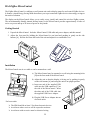
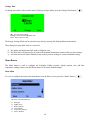
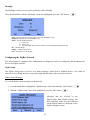
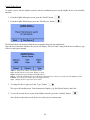
HAI ZigBee MicroControl The ZigBee MicroControl is a tabletop or wall mount unit used to display status for and control ZigBee devices. It features a timed Energy Saving Mode that allows you to put connected ZigBee devices into energy savings at the touch of a button. The display on the MicroControl allows you to easily set up, install, and control the wireless ZigBee system. The environmentally-friendly internal backup battery in the MicroControl provides approximately 4 hours of active use power and up to 24 hours of power in sleep mode. Getting Started 1. Unpack the MicroControl. Includes: MicroControl, USB cable and power adapter, and this manual. 2. Adjust the foot stand by holding the MicroControl in one hand and pushing in gently on the side buttons [A]. Pull the foot from the back of the unit and adjust for a comfortable view. A A Installation The MicroControl can sit on a table or can be mounted on a wall. a) The MicroControl may be mounted to a wall using the mounting holes [B] on the foot stand of the MicroControl. B b) Adjust the unit so that the display is facing you by pushing in gently on the side buttons [A] and swing the unit to an upright position. c) Insert one end of the supplied USB cable into the USB connector [C] on the side of the MicroControl. Insert the other end of the USB cable into the supplied USB Power Adapter. d) Plug the USB Power Adapter into an electrical outlet. For best results: The ZIM should be at least 5 feet from electronic devices Avoid areas where receiver will be exposed to moisture Avoid areas with excessive metal or electrical wiring 2 C