1
Konica Hexar
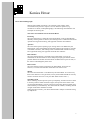
General camera functions
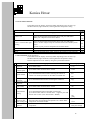
In the table below the display values may differ depending on the use of the Up
and Down buttons, light conditions, focusing distance and aperture setting.
All modes P A M
Function
Displa
y
1.5
Photographer's Action
press and hold release button halfway down and press MF button.
make your composition and release shutter
Focus Lock
Focus Lock with other light
reading
press and hold release button halfway down and press MF button.
point to another subject and press and hold release button halfway down
again.
go back to your previous composition and release shutter.
Set focus at infinity
Set fixed focus distances
Silent
press MF button
press MF button for more than 1 second
press and hold MF button while switching the camera on until L appears
1/30
7.0
2.4
1/30
999
0.6
L[0]
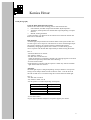
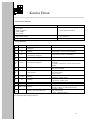
Camera functions (mode dependent)
In the table below the display values may differ depending on the use of the Up
and Down buttons, light conditions, focusing distance and aperture setting.
Personal adjustments can be made by using the Up and Down buttons.
Function
over or under
exposure
camera shake
critical speed
P
guide number
Photographer's Action
Display
press Select button
± 0.0
press Select button for more than 1 second
1/30L
press and hold Select button while switching the camera on
switch to A mode if you don't use the Hexar X14 flash unit
...
P36
PFL
multiple
exposure
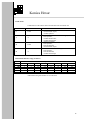
set over or under
exposure
set film speed
(ISO value)
press and hold Self button while switching the camera on
9[3]
press Select button
± 0.0
press Select button for more than 1 second
100
A
infra red film
setting
set manually
exposure time
M spot reading (4°)
set time and
aperture
press and hold Select button until ISO value appears
press Down button within 3 seconds when . . . appears press MF
button once or twice (750 = Konica 850 = Kodak)
press Select button and press Up or Down button simultaneously.
Exposure time corresponding to the aperture set is fixed. Make
composition and release shutter.
press select button to set exposure time
set aperture
100
...
750
[100]
1/250
...
1/125
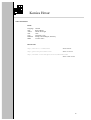
Picture will be taken
with your settings
16