1
How does onAll works?
Whenever the sensor being used by a customer detects an event, it issues
an alarm to the onAll platform that is automatically propagated to the devices
of the appropriated caregivers.
Simultaneously, the same alarms can become visible on the screens
installed in the institutions (if any since this is an optional part of the onAll
system). In these screens it can also be displayed information about who
needs help and what kind of alarm is about.
The caregiver can then assist the client and turn off the alarm by pressing
the button on his device. Later he can use the web application to register
information about the event and about his actions.
Users
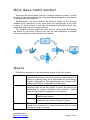
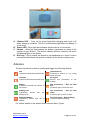
Follows the description of the intervenient people in the onAll system:
Administrator Manages the system from a back-office perspective, i.e.,
without intervening on the daily operation of the institution in
terms of customer care. He is responsible for the system’s
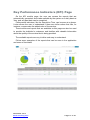
overall configurations. The Administrator can access a KPI
module with reports on operation’s performance.
Caregiver
Person responsible for providing the necessary care to the
customer thus will be the person to whom the alarms are
dispatched for proper verification and resolution. Usually
there are two levels of caregivers in an institution:
Nurse
Customer
A higher level of hierarchy; will only receive the
higher priority alarms.
Auxiliary Considered as the first line of customer
assistance, will receive all types of alarms.
Elderly person in the institution (also called Resident) that
needs to be monitored for some risk factors that the onAll
service can help to manage.
December 2013
www.oncaring.com
Page 5 of 40