1
Controls and Displays
Controls and Displays
lED Status Indicators
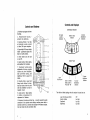
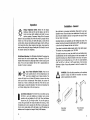
1. Aluminum cast upper and lower
housings.
2. Polycarbonate housing protects the electronics.
1
3. Receiving Window - four sets
of photocells equally spaced
to allow 360 degree reception.
2
4. Super-bright lED array is highly
visible - graphically displays the
blade or bucket position.
3
5. Power Switch turns the unit
on and off.
4
6. Grade location, battery status,
and deadband lED indicators.
7. Touchpanel Switches allow
adjustment of accuracy, on-grade
location and plumb indication,
laser out-of-Ievel warning, and
brightness. Refer to page 8 for
details.
LX:::=--W--
5
1-+---1+--
6
8. Mounting Knobs - large, front
facing knobs attached to stainless steel clamps allow for quick
and easy installation to mast or
magnetic mount.
9. Access screws - allows access
to battery compartment for
replacement of batteries.
10. Accessory Connector and Dust Cap - connector accepts the cable
connection to the optional remote display, machine power cabie, or
automatic control box. Connector also accepts Ni-MH battery charger.
Dust cap hel ps keep the connector clean.
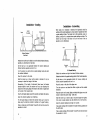
On Grade
Location
Indicators
Accuracy
(Deadband)
Indicators
Battery Status
Indicator
Switch Panel
7
8
Laser
Out-of-Level
Center or Offset
Grade Location /
Plumb On - Off
Accuracy
(Deadband)
Seledion
Display
Brightness
Selection
9
10
The initialor default settings when the receiver is turned on are:
laser Out-of-level (OOl)
Grade location
Deadband
Brightness
Off
last Set
last Set
last Set
5
4