1
BENISON
JB-4
Function operating
1、H/L power set
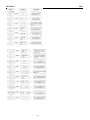
Under any model, press [M/SEL] LCD Appears “ POW.H 1 ”And press [M/SEL] it appears“ POW.H 1”turning knob,
choose “H/L”(H is high power, L is high power)press[M/SEL]
To back the manual, press[VFO/MR]for exit.
Shortcut:press [F/ ] and [1POW] LCD appears“POW.H 1”turning to choose“H/L”press [M/SEL] to confirm, press
[VFO/MR] for exit.
2、VOX and sensitivity set:
Under any model, press [M/SEL] key turning knob to choose manual 2,it appears“ VOX.OFF 2”and then press [M/SEL].
(OFF is close, the high the sensitive),press [M/SEL]
it appears“VOX. OFF 2”,running knob to choose “OFF/1~9”
again to back the manual, press [VFO/MR] for exit. LCD appears“VOX”after choose vox.
Shortcut:Press[VFO/MR] and [2VOX] then LCD appears“VOX.OFF 2”,turning knob choose“OFF/0~9”press [M/SEL]
to confirm and press [VFO/MR] for exit.
3、 Squelch Sensitivity Threshold:
Under any model, press [M/SEL] turning knob, choose manual 3,it appears“SQL.00 3” press [M/SEL] it appears
“SQL.00 3”turning knob to choose “00~09”
(the high the sensitivity)press [M/SEL] to confirm, press [VFO/MR]
for exit.
Shortcut:press [F/
] and [3SQL] it appears“SQL· OO 3”turning knob choose“00~09”press [M/SEL] to confirm,
press [VFO/MR] for exit.
4、Auto shut down set
Under any model press [M/SEL] to turning knob to choose manual 4, “APO.OFF 4”then press [M/SEL] it appears:
“APO.OFF 4”turning knob to choose“OFF/30/60/120/240”(close or choose time, the unit is minute)press [M/SEL]
it again to back the manual, press [VFO/MR] for exit. LCD appears “APO”when choose time.
Shortcut: press [F/
]and [4APO] it appears“APO. OFF 4”turning knob and choose“OFF/30/60/120/240”press
[M/SEL] to confirm, press [VFO/MR] for exit.
5、 Warning tone set
Under any model, press [M/SEL] turning knob to choose manual 5,appears“BP.ON 5 ”press [M/SEL] appears“BP. ON
5”turning knob to choose “ON/OFF”(ON is open, OFF is close)press [M/SEL] again to back the manual, Press
[VFO/MR] for exit.
Shortcut:press [F/
] and[5BEEP] appears “BP. ON 5”turning knob to choose“ON/OFF”press [M/SEL] to confirm,
and [VFO/MR] for exit.
6、Black lights
Under any model, press [M/SEL] turning knob to choose menu 6 it appears“LED.OFF 6 ”and then press [M/SEL] it
(OFF is close、ON is open、AUT is auto)press[M/SEL]again
appears“LED.OFF 6”turning knob to choose “OFF/ON/AUT”
11
to back the manual, and [VFO/MR] for exit.
Shortcut:press [F/ ]and [6LED]appears
“LED.OFF 6”turning knob to choose
“OFF/ON/AUT”press [M/SEL] to confirm,
and [VFO/MR] for exit.
7、CTDCD
Under frequency model, press [M/SEL] turning knob to choose manual 7,it appears“CT.DCS 7 ”and then press it appears
“CT.CSS 7”turning knob to choose “OFF/CTCSS/DCS”.Press [M/SEL] to back the manual, and [VFO/MR] for exit.
Choose “CTCSS” LCD will appears “CT” and choose “DCS” LCD will appears “DT”.
Shortcut: press [F/ ]and [7CTDCS] appears“CT.CSS 7”turning knob to choose“OFF/CTCSS/DCT”press [M/SEL] to
confirm, and [VFO/MR] for exit.
-7–