1
7.
SETTING OF TORQUE VALUE / BOLT LOAD
The HYTORC hydraulic pump unit has a working range of 20 BAR until maximum 700 BAR.
Within this range the pressure is infinitely adjustable.
Follow the next steps to adjust the right torque:
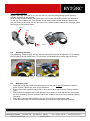
1. Every tool type has his own pressure/torque chart, supplied with your HYTORC tool.
Search for the right torque in the preferable column (Nm, kgm or ft.lbs.) in the chart and
read the right pressure to adjust the
pump in BAR (right) or PSI (left).
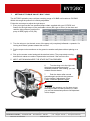
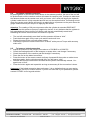
2. Turn the wing nut (on the tank cover of the pomp unit) completely leftwards = upwards. If a
locking knob exists, please release this one first.
3. Put the torque tool somewhere on the ground or another safe place without placing on a
nut.
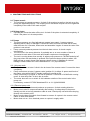
4. Pick up the remote control and push the start/run button. The pump starts running
and the tool makes one stroke. Repeat twice and check if the tool turns fine.
5. NEXT: AS FROM NOW KEEP THE START BUTTON PRESSED!
6.
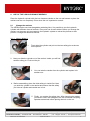
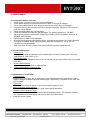
Turn the wing nut to the right until
the pressure gauge presents the
desirable pressure. After setting, you can
release the start button.
7.
Push the button after several
seconds again and check the pressure.
Fix the locking if adjustment is fine.
Finally, check the pressure again.
Important
To change the pressure you first have to turn
the wing nut back to lower pressure (0). Next
you can set the desired pressure like explained
in this chapter.
FOR MORE INFORMATION
HYTORC Nederland BV | Platinawerf 8 - 6641 TL Beuningen - NEDERLAND | Tel: +31(0)24 - 3 660 660 | www.hytorc.nl
HYTORC Benelux BVBA | Ysselaarlaan 65B - 2630 Aartselaar - BELGIË
ENG-versa- User manual.docx
Version 2.5 / Feb-14
| Tel : +32(0)38 - 705 220
| www.hytorc-benelux.be
8