1
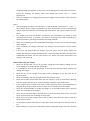
You can synchronize files on the computer with those on the phone according to your needs or
you can manage files on the storage card.
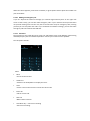
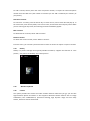
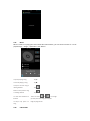
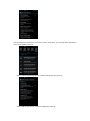
Select “MTP storage” to support the phone to function as a U-disk. If your computer is not
supported by WIN7, you need to install MTP drive (you can directly update window player to the
latest wmp11 which comes with MTP drive).
Follow the prompts appearing in the phone to operate, so that data uploading and downloading
with U disk can be achieved.
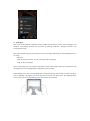
Select “Camera PTP”, you can export photos on the phone to the computer.
Note: Your mobile phone supports the plug-in feature. Without turning off your phone, however,
it does not support inserting or remove T card. Generally, it is not recommended to remove and
install the SD card.
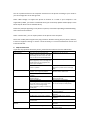
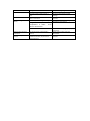
6. FAQS and Solutions
If you have any questions about the phone, please find the solutions from the table below.
FAQs
Poor reception
Echoes or noises
Shorter standby time
Failed to turn on your
phone
SIM card error
Causes
When you use your phone at poor
reception areas, for example, near high
rise buildings or base rooms, the radio
wave cannot be transmitted effectively.
When you use your phone at network
traffic congestion, such as working time
and off-duty time, the congestion can
result in poor reception.
This is related to the distance to base
station in question.
The trunk line of network is in bad
condition. It is a regional problem.
In some areas, the call lines are in bad
condition.
The standby time is relevant to
network settings.
Replace the batteries
When no signals are received, your
phone will continue searching for base
stations, thus consuming a large
amount of battery power and reducing
standby time.
The battery power is used up.
The SIM card is damaged.
The SIM card is not properly installed.
Failed to connect to the
network
The metallic face of the SIM card is
contaminated.
The SIM card is invalid.
Beyond the GSM coverage.
Solutions
Avoid this as far as you can.
Avoid this as far as you can.
You may ask the network service
provider to provide service coverage
map.
Hang off the call and dial again.
Choose another better line.
In poor reception areas, turn off your
phone temporarily.
Change with a new battery.
Use your phone at strong signal areas
or Turn off the phone temporarily.
Check the battery power level or
charge the battery.
Contact your network service
provider.
Ensure the SIM card is properly
installed.
Wipe the face with a clean cloth.
Contact your network service
provider.
Consult the network service provider
for service areas.