1
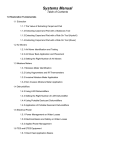
License Agreement ............................................................................................................. 4
Store2Office First Time Setup ............................................................................................ 6
Adding Stores to Store2Office Communicator............................................................... 6
Configuring Store2Office Communicator Settings ........................................................ 7
How to Setup a New Supervisor............................................................................... 10
How to Edit Existing Supervisors............................................................................. 10
How to Delete a Supervisor ...................................................................................... 11
To Download Files Using FTP ......................................................................................... 12
Viewing Files from a Store ............................................................................................... 12
Printing Reports in Store2Office Reporter ....................................................................... 13
Using the Calendar Wizard............................................................................................... 13
Edit Options ...................................................................................................................... 13
Tools Options.................................................................................................................... 14
How To Import a Master List for Menu Indexing ........................................................ 15
How to Use the Menu Indexing Utility......................................................................... 15
How to Create a Menu Profile ...................................................................................... 16
How to use Remote Menu Maintenance....................................................................... 17
Importing a Backup Profile........................................................................................... 18
Exporting a Menu File .................................................................................................. 19
Checking Version/Build of the Store2Office.................................................................... 20
S2O Composer .................................................................................................................. 21
Store Information ...................................................................................................... 21
Equipment Settings ................................................................................................... 21
Time Functions ......................................................................................................... 23
Keyboard Settings..................................................................................................... 24
Menu Items Settings ................................................................................................. 24
Production Line Settings........................................................................................... 25
824 Employee Settings ............................................................................................. 25
Ticket Trailer ............................................................................................................ 26
EPS Settings.............................................................................................................. 26
S2O Reporter .................................................................................................................... 27
Daily Summary ......................................................................................................... 27
Shift Info ................................................................................................................... 27
Exception Report ...................................................................................................... 28
Hourly/QTR Hourly Report...................................................................................... 28
Blue Book ................................................................................................................. 28
Status Report............................................................................................................. 28
Detailed Ticket.......................................................................................................... 29
Product Mix Info....................................................................................................... 29
Rankings ................................................................................................................... 29
Labor Information............................................................................................................. 29
Employee Profile ...................................................................................................... 29
Timesheet.................................................................................................................. 30
Payroll Summary ...................................................................................................... 30
Condensed Payroll Report ........................................................................................ 30
Version 1.1
Questions or Comments? Please contact the OMC Support Center
At (800) 767-6733
Page 2 of 40