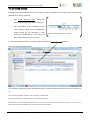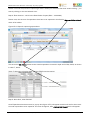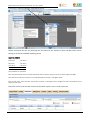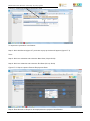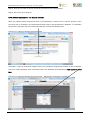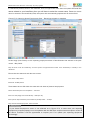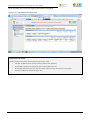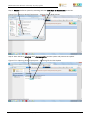
1
EPWP Integrated Reporting System (IRS) System User Manual Step-by-step guide for Capturers, Viewers and Authorisers Enquiries / Comments: Ms Mapule Mkhatshwa-Ngwenya Deputy Director: Capacity Building Expanded Public Works Programme Monitoring and Evaluation Directorate National Department of Public Works Contact: 087 357 2225 or 076 420 8155 E-mail: [email protected] EPWP IRS User Manual: The step-by-step guide EPWP Integrated Reporting System User Manual The EPWP Integrated Reporting System user manual is for the capturing, viewing and sign-off EPWP Projects. Table of Contents Table of Contents ........................................................................................................... 2 SECTION 1: 1.1 INTRODUCTION .......................................................................................... 5 System Support ................................................................................................ 5 SECTION 2: UNDERSTANDING EPWP ................................................................................ 6 2.1 What is EPWP? ................................................................................................. 6 2.2 Objectives and Key Characteristic of EPWP projects ....................................................... 7 2.3 The Scope of EPWP ............................................................................................ 8 2.4 Key Indicators for EPWP Quality Reporting .................................................................. 8 2.5 The role of M&E in EPWP.................................................................................... 11 2.6 What is good Quality Data? ................................................................................. 12 2.7 Total Quality Management .................................................................................. 12 2.8 Exclusion rules: Checks that disqualifies projects from inclusion in the quarterly report: ............. 13 2.9 PROJECTS /PARTICIPANTS RULES THAT SUBJECT THE PROJECT/PARTICIPANTS TO A WARNING .... 13 2.10 Data validation ............................................................................................... 14 2.11 Handling of Exclusion........................................................................................ 14 2.12 THE EPWP REPORTING SYSTEM AND PROCESS ................................................ 14 2.13 EPWP Monitoring and Evaluation Business Process ...................................................... 17 2.14 Key features of the EPWP Integrated Reporting System ................................................. 18 2.15 Access Rights ................................................................................................ 19 2.16 User Categories .............................................................................................. 19 2.17 Data Flow Process ........................................................................................... 21 SECTION 3: ACCESSING THE SYSTEM AND REGISTRATION ...................................................... 23 3.1 Accessing the system........................................................................................ 23 3.2 The Log In Page .............................................................................................. 25 3.3 New User Registration ....................................................................................... 27 3.3.1 PROCEDURE TO NEW USER REGISTRATION..................................................................... 28 3.3.2 RESET LOGIN ................................................................................................ 34 3.4 Log In and Log Out ........................................................................................... 36 3.4.1 Login................................................................................................... 37 3.4.2 LOG OUT .................................................................................................... 38 SECTION 4: SYSTEM ADMINISTRATION ............................................................................ 39 4.1 4.1.1 Overview ...................................................................................................... 39 MY PROFILE ................................................................................................. 39 © EPWP Monitoring & Evaluation Directorate (2013) 2|P a g e EPWP IRS User Manual: The step-by-step guide SECTION 5: 5.1 BUSINESS ADMINISTRATION ......................................................................... 41 Accessing the Excel template ............................................................................... 42 5.1.1 RETRIEVING THE TEMPLATE ................................................................................... 42 5.1.2 ACTIVATING MACROS IN THE SPREADSHEET ..................................................................... 45 5.1.3 CONFIRM ACTIVATION OF THE MACROS IN THE SPREADSHEET .................................................... 46 5.1.4 SAVE THE SPREADSHEET AS EXCEL 97-2003 WORKBOOK ..................................................... 47 5.2 Capturing beneficiary data in Excel template ............................................................. 49 5.2.1 EMPLOYMENT DATA .......................................................................................... 49 5.2.2 TRAINING DATA ............................................................................................... 51 5.3 Uploading ..................................................................................................... 53 5.3.1 Retrieving the saved Excel template .................................................................... 53 SECTION 6: PROJECT ADMINISTRATION ........................................................................... 57 6.1 Overview ...................................................................................................... 57 6.1.1 DATA CAPTURER ............................................................................................. 57 6.1.2 VIEWER...................................................................................................... 58 6.1.3 AUTHORISER ................................................................................................. 58 6.2 Projects ....................................................................................................... 59 6.2.1 VIEWER’S PROFILE ........................................................................................... 59 6.2.2 AUTHORISER’S PROFILE ...................................................................................... 59 6.3 My Projects ................................................................................................... 59 6.3.1 VIEWER’S PROFILE ........................................................................................... 59 6.3.2 AUTHORISER’S PROFILE ...................................................................................... 59 6.3.3 DATA CAPTURER’S PROFILE ................................................................................... 59 6.4 My Projects ................................................................................................... 60 6.4.1 Capturing – project details and location ................................................................ 65 6.4.2 Updating a project ........................................................................................ 71 6.4.3 FUNDING .................................................................................................... 82 6.4.4 EXPENDITURE ............................................................................................... 96 6.4.5 EMPLOYMENT .................................................................................................101 6.4.5.7 SERVICE PROVIDERS .........................................................................................124 SECTION 7: 7.1 REPORT ADMINISTRATION ...........................................................................125 Drawing Reports ............................................................................................126 7.1.1 PROJECT REPORTS ..........................................................................................126 SECTION 8: PROJECT ADMINISTRATION DATABASES ...........................................................134 8.1 Overview .....................................................................................................134 8.1.1 DATA CAPTURER ............................................................................................135 8.1.2 VIEWER.....................................................................................................136 8.1.3 AUTHORISER ................................................................................................138 © EPWP Monitoring & Evaluation Directorate (2013) 3|P a g e EPWP IRS User Manual: The step-by-step guide 8.2 The System Databases .....................................................................................141 8.2.1 BENEFICIARIES DATABASE – MANUAL UPLOADING .............................................................142 8.2.2 TRAINING SERVICE PROVIDERS ...............................................................................144 8.2.3 PROJECT SERVICE PROVIDERS ...............................................................................145 9. CONCLUSION .....................................................................................................146 © EPWP Monitoring & Evaluation Directorate (2013) 4|P a g e EPWP IRS User Manual: The step-by-step guide SECTION 1: INTRODUCTION This is a manual for the user (“user manual”) of the EPWP Integrated Reporting System (IRS). It outlines detailed processes that have to be followed by a user who either captures, view and or signs-off an EPWP project on the system. This user manual is a step-by-step guide on how to access the system, capture, view, update, and sign-off EPWP projects. 1.1 SYSTEM SUPPORT When experiencing system related problems such as login to acquire username, re-set password or require any other form of assistance on the system, system support is available at: 1. Telephone: 087 357 2227/8, or 2. E-mail: [email protected], or 3. Fax: 086 272 6333 The above system support information can also be found on the log-in screen (figure 1, below). Figure 1: System support contact details on the Log-in screen Source: EPWP Integrated Reporting System © EPWP Monitoring & Evaluation Directorate (2013) 5|P a g e EPWP IRS User Manual: The step-by-step guide When encountering challenges during capturing, it is advisable to print screen and paste to email for effective support on the system. Below are the steps on how to print screen: SECTION 2: UNDERSTANDING EPWP 2.1 WHAT IS EPWP? The Expanded Public Works Programme (EPWP) is a national labour intensive programme initiated by government that is aimed at providing poverty and income relief through temporary work for the unemployed to carry out socially useful activities. It draws significant numbers of unemployed people into productive work, so that they gain skills and increase their capacity to earn income. It is further reflected as a programme to provide public or community assets or services through a labour intensive programme initiated by government and funded from public resources (Ministerial Determination). The EPWP phase I was launched in April 2004 aimed to promote economic growth and create sustainable development. The goal of EPWP phase I (April 2004–March 2009) was to help alleviate poverty and unemployment by creating, at least, 1 million work opportunities (WOs) targeting 40% of the beneficiaries be women, 30% youth and 2% people with disabilities. The first phase (or phase I) of EPWP exceeded its 1 million target one-year ahead of time by creating 1.6million WOs. Building from the success of Phase I, Government decided to continue with this labour intensive approach to combat poverty and unemployment by setting targets at 4.5 million WOs and 2million Full Time Equivalence (FTEs). The concept of FTEs aimed at increasing the duration of employment into any EPWP project. WO relate to paid work created for an individual on an EPWP © EPWP Monitoring & Evaluation Directorate (2013) 6|P a g e EPWP IRS User Manual: The step-by-step guide project for any duration. The same person can be employed on different projects and each employment period will be counted as a work opportunity, whereas FTE refers to person days of work and training divided by 230 days. Thus, 1 FTE is equivalent to 230 person days. The EPWP phase II was launched in April 2009 and aimed to create 4.5 million short and on-going WOs with an average duration of 100 days over the five-year period (April 2009–March 2014). Thereafter, 4.920 million WOs plus 2.020 FTEs were created. Currently, the EPWP is in the 3rd phase (phase III) launched in April 2014 and aim to create 6 million WOs and 2 million FTEs during the five year period (April 2014–March 2019). 2.2 OBJECTIVES AND KEY CHARACTERISTIC OF EPWP PROJECTS The objective of EPWP is to utilize public sector budgets to reduce and alleviate unemployment. This objective is to be achieved by creating productive employment opportunities and by enhancing the ability of workers to earn an income after they leave the programme, either in the labour market or through entrepreneurial or cooperative income-generating activities. Work opportunities are created, through intensive methods, in the following four ways: a) Government-funded infrastructure projects; b) Creating work opportunities in public environmental and culture programmes (e.g. Land Care); c) Creating work opportunities in public social programmes (e.g. community care workers); and d) Utilising general government expenditure on goods and services to provide the work experience component of small enterprise learnerships or incubation programmes. The ability of workers to earn an income after they leave the programme is expected to be enhanced by providing participants with a combination of work experience and skills development programmes. Table 1: Objectives of EPWP Below are key four objectives: To increase the contribution of public sector expenditure on goods and services to the alleviation of unemployment. To provide ( unskilled) unemployed people with a combination of work experience and training © EPWP Monitoring & Evaluation Directorate (2013) 7|P a g e EPWP IRS User Manual: The step-by-step guide To deliver quality, cost effective services using labour intensive techniques To contribute to halving unemployment by 2014 through public and community service delivery The above goals find expression in the four sectors (Environment & Culture, Infrastructure, NonState & Social), which serve as vehicles for delivery of the programme. While many projects and programmes of government create employment, not all of them are classified as EPWP projects or programmes. Given the wide variation of projects implemented by government, it is not always straightforward to distinguish between EPWP projects and non-EPWP projects. The key characteristics of EPWP projects are listed below: a) They employ large numbers of local, low skilled, unemployed persons who are willing to work – this is the EPWP target group b) They are highly labour intensive: a large percentage of the overall project costs are paid out in wages to the EPWP target group c) They provide a service to or develop an asset for the community. 2.3 THE SCOPE OF EPWP EPWP is a cross-cutting programme and it covers all three (3) spheres of (local, provincial & national) government, State Owned Enterprises (SOEs) including Non-State Organisations (NSOs). The Monitoring and Evaluation (M&E) Directorate of the EPWP unit reports on all EPWP projects across the four (4) sectors of EPWP, namely: Environment & Culture Sector (e.g. Working for Water, Land Care), Infrastructure Sector (e.g. Labour-intensive Construction and Maintenance), Social Sector (e.g. Home-Based Care and Early Childhood Development), and Non-State Sector 2.4 KEY INDICATORS FOR EPWP QUALITY REPORTING 2.4.1 Work opportunity It is paid work created for an individual on an EPWP project for any period of time, within the employment conditions of the code of good practice for special public works programmes. In the case of social sector projects, learnerships will also constitute work opportunities. The same © EPWP Monitoring & Evaluation Directorate (2013) 8|P a g e EPWP IRS User Manual: The step-by-step guide individual can be employed on different projects and each period of employment will be counted as a work opportunity. Information to be reported is the number of work opportunities created. 2.4.2 Person-days of work The number of people who worked on a project times the number of days each person worked for the entire project duration. Example 1: Person A worked for 10 days Persons B and C worked for 8 days each and Person D worked for 3 days (1X 10) + (2 X 8) + (1 X 3) = 29 person-days of work to be reported Example 2: Twenty people worked for 20 days a month for 12 months 20People X 20 days X 12 months (20 X 20 X 12) = 4800 person-days of work to be reported 2.4.3 Person-days of Training The number of people who worked on a project times the number of days each person trained. A training day is at least 7 hours of formal training. Formal training is further categorised as: literacy & numeracy, life skills, vocational skills and business skills and includes the assessment of beneficiaries. For each category of training a distinction will be made between accredited and non-accredited training days and type of training received whether learner ship or skill. In the case of the social sector (and for all sectors from 2005/06) information on credits (towards NQF qualifications) and NQF qualifications acquired will also be reported. Information to be reported: Number of person-days of training and course specification. 2.4.4 Learnership A learnership combines work-based experience with structured learning. It results in a qualification that is registered within the National Qualifications Framework (NQF) by the South African Qualification Authority (SAQA). A learner who completes a learnership has a qualification © EPWP Monitoring & Evaluation Directorate (2013) 9|P a g e EPWP IRS User Manual: The step-by-step guide that signals occupational competence and which is recognised throughout the country. A learnership requires that a trainer, a coach, a mentor and an assessor assist the learner. 2.4.5 Project Budget It is the overall budget including stipend for the project. Is price tendered by the contractor + the professional fees for the professional service provider appointed to design and supervise the project. The project budget excludes government management & administration costs. 2.4.6 Project expenditure Is actual expenditure (as defined by National Treasury) on projects and supporting infrastructure, including stipends, feasibility studies and research but excluding government administration costs. Information to be reported: figures / rands of actual quarterly expenditure 2.4.7 Daily Wage Rate Daily wage rate (whether task-rated or time-rated) per individual project. A monthly wage should be converted into a daily wage through division by the average number of person days per month. Information to be reported is daily wage per beneficiary. 2.4.8 Demographic Data The EPWP is targeting unemployed, local, low skilled South African citizens willing to work on EPWP projects. The proportion of beneficiaries that fall within the following categories must be recorded: Youth i.e. 18 – 35 years of age Women People with Disabilities / physically challenged The definitions contained in the Preferential Procurement Regulations of 2001 for these categories of beneficiaries will be utilised. Information to be reported: Number of Youth, Women and People with disabilities. 2.4.9 Full Time Equivalent (FTE) One full Time Equivalent is equal to 230 days of work and training. This number was decided on in the following way: © EPWP Monitoring & Evaluation Directorate (2013) 10|P a g e EPWP IRS User Manual: The step-by-step guide For task-rated workers, tasks completed should be used as a proxy for 40 hours of work, based on a task completed in a week. Formula for Calculation: Number of FTEs = (Person days of work + person days of training) / 230 2.4.10 EPWP incentive grant It is a grant paid to public bodies to incentivise creation of work opportunity. The grant is paid per quantum of employment created for the target group 2.5 THE ROLE OF M&E IN EPWP The M&E Directorate of EPWP focuses on two areas namely; (a) Monitoring and (b) Evaluation. a) Monitoring Role: Data Collection and Capturing – monitoring for good quality data Data Verification – monitoring for compliance with EPWP policy Data Validation – monitoring whether data is included or excluded as per requirements On a monthly basis, Monitoring unit validate raw data and provide feedback to reporting bodies via Lead Departments, Provincial Coordinators and Programme Managers so that they rectify by updating their project reports directly into the reporting system. It should be noted that projects and participants that fail validation will not be used in the quarterly report BUT will remain in the EPWP database. These projects and participants will be considered for inclusion in the report for the current quarter as soon as they are corrected. b) Evaluation Role: Commissioning of studies to evaluate the impact of EPWP in terms of the key drivers of job creation and poverty alleviation © EPWP Monitoring & Evaluation Directorate (2013) 11|P a g e EPWP IRS User Manual: The step-by-step guide Conduct data quality audits (DQA) EPWP M&E verify and validate captured data prior reporting to the Minister and Treasury, so good quality data is important. 2.6 WHAT IS GOOD QUALITY DATA? Good quality data has the following dimensions, that is: Accurate and valid – of the original source; Reliable – data are consistent; Accessible – data are available to authorised persons when and where required (during DQAs) Relevant and useful – information is pertinent and useful Good quality data also has the following characteristics (“the three (3) C’s”): 1. Correct Accurate and valid from the original source Captured data reflects what actually happened 2. Complete All reporting units must submit their data All required data elements should be recorded No gaps in data and it is pertinent and useful 3. Consistent Stable and reliable data No unexplained variations in data and it is available when required, e.g. during data quality audits Data is consistent 2.7 TOTAL QUALITY MANAGEMENT According to Deming W. E (1982) corroborated by Juran J (2004) Total Quality Management (TQM) refers to management methods used to enhance quality and productivity in business organisations. TQM is a comprehensive management approach that works horizontally across an organisation, involving all departments and employees plus extending backward and forward to include both suppliers and clients/customers. TQM is only one of many acronyms used to label management systems that focus on quality. Same applies to other systems; TQM provides a framework for implementing effective quality and productivity initiatives that can increase the profitability and competitiveness of organisations. © EPWP Monitoring & Evaluation Directorate (2013) 12|P a g e EPWP IRS User Manual: The step-by-step guide TQM leads to increased productivity and cost-effectiveness that involves below six basic concepts: The involvement of the entire workforce – active participation(Collector, Capturer, Viewer / Authoriser and Sign off) The commitment from management in providing top-to-bottom vice versa supports (e.g. work and training days, budget & exp.) A focus on the requirements for compliance/inclusion The continuous improvement of processes The involvement of all stakeholders such as Data Collectors, Funders, Implementers, Coordinators and Partners (PPP) An effective utilisation of performance indicators 2.8 EXCLUSION RULES: CHECKS THAT DISQUALIFIES PROJECTS FROM INCLUSION IN THE QUARTERLY REPORT: The following are rules that exclude projects from inclusion in the quarterly report: Project has no budget Project has no expenditure Project has no person-days The expenditure of the project exceeds the budget by more than 20% Project has no daily wage The total maximum employment period exceeded as determined by the Ministerial Determination (23 days) 2.9 Total maximum employment period exceeded (23 days) There is a duplicate projects Beneficiary is under sixteen years of age Beneficiary is without valid form of identification (ID) PROJECTS /PARTICIPANTS RULES THAT SUBJECT THE PROJECT/PARTICIPANTS TO A WARNING Project owners / capturers will be alerted if the following validation rules are not met: © EPWP Monitoring & Evaluation Directorate (2013) 13|P a g e EPWP IRS User Manual: The step-by-step guide Project pays below the minimum wage as specified in the Ministerial Determination Project outputs are not reported (services and / or assets) Expenditure is more than the budget by less than 20% Projects or participants records are not available NB: Employees permanently employed by the Service provider (Contractor) such as Engineers, Artisans etc should not be reported as they are in their payroll and no work opportunity created on them. 2.10 DATA VALIDATION EPWP Phase II data validation is automatically done by the system during capturing. It should be noted that there are things that the system cannot validate hence you still finds compliant projects that will be excluded after being validated by Monitoring and Evaluation. After the cut-off date for the quarter (by which all projects should have reported), EPWP Monitoring and Evaluation accept data and validate for duplicates and other inconsistencies. 2.11 HANDLING OF EXCLUSION Projects that do not meet the validation requirements are excluded. If the data of the project is improved, the project may be included in the next quarter by the capturer. 2.12 THE EPWP REPORTING SYSTEM AND PROCESS 2.1.2.1 Introduction The aim of this document is to outline processes that have to be followed by system users, for example data capturers, when capturing EPWP projects on the system or viewers when generating reports. In short, this document provides sequential step-by-step guidelines on how to access the system, capture, view, sign-off and update projects. 2.12.2 Overview of the EPWP Integrated Reporting System The EPWP Integrated Reporting System (“IRS”) is a planned system for collecting, storing and reporting data on EPWP projects. The system is managed by the National Department of Public © EPWP Monitoring & Evaluation Directorate (2013) 14|P a g e EPWP IRS User Manual: The step-by-step guide Works and only delegated representatives of public bodies that implement EPWP projects are permitted access to the system. There are specific procedures and deadlines that have to be met in terms of reporting. 2.12.3 Loading updated project performance on the EPWP IRS First, it is important to note that public bodies in provinces and municipalities are required to update EPWP project information at every monthly reporting cycle onto the EPWP IRS. Second, key data that must be reported on for every project must include: 2.12.3.1 Beneficiary information: A beneficiary list must be uploaded for every project. This will contain profile data of beneficiaries. A beneficiary form will be provided to public bodies and this form should be filled in – weekly or bi-weekly – and provided per project per monthly reporting cycle. The form requires the following information to be kept and maintained: i. Identity – name, surname, date of birth and an identity number ii. Gender, age and disability status iii. Education and literacy level iv. Daily wage to be received v. Training attended 2.12.3.2 Site information: The following information, to confirm the number of people at work daily, must be maintained and provided by the public body to National Public Works on a monthly basis: i. Daily site attendance register – attendance registers showing all the beneficiaries that were registered at work must be completed on site on a daily basis. These must be signed-off by the project manager on a weekly basis. The contracted consulting organisation will pay beneficiaries fortnightly. ii. Summary of monthly attendance – the contracted consulting organisation will compile a monthly summary for the public body. 2.12.3.3 Payment information: This generally seeks to confirm what was paid, for how much work and to whom. There are various ways this can be provided and should be sign-off by the project manager: i. Payment register – which is a list of workers, paid showing wages paid per beneficiary, signed-off by each beneficiary as proof of acceptance of payment. This register includes the name of the worker, either an identity (or other unique identifier) number, the number of days that the pay covers, the wage rate and total wages paid. ii. Bank records showing the transfers to each worker account signed by contractor as proof of payment – which must specifically show the name of the worker, the identity (or other unique identifier) number © EPWP Monitoring & Evaluation Directorate (2013) 15|P a g e EPWP IRS User Manual: The step-by-step guide 2.12.3.4 Performance information: This information will be captured in a progress report template and will draw information on person days of work, performed against FTE targets, training days, beneficiary profiles and wages paid. 2.12.4 Process and timeline for project progress reporting on the EPWP IRS To ensure that the required data is collected every month, there are specific due dates for submission: i. By the 25th of every month, the above required data must be collected by the contractor. ii. The contractor will provide the progress report to the project manager for sign-off before the end of the month. iii. The project manager will then submit all the necessary signed-off documentation to the public body. iv. The public body will approve and sign-off on the submitted report by 7 days after the end of the month and will provide the TA with a copy of the data. v. The will be a process of validation between the TA and the public body thereafter from 714 days after the end of the month (which can happen before, and after the capturing of the data on the EPWP IRS). vi. The TA will enter the data onto the EPWP IRS before 11 days after the end of the month. All information loaded on the EPWP IRS must be signed-off quarterly by the relevant public body (represented by the delegated official) in order to be considered for the incentive for that quarter. NB: The EPWP system reporting cut-off date is the 15th after the closure of a Quarter OR on the 15th after every fourth month as illustrated below: April May June Quarter 4 July Aug Sept Quarter cut Update off 1 cut October Nov Dec Quarter Update off 2 cut Jan Feb March Quarter Update off 3 cut Update off The National Public Works will assist public bodies to produce monthly and quarterly reports from the system as indicated above. There are various types of report that can be generated from IRS to help all parties to manage or oversee the programme, these include: Standard Reports Project Reports Beneficiary Reports Labour Intensity Reports Sector Financial Year Reports © EPWP Monitoring & Evaluation Directorate (2013) 16|P a g e EPWP IRS User Manual: The step-by-step guide Average Duration Reports Work Opportunities Reports 2.13 EPWP MONITORING AND EVALUATION BUSINESS PROCESS Public bodies are expected to capture and update their project data (deliverables) on a monthly basis. Below process is in place to assist in the generation of reports on the work opportunities and FTEs created: The EPWP reporting process The three (3) spheres of government in all nine (9) provinces and the four (4) sectors of EPWP (Environment & Culture, Infrastructure, Non-State and Social) have to report on the progress of their projects on a monthly basis. The M&E Directorate of EPWP validate the captured raw data monthly and consolidate the final performance reporting on a quarterly basis to the Minister and Treasury etc. © EPWP Monitoring & Evaluation Directorate (2013) 17|P a g e EPWP IRS User Manual: The step-by-step guide Figure 2: Overview of the EPWP reporting process Figure 4: Key features of the system Source: Department of Public Works (EPWP) All departments in all spheres are encouraged to identify EPWP projects and report accordingly. As shown in figure 3 there are three important roles players that crucial in the reporting value chain: Data Capturers who capture project data into the system Data Viewers who check for correctness of the data and give feedback to data capturers Authorisers who sign-off valid and compliance EPWP projects 2.14 KEY FEATURES OF THE EPWP INTEGRATED REPORTING SYSTEM The system has the following: Basic EPWP Project data What the project is about Figure 3: EPWP Reporting Process (Capture – Sign-Off) Where it is taking place How it is funded and by whom; © EPWP Monitoring & Evaluation Directorate (2013) 18|P a g e EPWP IRS User Manual: The step-by-step guide expenditure Beneficiary data Who are the beneficiaries (Name, ID) Profile: Age, Race, Gender, Disability (if any) Employment and training data per beneficiary Employment: Job title, duration of Figure 4: Key features of the system employment, daily wage rate Training: Course(s) attended, duration, service provider 2.15 ACCESS RIGHTS Users are permitted access and functionality (capturing, viewing and sign-off) on the system according access roles they have assigned for themselves during the User Registration stage; this is before they are able to Log-in. The security features do not, for example, permit a Data Capturer user category the right to Sign-off an EPWP project. 2.16 USER CATEGORIES System users are pre-defined as follows: Capturer – has rights limited to capturing EPWP project data Viewer – checks for correctness of data and provides feedback Authoriser – signs-off valid EPWP projects Table 2 (below) shows the rights and limitations of the three user roles in the four administration areas. © EPWP Monitoring & Evaluation Directorate (2013) 19|P a g e EPWP IRS User Manual: The step-by-step guide Table 2: Rights of Users in the four functional administration areas Capturer Viewer Authoriser System Administration Management of ‘My Profile’ Management of ‘My Profile’ Management of ‘My Profile’ Make changes to registered profile Make changes to registered profile Make changes to registered profile Business Administration Upload data Incentive Grants Upload beneficiary data in bulk Filter and view Project Administration Projects Filter Records Edit Record, Sign Off and Filter Records Filter and view View project data in detail and sign off Add Record, Edit Record and Filter Records Filter Records Edit Record, Filter Records Capture and manage projects Filter and view View project data in detail My Projects Beneficiaries (Beneficiary Management) Add Record, Edit Record, Delete Record and Filter Records Filter Records Capture and manage beneficiary data Filter and view Training Service Provider (TSP) Add Record, Edit Record, Delete Record and Filter Records Filter Records Capture and manage TSP data Filter and view Project Service Provider (PSP) Add Record, Edit Record, Delete Record and Filter Records Filter Records Capture and manage PSP data Filter and view Training Administration Add Record, Edit Record and Filter Records Filter Records Capture and manage training data Filter and view Sign Off Projects Sign Off and Filter Records Report Administration Reports Reports Reports Draw and view reports Draw and view reports Draw and view reports © EPWP Monitoring & Evaluation Directorate (2013) 20|P a g e EPWP IRS User Manual: The step-by-step guide 2.17 DATA FLOW PROCESS The National M&E Unit of EPWP has set the following data flow process for capturing EPWP projects and generating reports. Figure 5: EPWP Data Flow Process Source: Department of Public Works (EPWP) Data Capturers capture EPWP project data into the system Data Viewers check for the correctness of project data and give feedback An official delegated by the HOD views data of an EPWP project and recommends to the HOD for sign-off The Coordinating HOD signs-off data National M&E Unit accept data and check for duplicates as well as inconsistencies, and then communicates with HOD or delegated official National M&E Unit generates reports which include invoices for payment of the incentives to relevant reporting bodies As highlighted in figure 5 above, EPWP reported data should be collected directly from site as primary data. Collected data should be verified using portfolio of evidence such as beneficiary workers’ attendance register, payment certificate etc. A template should be created by implementing bodies for sign-off project site data during site visits. Once signed off, a correct data collection tool will be used to populate verified collected data. Thereafter, data will be captured directly into the EPWP reporting system prior cut-off date. Data Implementing and Reporting bodies are urged to follow below project site data flow reflected in figure 5(b) below inorder to avoid or minimise non-compliance project reporting: © EPWP Monitoring & Evaluation Directorate (2013) 21|P a g e EPWP IRS User Manual: The step-by-step guide Figure 5(b): Project Site Data Flow The section that follows, navigates EPWP Integrated Reporting System. This is, then, followed by an outline that shows a sequential approach to the capturing of EPWP projects on the system. © EPWP Monitoring & Evaluation Directorate (2013) 22|P a g e EPWP IRS User Manual: The step-by-step guide SECTION 3: ACCESSING THE SYSTEM AND REGISTRATION KEY AREAS: New user registration Login and logout of the system Reset login when you have forgotten username and/or password 3.1 ACCESSING THE SYSTEM The EPWP IR System can be accessed from the website http://epwpsystem.dpw.gov.za to get to the system’s Login page (figure 6). Figure 6: Accessing the EPWP Integrated Reporting System Source: EPWP Integrated Reporting System Step 1: Make sure that Internet Explorer is your Internet Browser (figure 6, step 1). For optimal performance of the EPWP System make sure that you are using version 8 of Internet Explorer and upwards (e.g. version: 9 or 10). Although you can access the system through older versions, such as version 7 of Internet Explorer, the system will, however, not perform certain processes. Please note that similar system usability problems will be encountered when using Mozilla Firefox as your browser. © EPWP Monitoring & Evaluation Directorate (2013) 23|P a g e EPWP IRS User Manual: The step-by-step guide Step 2: Type the http://epwpsystem.dpw.gov.za web address, as shown in step 2 of figure 6 and this will open the Log In page of the EPWP System – as shown in figure 6(a). Figure 6(a): The Log In page of the EPWP System Source: EPWP Integrated Reporting System POINTS TO REMEMBER: 1. Make sure that Internet Explorer (version 8 and upwards) is your Internet Browser. 2. Make sure that you type the http://epwpsystem.dpw.gov.za web address as indicated in figure 6 to access the system’s Log In page. © EPWP Monitoring & Evaluation Directorate (2013) 24|P a g e EPWP IRS User Manual: The step-by-step guide 3.2 THE LOG IN PAGE The Log In page of the EPWP IRS System has four functional areas (figure 6(b)). Figure 6(b): Functional areas of the Log In page Parts of the Log in page Source: EPWP Integrated Reporting System Part 1: Options Under Options there are three sub-headings – User registration, Reset Log in and Training Manual: To register a new profile as a new user “click” User registration If you are a registered user, but you have forgotten your log in password, “click” Reset Log in For referral when using the system, you can “click” Training Manual Part 2: Log In A user that is registered on the system can enter a “username” and “password” and the system will give them access to restricted information and allow them to edit the contents of a project, depending on the extent of the access rights. Part 3: Links Under Links there are two sub-headings – EPWP and Public Works: When you “click” EPWP, the system will open the EPWP website. When you “click” Public Works, the system will open the Public Works website. © EPWP Monitoring & Evaluation Directorate (2013) 25|P a g e EPWP IRS User Manual: The step-by-step guide Part 4: Contact Contact provides you with a list of options of contacting the helpdesk when you experience problems on the system. You can contact them via e-mail, by “clicking” on the e-mail address link, by telephone (087 357 2227/8) and/or by fax (086 272 6333) by means of the numbers that have been listed – Also see Section 1.1: System Support details. © EPWP Monitoring & Evaluation Directorate (2013) 26|P a g e EPWP IRS User Manual: The step-by-step guide 3.3 NEW USER REGISTRATION To register your profile, whether you are a new user or you are registering a profile for another role, “click” on User registration. Figure 6(c): Functional areas of the Log In page Click User registration to register your profile Source: EPWP Integrated Reporting System Under Options, “click” User registration to get registered (figure 6(c)) – and a User Registration form will appear (figure 7). Figure 7: New User Registration Form Source: EPWP Integrated Reporting System © EPWP Monitoring & Evaluation Directorate (2013) 27|P a g e EPWP IRS User Manual: The step-by-step guide 3.3.1 PROCEDURE TO NEW USER REGISTRATION The user registration form shown in figure 7 is divided into three parts (personal details, manager’s information and access role) and it is compulsory that all parts be completed. Figure 7 shows a sequence of steps that must be followed when completing the user registration form – please read the narrative below to understand the type of information required for each data field. Step 1: Personal Details (Please also refer to the steps in figure 7, above) Name: Your first name Surname: Your surname Cell Phone: Your cellular or mobile phone number Telephone: Work telephone number E-mail: Work e-mail address Username: The name that will be used to login to the system Password: This should be eight characters in length, e.g. code#101 may improve security levels and make it difficult for hackers to access your profile Sectors: Choose from dropdown list the EPWP sector (Infrastructure, Social, Non-State or Environment & Culture) that is applicable to you. If you capture for and report on more than one sector, select All, instead of a specific sector Sphere: Choose from dropdown list the sphere (national, provincial or municipality) of government that you work for Province: Choose from dropdown list the province that you fall under District: Choose from dropdown list the district municipality you fall under in terms of your office base. If you fall under a Metropolitan Municipality, select that option. Municipality: Choose from dropdown list the local municipality you fall under in terms of your office base. If you selected Metropolitan Municipality under District, the dropdown list will only show the metro that you fall under. Town: Choose from dropdown list the town that you fall under (where your offices are) Employer: Choose from dropdown list your employer. It is important for users to be careful when making use of the dropdown list, as shown by figure 8. For example, if your employer is the Department of Education at Provincial level, the prefix of the Department of Education or any department will indicate the province it falls under – figure 8 shows FS - Department of Education for the Free State and GP – Department of Education for the Gauteng Province. National departments does not have a prefix. © EPWP Monitoring & Evaluation Directorate (2013) 28|P a g e EPWP IRS User Manual: The step-by-step guide Figure 8: Frequently observed mistake when selecting from dropdown box Source: EPWP Integrated Reporting System Step 2: Manager Info (Please refer to the steps in figure 7, above) Enter your manager’s information: Name – first name and surname; Telephone – work telephone number; E-mail – manager’s work e-mail address Step 3 & 4: Access Roles and Send Request (Please refer to the steps in figure 7, above) The EPWP IRS System possesses security measures that allow users access according to their rights. The access rights determine such things as who may capture EPWP project data or who may sign-off. Choose from the dropdown list your role (Capturer, Viewer or Authoriser/Sign Offer) under this profile. When finished, click Send Request. The following business process flow should be noted by system users after registration. Firstly the user register, help desk confirm with managers telephonically or via emails, thereafter approve the user registration. Approved users are then recorded in the database and lastly access granted. Roles for Provinces Data Capturing Viewing and Sign-off A response via e-mail will be sent to the e-mail address that you registered under your personal details, and where the registration has been successful, and then you can start using the system. At the moment, this process registration, which includes verification of the applicant’s details, takes about 24 hours. Users are urged to follow up after registration. © EPWP Monitoring & Evaluation Directorate (2013) 29|P a g e EPWP IRS User Manual: The step-by-step guide 3.3.1.1 Common problems encountered by users Common problems This is a list of problem that capturers commonly encounter when using the system APPROACH TO ENTERING DATA IN THE FIELDS The logical approach of entering data in the fields of the system should be from left to right, row by row – as shown in figure 8-1 (Correct approach). This is imperative as data fields to be captured are neither interlinked nor interconnected. The tab button can also be used to move from one field to another, instead of the mouse. Figure 8-1: General approach of entering data in the fields It is incorrect to enter data vertically, from top to bottom. The Data capturers should pause a bit after selecting from the dropdown. This allows the system to remove data that one is not interested on and avail only the ones to choose from such as sphere, province, district, municipality, town, employer etc: Drop down © EPWP Monitoring & Evaluation Directorate (2013) 30|P a g e EPWP IRS User Manual: The step-by-step guide USERNAME AND PASSWORD ARE CASE SENSITIVE Users, sometimes struggle to login the system after having entered their ‘correct’ username and password, because of inconsistencies in format – e.g. capturer 1, instead of Capturer 1. Figure 8-2: Username and password are case sensitive If, as shown in figure 8-2, the registered username is Capturer 1, you should not enter capturer 1 or CAPTURER 1, when logging-in – otherwise, the system will consider this as incorrect or an error. Please note that the same level of consistency applies to password, as well. © EPWP Monitoring & Evaluation Directorate (2013) 31|P a g e EPWP IRS User Manual: The step-by-step guide CAPTURING FOR MORE THAN ONE SECTOR When you capture or view for more than one sector, please select All from the dropdown box (see figure 8-3). Figure 8-3: Reporting Sector Options REGISTERING YOUR GEOGRAPHIC LOCATION As indicated above, users have to enter data into the fields from left to right, row by row. Figure 8-4: Location hierarchy – Province, District, Municipality and Town © EPWP Monitoring & Evaluation Directorate (2013) 32|P a g e EPWP IRS User Manual: The step-by-step guide This becomes critical when data for geographic location has to be entered. For example, the system does not allow you to select: (i) Town without first selecting Municipality, (ii) Municipality without first selecting District, and (iii) District without first selecting Province. It is, therefore, important to work sequentially on the system from left to right, row by row. FINAL STEP When you have correctly entered the details, click Send Request, otherwise click Cancel or go back to rectify any problem area – the validation error should indicate what requires rectification. Figure 8-5: Final Steps © EPWP Monitoring & Evaluation Directorate (2013) 33|P a g e EPWP IRS User Manual: The step-by-step guide 3.3.2 RESET LOGIN The system allows the user the option to reset password, if and when the user forgets it (figure 9). Figure 9: Reset password Step 1 of figure 9: Click on reset login; the system will take you to a new screen. In the new screen, step 2 of figure 9; enter the same e-mail address that you submitted in the user registration form in figure 7 and click Send Request. Step 3 of figure 9-1; Reset password – Select User to change password © EPWP Monitoring & Evaluation Directorate (2013) 34|P a g e EPWP IRS User Manual: The step-by-step guide The system will thereafter avail users data, click on the radio button next to it and when highlighted click on Send Request. Step 4 of figure 9-1; Reset password – Activate Reset Login Below message in red will appear. Capture username and password by entering the word “password” on both to activate and click Login. © EPWP Monitoring & Evaluation Directorate (2013) 35|P a g e EPWP IRS User Manual: The step-by-step guide Step 5 of figure 9-1; Reset password – Change Password Below screen an able the user to change password and click SAVE. Thereafter the system will take you to the Home page (figure 11). 3.4 LOG IN AND LOG OUT Once your username and password has been successfully registered in the system, the registered user can log in and work in the restricted area. Please remember that the system should be accessed through the website http://epwpsystem.dpw.gov.za/ by means of Internet Explorer version 8 and upwards. The system will, thereafter, show the Login page (figure 10). ALWAYS REMEMBER THAT: Username and password are case sensitive. If you enter your username as Username100, the system will not accept USERNAME100 or username100 or Usernameoo1, when you login – the system will only accept Username100. The same applies to password. Also note that all data fields are compulsory, except for the cell phone number field under the Personal details section. In other words, all compulsory fields need to have been filled before clicking Send Request. © EPWP Monitoring & Evaluation Directorate (2013) 36|P a g e EPWP IRS User Manual: The step-by-step guide 3.4.1 Login Step 1, figure 10: To login enter your Username followed by your Password and then click Login – figure 10: Login page. Figure 10: Login page Thereafter the system will take you to the Home page (figure 11). When you click on the System Administration tab on the left-hand side of the Home page screen, the system will close the sub-headings, Home and My Profile, under the System Administration functional area to show the other three functional areas – Business Administration, Project Administration and Report Administration (figure 11 – left-hand side screen). © EPWP Monitoring & Evaluation Directorate (2013) 37|P a g e EPWP IRS User Manual: The step-by-step guide 3.4.2 LOG OUT To login, enter your Username followed by your Password and then click Login – figure 10: Login page. Figure 11: The Functional Areas in the Home page If you, however, wish to log out, scroll down (step 1 of figure 11) to the bottom of the screen. Once at the bottom of the screen, you can click on Log out – the Log out function is available in all the pages of the system once you are in the restricted area. Figure 11-1: Log out function Please note that the system indicates the Username of the person who is currently logged in. © EPWP Monitoring & Evaluation Directorate (2013) 38|P a g e EPWP IRS User Manual: The step-by-step guide SECTION 4: SYSTEM ADMINISTRATION 4.1 Overview Users are permitted access and functionality on the system according to Access Role they have assigned for themselves during the User Registration stage, before they are able to Log in. In System Administration all three user categories can view and make changes to their personal details. 4.1.1 MY PROFILE For the user who is registered as a capturer, under the System Administration section (figure 12) you will find the following sub-headings. Home My Profile Figure 12: The Home page – System Administration and My Profile The system defaults to the Home page, the user has to click ‘My Profile’ to view the details of his/her registered profile (figure 12). Figure 13 shows, under ‘My Profile’, the details of the user that is currently logged on – these details were entered during the profile registration stage. If you wish to make changes to your personal details, you can only make changes in the fields that are in a black font only – the fields that appear in the grey font can only be changed with permission of the system administrator. Once changes have been made to personal details, the capturer, viewer or authoriser can submit changes by clicking on Submit Request – step 6 of figure 13. © EPWP Monitoring & Evaluation Directorate (2013) 39|P a g e EPWP IRS User Manual: The step-by-step guide Figure 13: System Administration – My Profile Thereafter, wait for a response from the system. © EPWP Monitoring & Evaluation Directorate (2013) 40|P a g e EPWP IRS User Manual: The step-by-step guide SECTION 5: BUSINESS ADMINISTRATION This section of the system is about the processes involved in the bulk uploading of beneficiary employment and training data. The process of bulk uploading is particularly useful when a large number of beneficiaries have to be captured. The section is divided into sub-sections that help demonstrate the different steps that form part of the entire bulk uploading process: Accessing the Excel spreadsheet from the system to populate a large number of beneficiaries Enabling the macros to activate the validation rules of the Excel spreadsheet Simple manner of confirming that the macros have been enabled Capturing employment and training data of the beneficiaries and where to find: o The Project Code o The Implementing Body o The Course Code o The Training Service Provider Uploading the populated Excel spreadsheet: o Retrieving the saved Excel spreadsheet file o Uploading the Excel spreadsheet file Confirming a successful bulk upload process The sections that follow outline the way in which the uploading process has to be undertaken. © EPWP Monitoring & Evaluation Directorate (2013) 41|P a g e EPWP IRS User Manual: The step-by-step guide 5.1 Accessing the Excel template 5.1.1 RETRIEVING THE TEMPLATE To retrieve the Excel template for the bulk upload process click Upload Data. Figure 14: Fetching the Excel template for bulk uploading – step 1 The system will open the Upload Data section and then click Beneficiary Work/Training to fetch spreadsheet. Figure 14-1: Fetching the Excel template for bulk uploading – step 2 © EPWP Monitoring & Evaluation Directorate (2013) 42|P a g e EPWP IRS User Manual: The step-by-step guide Thereafter, a Windows Internet Explorer pop-up window will ask if you want to Open or Save the Excel template. Figure 14-2: Fetching the Excel Spreadsheet Template Click Open and the spreadsheet will open. Figure 14-3: Fetching the Excel Spreadsheet Template The beneficiary data that the user uploads in this section is for projects that are already captured and are in the system. NB: It should be noted that the system will only bulk upload beneficiary data captured on the above shown template. Where there are dropdowns such in Colum E to G and I, users should use © EPWP Monitoring & Evaluation Directorate (2013) 43|P a g e EPWP IRS User Manual: The step-by-step guide it and avoid retyping as a font might mistakenly change and hinder bulk uploading process. Changes on beneficiary template such as adding of lines etc should be prohibited as it affects built in validations. © EPWP Monitoring & Evaluation Directorate (2013) 44|P a g e EPWP IRS User Manual: The step-by-step guide 5.1.2 ACTIVATING MACROS IN THE SPREADSHEET Once the Excel spreadsheet is open, you have to activate the Macros so that the validation rules of the template are functional. Figure 15: Enabling Macros in the spreadsheet The validation rules will continually check that data entered into the spreadsheet falls in the appropriate parameters defined by the system for beneficiary data. Do this when according to step 1, the macros have been disabled. Thereafter click on Options. Figure 15-1: Enabling Macros in the spreadsheet When this opens the options pop-up box, click on enable the macros and then click OK. © EPWP Monitoring & Evaluation Directorate (2013) 45|P a g e EPWP IRS User Manual: The step-by-step guide 5.1.3 CONFIRM ACTIVATION OF THE MACROS IN THE SPREADSHEET To test if the spreadsheet’s validation rules are fully operational, move the mouse pointer over the ID number cell (D2) and click in it. Figure 16: Check if validation rules are operational Type your cellphone number or your work telephone number. Once the cell turns red, it means that the validation rules are fully operational, because only South African ID numbers are supposed to be entered in that cell. © EPWP Monitoring & Evaluation Directorate (2013) 46|P a g e EPWP IRS User Manual: The step-by-step guide 5.1.4 SAVE THE SPREADSHEET AS EXCEL 97-2003 WORKBOOK Once the above tests have been completed, save the spreadsheet. Click Save As, and then select the Excel 97-2003 Workbook option. Figure 17: Save as Excel 97-2003 Workbook Save the file under an appropriate EPWP Beneficiaries’ folder. Figure 17-1: Saving Excel Spreadsheet Template Make sure that there are monthly sub-folders, as shown below. © EPWP Monitoring & Evaluation Directorate (2013) 47|P a g e EPWP IRS User Manual: The step-by-step guide Save your populated beneficiaries’ employment and training data file in a convenient location within a monthly folder system that would help save time for easily retrieval. Figure 17-2: EPWP Beneficiaries sub-folders © EPWP Monitoring & Evaluation Directorate (2013) 48|P a g e EPWP IRS User Manual: The step-by-step guide 5.2 Capturing beneficiary data in Excel template 5.2.1 EMPLOYMENT DATA In this section we show how to capture beneficiary employment data on the Excel spreadsheet – this is the same spreadsheet that you downloaded from the system. Figure 18: Populating beneficiary data in the Excel spreadsheet To capture employment data of beneficiaries on the Excel template make sure that the ‘Work’ worksheet, for employment, is open. The ‘Work’ or employment worksheet has the following headings: EMPLOYMENT WORKSHEET First Name Initials Last Name I.D. Number Gender Disabled Race Project Code Month Year Days Worked Wage Rate Job Description Enter the details of each beneficiary according to these headings: First Name – Type name of beneficiary in Initials – Type initials Last Name – Type surname of beneficiary ID Number – Type ID number Gender – Select from dropdown box Disabled – Select option from dropdown box Race – Select from dropdown box Project Code – Type relevant project code Month – Select month from dropdown box Year – Type year Days Worked – type number days worked in the selected month Wage Rate – type daily wage rate Job Description – type job description © EPWP Monitoring & Evaluation Directorate (2013) 49|P a g e EPWP IRS User Manual: The step-by-step guide Always Remember To successfully upload an Excel template that is populated with beneficiary data, ensure that the correct project code and implementing body are entered. You will find a Project Code and Implementing Body in Project Details of Project Information, once project details have been successfully captured. Figure 18-1: Where to find Project Code and Implementing Body In this case Project Code is PR13/14983 and Implementing Body is Polokwane. Please make sure that you retain the format (PR13/14983 and not pr13/14983) for project code when you enter it into the Excel spreasheet field, otherwise it will not upload. © EPWP Monitoring & Evaluation Directorate (2013) 50|P a g e EPWP IRS User Manual: The step-by-step guide 5.2.2 TRAINING DATA In this section we show how to capture beneficiary training data on the Excel spreadsheet – this is the same spreadsheet that you downloaded from the system. To capture training data of beneficiaries in the Excel template, make sure that the ‘Training’ worksheet is active. . Figure 19: Populating beneficiary data in the Excel spreadsheet The ‘Training’ worksheet has the following headings: TRAINING WORKSHEET First Name Initials Last Name I.D. Number Gender Disabled Month Year Training Days Project Code Course Code Service Provider Implementing Body Enter beneficiary data according to these headings: First Name – Enter first name Initials – Enter initials Last Name – Enter last name ID Number – Enter ID number Gender – Select gender from dropdown menu Disabled – Select option from dropdown box list Month – Select from dropdown box list Year – Enter year Training Days – Enter days Project Code – Enter relevant project code Course Code – Enter relevant course code Service Provider – Enter relevant training service provider Implementing Body – Enter relevant implementing body © EPWP Monitoring & Evaluation Directorate (2013) 51|P a g e EPWP IRS User Manual: The step-by-step guide Always Remember To successfully upload an Excel template that is populated with beneficiary data ensure that, in addition to a correct project code, a correct Course Code, Training Service Provider and Implementing Body have been entered. Course code and service provider are found under the training administration section. Figure 19-1: Where to find Course Code and Training Service Provider In this case, the: Course Code is 12618 Service Provider is Lichenry Mariri Construction © EPWP Monitoring & Evaluation Directorate (2013) 52|P a g e EPWP IRS User Manual: The step-by-step guide 5.3 Uploading 5.3.1 Retrieving the saved Excel template To retrieve the saved beneficiary data in the Excel Template, click on the Business Administration tab. Once the Business Administration functional area is open, click on ‘Upload Data’. Figure 20: Bulk uploading – retrieving file to upload Once the ‘Upload Data’ section is open, click on browse and the system will open a window where you can choose the correct file to upload by searching where you saved it. Figure 20-1: Bulk uploading – retrieving file to upload © EPWP Monitoring & Evaluation Directorate (2013) 53|P a g e EPWP IRS User Manual: The step-by-step guide When you have found the correct file to upload, choose it (click on it) and click open. Thereafter, the directory of the chosen file will be attached for uploading onto the system. Figure 20-2: Bulk uploading – Upload File Thereafter, click on ‘Upload File’ to incorporate the beneficiary data into the system databases. Figure 20-3: Bulk uploading – Processing File Upload © EPWP Monitoring & Evaluation Directorate (2013) 54|P a g e EPWP IRS User Manual: The step-by-step guide When the system has successfully uploaded employment beneficiary data, the system will show a message ‘Upload Complete’, accompanied by an indication of how many records have been updated. In this case, we only uploaded the employment data of one beneficiary, which is why the message is ‘Records updated: 1’. Figure 20-4: Bulk uploading – Complete and successful upload If the upload process is complete but unsuccessful, the system will show a message that ‘Upload Complete’. The user should check the name of the saved file if it does not consist of special characters such as apostrophes (‘; “) and bulk upload again. Figure 20-5: Bulk uploading – Complete but unsuccessful upload © EPWP Monitoring & Evaluation Directorate (2013) 55|P a g e EPWP IRS User Manual: The step-by-step guide Figure 20-6: Bulk uploading – Complete but not all successfully uploaded If the upload process is complete but not all employment or training data successfully uploaded, the system will show a message that ‘Upload Complete’. It will further indicate the reasons for data not bulk uploaded and the number of records updated. The user should rectify mistakes identified and bulk uploads again. If rectified but still does not bulk upload, then print screen and send via email to the Help desk or System administrator. Once employment and training data is successfully uploaded it must be verified at the Employment and Training screens. It should be noted that beneficiaries successfully uploaded,their personal data should be updated in the Beneficiary database. © EPWP Monitoring & Evaluation Directorate (2013) 56|P a g e EPWP IRS User Manual: The step-by-step guide SECTION 6: PROJECT ADMINISTRATION PROJECT ADMINISTRATION On completion of this step you will be able to: Add new projects, Update the existing projects or Delete incorrect project information NB: For new projects Project Administration data precedes Business Administration 6.1 Overview The system gives the Data Capturer, Viewer and Authoriser different access rights in the Project Administration area. For example, the system does not allow one Data Capturer to view another’s projects or the right to sign off projects. Similarly, the system does not give a viewer the right to sign off and limits their participation rights to viewing projects that have been captured only. Table 3: System User Access and Rights in Project Administration Area Capturer Viewer Authoriser Projects No Access Access Access Rights A My Projects Access Rights A Beneficiaries Access Rights A Training Service Providers Access Rights A Project Service Providers Access Rights A Sign Off Projects No Access Rights A E ● ● ● ● F D A E F ● D Access E ● F ● D A ● F ● D A E F ● D ● F ● D A E F ● D ● E F ● D A E F ● D D A D S F ● D S D S ● D S F ● D S F ● D S ● E ● E F E ● F No Access E F ● D No Access F ● Access Access E F No Access Access E ● Access Access E E E E ● Access F D E ● ● Notes: A – Add Record; E – Edit Record; F – Filter Records; D – Delete Record; S – Sign-off The Authoriser is the only user that is allowed by the system to sign-off on projects. The Authoriser can filter existing projects and can gain access into the restricted area regarding Project Information by means of the ‘Edit Record’ function. 6.1.1 DATA CAPTURER For the Capturer, the Project Administration functional area consists of five (5) sub-headings: My Projects Beneficiaries Training Service Providers Project Service Providers Training © EPWP Monitoring & Evaluation Directorate (2013) 57|P a g e EPWP IRS User Manual: The step-by-step guide The system permits the user who is registered as a capturer the right to Add, Edit, Filter and/or Delete data, which means that the capturer has the right to: Add new information – add a new project, budget, a beneficiary, training provided, etc Edit existing information – make changes to already existing information such as expenditure Filter – filter for specific information, e.g. when searching for beneficiaries with a valid status Delete existing information – delete incorrect captured information during capturing (in particular areas) 6.1.2 VIEWER For the Viewer, the Project Administration functional area consists of six (6) sub-headings: Projects My Projects Beneficiaries Training Service Providers Project Service Providers Training The system permits the user who is registered as a viewer the right to mainly view, by Filtering Records of existing projects: Filter – filter for specific information, e.g. when searching for beneficiaries with a valid status 6.1.3 AUTHORISER For the Authoriser, the Project Administration functional area consists of six (5) sub-headings: Projects My Projects Sign Off Projects Project Service Providers Training The system permits the user who is registered as an Authoriser/Sign Offer the right to Edit, Filter certain data and projects as well as Sign Off projects: Edit existing information – make changes to already existing information Filter – filter for specific information, e.g. when searching for beneficiaries with a valid status Sign Off Projects – sign off projects that are valid for sign off © EPWP Monitoring & Evaluation Directorate (2013) 58|P a g e EPWP IRS User Manual: The step-by-step guide 6.2 Projects 6.2.1 VIEWER’S PROFILE The system allows the Viewer the right to view, by filtering through existing projects only. This enables the Viewer to check for correctness of the data and to give feedback to capturers. For access to details of a project the rights of a Viewer are restricted to viewing the summary list of projects – the viewer does not have the right to ‘Edit Record’, which would permit this. 6.2.2 AUTHORISER’S PROFILE The system allows the Authoriser the right to edit, sign off and filter existing records of existing projects. The Authoriser has access to details of a project by virtue of the right to ‘Edit Record’, which would permit this. The Authoriser can sign off projects that are valid and compliant for sign off on a quarterly basis prior closure of the system. 6.3 My Projects 6.3.1 VIEWER’S PROFILE The system allows the Viewer the right to view, by filtering through existing projects only. This enables the Viewer to check for correctness of the data and to give feedback to capturers. For access to details of a project the rights of a Viewer are restricted viewing the summary list of projects – the viewer does not have the right to ‘Edit Record’, which would permit this. The Viewer can filter existing project records by using Project Name, Project Code, Programme or Sub Programme. 6.3.2 AUTHORISER’S PROFILE The system allows the Authoriser the right to edit and filter existing records of existing projects. 6.3.3 DATA CAPTURER’S PROFILE The system allows the Data capturer the right to add a new project, edit an existing one and view existing ones by filtering through. Please see section 7.4 (below), which outlines the process of capturing a project, in detail. © EPWP Monitoring & Evaluation Directorate (2013) 59|P a g e EPWP IRS User Manual: The step-by-step guide 6.4 My Projects Click on “My Projects” under Project Administration and system will show a list of projects that have been captured by the logged-in Data capturer, if there are any. Figure 21: My Projects Under “My Projects”, as a Data capturer, the system allows you to add record, edit record and filter records, as shown below. Please note that the system does not give a Data capturer the right to delete any projects that have been captured. It is only the System administrator permitted to delete projects when mistakenly captured prior the cut-off date. Once projects are included in a quarterly report they are not allowed to be deleted because M&E will have counted them in the cumulative report. © EPWP Monitoring & Evaluation Directorate (2013) 60|P a g e EPWP IRS User Manual: The step-by-step guide Figure 21-1: Data Capturer’s rights in My Projects In other words, as a Data capturer you can Add, Edit or Filter Record only: To Add a new project click on Add Record To update an existing project click on Edit Record To look for specific projects, such as projects that are invalid, click on Filter Record Click on Add Record and the system will take you to the restricted area of Project Information. Figure 21-2: Adding a new EPWP Project into the system In the Project Information area, each EPWP Project is structured into the nine (9) key segments – figure 21-3. © EPWP Monitoring & Evaluation Directorate (2013) 61|P a g e EPWP IRS User Manual: The step-by-step guide Figure 21-3: Components of an EPWP Project in the system These nine segments can be group into six logical areas to answer the following questions: 1. Project description: What is the project about and where it is taking place? 2. Financial data: Who funded the project and how were the funds utilised? Wages and non-wages 3. Beneficiary data: Who benefited from the labour intensive work opportunities and training of the project? 4. Project Manager: Who knows what is happening in the implementation of this project? Only officials and not contractors/NGOs 5. Project deliverables: What are the outputs of the project? End product and not milestones 6. Service providers: Which service providers, if any, benefited in the implementation of the project? 6.4.1 Add Project To guide a Data capturer in adding a new EPWP Project into the system, we provide context by means of an EPWP Project that took place in the Eastern Cape – this is a dummy project. CONTEXT Province: Eastern Cape District: Alfred Nzo DM Municipality: Umzimvubu LM Alfred Nzo DM is the Water Service Authority that is responsible for the provision of water supply in the town of Mount Frere under the Umzimvubu LM. One of the surface water sources that supplies water to the town of Mount Frere is the Ntenetyana Dam. In this EPWP project, the bulk water supply pipes that carry water over an 18km distance from the Ntenetyana Dam to the town of Mount Frere are being refurbished at a cost of R19 million. This bulk water supply infrastructure refurbishment project will be undertaken over a seven (7) month period from 1 January 2013 to 31 July 2013. This project has 120 beneficiaries engaged in labour intensive work of the project. Before we capture this information on the system, we first transfer the relevant aspects of this project onto an EPWP Project Data Form. © EPWP Monitoring & Evaluation Directorate (2013) 62|P a g e EPWP IRS User Manual: The step-by-step guide Table 4: Adding new EPWP Project data into a Data Collection Tool IRS Data Collection Form Project Details Field requested Project Name Code No (IRS Number)* Project Number Complete this section XN WS Water Supply XG/SS/1000 Registration Number Registration Date 01 January 2013 Sector Program Sub-Program Sphere Infrastructure sector Municipal Infrastructure Water and Sanitation Municipality Implementing Body Alfred Nzo Upgrade of 18km infrastructure water supply Description Status Report Stage Description Should be unique *Optional - IRS System Generated Value Should be unique Number allocated during project approval(NPO/MIG etc) Date prior project kick start. IRS Date Format 09/Jul/2012 Will delete Sub-Program if updated Completed when Sub-Program is selected Determine program Where the project is implemented Name in full, abbreviations should be avoided Is advisable to be specific (upgrade of infrastructure water supply) and include unit of measure (km) with quantity (18). Implementation Project Location Street number Street Block name Capture where applicable Capture where applicable Province District Municipality Eastern Cape Alfred Nzo Local Municipality Umzimvubu Town Mount Frere Between Ntenetyana dam and Mount Frere town Description of Location Longitude Latitude Capturing the Local Municipality name first will populate the District Municipality and Province automatically If more than one, choose where majority is based If in different wards or districts, capture the names of wards (ward 3, 9, 11 & 44) and or districts. Automatically completed by IRS Automatically completed by IRS © EPWP Monitoring & Evaluation Directorate (2013) 63|P a g e EPWP IRS User Manual: The step-by-step guide The Data Collection Tool contains almost all the fields that you will find on the system. The content of Table 4 is the same project data that will be populated into the fields of the system. This approach to capturing minimises the risk of transferring erroneous data since this part of project data cannot be rectified once saved. Table 4-1: Relationship between a Data Collection Form and the system Table 4 contains the same project data that will be populated into the system. © EPWP Monitoring & Evaluation Directorate (2013) 64|P a g e EPWP IRS User Manual: The step-by-step guide 6.4.1 Capturing – project details and location 6.4.1.1 Project Details ALWAYS REMEMBER Work from left to right row by row, or press Tab to move from one field to another Figure 22 shows that we are on component 1 of the Project Information area – this is where project details are captured in the system. Before basic project data of a new project can be captured make sure that Project Details screen is Figure 22: Components of Project Information active by clicking on the Project Details tab (figure 23). Then the capturer can enter basic information about a project. Figure 23: Adding a new EPWP Project onto the system The Project Details section provides fields for entering basic project data to describe the project and the location where it is taking place. Basic Project data (Part 1: Name, Project number, Registration number and date) Name: Enter the name of the project. This refers to the name as it appears on the tender documents and/or any other official documents. In this example, we enter: XN WS Water Supply. NB: If the project is funded from the incentive grant, then the name of the project should be captured as follows: IG/XN WS Water Supply © EPWP Monitoring & Evaluation Directorate (2013) 65|P a g e EPWP IRS User Manual: The step-by-step guide Code No: The system automatically generates the Project Code. In other words, no entry is required in this field. Project Number: Enter the unique number as it appears on the tender documents and/or any other official documents. In this example, we enter: XG/WS/1000. Registration Number: Enter the allocated number after the approval of the project such as an NPO number for a Social Sector project, MIG number for an Infrastructure project and or Supply chain number for any Sector etc. It can be omitted if the project was not registered. Registration Date: Enter the registration date by clicking on calendar icon and following the step shown in figure 23-1, below. It is the date when the project was approved. This date should be prior the project start date. Please note that registration date in this example is taken as the day when the Municipal Council resolution about this project was taken and not the day the project was registered on the system. Figure 23-1: Capturing registration date on calendar The registration date is 1 January 2013 in this case. In case of social sector projects such as ECD, they should capture their date when the site was registered. Procedure to capture date Step 1: Select the relevant calendar year from dropdown list – 2013 Step 2: Select the relevant month from dropdown list – January Step 3: Click on the relevant day – 1 Please note, when capturing date: First, select the relevant year from the dropdown list, followed by the month and then click on the relevant day, according to the steps shown in figure 23-1. After the relevant day (step 3 in figure 23-1) is clicked on the calendar, the date will be populated into the field. © EPWP Monitoring & Evaluation Directorate (2013) 66|P a g e EPWP IRS User Manual: The step-by-step guide Basic Project data (Part 2: Sector, Programme, Sphere and Implementing body, among others) ALWAYS REMEMBER Do not rush through from one dropdown box to another, this may cause the system to stall and you may be required to start all over again, as a result. Wait for it to give you an indication to proceed – which will be written as “Please select one”, for example. Sector: This is an Infrastructure Sector Project – choose sector from dropdown list. In this example, we select Infrastructure Programme: This project falls under Municipal Infrastructure – choose relevant programme from dropdown list. In this example, we select Municipal Infrastructure Sub-programme: Choose relevant sub-programme from dropdown list. In this example, we select Water and Sanitation Sphere: This project falls under the jurisdiction of Alfred Nzo District Municipality – choose relevant sphere from dropdown list. In this example, we select Municipality Implementing body: Choose relevant implementing body from dropdown list. In this example, we select Alfred Nzo. NB: It should be noted that provincial departments should start by selecting a prefix such as EC: Department of Public Works and national departments should select the name of the department without a prefix e.g. Department of Public Works Description: Enter description of project in the field. Preferably should include exactly what is happening, unit of measure (km) and quantity (how many). In this example: “Upgrade of water supply infrastructure over an 18km distance” NB: Additional information for EPWP phase 3 includes community benefitting from the project and should be captured next to the project description, see reflected below: NB: If the project have more than one project description such as upgrading of water supply infrastructure over an 18km distance and paving 10km. Therefore, it should be captured separately as follows including community benefitting: Status: Choose status from dropdown list. The status is divided into five that is (i) Not initialised (The project has been approved BUT no expenditure yet); (ii) Initialised (There is expenditure BUT is for non-wages only such as material, engineering designs, protective clothing etc.); (iii) Implementation (Beneficiaries are involved including stipend); (iv) Terminated (Stop or put on hold) & (v) Completed (Can’t be updated the following quarter). In this example, we select Implementation Reporting Stage: The system will have defaulted capturing. Archived: PLEASE SKIP THIS OPTION © EPWP Monitoring & Evaluation Directorate (2013) 67|P a g e EPWP IRS User Manual: The step-by-step guide 6.4.1.2 Project Location CONTEXT This project is taking place between Ntenetyana Dam and the town of Mount Frere, so there is no specific address Please enter Street Number and Street/Block Name if applicable, otherwise leave empty. These fields are not compulsory. Please note that the data for province, district and municipality may have been automatically populated by the system; otherwise, the data Figure 24: Components of EPWP IR System capturer will have to select from the dropdown boxes where the project is taking place, as follows: Province (e.g. Eastern Cape) → District (e.g. Alfred Nzo) → Municipality (e.g. Umzimvubu) → Town (e.g. Mount Frere) Once the name of the town has been entered, the system automatically determines the central coordinates (latitude and longitude) of that town. In this case, Mount Frere is the town that nearest to where the project is taking place and the coordinates are: Latitude (-30.740909) and Longitude (28.715012). Figure 25: X and Y coordinates of town near the project area In other words, the central point of Mount Frere is located about 30.7 degrees south of the equator (y = -30.740909) and about 28.7 degrees east of the Greenwich Meridian (x = 28.715012). © EPWP Monitoring & Evaluation Directorate (2013) 68|P a g e EPWP IRS User Manual: The step-by-step guide Description of location: Provide a brief description of where the project is taking place, in this case: “Between Ntenetyana Dam and Mount Frere town” After the correct Project Details and location have been entered, then click Save Record. Figure 26: Save Project details and location Click Save Record The system will indicate if the Project Details have been saved and click Close. Figure 26-1: Save Project details and location – Project Saved © EPWP Monitoring & Evaluation Directorate (2013) 69|P a g e EPWP IRS User Manual: The step-by-step guide POINTS TO REMEMBER: 1. This is the only stage in the capturing process that has to be completed in full, without interruption. 2. If the data capturer exits this stage before completion, the data will not be saved. 3. Once Project Details and Project Location have been successfully saved and closed, the data capturer can take a break and exit the screen by clicking Logout. To proceed after Logout, enter username & password and click Login. The capturer can also proceed updating the project data immediately after saving. When the data capturer returns to this project, the system does not allow for any changes to be made to the saved data. All the fields will appear in a grey font; this means that the system will not allow for any changes to be made. 4. This is the only screen after saving if mistakes are done such as Project name, number, description etc. cannot be changed or delete. A request should be sent to the System administrator to delete so enable the Capturer to recapture correctly. 5. The system, however, allows for the data capturer to make changes to the status of the project. By making changes to project status, the data capturer can indicate if the project has been completed, or terminated, etc. 6. From this part the system allows the data capturer to update the system as the project is being implemented until completion. © EPWP Monitoring & Evaluation Directorate (2013) 70|P a g e EPWP IRS User Manual: The step-by-step guide 6.4.2 Updating a project 6.4.2.1 Introduction EPWP REPORTING CYCLE The reporting cycle of EPWP projects runs from the 1st of April each calendar year to the 31st of March of the following calendar year. In our example of the water supply upgrade in the Ntenetyana project, which commenced on the 1st of January 2013 to be completed on 31 July 2013, data has to be captured for two EPWP reporting periods – the 2012/13 reporting period and the 2013/14. Data for the months of January to March 2013 falls under the 2012/13 EPWP reporting cycle, while data for the months of April 2013 to July 2013 falls under the 2013/14 EPWP reporting cycle. Each EPWP reporting cycle is divided into four (4) quarters, and it is as follows for the 2013/14 EPWP reporting cycle: Quarter 1: 1 April 2013 to 30 June 2013 Quarter 2: 1 July 2013 to 30 September 2013 Quarter 3: 1 October 2013 to 31 December 2013 Quarter 4: 1 January 2014 to 31 March 2014 QUARTERLY END DATES ON THE SYSTEM For data capturing the system closes 15 days after each quarter comes to an end; thereafter the system will not allow data of the previous quarter to be captured. Quarter 1 closes on 15 July (midnight) Quarter 2 closes on 15 October (midnight) Quarter 3 closes on 15 January (midnight) Quarter 4 closes on 15 April (midnight) If a quarter closes and project data are not captured in the system, the Reporting body should apply for a special request and sent to the Director General (DG) of the National Department of Public Works including motivations. It is the DG on merit that will mandate the EPWP Monitoring and Evaluation and/or System Administration to have the previous quarter opened so that data can be captured. © EPWP Monitoring & Evaluation Directorate (2013) 71|P a g e EPWP IRS User Manual: The step-by-step guide 6.4.2.2 PROJECT UPDATE As the project progresses and implementation is taking place, project progress data has to be captured into the system during the reporting cycle. The section that follows outlines the procedure of updating an existing EPWP project – i.e. one that was saved on the system. To open the ‘Water Supply Upgrade in Mt Frere’ project, make sure that you have logged-in and you are in the Project Administration functional area – click on My Projects and a list of EPWP projects that you have captured, if any, will be shown on the screen. Figure 27: Project Update – Filtering through projects If you have numerous projects listed on the screen and struggle to find the relevant EPWP project click on Filter Records. This allows you to find the specific project you want to work on. © EPWP Monitoring & Evaluation Directorate (2013) 72|P a g e EPWP IRS User Manual: The step-by-step guide The ‘Water Supply Upgrade in Mt Frere’ project that we want to update falls under the Infrastructure Sector; it is a Municipal Infrastructure Programme under the Water and Sanitation Sub-Programme. If you have forgotten the name of the project click on Programme and a list of programmes will appear; select Municipal Infrastructure from the dropdown list. Figure 27-1: Project Update – Filtering process If you wish, also select Municipal Infrastructure: Water and Sanitation under sub-programmes and then click Filter. Figure 27-2: Project Update – Select project and Edit Record Once you see the relevant project name, which is XN WS Water Supply in this case, click on the radio button next to it and when the project is highlighted click on Edit Record. © EPWP Monitoring & Evaluation Directorate (2013) 73|P a g e EPWP IRS User Manual: The step-by-step guide Thereafter, the system should open the project information area of this project – XN WS Water Supply, in this case. Figure 28: Project Update – Project details Please note that all the fields under Project Details are in a grey font. This means that the system will not allow for Project Details and Project Location to be edited. The only field that can be edited, depending on the stage of the EPWP project as it progresses, is the Status field. At present, the XN WS Water Supply project is still being implemented. When it is completed you can select ‘Completed’ from this field’s dropdown list – to indicate its completion. From this point you can continue to capture data regarding the exact location of the project on the map, the Funding details, Expenditure, Employment, Contacts, Output, Training as well as Service Providers of the project. Please see the procedure of capturing data in these areas in the sections that follow. © EPWP Monitoring & Evaluation Directorate (2013) 74|P a g e EPWP IRS User Manual: The step-by-step guide 6.4.2.3 PROJECT LOCATION - GIS What is GIS? In its simplest form, a Geographical Information System (GIS) can be seen as an electronic map. This view is supported by the following definition: “GIS is computer software that links geographic information (where things are) with descriptive information (what things are)” (ESRI, 2002). Accessing the EPWP GIS capture application The GIS application can be accessed from the Project Details section by clicking Capture on Map, as shown in figure 29. Figure 29: Accessing the GIS capture application The system will take you to the map page shown in figure 29-1 and the map is always centred to nearest town selection in Basic Project screen. The centre of the nearest town, to the EPWP project, is depicted by the pink dot, which is derived from the latitude and longitude coordinates when the name of the town is selected from project location, when registering project details. PLEASE NOTE: The centre of the nearest town depicted by the pink dot is not necessarily the actual project location. Project implementers are encouraged during Inloco inspections to read and record the latitude and longitude coordinates. © EPWP Monitoring & Evaluation Directorate (2013) 75|P a g e EPWP IRS User Manual: The step-by-step guide In this case, figure 29-1 shows the centre of Vryburg and the actual location still has to be identified and captured. Figure 29-1: The Capture Tool Capture Toolbar Please note that the Map is always centred to the nearest town selection Click the Capture Tool, from the tool bar, and the capture window will open. Figure 29-2: The Capture window Select the type of feature. Usually a site will be a point, a road maintained will be a line and an area cleared of alien vegetation will be a polygon. Within the capture pop-up window, select the pen and capture the location of the project by clicking on the correct location in the map area. The new point will be visible on the map. You may add more than one point for a project by clicking multiple points on the map. If you are adding a line or polygon, double click when on the last point when you are done. © EPWP Monitoring & Evaluation Directorate (2013) 76|P a g e EPWP IRS User Manual: The step-by-step guide 1. You may add “Comments’’ for the project. 2. The system will process the drawing (as shown by the green progress bar in the center of the map) and it will show the drawing on the map. 3. Save your drawing. 4. Close the capture pop-up window by clicking the X at the corner. If you did not save, the following message will appear to indicate that you have not saved the project location, click cancel, then go back and save . How to delete or move a point if captured incorrectly If you captured the location incorrectly and would like to amend this, you can either delete the point or move the point. The following indicated the tools available to accomplish this. © EPWP Monitoring & Evaluation Directorate (2013) 77|P a g e EPWP IRS User Manual: The step-by-step guide 1. To move a point that has been captured, make sure the point is selected by first selecting the select button and clicking on the feature you want to move. Then click on the move feature(s) icon from the capture tool pop-up window. Click and drag the point, while keeping the mouse button down, to the correct location. 2. To delete a point that has been captured, make sure the point is selected by first selecting the select button and clicking on the feature you want to delete. Then click on the delete feature(s) icon from the capture tool pop-up window and the captured project will be deleted once you click on the button .. 3. If you know the X, Y coordinates of a project point, you can add them by selecting and click the tool, then enter the X, Y coordinates. After adding the points, choose between Continue Adding if you still have more point(s) or select Add Final points if you want to finish adding points. 4. If you want to clear features on the map, select and click 5. If you want to select a feature(s), please click © EPWP Monitoring & Evaluation Directorate (2013) tool. tool. 78|P a g e EPWP IRS User Manual: The step-by-step guide How to view the location of a previously captured project Start by going to the project in the project list of the EPWP Web-based System and open the project’s basic information. Figure 30: View on map Then select the View Map icon - . The web-based GIS application will open and zoom to the location of the selected project. Figure 30-1: Project information on map You can check the Project Information to confirm whether it is your project with the Map Identity button. First select the Map Identify button, and then click on the project in the map area. You will be able to confirm that it is your project by investigating the Username and the Comments information. © EPWP Monitoring & Evaluation Directorate (2013) 79|P a g e EPWP IRS User Manual: The step-by-step guide The map identity button enables the user to identify different features on the map by selecting this tool and then clicking on the feature. To change the layer for which information is supplied click on the upside down triangle next to the layer name in the pop-up box as seen from the screen shot below. The example below gives the user the choice to select between the following layers: Suburbs, MunicProv, Municipalities or Provinces Map Legend The web-based GIS system has a map legend on the left panel of the webpage. The map legend displays the available layers or features visible in the map Each layer can be made visible or invisible by turning it on or off with the check box . Example 1: The Points of Interest layer is invisible on the current map because it is not zoomed in enough. (It is ticked but grayed out) Example 2: The Built-Up Areas layer is turned off on the figure 7. Layers can be expanded to see the map symbol Example 3: The railway layer under transport category has been expanded it shows that it is represented by the following symbol . Layers are grouped into categories i.e. Projects, Point of Interests, Transport, etc Map Tool bar Zoom in tool Select this tool and then click on the map to zoom in. The map will zoom in centred on the clicked location. Click and while holding in the mouse button drag a rectangle to zoom to a specific area on the map. The map will zoom into this area and display more detailed information. Keep zooming in till you can identify the area you are interested in. © EPWP Monitoring & Evaluation Directorate (2013) 80|P a g e EPWP IRS User Manual: The step-by-step guide Zoom out tool Select this tool and click on the area of interest. The map will zoom out, centred to the clicked location. Click and while holding in the mouse button drag a rectangle to zoom out from a specific area on the map. The map will zoom out and show less detail but a larger area. The smaller the rectangle you draw, the farther out the map view will zoom. Pan Tool Select this tool and click (while holding the mouse button down) and drag the map to view a different area of the map. Release the mouse button to view the new area. Full Extent The button will allow you to zoom out to the full geographic extent of South Africa (or the Province). Back Extent This button will take you back to your previous view. Forward Extent Go forward a view when the Back Extent has been used. Magnifier: This will open a small window that maginfies that part of the map it is moved over. Map feature identity Select this tool and click any feature on the map. Information about the feature will display. For a description of the usage of this tool, refer to Page 22 of this user manual. Measuring tool This tool is used to measure a distance on the map. Select the tool then click on two points to measure the straight line distance between then. You can change the units of measure if you desire. Overview map Select this tool to show the current location of the zoomed in map on the entire South African map. Clear Graphics Clear any selected features on the map. Capture tool Select this tool if you want to capture the location of a project on the map. A pop-up window with more icons will open. Refer to page 17 for more information on how to capture a project. Close tool: Click this tool to exit the web-based GIS application. © EPWP Monitoring & Evaluation Directorate (2013) 81|P a g e EPWP IRS User Manual: The step-by-step guide 6.4.3 FUNDING 6.4.3.1 Introduction To add funding data of a project click on the funding tab after project details have been saved. Make sure that the Funding tab is active before entering funding data, as shown in figure 31. Figure 31: The capturing funding details Please note that this section is divided into Funders and Budget – Funders is about who funded the project and for how much, while Budget is about the amount of funds that have been allocated for the project. Technically, the system provides for a Planned Budget and a Reported Budget. The Planned Budget relates to projects that have a multi-year budget, which goes beyond the current EPWP reporting period. If the project is for 1 financial year therefore the Planned and Reported Budget data will be the same. The Reported Budget (Annual) is for the current reporting period only. The Planned Budget section is only applicable to the Infrastructure Sector: 1. There are three (3) sections for the Infrastructure Sector: (i) Funder, (ii) Planned Budget and (iii) Reported Budget (see figure 31-1). 2. There are two (2) sections for the Environment and Culture, Social and Non-State Sectors: (i) Funder and (ii) Reported Budget (see figure 31-2). © EPWP Monitoring & Evaluation Directorate (2013) 82|P a g e EPWP IRS User Manual: The step-by-step guide Figure 31-1: Funding Screen for Infrastructure Sector Figure 31-2: Funding Screen for Environment & Culture, Social and Non-State Sectors © EPWP Monitoring & Evaluation Directorate (2013) 83|P a g e EPWP IRS User Manual: The step-by-step guide 6.4.3.2 PLEASE NOTE It is important to always remember that data of a project has to be aligned with the Treasury annual financial reporting cycle. The Treasury annual financial reporting cycle starts on 1 April of each year and ends on 31 March in the subsequent year. For example, the 2013/14 financial year of EPWP started on the 1 April 2013 and ends 31 March 2014. The funding data of our XN WS Water Supply project, therefore, has to be contextualised within the EPWP reporting cycle(s). CONTEXT The upgrade of the water supply between the Ntenetyana Dam and Mount Frere town will be undertaken over a seven (7) month period from 1 January 2013 to 31 July 2013 at a cost of R19 million. We are currently (at 27 June 2013) capturing, for a project which commenced on 1 January 2013 and the expected date of completion is 31 July 2013. An amount of R19 million was budgeted for the implementation of this project, with the expectation that an amount of R3 million would be spent each month until the 30th of June 2013 and then R1 million would be spend in July 2013 – see table 5. Table 5: Alignment of project data with the EPWP reporting period In terms of EPWP reporting, this budget runs over two EPWP financial periods – (i) the 2012/13 EPWP financial reporting period, and (ii) the 2013/14 EPWP financial reporting period. Table 5 shows that the months of January, February and March fall under the 4th quarter of the 2012/13 EPWP reporting period, while the months of April, May, June and July fall under the 2013/14 EPWP reporting period. The data for April, May and June fall under the 1st quarter of the 2013/14 EPWP reporting period, while the data for July falls under the 2nd quarter of the 2013/14 EPWP reporting period. This data, therefore, has to be divided and captured accordingly. © EPWP Monitoring & Evaluation Directorate (2013) 84|P a g e EPWP IRS User Manual: The step-by-step guide Put differently, R9 million of this project has been budgeted for the 4th quarter of the 2012/13 EPWP reporting cycle: Quarter 4: 2012/13 January 2013 – R3 million February 2013 – R3 million March 2013 – R3 million Total – R9 million And, remaining R10 million has been budgeted for the 1st and 2nd quarter of the 2013/14 EPWP reporting cycle: Quarter 1: 2013/14 April 2013 – R3 million May 2013 – R3 million June 2013 – R3 million Total – R9 million Quarter 2: 2013/14 July 2013 – R1 million August 2013 – R0 million September 2013 – R0 million Total – R1 million Please note: In the 2nd quarter we have included the months of August and September for completeness only, otherwise they are not relevant in the case of this project. In other words, this project runs over two financial periods for the purposes of EPWP reporting. While the total budgeted cost of the project is R19 million, it means that the first R9 million for Jan-Feb-Mar can be report as total budget for the 2012/13 EPWP reporting period, while final R10 million can be recognised for the 2013/14 EPWP reporting period. Furthermore, R9 million of the latter R10 million falls into the 1st quarter of 2013/14 and the remaining R1 million into the 2nd quarter. In the sections that follow, we demonstrate how to correctly capture the above data for EPWP reporting purposes. © EPWP Monitoring & Evaluation Directorate (2013) 85|P a g e EPWP IRS User Manual: The step-by-step guide 6.4.3.3 Funding – the capturing Funders (applicable to all sectors) This part is applicable to all the sectors. Enter details of the entity that has provided funds for the project as it appears on the official documents. Enter funder(s) data as follows (figure 33-1): Figure 32: Components of EPWP IR System Step 1: Click Add Record. Figure 33: Capturing Funder Details – Add Record The system will open the window to capture funders’ data (figure 33-1). Figure 33-1: Capturing Funder Details – Enter Funder Data Thereafter, do the following steps: Step 2. Enter the Sphere – which is Municipality © EPWP Monitoring & Evaluation Directorate (2013) 86|P a g e EPWP IRS User Manual: The step-by-step guide Step 3. Amount – R9 million (NB: this applies to the 2012/13 period) Step 4. Select Name of Funder from the dropdown list – which is Alfred Nzo Step 5. Financial Year – the 2012/13 financial year to record for the months of January, February and March Step 6: When finished click Save, otherwise Cancel To capture the funded amount of R10 million for the 2013/14 financial repeat the same process from step 1 to step 6. Below screen shows the summary of the captured 2012/13 and 2013/14 Funding data after clicking Save Funder: Figure 33-2: Summary of Funding Details – After clicking Save Funder The above stated process on capturing Funding data should be followed appropriately. It is imperative to capture the correct Funding Body because they are the once receiving incentive payment for the project implemented. If a wrong Funder is captured, subsequently incentives will be paid to wrong institution or organisation. The financial years should be double checked during capturing. Incentive grants are dispersed by National Department of Public Works to qualifying Funding bodies. Capturers should capture the Funder of the project in the funding screen and NOT Department of Public Works. Thereafter proceed to capture for Planned Budget and Reported Budget. Planned Budget (applicable to Infrastructure Sector) Please note that the method of capturing on the Planned Budget section and on the Reported Budget is exactly the same (figure 33-3). The data capturing approach is as follows: © EPWP Monitoring & Evaluation Directorate (2013) 87|P a g e EPWP IRS User Manual: The step-by-step guide Figure 33-3: Steps to capturing Planned Budget Data Step 1: Start Date – select date from the dropdown box (1 January 2013) Step 2: End Date – select date from the dropdown box (31 July 2013) (Please refer to figure 33-3, below, to see how a date is captured on the system) Step 3: Amount – enter the Rand value of the project, which is R19, million, as 19000000. The system will convert to the correct currency (rand). It is advisable to round figure the amounts captured. Step 4: Click Save Planned Budget Please note that Project span is automatically calculated as soon as the start and end dates have been entered – e.g. if start = 1 January 2013 and end = 31 July 2013, then project span = 7 months. © EPWP Monitoring & Evaluation Directorate (2013) 88|P a g e EPWP IRS User Manual: The step-by-step guide Figure 33-4: Capturing Start and End Date of Budget Once Planned Budget has been saved, a pop-up box (figure 33-5) will appear and this will be for the month-to-month budget to be broken down / captured. If it does not appear, then click on Add Record and it will appear. Figure 33-5: Capturing Monthly Cash flow of Budget Please remember that we are still capturing the R9 million for the 4 th quarter of the 2012/13 EPWP reporting period, which relates to the months of January, February and March 2013. Quarter 4: 2012/13 January 2013 – R3 million February 2013 – R3 million March 2013 – R3 million Total 2012/13 – R9 million © EPWP Monitoring & Evaluation Directorate (2013) 89|P a g e EPWP IRS User Manual: The step-by-step guide Step 1: Click Financial Year and select 2012/13 and the system will open for the months of January, February and March. Step 2: Enter the relevant amounts in the opened fields as shown in the figure above. Step 3: Click save, when finished. The system will show a message that the budget has been successfully saved and then click close. The total amount of R9 million is shown in the grey field below the financial year of 2012/13. See below summary screen after clicking save: Figure 33-6: Summary of Saved Planned Budget – 2012/13 (R9 million) In the second leg, we shall capture for the amount of R10 million which has been budgeted for the 1st and 2nd quarter of the 2013/14 EPWP reporting cycle: Quarter 1: 2013/14 April 2013 – R3 million May 2013 – R3 million June 2013 – R3 million Total – R9 million Quarter 2: 2013/14 July 2013 – R1 million August 2013 – R0 million September 2013 – R0 million Total – R1 million © EPWP Monitoring & Evaluation Directorate (2013) 90|P a g e EPWP IRS User Manual: The step-by-step guide To capture for the 2013/14 financial period click Add Record, again. Figure 33-7: Capturing Planned Budget Once Add Record has been clicked, a pop-up box (figure 33-8) will appear and this will be for the monthto-month budget to be broken down / captured. Figure 33-8: Capturing Monthly Cash flow of Budget The procedure of capturing is exactly the same as that shown above: Step 1: Click Financial Year and select 2013/14 and the system will open for the months of April, May, June and July. Step 2: Enter the relevant amounts in the opened fields as shown in the figure above. © EPWP Monitoring & Evaluation Directorate (2013) 91|P a g e EPWP IRS User Manual: The step-by-step guide Step 3: Click save, when finished. The system will show a message that the budget has been successfully saved and then click close. The total amount of R10 million is shown in the grey field (see figure 33-8) below the financial year of 2013/14. See below Planned Budget summary after clicking Save Budget - 2013/14: Figure 33-9: Summary of Saved Planned Budget – 2013/14 (R10 million) We have now captured the R19 million budget of Water Supply upgrade between Ntenetyana Dam and the town of Mount Frere, by correctly classifying it in the relevant periods as shown above. It should be noted that if the project is implemented within 1 Treasury financial year or less especially from 1st April – 31st March; the Funding summary should be broken down accordingly and reflects as follows: Figure 33-10: Summary of Saved Planned Budget – 2013/14 (R19 million) © EPWP Monitoring & Evaluation Directorate (2013) 92|P a g e EPWP IRS User Manual: The step-by-step guide Reported Budget (applicable to All Sectors) Please note that the method of capturing on the Planned Budget section and on the Reported Budget is exactly the same (figure 33-11), but there are important differences due to the nature of this Water Supply upgrade project that we are capturing. The most important difference is that under Reported Budget we are dealing with the current EPWP reporting period data only – this is 2013/14. As a result of this our start date will be 1 April 2013, instead of 1 January 2013, because the start date of the 2013/14 Treasury period is 1 April 2013. In other words, we shall exclude project data that does not belong to this (2013/14) financial year. Figure 33-11: Steps for capturing Reported Budget Data The procedure is as follows: Step 1: Start Date – select date from the dropdown box (1 April 2013) Step 2: End Date – select date from the dropdown box (31 July 2013). The end date remains the same, even though the EPWP reporting period end on 31 March 2014. (Please refer to figure 33-12, below, to see how a date is captured on the system) Step 3: Amount – enter the Rand value of the project, which is R10, million, as 10000000 Step 4: Click Save Planned Budget Please note that Project span is automatically calculated and populated as soon as the start and end dates have been entered – e.g. if start = 1 April 2013 and end = 31 July 2013, then project span = 4 months. © EPWP Monitoring & Evaluation Directorate (2013) 93|P a g e EPWP IRS User Manual: The step-by-step guide Figure 33-12: Capturing Start and End Date of Budget Once Reported Budget has been saved, a pop-up box (figure 33-13) will appear and this will be for the month-to-month budget to be captured. If it does not appear, then click on Add Record and it will appear. NB: It is compulsory to breakdown the month to month budget as final reported figures are retrieved from below broken down table. If not broken down, your report will not reflect the budget figure. Figure 33-13: Capturing Monthly Cash flow of Budget Please remember that we are capturing the R10 million for the 1st and 2nd quarter of the 2013/14 EPWP reporting period, which relates to the months of April, May, June and July 2013. Quarter 1: 2013/14 April 2013 – R3 million May 2013 – R3 million June 2013 – R3 million © EPWP Monitoring & Evaluation Directorate (2013) 94|P a g e EPWP IRS User Manual: The step-by-step guide Total – R9 million Quarter 2: 2013/14 July 2013 – R1 million August 2013 – R0 million September 2013 – R0 million Total – R1 million The procedure is as follows: Step 1: Click Financial Year and select 2013/14 and the system will open for the months of April, May, June and July. Step 2: Enter the relevant amounts in the opened fields as shown in the figure above. Step 3: Click save, when finished. The system will show a message that the budget has been successfully saved and then click close. The total amount of R10 million is shown in the grey field below the financial year of 2013/14. Thereafter a summary of captured Reported Budget will appear as follows: Figure 33-14: Summary of Saved Reported Budget 2013/14 (R10 million) The above screen reflects all data fields captured from Funder, Planned Budget and Reported Budget. It should be noted that after breaking down budget data, a summary should reflects below. If the summary is not reflected it means that the capturer did not break down the budget or did not save data after breaking down the budget. Definition of Planned and Reported Budget Planned Project Budget: Is the overall project costs allocated for the entire project span (inclusive of stipend) Reported Project Budget: Is the annual costs allocated for the project (inclusive of stipend) © EPWP Monitoring & Evaluation Directorate (2013) 95|P a g e EPWP IRS User Manual: The step-by-step guide 6.4.4 EXPENDITURE Introduction It is only expenditure (wages & no-wages) that has been incurred that has to be captured in this section. Expenditure to be captured, therefore, relates to the current quarter money spent of the 2013/14 EPWP financial year only. Since we are in the month of June 2013, only expenditure up to the 31 st of May 2013 can be captured. The expenditure data of our XN WS Water Supply project, therefore, has to be contextualised within the EPWP reporting cycle. CONTEXT The upgrade of the water supply between the Ntenetyana Dam and Mount Frere town incurred total expenditure of R15 million between 1 January 2013 and 31 May 2013. We are currently (at 27 June 2013) capturing, for the project which commenced on 1 January 2013. An amount of R15 million was utilised during the period to 31 May 2013 in the implementation of this project – see column A of table 6. Table 6 shows how the actual amounts of monthly expenditure incurred have been divided into the 2012/13 (column B) and 2013/14 (column C) financial periods. Table 6: Alignment of project data with the EPWP reporting period Expenditure of R9 million, which was incurred during the months of January, February and March of 2013, belongs to the 4th quarter of the 2012/13 EPWP reporting cycle. Expenditure of R6 million that was incurred during the months of April and May of 2013 belongs to the 1st quarter of the 2013/14 EPWP reporting cycle. The captured end date on the expenditure screen should always be the last day of the quarter to allow the system to accommodate updates on all three months in a quarter. As shown in Table 6, the expenditure breakdown for 2013/14 will reflect R3000 000 in April; R3000 000 in May and R0 in June. © EPWP Monitoring & Evaluation Directorate (2013) 96|P a g e EPWP IRS User Manual: The step-by-step guide THE CAPTURING PROCESS Although there are similarities on how you capture under expenditure and funding, there are important differences in what is captured: Only actual amounts spent during the current reporting quarter can be captured. Only expenditure of the preceding month can be captured. Since for the XN WS Water Supply period we are capturing in June 2013, only expenditure up to the end of 31 Figure 34: Components of EPWP IR System May can be captured on the system. To capture expenditure data of a project, make sure that the expenditure tab is active. Figure 35: Capturing expenditure The method of capturing current expenditure data is as follows (please read with the steps in figure 351): Step 1: Click Start Date calendar and enter date (1 April 2013) Step 2: Click End Date calendar and enter date (31 May 2013) Project Span is automatically calculated as soon as the start and end dates have been entered – e.g. if start is 1 April 2013 and end is 31 May 2013, then project span is 2 months. © EPWP Monitoring & Evaluation Directorate (2013) 97|P a g e EPWP IRS User Manual: The step-by-step guide Please note that the process of capturing a date is exactly the same as that show under funding – you start by clicking on the red calendar icon. Step 3: Enter Amount – which is the Rand Value of spent (R6m – 6000000) Please note, the amount of expenditure that has to be captured in this field is the cumulative amount, which is R6 million. Figure 35-1: Steps for capturing expenditure The amount of R6 million relates to the actual expenditure incurred in April and in May 2013, as shown in table 7, below. Table 7: Alignment of project data with the EPWP reporting period Step 4: Click Save, when finished Once Expenditure has been saved, a pop-up box (figure 35-2) will appear and this will be for the monthto-month expenditure to be captured. If it does not appear, then click on Add Record and it will appear. © EPWP Monitoring & Evaluation Directorate (2013) 98|P a g e EPWP IRS User Manual: The step-by-step guide Figure 35-2: Capturing Monthly Expenditure-Actual Please remember that we are capturing the R6 million for the months of April and May 2013, which belong to the 2013/14 EPWP reporting period. Quarter 1: 2013/14 April 2013 – R3 million May 2013 – R3 million June 2013 – R0 million Total – R6 million The procedure is as follows: Step 1: Click Financial Year and select 2013/14 and the system will open for the months of April and May. Step 2: Enter the relevant amounts in the opened fields as shown in the figure above. Step 3: Click save, when finished. The system will show a message that the budget has been successfully saved and then click close. See below summary of the total amount of R6 million spent in April and May 2013/14: © EPWP Monitoring & Evaluation Directorate (2013) 99|P a g e EPWP IRS User Manual: The step-by-step guide Common problems when capturing Expenditure Data It is common that when the month expenditure window opens, all the monthly fields are in grey. For example, when we want to capture for the 2013/14 financial year, all fields are in grey when it first opens. This means that the system does not allow any capturing to take place. To activate this, select previous financial year like 2012/13, it will also be grey as show below. Thereafter, select the required financial year, which is 2013/14 in this case, and the monthly fields of the relevant quarter should open. Figure 35-3: Opening the fields of monthly expenditure data Definition of Expenditure Project Expenditure: Is the overall costs spent for the project (wages & non wages) NB: 1. The Start date is captured once in the expenditure screen. 2. The end date must be updated using the last day of that specific quarter e.g. (Q1: 30 June; Q2:30 September; Q3: 31 December and Q4: 31 March) to allow the system to avail correct months within. 3. Expenditure MUST be updated on a monthly basis and thereafter cumulated as shown above in figure 35-1 4. It should be noted that the system reflects the month to month broken down figure as a final expenditure for a project therefore cumulated figures should also be broken down on a monthly basis. NB: It is compulsory to breakdown the month to month expenditure, as final reported expenditure figures are retrieved accrued from the above broken down table. If not broken down, your report will not reflect the expenditure figure. © EPWP Monitoring & Evaluation Directorate (2013) 100|P a g e EPWP IRS User Manual: The step-by-step guide 6.4.5 EMPLOYMENT Introduction This section will allow you to add and manage beneficiaries linked to a particular project. You will not be able to capture new beneficiary details in this section, but would rather do so in the Beneficiary database section. The employment section is divided into two parts – for planning purpose of the entire project duration, under Planned Employment and for capturing actual beneficiaries that worked in that particular period (month), under Actual Employment. Column A of table 8 shows that there are 15 240 person days that would result from this project between 1 January and 31 July 2013. The total person days of 15 240 are based on 120 beneficiaries that would work for 20 days on the project between January and June, as well as 7 days in July 2013. Definition of Person days of work Person days of work: The number of people who worked on a project times the number of days each person worked. The above calculations and as reflected in Table 8 are based on the following formula: Person days per month (Planned) = Number of beneficiaries x days works. Person days of the project (Planned) = person days per month x duration of the project in months. • (120 Beneficiaries X 20 days X 6 months Jan-June) + ( 120 Beneficiaries X 7 days in July) • (120 X 20 X 6 ) + (120 X 7) • (14 400) + ( 840)= 15 240 • 15 240 Planned Person-days of work to be captured Planned Employment: Is the planning of envisage beneficiaries to be contracted in a project for the entire project duration and is captured once but updated when there is a need. Actual Employment: Is participated contracted beneficiaries and updated on a monthly basis The Planned employment data is for the entire project duration. It can be updated as the project is CONTEXT reviewed or amended. This data assist in the planning of beneficiary implementation process. The The upgrade of the water supply between the Ntenetyana Dam and Mount Frere town would generate 15 240 person anticipated number of beneficiaries to be involved in a project plus anticipated number of days to work days between 1 January 2013 and 31 July 2013 (Entire project duration). and duration (how long) is taken into consideration when calculating the person days of work. © EPWP Monitoring & Evaluation Directorate (2013) 101|P a g e EPWP IRS User Manual: The step-by-step guide Table 8: Alignment of project data with the EPWP reporting period Figure 36: Components of EPWP IR System THE CAPTURING PROCESS Please note that actual employment data of beneficiaries can be captured by means of the ‘manual’ process or the bulk upload process. Note that Beneficiaries’ ID number is compulsory in the IRS. The system allows ID number to be updated in the database if it was incorrectly or wrongly captured. It should further be noted that correct ID numbers are encouraged to contribute to the work opportunities (WOs) created. The use of child labour in EPWP is prohibited therefore Beneficiaries participating should not be below 16 years of age. When employment data of beneficiaries is captured by means of the ‘manual’ process, those beneficiaries have to be already available on the database of beneficiaries. On the other hand, when employment data is captured by means of the bulk uploading process, there is no such prior requirement, because during this process the beneficiaries are also being uploaded onto the system’s database of beneficiaries. The important part to be noted is to update the beneficiary data especially addresses and contacts etc. in the database after successfully bulk uploaded. 6.4.5.1 Planned Employment For planned employment, we shall focus on data for the 2013/14 EPWP reporting period, even though the project started on 1 January 2013. In other words, only the 8 040 person days are relevant during the current EPWP reporting cycle. To capture the employment tab must be active. © EPWP Monitoring & Evaluation Directorate (2013) 102|P a g e EPWP IRS User Manual: The step-by-step guide Figure 37: Capturing Planned Employment Data To capture the procedure is as follows: Step 1: Click Add Record (figure 37), and then a pop-up window will appear (figure 37-1) Then: Step 2: Click icon calendar and select the Start Date (1 April 2013) Step 3: Click icon calendar and select the End Date (31 July 2013) Figure 37-1: Step to capture Planned Employment Data Step 4: Enter Number of People to be employed as the project’s beneficiaries © EPWP Monitoring & Evaluation Directorate (2013) 103|P a g e EPWP IRS User Manual: The step-by-step guide Step 5: Enter the number of person days that will result from the employment Step 6: Click save, when finished 6.4.5.2 Actual Employment - the ‘manual’ process When you capture actual employment data of a beneficiary by means of the ‘manual’ process, make sure that such a beneficiary or beneficiaries already exist in the beneficiaries’ database. To undertake the process, start with step 1 by clicking Add Record, under Actual Employment. Figure 37-2: Capturing Actual Employment Data Thereafter, a pop-up window will appear where you will capture employment details of one beneficiary at a time. If the beneficiary does not already exist in the database of beneficiaries, it will appear in a red font. Figure 37-3: Capturing Actual Employment Data – Beneficiary not already in database © EPWP Monitoring & Evaluation Directorate (2013) 104|P a g e EPWP IRS User Manual: The step-by-step guide If a beneficiary already exists in the database, once you type in the name then the system will list all the names related to your beneficiary then you will have to select the correct name. Once the correct name is entered in the beneficiary field, the system will automatically populate the ID number field. Figure 37-4: Capturing Actual Employment Data – Beneficiary already in database At this stage (June 2013), we are capturing employment data of beneficiaries that worked in the past month – May 2013. Step 2: Enter name of beneficiary, and the system will populate ID number if the beneficiary is already in the database. Ensure that the start and end date are correct: Start date: 1 May 2013 End date: 31 May 2013 These dates have to fall within the start and end dates of planned employment. Select Job description from dropdown – Labourer Enter the daily wage rate of beneficiary – R85 per day Enter person days worked by the beneficiary in May 2013 – 15 days Step 3: Click Save Employment, when finished IRS Compatibility If your Actual Employment screen is not reflected as in Figure 37-4, it means that your capturing equipment (computer/laptop) is not compatible with the IRS which requires Internet explorer version 8 © EPWP Monitoring & Evaluation (2013) 105|P a g e or above. Therefore it Directorate will be appreciated to request your IT to update your capturing equipment accordingly. EPWP IRS User Manual: The step-by-step guide Once complete, this is how the captured information will appear. Figure 37-5: Captured Employment Data Important to be noted: If bulk upload process will be used the following should be noted: Only the template from the system must be used for bulk uploading The template should not be tampered with such as drawing lines etc. Do not type data where there are drop downs but select from drop downs prior copy & paste Save the template as reflected in Figure 37-6 © EPWP Monitoring & Evaluation Directorate (2013) 106|P a g e EPWP IRS User Manual: The step-by-step guide 6.4.5.3 Actual Employment - the bulk upload process When you capture actual employment data of beneficiaries by means of the bulk upload process, beneficiaries do not have to already exist in the beneficiaries’ database. They are simultaneously uploaded onto the database during the bulk upload process, which is as follows: Step 1: Ensure that the relevant beneficiaries have been captured on the bulk upload Excel template. Make sure that the correct Project Code is included. Where there are dropdowns select data from the dropdowns. Use Work sheet for beneficiaries who worked and Training sheet for beneficiaries who received training. In the case where Beneficiaries only received training such as Learnerships etc. capture them on Work sheet first but allocate them zero (0) days worked and correct training days received. Figure 37-6: Capturing Actual Employment – Excel File to be uploaded Step 2: Save this spreadsheet as Excel 97-2003 Workbook. Go to the Business Administration section, click Upload Data and then fetch the spreadsheet where it is saved by clicking browse. Figure 37-7: Capturing Actual Employment – Browse for File to Upload © EPWP Monitoring & Evaluation Directorate (2013) 107|P a g e EPWP IRS User Manual: The step-by-step guide Step 3: Choose the file to upload by selecting and then click Open or Double click on the file. Figure 37-8: Capturing Actual Employment – Choose File for Bulk Upload Step 4: Once the file is attached, then click upload file and the system will process the upload. Figure 37-9: Capturing Actual Employment – Attaching File for Bulk Upload © EPWP Monitoring & Evaluation Directorate (2013) 108|P a g e EPWP IRS User Manual: The step-by-step guide As the system uploads the actual employment data of the beneficiaries who worked during the month of May 2013, the screen will turn dark, as shown below. Figure 37-10: Capturing Actual Employment – Bulk Upload Processing Once the process has successfully completed, the system will provide a message that ‘Upload Complete’ and specify (5) Records updated. Figure 37-11: Capturing Actual Employment – Bulk Upload Complete If the bulk upload process was not successfully completed, the message will be ‘Upload Complete’ and the system will not indicate how many beneficiaries records were updated. © EPWP Monitoring & Evaluation Directorate (2013) 109|P a g e EPWP IRS User Manual: The step-by-step guide To confirm a successful upload process, go to the Employment section. Our five (5) beneficiaries have been included under actual employment, along with the first beneficiary that we uploaded ‘manually’. Figure 37-12: Capturing Actual Employment – Beneficiaries uploaded in Employment During this process the 5 beneficiaries have been included in the beneficiaries’ database as well. Figure 37-13: Capturing Actual Employment – Beneficiaries uploaded in beneficiaries’ database To confirm this, click on beneficiaries and then filter according to the names of the beneficiaries. Remember to update beneficiary data such as physical address, contact and relative name & contacts. NB: PLEASE SEE THE BUSINESS ADMINISTRATION SECTION TO BETTER UNDERSTAND HOW THE BULK UPLOAD PROCESS WORKS. © EPWP Monitoring & Evaluation Directorate (2013) 110|P a g e EPWP IRS User Manual: The step-by-step guide 6.4.5.4 PROJECT CONTACTS The person to be entered as a contact should be an official not a contractor such as project manager of the project that is being captured. It should be a person with a knowledge and insight about the project and not the data capturer, unless is the same person. Make sure that you are under the Contact tabs. Figure 38: Components of EPWP IR System To capture a contact, step 1 is to Add Record. Figure 39: Capturing Project Contacts Figure 39-1: Capturing Project Contacts Step 2: Enter the Name, Work Address, Work Telephone, Cell Phone and Email – has been entered. Step 3: Click Save Contact, when finished. © EPWP Monitoring & Evaluation Directorate (2013) 111|P a g e EPWP IRS User Manual: The step-by-step guide 6. 4. 5.5 PROJECT OUTPUT Introduction The project output section is divided into two parts – for planning purposes, under Planned Output and for capturing deliverables that were actually achieved in a particular period, under Actual Output. Planned Output Column A of table 9 shows that there are 18 kilometres (km) of pipelines that would be installed in this project between 1 January and 31 July 2013. CONTEXT The upgrade of the water supply between the Ntenetyana Dam and Mount Frere town would install 18km of pipelines between 1 January 2013 and 31 July 2013. The output data has to be obtained from the approved project business plan. Table 9: Alignment of project data with the EPWP reporting period Column B includes the actual output for the 2012/13 Treasury reporting period, while column C shows the output for the 2013/14 Treasury reporting period. © EPWP Monitoring & Evaluation Directorate (2013) 112|P a g e EPWP IRS User Manual: The step-by-step guide Capturing Planned Output The planned output is for the entire project duration that means envisage end product after the project is completed. The XN WS Water Supply project: 18 km pipelines to be installed. To capture Planned Output, click Add Record (figure 40) and this will be followed by a pop-up window (figure 40-1). Figure 40: Capturing Planned Output – Add Record Figure 40-1: Capturing Planned Output – Enter Data Select the type of project expected output from the dropdown box: km(unit of measure) of pipelines installed Provide a brief description of the expected output: pipelines to be installed Enter quantity, which is 18 km: 18 Click Save, when finished. © EPWP Monitoring & Evaluation Directorate (2013) 113|P a g e EPWP IRS User Manual: The step-by-step guide Actual Output Column A of table 31 shows that there were 15 kilometres (km) of pipelines that were installed between 1 January and 31 May 2013. CONTEXT During the upgrade of the water supply between the Ntenetyana Dam and Mount Frere town there were 15km of pipelines that were installed between 1 January 2013 and 31 May 2013 – 9km between January and the end of March 2013, and 6km between April and end of June 2013. The output data has to be aligned with the cycles of EPWP reporting. The data for January to March 2013 falls under the 2012/13 EPWP reporting period, while that between April and July 2013 falls under the 2013/14 EPWP reporting period. Table 10: Alignment of project data with the EPWP reporting period Column B of table 10 includes the actual output for the 2012/13 EPWP reporting period (9km of pipelines installed from January to the end of March), while column C shows the output for the 2013/14 EPWP reporting period (6km of pipelines installed from April to the end of May 2013). NB: If the project have more than one project output such as upgrading of water supply infrastructure over an 18km distance and paving 10km road. The planned is captured once and actual should be updated on a monthly basis separately as follows including community benefitting: © EPWP Monitoring & Evaluation Directorate (2013) 114|P a g e EPWP IRS User Manual: The step-by-step guide Capturing Actual Output In capturing actual output for the XN WS Water Supply project, we shall ignore the 2012/13 period and focus on the 2013/14 EPWP reporting period – there were 6km of water supply pipelines installed by the end of May 2013. To capture Actual Output, click Add Record (figure 40-2) and this will be followed by a pop-up window (figure 40-2). Figure 40-2: Capturing Actual Output – Add Record Figure 40-3: Capturing Actual Output – Enter Data Select the type of output expected from the project from the dropdown box: km of pipelines installed Provide a brief description of the expected output: 6km of pipelines were installed Enter quantity, which is 6 km for the 2013/14 EPWP reporting period: 6 Click Save, when finished. NB: If 8.5km of pipelines were installed, enter that in the description filled and enter 9 in quantity, to round-off. © EPWP Monitoring & Evaluation Directorate (2013) 115|P a g e EPWP IRS User Manual: The step-by-step guide 6.4.5.6 PROJECT TRAINING This section shows how to capture and manage information for Planned Training and Actual Training of a project. When you click on the Training tab the system take you the training screen in figure 42. Planned Training To capture planned Training click Add Record, as shown on figure 42. Figure 41: Components of EPWP IR System Figure 42: Capturing Planned Training – Add Record Thereafter, a window will pop-up (figure 42-1) – (i) capture the Start and End dates of the planned training, (ii) the description of the training and (iii) the number of beneficiaries expected to attend. Figure 42-1: Capturing Planned Training – Enter Data Click Save, when finished. © EPWP Monitoring & Evaluation Directorate (2013) 116|P a g e EPWP IRS User Manual: The step-by-step guide Actual Training This part allows for the capturing of training that has already taken place. In this part, the system allows you to filter only and so to capture actual training data click training on the left-hand side to begin the process. Figure 42-2: Capturing Beneficiary Training – Training Administration The system will open the Training Administration section. Enter the details of the specific course that the beneficiaries attended in the previous month of the current quarter – for the XN WS Water Supply project this is the bricklaying course for the month of May 2013. Click save when course details have been captured. Figure 42-3: Capturing Beneficiary Training – Course Data See course details required for capturing, below. © EPWP Monitoring & Evaluation Directorate (2013) 117|P a g e EPWP IRS User Manual: The step-by-step guide COURSE DETAILS REQUIRED BY THE SYSTEM Select relevant Course from dropdown list – e.g. Bricklaying (NB: The system will populate Course Code (2356); indicate accreditation (√ - YES) as well as the NQF level (3). These fields will appear in grey) Select Start (8 April 2013) and End date (12 May 2013), Select the Province (Eastern Cape) and town (Mount Frere) where it took place from dropdown list, Enter the name of the contact person (Mr Trainer) of the training course, his/her telephone number (0471234567) and e-mail address ([email protected]). Select the name the institution that funded it from dropdown list – for example the name of the Municipality (Alfred Nzo) Click Save when finished. The system will show a message that the training details have been saved successfully. Once successfully saved, the system will open a new section (beneficiaries on course) to capture beneficiaries who attended the relevant training course, see below. Figure 42-4: Capturing Beneficiary Training Data This section allows you to capture data of one beneficiary at a time – this is the ‘manual’ approach of capturing training data of beneficiaries. Please note that if the name of the beneficiary does not exist in the beneficiary database, you will not be able to capture their training data. The second approach of capturing training data of beneficiaries is by means of the bulk upload process. The bulk upload approach allows you to capture training data of many beneficiaries simultaneously. This process does not require beneficiaries to have been pre-loaded on the beneficiary database. It achieves a dual purpose, (i) uploading profile data of beneficiaries onto the beneficiaries’ database and (ii) uploading training data of beneficiaries into training administration, at the same time. © EPWP Monitoring & Evaluation Directorate (2013) 118|P a g e EPWP IRS User Manual: The step-by-step guide CAPTURING BENEFICIARY TRAINING DATA – MANUAL PROCESS To start the process, click on Add Record. Figure 42-5: Capturing Beneficiary Training – Manual Process In the pop-up window, enter the details of each beneficiary that attended the training course. Figure 42-6: Capturing Beneficiary Training – Enter Data Enter the name of the beneficiary (Kwanda Tutani) and the system will populate ID number – if the name of a beneficiary that does not already exist on the beneficiaries’ database, it will appear in a red font. Enter the number days of attendance, which is 2 days and then link this training course to the project that you are capturing for, which is XN WS Water Supply; Click Save, when finished. © EPWP Monitoring & Evaluation Directorate (2013) 119|P a g e EPWP IRS User Manual: The step-by-step guide CAPTURING BENEFICIARY TRAINING DATA – BULK UPLOAD PROCESS When you capture actual training data of beneficiaries by means of the bulk upload process, beneficiaries do not have to be pre-loaded on the beneficiaries’ database. Beneficiary profiles are simultaneously uploaded onto the database through this process. To undertake this process do the following: Step 1: Ensure that the relevant beneficiaries have been captured on the bulk upload Excel template. Make sure that the correct Project Code, Course Code, Service Provider and Implement Body have been included. Figure 42-7: Capturing Beneficiary Training Data on the Excel Bulk Upload Template Step 2: Save this spreadsheet as an Excel 97-2003 Workbook. To upload the spreadsheet onto the system, go to the Business Administration section, click Upload Data and then browse for it where it is saved by clicking browse. Figure 42-8: Capturing Beneficiary Training Data – Browsing for File © EPWP Monitoring & Evaluation Directorate (2013) 120|P a g e EPWP IRS User Manual: The step-by-step guide Step 3: Choose the file to upload by selecting and then click Open. Figure 42-9: Capturing Beneficiary Training Data – Choosing File Step 4: Once the file is attached, then click upload file and the system will process the upload. Figure 42-10: Capturing Beneficiary Training Data – Uploading File © EPWP Monitoring & Evaluation Directorate (2013) 121|P a g e EPWP IRS User Manual: The step-by-step guide As the system uploads the actual training data of the beneficiaries for the month of May 2013, the screen will turn dark, as shown below. Figure 42-11: Capturing Beneficiary Training Data – Uploading Excel File Once the process has successfully completed, the system will provide a message that ‘Upload Complete’ and 5 Records have been updated, for example. Figure 42-12: Capturing Beneficiary Training Data – Upload Complete If the bulk upload process was not successfully completed, the message be ‘Upload Complete’ and the system will not indicate how many beneficiaries records were updated. © EPWP Monitoring & Evaluation Directorate (2013) 122|P a g e EPWP IRS User Manual: The step-by-step guide To confirm a successful upload process, go to the Training section. The uploaded beneficiaries will appear in this part of the training screen. Figure 42-13: Capturing Beneficiary Training Data – Confirming Uploaded data During this process the beneficiaries have also been uploaded onto the beneficiaries’ database. Figure 42-14: Capturing Beneficiary Training Data – Beneficiary Profiles also uploaded onto database To confirm this click on beneficiaries and then filter according to the names of the beneficiaries NB: PLEASE SEE THE BUSINESS ADMINISTRATION SECTION TO BETTER UNDERSTAND HOW THE BULK UPLOAD PROCESS WORKS. © EPWP Monitoring & Evaluation Directorate (2013) 123|P a g e EPWP IRS User Manual: The step-by-step guide 6.4.5.7 SERVICE PROVIDERS This section demonstrates how to capture and manage data of the service providers for the project you are working on. The data capturer has the right to Add a new service provider, Edit or Delete details of such service provider. A new service provider can be added to a project only when it profile data has already been loaded onto the database of project service providers. To add a new service provider, please click Add Record (figure 44). Figure 43: Components of EPWP IR System Figure 44: Capturing Service Providers – Add Record Once the pop-up screen comes up, (i) select the relevant name of service provider from dropdown list, (ii) the start date when the service provider began working, (iii) the end date and (iv) the value of the service provider’s contract. Figure 44-1: Capturing Service Provider – Enter Data Click Save, when finished © EPWP Monitoring & Evaluation Directorate (2013) 124|P a g e EPWP IRS User Manual: The step-by-step guide SECTION 7: REPORT ADMINISTRATION This section demonstrates how to generate, view and print reports of EPWP projects that have been captured onto the system. Figure 45: Reports – Types of Reports The various types of Reports, these include: Standard Reports Project Reports Beneficiary Reports Labour Intensity Reports Sector Financial Year Reports Average Duration Reports Work Opportunities Reports In the sections that follow we illustrate the process of generating reports by means of an example. Please note that Data Capturers, Viewers and Authorisers are all able to generate, view and print reports. © EPWP Monitoring & Evaluation Directorate (2013) 125|P a g e EPWP IRS User Manual: The step-by-step guide 7.1 Drawing Reports 7.1.1 PROJECT REPORTS In this section, by means of an example, we illustrate how to generate a report. Let us assume that you are a viewer, in the Cacadu District of the Eastern Cape, who is interested in what was happening in the Environment and Cultural Sector over the 12-month period ending 31 May 2013. Start by clicking on Report Administration and then click on Reports and the system would open this page. Figure 45-1: Reports – Opening the page Since you are interested in the Environment & Culture projects, click Project Reports sub-heading. Figure 45-2: Reports – Selecting Project Reports © EPWP Monitoring & Evaluation Directorate (2013) 126|P a g e EPWP IRS User Manual: The step-by-step guide The system will open the Project reports page. Thereafter select the relevant start date, which is 1 June 2012, the end date, which is 31 May 2013, and then select the Environmental and Culture Sector. Figure 45-3: Reports – Defining parameters of the Project Report Select Excel as the export format of this report and then click View Report. The system will open this message box and ask if you want to open or save this report. Figure 45-4: Reports – Drawing and viewing a Project Report Click Open, at this stage. © EPWP Monitoring & Evaluation Directorate (2013) 127|P a g e EPWP IRS User Manual: The step-by-step guide It will open this report, which contains a list of the Environment & Culture Sector projects that were captured between 1 June 2012 and 31 May 2013 in all provinces of South Africa (e.g. North West, Gauteng and Free State). Figure 45-5: Reports – Project Report in Excel Format The focal point, however, is in EPWP projects of the Cacadu District in the Eastern Cape. To view only those specific projects, follow this Excel filtering process: Step 1: Move the mouse pointer over to beginning of row 2 – to highlight all the headings in row 2, click on row 2. Figure 45-6: Reports – Filtering Process to view specific reports Make sure that the entire row 2 is highlighted as shown above. © EPWP Monitoring & Evaluation Directorate (2013) 128|P a g e EPWP IRS User Manual: The step-by-step guide Step 2: Make sure that the home tab is active and the move the mouse pointer Sort & Filter under the Editing group. Thereafter, click on Sort & Filter. Figure 45-7: Reports – Filtering Process to view specific reports This will show various sort and filter options, and from this group, select Filter Figure 45-8: Reports – Filtering Process to view specific reports © EPWP Monitoring & Evaluation Directorate (2013) 129|P a g e EPWP IRS User Manual: The step-by-step guide Once the filter is applied, all the headings of row 2, will have the a drop-down arrow , which means that filtering is enabled but not applied. Figure 45-9: Reports – Filtering Process to view specific reports Please remember, that our viewer is only interested in projects of Environment & Culture Sector of the Cacadu District in the Eastern Cape. To apply the filter, the viewer has to click on the province dropdown arrow . Figure 45-10: Reports – Filtering Process to view specific reports Environment & Culture Sector projects from all provinces that were captured over 12-month period ending 31 May 2013 would be listed, so all the provinces will have been selected or ticked. © EPWP Monitoring & Evaluation Directorate (2013) 130|P a g e EPWP IRS User Manual: The step-by-step guide Since, as our viewer, you are only interested in one province, start by clicking on Select All, to deselect all provinces and all ticks will be removed. Figure 45-11: Reports – Filtering Process to view specific reports Thereafter, click on the Eastern Cape – once selected, there will be a tick next to it. Figure 45-12: Reports – Filtering Process to view specific reports © EPWP Monitoring & Evaluation Directorate (2013) 131|P a g e EPWP IRS User Manual: The step-by-step guide Notice that there is a Filter button next to Province, which means that a filter is applied. Figure 45-13: Reports – Filtering Process to view specific reports Furthermore, only Environment & Culture EPWP projects of the Eastern Cape that were captured over the 12-months to 31 May 2013 will appear. Since there are only 3 projects, we shall not proceed with the filtering process. However, if there were many projects, you would have click on District Name and repeat the above shown process of filtering by: Deselecting all other district, by clicking Select All Click on Cacadu, as the district of choice And then only projects that were capture for this district would be shown in the report. © EPWP Monitoring & Evaluation Directorate (2013) 132|P a g e EPWP IRS User Manual: The step-by-step guide As our viewer, you can see the data of the two projects: (i) a Parks and Beautification EPWP project in the Ikwezi Local Municipality, which is being implemented and (ii) a Waste Management EPWP project in the Camdeboo municipality – also under implementation. Figure 45-14: Reports – Filtering Process to view specific reports At this stage our viewer can, then, save the filtered report. Figure 45-15: Reports – Filtering Process to view specific reports Please note that once the report has been generated, it can be viewed, saved and printed. © EPWP Monitoring & Evaluation Directorate (2013) 133|P a g e EPWP IRS User Manual: The step-by-step guide SECTION 8: PROJECT ADMINISTRATION DATABASES PROJECT ADMINISTRATION DATABASES On completion of this step you will be able to: Add new beneficiaries, Update monthly data for existing beneficiaries or Delete incorrect beneficiary information 8.1 Overview In database management, the rights of the three user categories are as shown in table A, below. Table 11: Rights of Users in Database Management Capturer Viewer Authoriser Beneficiaries (Beneficiary Management) Add Record, Edit Record and Filter Records Filter Records Not Applicable Filter Records Edit Record and Filter Records Filter Records Not Applicable Training Service Providers Add Record, Edit Record and Filter Records Project Service Provider Add Record, Edit Record and Filter Records © EPWP Monitoring & Evaluation Directorate (2013) 134|P a g e EPWP IRS User Manual: The step-by-step guide 8.1.1 DATA CAPTURER For a data capturer, Project Administration consists of five (5) sub-headings: My Projects Beneficiaries Training Service Providers Project Service Providers Training Figure 46: Database Management in Project Administration The sub-headings, Beneficiaries, Training Service Providers and Project Service Providers are all databases, where the data capturer can add, update, filter and in some cases delete the uploaded beneficiary and/or service provider information: Add new information – add a new project, a beneficiary, training provided, etc Edit existing information – make changes to already existing information Filter – filter for specific information, e.g. when searching for beneficiaries with a valid status Delete existing information – delete incorrect information © EPWP Monitoring & Evaluation Directorate (2013) 135|P a g e EPWP IRS User Manual: The step-by-step guide 8.1.2 VIEWER For a viewer, Project Administration consists of six (6) sub-headings: Projects My Projects Beneficiaries Training Service Providers Project Service Providers Training Figure 46-1: Database Management in Project Administration Beneficiaries, Training Service Providers and Project Service Providers are all databases, where the viewer can only filter and view the uploaded beneficiary and/or service provider information. Filter – filter for specific information, e.g. when searching for beneficiaries with a valid status © EPWP Monitoring & Evaluation Directorate (2013) 136|P a g e EPWP IRS User Manual: The step-by-step guide The viewer’s role is mainly limited to viewing, for example under Projects, the viewer’s rights are only restricted to filtering through the list of projects without seeing the specific details in Project Information. Figure 46-2: Project Administration – Projects Figure 46-3: Project Administration – My Projects In My Projects, the viewer’s rights are also only restricted to filtering through the list of my projects without seeing the specific details in Project Information. © EPWP Monitoring & Evaluation Directorate (2013) 137|P a g e EPWP IRS User Manual: The step-by-step guide 8.1.3 AUTHORISER For an authoriser, Project Administration consists of four (4) sub-headings: Projects My Projects Sign-Off Projects Project Service Providers Figure 46-4: Project Administration – Projects Project Service Providers is a database, where the authoriser can filter the uploaded service provider information. My Projects Under the Projects sub-heading, the system permits the user who is registered as an authoriser the right to Edit, Filter and Sign-Off project data: Edit existing information – make changes to already existing information Filter – filter for specific information, e.g. when searching for beneficiaries with a valid status Sign-Off – Sign-Off project data The ability to Edit Record allows the authoriser the opportunity to view detailed project data under Project Information. © EPWP Monitoring & Evaluation Directorate (2013) 138|P a g e EPWP IRS User Manual: The step-by-step guide My Projects Figure 46-5: Project Administration – My Projects Under My Projects sub-heading, the system permits the user who is registered as an authoriser the right to Edit and Filter project data: Edit existing information – make changes to already existing information Filter – filter for specific information, e.g. when searching for beneficiaries with a valid status The ability to Edit Record allows the authoriser the opportunity to view detailed project data under Project Information. © EPWP Monitoring & Evaluation Directorate (2013) 139|P a g e EPWP IRS User Manual: The step-by-step guide Sign-Off Figure 46-6: Project Administration – Sign-Off Under the Sign-Off sub-heading, the system permits the user who is registered as an Authoriser the right to Sign-Off and Filter project data: Filter – filter for specific information, e.g. when searching for beneficiaries with a valid status Sign-Off – Sign-Off project data © EPWP Monitoring & Evaluation Directorate (2013) 140|P a g e EPWP IRS User Manual: The step-by-step guide 8.2 The System Databases Project Administration consists of three (3) databases, for: Beneficiaries Training Service Providers Project Service Providers In this section, the system permits the user who is registered as a capturer the right to Add, Edit and/or Delete data, which means that the capturer has the right to: Add new information – add a new project, a beneficiary, training provided, etc Edit existing information – make changes to already existing information Delete existing information – delete incorrect information Please note, that for a new project the capturer normally starts working on Project Administration so as to generate three data fields – Project Code, Course Code and Project Funder – that are compulsory for successfully executing Business Administration or bulk uploading. © EPWP Monitoring & Evaluation Directorate (2013) 141|P a g e EPWP IRS User Manual: The step-by-step guide 8.2.1 BENEFICIARIES DATABASE – MANUAL UPLOADING ‘Beneficiaries’ is the second sub-heading under Project Administration. This section provides you with a list of beneficiaries’ profiles that have been loaded onto the system from the Public Work’s database. This is where a beneficiary’s profile can be uploaded manually or through the bulk uploading process. To capture a beneficiary ‘manually’ click Add Record Figure 47: Beneficiary Management The system will open a form where you can capture the profile of a beneficiary; click Update when finished. Figure 47-1: Beneficiary Management © EPWP Monitoring & Evaluation Directorate (2013) 142|P a g e EPWP IRS User Manual: The step-by-step guide REQUIRED BENEFICIARY DETAILS FOR PROFILE Enter the details of each beneficiary according to these headings: Name – Type name of beneficiary Surname – Type surname of beneficiary Nationality – Select nationality from dropdown list ID Number – Type ID number Gender – Select from dropdown box Race – Select from dropdown box Disabled – Tick on box if the beneficiary has a disability and select type from dropdown list Address – Address of beneficiary Telephone – Where beneficiary can be reached Cell phone – Where beneficiary can be reached Relative Name – Name of a relative that can be reached Relative phone – Where relative can be reached The system will indicate if the status of ID number is valid or not. Click the Save Beneficiary button and the beneficiary will be added to the system database. This beneficiary can now be captured under employment and training. The Filter Record option is available to search through the database. Figure 47-2: Beneficiary Management Through the Edit Record option, changes can be made to a beneficiary’s profile and then Click Update Beneficiary button. © EPWP Monitoring & Evaluation Directorate (2013) 143|P a g e EPWP IRS User Manual: The step-by-step guide 8.2.2 TRAINING SERVICE PROVIDERS ‘Training Service Providers’ is the third sub-heading under the Project Administration section. In this section you will be able to add training service providers to the system. When you click on the Training Service Providers link, your interface will like the one on figure 48. Figure 48: Training Service Providers When you click on the Add Record button, figure 48, a data entry form opens in the format, shown in figure 48-1. Figure 48-1: Training Service Providers You will then fill in the required data for the service provider and save once done. The Edit Record will open the relevant record to make changes to that particular record and the click Save or Update. © EPWP Monitoring & Evaluation Directorate (2013) 144|P a g e EPWP IRS User Manual: The step-by-step guide 8.2.3 PROJECT SERVICE PROVIDERS ‘Project Service Providers’ is the fourth sub-heading under the Project Administration section. In this section you will be able to manage a list of project service providers in the system’s database. Figure 49: Project Service Providers When you click on the Add Record button, figure 49, a data entry form opens in the format, shown in figure 49-1. Figure 49-1: Project Service Providers details You will then fill in the required data for the service provider and save once finished. The Edit Record will open the relevant record to make changes to that particular record and save when finished. © EPWP Monitoring & Evaluation Directorate (2013) 145|P a g e EPWP IRS User Manual: The step-by-step guide 9. CONCLUSION The EPWP Monitoring and Evaluation Division would like to express its sincere gratitude to all those who participated in training and those who will interact with the system. This Manual is developed in order to broaden their understanding on EPWP reporting and on how to assist system users whilst waiting for a structured training in order to report effectively. Comments and suggestions for improvements are welcome and can be submitted to the EPWP M&E Division as highlighted in the cover page. © EPWP Monitoring & Evaluation Directorate (2013) 146|P a g e