1
1808_Sky_Remote_Instructions
01-07-2003
11:00
Pagina 1
remote control
user instructions
Introduction
B
Your Sky remote control is compatible with any Sky Digibox
receiver. To ensure that your Sky remote control is correctly set up
to work with your equipment, it is very important that you observe
the following instructions.
A
Getting started
Setting up your Sky remote control to
operate your TV
C
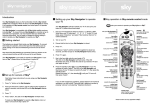
Key operation
sets your remote to operate your Sky Digibox receiver
Your Sky remote control will also operate your TV. It has a default
setting to Sony, so if you have a Sony television your Sky remote
control should already enable television operation.
To set up for your brand of TV please follow these steps:
LED
1. Turn on your TV.
The batteries are already fitted inside your Sky remote control. To
connect them ready for operation, remove the tape from the battery
pack by gently pulling on the tab and withdrawing it from the unit
as shown below.
2. Find your TV manufacturer listed in section H, e.g Philips is 0081.
Write down your TV code here [
][
][
][
]. If your TV is
not listed, press "interactive" and select "Sky Customer Service"
for further assistance.
Next check that the batteries are connected. Press any button on
the unit and check that the red LED at the end of the unit flashes.
3. Press "tv”.
Your Sky remote control is now ready to operate your Sky Digibox
receiver.
4. Hold down "select" and the red button together for about two
seconds, until the red LED on the Sky remote control flashes twice.
tv
sets your Sky remote
control to operate your TV
standby
turns your
Sky Digibox receiver
(or TV) on and off
box office
shows the Box Office
screen
services
shows the Services
screen
tv guide
shows the TV Guide screen
interactive
shows the interactive
screen
mute
turns your TV’s sound off
and on
5. Press "tv" again.
6. Key in the four digit code for your brand of TV. The LED on the
Sky remote control will flash twice. If the LED illuminates only once,
re-check the code for your brand of TV and start again at step 3.
7. Press the standby button on your Sky remote control. If your TV
switches off, press "select". The LED on the Sky remote control will
flash twice. If your TV does not switch off, press "tv", then press
the standby button. Repeat this (press "tv", then standby) until your
TV turns off, then press "select".
If you are experiencing problems, please refer to ‘Troubleshooting’ in
section G.
To reset your Sky remote control to it’s factory settings, press “tv”
then hold down "select" and the red button together for about two
seconds, until the red LED on the Sky remote control flashes twice.
Then press “981.”
i
shows information
about the programme
you have highlighted
vol+ and changes your TV’s volume
arrows
move the highlight around
the screen to select the
option you want
ch+ and changes the channel
select
selects the option you
have highlighted or
confirms your choice
text
switches to text mode
colour keys
select the corresponding
colour options shown
on-screen
back up
shows the previous
screen
help
shows help on using
Sky Guide
number keys
select channel numbers
or on-screen options
1
702634
2
3