1
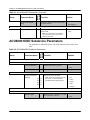
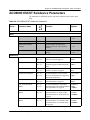
Chapter 6: ACO6800+4X2+ICQST Parameters, LEDs, and Alarms
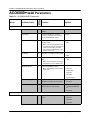
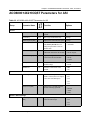
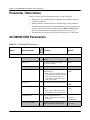
Group
Parameter Name
Bank,
Switch
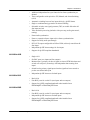
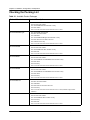
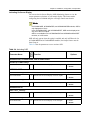
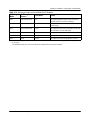
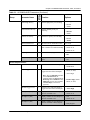
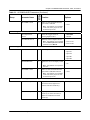
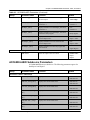
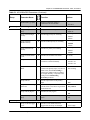
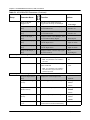
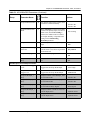
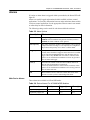
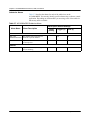
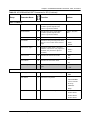
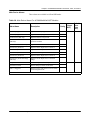
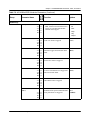
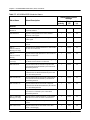
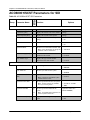
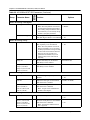
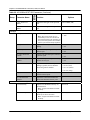
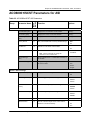
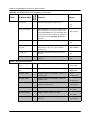
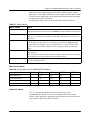
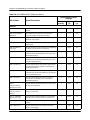
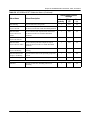
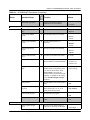
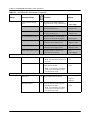
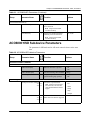
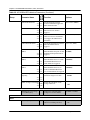
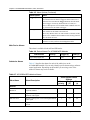
Table 6-2. ACO6800+4X2+ICQST Parameters for SDI (Continued)
Function
Options
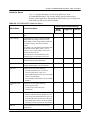
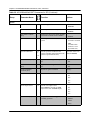
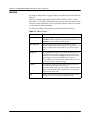
Trouble Slide
Background
4, 4
Select the background for default trouble
slide
•
•
•
•
•
•
Black
75% Color Bar
100% Color Bar
H Sweep
Multiburst
Ramp
MicroSD Card Status
[RO]
--
Indicates whether the SD card is
available
•
•
•
•
•
•
Absent
Locating File
Not Compatible
Please Select File
Loading File
File Loaded
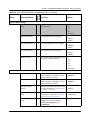
MicroSD Card Loading
Process [RO]
--
Reports the image loading process
(percentage)
<values> (unit =%)
Trouble Slide (1-3)
(MG2) [RO]
--
Displays the trouble slide name stored on
SD card
<string>
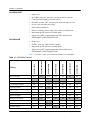
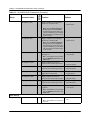
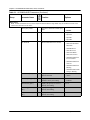
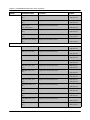
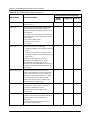
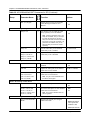
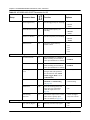
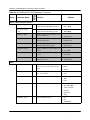
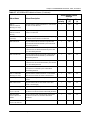
Luma Gain*
5, 1
Sets the video luminance gain
-6 to 6 dB (0)
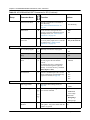
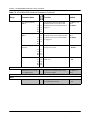
Luma Offset*
5, 2
Sets the video luminance offset
• 0 to 15 IRE (0)
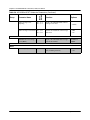
Video > ProcAmp
Note Units depend on the operation
frame rate: IRE @ 59.94 or mV @ 50.
• -100 to 100 mV (0)
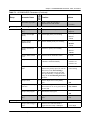
Cb Gain*
5, 3
Sets the video Cb gain
-6 to 6 dB (0)
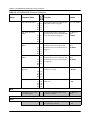
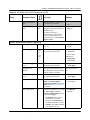
Cr Gain*
5, 4
Sets the video Cr gain
-6 to 6 dB (0)
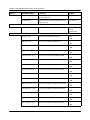
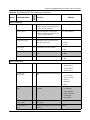
Cb Offset*
5, 5
Sets the video Cb offset
0 to 100% (50%)
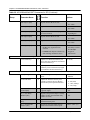
Cr Offset*
5, 6
Sets the video Cr offset
0 to 100% (50%)
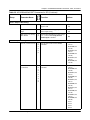
Hue*
5, 7
Sets the hue for color
White Clip Enable*
5, 8
Activates the white clip
• -180 to 180 degrees
(0)
Note Range depends on the set operation
standard: -90 to 90 only @ SD-625.
• -90 to 90 degrees (0)
• Disabled
• Enabled
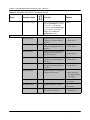
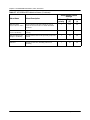
White Clip Level*
5, 9
Sets the white clip level
Note Units depend on the set operation
frame rate: IRE @ 59.94 or mV @ 50.
• 636.8 to 763.2 mV
(700)
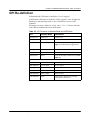
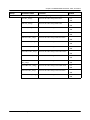
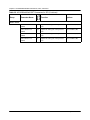
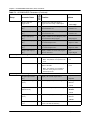
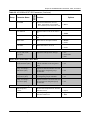
Black Clip Enable*
5, A
Activates the black clip
• Disabled
• Enabled
Black Clip Level*
5, B
Sets the black clip level
• -6.8 to 6.8 IRE (0)
Note Units depend on the set operation
frame rate: IRE @ 59.94 ore mV @ 50.
94
• 90.1 to 109.0 IRE
(100)
• -47.9 to 47.9 mV (0)
ACO6800+ Installation and Operation Manual