1
Chapter 2:
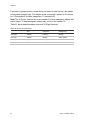
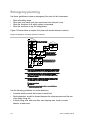
1. Set the unit code dial to a unit number different from all other X10 modules
(between 1 and 8).
2. Set the house code for the installation.
3. Plug the module into a wall outlet.
4. Plug the lamp/appliance into the module.
Caution: Do not plug appliances or lamps with 300-watt or larger bulbs into lamp
modules.
To install universal modules, do the following:
1. Set the unit code dial to a unit number different from all other X10 modules
(between 1 and 8).
2. Set the house code for the installation.
3. Set the module switches to momentary and relay only.
4. Connect the module terminals to the desired device terminals.
5. Plug the universal module into a wall outlet.
Note: See Light and appliances control to program a keyfob to activate a
universal module controlled device.
Simon 3 Installation Manual
27