1
MAG Design PocketVJ
Create h.264 movies in Adobe After Effects®
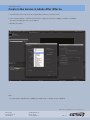
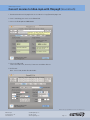
1. In the Render Queue tab, click on Outputmodule and select Format: H.264
2. Select Format Options.. and check the bitrate settings (for FullHD use 6Mbps, for VGA use 2.4Mbps)
You may use higher bitrates, e.g. 10 Mbit/s*
3. Render your movie
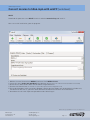
Note:
- For Syncing with high bitrates (10MB/s) you might have to change the Sync Window
We don‘t take any responsibilities for errors caused by the user!
MAG Design
Seftigenstrasse 22
CH-3007 Bern
[email protected]
079 651 44 59
www.magdesign.ch
Page 14










![20120815_PipeBurst Pro Jr User Manual V1[...]](http://vs1.manualzilla.com/store/data/005915031_1-fc76e6520fc4c8a26c3a91dcf3e505a9-150x150.png)