1
WebRelay-10 Users Manual
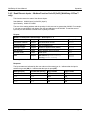
Appendix D: Log Files (WebRelay-10 Plus™ only)
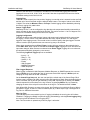
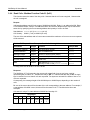
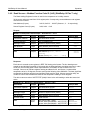
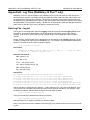
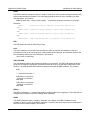
System Log File – syslog.txt
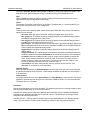
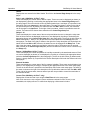
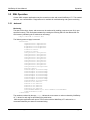
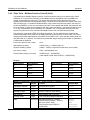
The systole file records various system events, which can be used for diagnostics and troubleshooting
purposes.
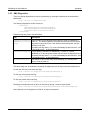
File Format:
MM/DD/YYYY HH:MM:SS, (category to which message applies): (message)
Sample File:
01/02/2010 04:08:13 DEVICE: Power Up.
01/01/2010 00:41:05 DEVICE: Reset factory defaults.
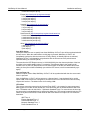
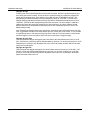
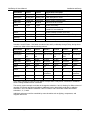
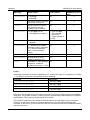
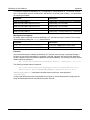
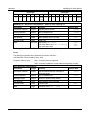
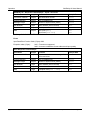
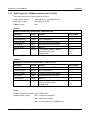
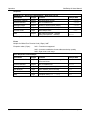
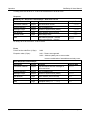
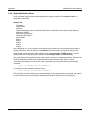
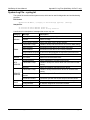
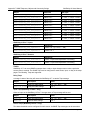
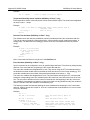
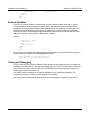
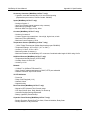
Listed below is a description of messages that a user may see:
Category
DEVICE
EMAIL
CLOCK
NTP
SERVER
REMOTE
SERVER
DHCP
Message
Description
Power Up
Device has been properly powered.
Initialize
Device is ready.
Reset Factory Defaults
Device has been reset to factory defaults.
Failed DNS Lookup
Unable to lookup mail server due to an incorrect DNS setting.
Bad Username
Email was not sent due to an incorrect user name.
Bad Password
Email was not sent due to an incorrect password.
Authentication Required
A user name and password are required by the mail server.
No Response
No response from SMTP server.
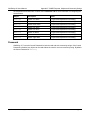
RTC Reset
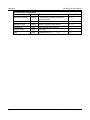
Real Time Clock has been reset.
Request Attempt
Device attempting to connect to NTP Server
Failed DNS Lookup
Unable to lookup NTP server name due to an incorrect DNS
setting.
Success
Device successfully connected to NTP Server.
Failed DNS Lookup
Unable to lookup Remote Server due to an incorrect DNS
setting.
Connection Attempt
Started
Connection port with Remote Server has ben opened.
Connection Closed
Connection port with the Remote Server has been closed.
Address Acquired
IP address request successful, and IP address assigned.
Lease Renewal
IP address assigned to device was renewed.
MAIN_MCU New Firmware Loaded
Xytronix Research & Design, Inc.
New firmware has been loaded to the device.
page 91