1
QuickDimmer
GETTING STARTED
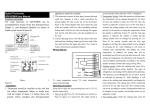
Plug a load up to 2,400 Watts Maximum into the output (fig. B)
Make sure Main dimmer dial is at ZERO (fig. A)
Using the proper gauge extension cord; apply power to the input (fig. B)
Press the ON button & while in view of the lamps, use the Input / Preheat +
trimmer (fig. A) to trim the output up to a useable level.
Then using the main dimmer dial (fig. A-1) to dim lamps up to desired level
ADDITIONAL FEATURES
This unit is equipped with a fan, its
use is not necessary; however we do recommend using the it at all times,
especially when operating in HOT environments (ambient air temps are
above 80°Fahrenheit) AND @ the rated output of 2,000 - 2,400 Watts MAX.
If you are consistently using smaller loads (1.5kW, 1kW, .5kW) or if you
require absolute silence please set fan mode switch to OFF.
The fan ON/OFF switch is located inside the unit, “wait…WHAT? Why did
you do that?” This is our way to stop users of rented gear from shutting
the fan OFF and potentially damaging the unit from overheating.
We have seen it all from sound blankets to plastic bags, remember these
items will cause overheating and the fan is there to help prevent it! THE
FOLLOWING SHOULD ONLY BE DONE WHEN THE UNIT IS NOT
ENERGIZED! YOU COULD BE SERIOUSLY HARMED & DAMAGE THE UNIT!
6|Page