1
Expanded Example Set
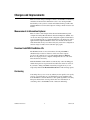
Several programming examples have been added to the 13 examples in
the previous release of the FlexMotion VI Library. You can find these
examples in examples»Motion»FlexMotion»Onboard.llb under the
LabVIEW Open VI option.
You can find C and Visual Basic examples in C:\\Program
Files\National Instruments\Motion\FlexMotion\Examples.
Limit Filters
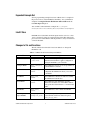
In FlexMotion 5.0, the limit and home inputs must be active for at least
1 ms to guarantee it will be recognized, instead of the 20 µs filter in the
previous version of FlexMotion. This digital filter is always enabled and
can not be disabled.
Changes to VIs and Functions
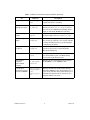
The VIs and functions in Table 1 have been added to or changed in
FlexMotion 5.0.
Table 1. FlexMotion VI and Function Changes and Additions
VI
Function
Description
Initialize Controller
flex_initialize
_controller
New VI/function; replaces all previous
initialization mechanisms; applies configuration
settings from MAX to your controller
Configure Buffer
flex_configure_
buffer
New VI/function; allows you to set up a buffer on
your FlexMotion controller
Write Buffer
flex_write_
buffer
New VI/function; after a buffer has been
configured, this VI/function allows you to write
to the buffer.
Read Buffer
flex_read_
buffer
New VI/function; after data is written to a buffer,
this VI/function reads the data
Check Buffer
flex_check_
buffer
New VI/function; this VI/function provides
information about the state of the buffer and how
many points have been written to or read from the
buffer.
Clear Buffer
flex_clear_
buffer
New VI/function; clears a buffer from RAM
Set Breakpoint
Output MOMO
flex_set_
breakpoint_momo
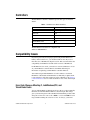
Allows you to specify an input vector; the VI has
a new terminal and the new function replaces
flex_set_bp_momo
© National Instruments Corporation
3
FlexMotion Version 5.0