1
PeopleImport
User Manual
Created: Friday, March 08, 2013
PeopleImport
The title page normally introduces your product or service. You might
include the author's name, company name, company logo, copyright
information, etc.
Table of Contents
1
Welcome
2
2
Tutorial Video
4
3
Release Notes
5
Version 2.1 Release Notes
Version 2.0 Release Notes
4
Installation
PeopleImport System Requirements
Installing PeopleImport from the Internet & Logging In
6
9
13
14
15
5
Best Practices
17
6
Options, Proxy Settings & Sandbox Settings
22
PeopleImport Options
General Settings
File Paths
Proxy Settings
Sandbox Settings
7
Step by Step Instructions
Stage 1 - Mapping
Stage 2 - Compare
Stage 3 - Matching
Setup Matching Criteria
Final Matching Conditions
Campaigns and Tasks
Mapping Types
Stage 4 - Global Campaigns and Tasks (optional)
Stage 5 - Results and Processing
23
24
27
29
31
33
34
37
40
41
45
47
49
53
56
8
Scenarios
61
9
PeopleImport Restore Instructions
63
10 FAQ
General FAQ
65
66
Index
1 . PDF Back Cover
PeopleImport
PeopleImport
Welcome . 2
PeopleImport 2 for AppExchange
Online Help
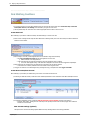
The most current version available is 2.10.10. Click here to learn more about the new release and
download a copy.
To check what version you are currently running click on "i" in the lower left hand corner of the screen
If you are running an earlier version please upgrade to the latest version.
.
Welcome
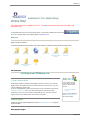
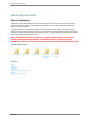
Welcome to the PeopleImport online help system. Browse through the help pages by clicking on the folders below or selecting
pages in the table of contents.
To quickly find specific product information, enter search criteria in the search box above and click the search button.
Tutorial Video
Release Notes
Installation
Scenarios
PeopleImport Restore
Instructions
FAQ
Best Practices
Options, Proxy
Settings & Sandbox
Settings
Step by Step
Instructions
Ask Someone
Get Help from CRMfusion, Inc.
Visit the Customer Portal
PeopleImport customers enabled as Self Support Users have access to our Customer
Support Portal. The support portal can be used to search for a solution or to log a case
with the CRMfusion support team.
If you are a PeopleImport customer and wish to gain access to the Portal, please email
[email protected]. One of our support team members will send you login
instructions. If you have been activated as a DemandTools user, you will not need to
request another access-both products are covered in one portal.
If you're unable to find what
you're looking for in this help
system, try these alternative
resources:
●
Public Knowledgebase
●
Pricing
Contact our support department:
Email: [email protected]
Phone: (800) 961-8205
Customer Support
Contact our customer support department by email at [email protected] or by phone
at (800) 961-8205
Most popular pages
PeopleImport
3 . Welcome
●
Welcome
●
Best Practices
●
Step by Step Instructions
●
Stage 1 - Mapping
●
Setup Matching Criteria
●
Mapping Types
●
Stage 3 - Matching
●
Stage 5 - Results and Processing
●
Sandbox Settings
●
Version 2.0 Release Notes
PeopleImport
Tutorial Video . 4
Home > Tutorial Video
Tutorial Video
PeopleImport Training Video
See also
Welcome
Release Notes
Installation
Best Practices
Options, Proxy Settings & Sandbox Settings
Step by Step Instructions
Scenarios
PeopleImport Restore Instructions
FAQ
PeopleImport
5 . Release Notes
Home > Release Notes
Release Notes
Articles in this section
Version 2.1 Release
Notes
Version 2.0 Release
Notes
See also
Welcome
Tutorial Video
Installation
Best Practices
Options, Proxy Settings & Sandbox Settings
Step by Step Instructions
Scenarios
PeopleImport Restore Instructions
FAQ
PeopleImport
Release Notes . 6
Home > Release Notes > Version 2.1 Release Notes
Version 2.1 Release Notes
The most current version available is 2.10.10.
To check what version you are currently running click on "i" in the lower left hand corner of the screen
If you are running an earlier version please upgrade to the latest version.
.
Upgrade Information
If still running a 1.X version of PeopleImport, it is recommended that all customers upgrade to this new version as soon as
possible to avoid the possibility of creating duplicates when a matching record may in fact exist. PeopleImport's multi-threading
architecture in combination with heavy Salesforce API traffic could result in not all records being downloaded for comparison. The
download status would indicate the correct number of records were returned from the Salesforce API, but not all records were
actually received by PeopleImport. This resulted in some matches NOT being detected when in fact there was a matching record.
As a result duplicates can be created but NO RECORDS WILL BE UPDATED INCORRECTLY.
NOTE: This situation is very rare and sporadic in nature and only occurred when there was a large number of
matching steps combined with heavy API traffic. In most cases the correct insert/update counts are returned.
Changes made in this release ensure that all records are received otherwise the entire download will fail.
This new version of PeopleImport can be installed over the existing production release (do not need to uninstall the old version
prior to upgrading).
As a precaution, please backup your PeopleImportData directory prior to upgrading.
Version 2.10.10 is built on API 24.0 (Spring '12). If a custom endpoint was specified in the previous version (e.g. to access a
sandbox), after upgrading, the API version in the endpoint should be updated to 24.0. Using an earlier endpoint may work, but a
warning will be generated when attempting to save the "proxy settings". Ideally the endpoint should be updated to ensure full
compatibility.
New Features in PeopleImport 2.1
●
Ability to Display/Save a Text Description of a Scenario
●
Option to Save Scenarios Locally
●
New "Salesforce Timeout" Option Setting
●
Regular Expression Mapping Type Added
●
Default "New Contact - Existing Account" Matching Step Added
●
Ability to Assign New Records to Partner Users New in version 2.10.04!
●
New Mapping Types: Regular Expression Y/N, Relaxed Domain, State Match New in version 2.10.10!
Ability to Display/Save a Text Description of a Scenario
●
The details of a scenario (selections in Stages 1-4) can now be displayed in text format and even saved as a .txt file
●
Click the "i" to the left of a Scenario name to display the text description
●
Allows users that do not have direct access to PeopleImport to review Scenario Details
❍ e.g. Send to management for review/approval
Option to Save Scenarios Locally
●
●
New option added to PeopleImport -> Options which enables the ability to save scenarios locally on the user's PC
Allows easier re-use of scenarios across different organizations e.g.:
❍ Consultants working on different Salesforce Organizations
❍
●
Sharing Scenarios between production and sandbox
Allows users to backup their own scenarios locally
PeopleImport
7 . Release Notes
New "Salesforce Timeout" Option Setting
●
Avoid a Salesforce API timeout by extending the default timeout of 2 minutes to as high as 30 minutes
❍ Specify how many minutes PeopleImport waits to receive a response back from the API before returning an error for
the request
●
Helpful for very large queries that may timeout waiting to be started by the API
●
Note: Settings beyond 10 minutes will have no effect unless approved by salesforce.com support
Regular Expression Mapping Type Added
●
Ability to leverage Regular Expressions to build your own matching algorithm
Default "New Contact - Existing Account" Matching Step Added
●
●
Stage 3 now automatically adds a default "New Contact - Existing Account" Step when electing to match to Contacts in
Stage
Added to ensure that users do not forget to check for an existing Account BEFORE electing to add a New Contact/New
Account in Final Matching
❍ This step is optional and can be deleted if desired
Ability to Assign New Records to Partner Users - New in version 2.10.04!
New Option added to PeopleImport -> Options, Download All User Types, which enables the ability to assign new records to
Salesforce Partner Users
●
●
●
Enabling this option will allow new Leads/Contacts/Accounts to be assigned to a Partner User by mapping over the user ID
❍ After checking the box WILL NEED TO LOGOUT AND BACK IN TO PEOPLEIMPORT for the option to take
effect
When not enabled (and attempting to assign records to a portal user), users will receive an error that the input value could
not be converted to an owner ID:
❍ "Converting Alias or Name to ID",,,,,,,"The input value of 005A0000001MTZ8 could not be converted to an owner ID.
The current Users ID was used"
If Partner Portal is not enabled on the Salesforce instance, checked/unchecked will have no effect
New Mapping Types: Regular Expression Y/N, Relaxed Domain, State Match New in version
2.10.10!
●
Regular Expression Y/N
❍ Returns a Yes or No value if the data passes the Regular Expression vs. returning the matchng value or a blank like
the standard Regular Expression mapping type
❍
For example, could create a Regular Expression to see if a field was 5 digits, blank or 5 chars:
23232 = Yes
232323 = No
= Yes
Aabbc = Yes
Bob = No
●
Relaxed Domain
❍ Matches top level domains for websites
❍
❍
●
Matches the word before the period, i.e. “crmfusion”
■
Matches: www.crmfusion.com -> crmfusion.com -> http:\\www.crmfusion.com -> crmfusion.co.uk ->
www.crmfusion.com\demandtools\downloads
Helpful for email to website matches.
State Match
❍ Matches US State and Canadian province abbreviations to their long names
❍
See also
PeopleImport
i.e. MA -> Massachusetts, CA -> California, ON -> Ontario
Release Notes . 8
Version 2.0 Release Notes
PeopleImport
9 . Release Notes
Home > Release Notes > Version 2.0 Release Notes
Version 2.0 Release Notes
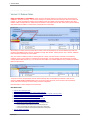
NOTE TO EXISTING 1.X CUSTOMERS: Please review this document carefully to be aware of all the new features and
CHANGES to existing functionality. The process for looking for an existing Account when electing to add a new Contact has
changed. In earlier PeopleImport releases, Account Matching steps were added in the Final Match Conditions when "New
Contact" (match existing/create if no match found) was selected. These steps have now been moved to the general matching
steps section with the addition of "New Contact - Existing Account" match steps.
When loading a scenario previously created with an earlier version of PeopleImport, any Account Matching steps that were
provided in Final Matching have now been translated to a single "New Contact - Existing Account" step. However, additional
looser matches for Accounts can now be added.
Also, when neither a matching Contact or matching Account is found, and "New Contact" is selected in Final Matching
Conditions, there is now an option to "Limit New Account Duplicates". Account matching steps provided here will avoid
creating duplicate NEW Accounts (e.g. one new Account with multiple new Contacts attached to it) by matching the specified
data in the input source.
The previous version of PeopleImport used the Account Matching steps in Final Matching Conditions to limit the new
Accounts, THESE ARE NOT CARRIED OVER to the new version for New Accounts, so the scenario must be updated to
include "New Account Settings" to avoid creating new Account duplicates.
More information on these changes can be found below.
New Feature List:
●
Support for 64-bit Operating Systems
●
Support for Excel 2007 (xlsx), Access 2007 (accdb) and ODBC Input Data
●
Faster Processing Allows for More Salesforce Records to be Downloaded for Comparison in One Import Pass
●
New General Settings Available in the PeopleImport Options Menu
●
New File Paths Tab Available in PeopleImport Options Menu
●
Owner Alias and Owner Full Name Can Now be Mapped from Input File
●
Ability to Show Salesforce Data in Final Results Grid for Any Mapped Field
●
●
Enhancements Made to the Matching Process in Stage 3:
❍ Multiple Matching Steps Available When Searching for Existing Accounts
❍
Can Now Add New Contacts AND New Leads in the Same Import Pass
❍
Contact Insert Will NOT Fail if Existing Account Owned by an Active Owner
❍
Clone Step Button Added for Easier Replication/Modification of Existing Steps
Three New Mapping Types Added
PeopleImport
Release Notes . 10
❍
Acronym, Acronym (Cleaned Account) and First XX Words
●
Auto-Check Now Performed to Check for Bad Data in Input File Before Processing
●
Ability to Map a Campaign ID and Status From the Input File
●
Additional Task Customization Options
●
Enhancements Made to Final Results Grid for Easier Review of Matches
❍ Including an additional Final Results file, raw data file vs. formatted xml, which can be used to add custom Tasks and/or Campaign Members
via DemandTools MassEffect or Salesforce Data Loader
Support for 64-bit Operating Systems
Although still built as a 32-bit application, PeopleImport will work with 64-bit operating systems such as 64-bit Vista and Windows 7
●
If running on a 64-bit operating system, ideally a minimum of 4 gig of RAM should be installed on the PC, such that the full 2 gig that can be utilized
by PeopleImport is available for use
More information on PeopleImport System Requirements can be found in Installation -> PeopleImport System Requirements
●
A PeopleImportData folder is now created when PeopleImport is installed, with subfolders to store log, restore and replacelist files
❍ This avoids previous problems with Vista customers that were not able to create files directly in the C:\Program Files\PeopleImport directory
❍
A File Paths tab is now available in the PeopleImport Options menu letting the user know exactly where the PeopleImportData folder was
created
More information on File Paths can be found in Options, Proxy Settings & Sandbox Settings -> PeopleImport Options -> File Paths
Support for Excel 2007 (xlsx), Access 2007 (accdb) and ODBC Input Data
Excel 2007 and Access 2007 files can now be read directly into PeopleImport as an input data source
●
The previous version required these to be saved as 2003 files
●
When specifying input files no longer have to specify the file type, simply read in the file
●
An option to connect directly to a SQL database via a system DSN is also provided
Faster Processing Allows for More Salesforce Records to be Downloaded for Comparison in One Import Pass
Enhancements have been made to the key building process which significantly speeds up download times and allows more records to be processed in one
pass
●
Can expect up to 50% faster processing speeds
New General Settings Available in the PeopleImport Options Menu
●
Separate default mapping options are available for Leads vs. Contacts/Accounts
Note: For customers that upgraded from 1.X to 2.X, where "Merge" had previously been selected as a
default mapping setting, the default has now been changed to "Update".
●
Option to "Prepend" vs. "Append" text area fields when merging new data with existing data
●
Update/Insert Batch Size can now be adjusted to better handle Apex Triggers that have not been optimized to handle batches of 100
●
A "Default Restore File Extension" can be specified
❍ csv, xls, xlsx or mdb
More information on General Settings can be found in Options, Proxy Settings & Sandbox Settings -> PeopleImport Options -> General Settings
New File Paths Tab Available in PeopleImport Options Menu
●
Log, Restore and Replace Lists files locations can now be customized as needed
❍ A PeopleImportData folder is now created either in the MyDocuments (Windows XP) or Owner (Windows Vista) directory when PeopleImport
is installed
❍
❍
●
Allows for better support for Windows Vista users where file cannot be written to the C:\Program Files directory
Files can now be redirected to a shared drive such that multiple PeopleImport users at the same organization can all have access to log,
restore and customizations made to replace lists (cleaned account name and nickname lists)
An option to organize Log and Restore files by Organization ID is provided
❍ Allows the ability to separate production from sandbox files
More information on File Paths can be found in Options, Proxy Settings & Sandbox Settings -> PeopleImport Options -> File Paths
Owner Alias and Owner Full Name Can Now be Mapped from Input File
When mapping an Owner from an input source, the Owner Alias, Full Name OR Owner ID can now be used. Regardless of which one is in the input file,
the field should to be mapped to the Owner ID field.
PeopleImport
11 . Release Notes
Ability to Show Salesforce Data in Final Results Grid for Any Mapped Field
A "Show in Grid" checkbox is now available when mapping fields from an input source. When checked and a match is found, data from the field in
Salesforce is displayed on the Final Results grid is Stage 5.
Enhancements Made to the Matching Process in Stage 3:
1. Multiple Matching Steps Available When Searching for Existing Accounts
Previously when electing to create a new Contact when no existing Contact or Lead was matched, an option to "Match to Existing Account/Create if no
Match Found" was used to look for existing Accounts. The downside was that only one set of matching criteria could be specified when looking for a
matching Account.
With the addition of "New Contact - Existing Account" matching steps, multiple steps can now be specified (just like looking for matching Contacts or Leads)
such that more rigid criteria can be specified in one step, and then looser criteria in later steps. These new steps are added after all Contact and Lead
matching steps and act as "buckets" just like all other matching steps.
In addition, when electing to create a New Contact in Final Matching Conditions, "New Account Settings" allows for specifying matching criteria to look for
duplicates AMONG the incoming data to avoid creating duplicate New Accounts.
NOTE: "New Contact - Existing Account" steps need to be specified to look for EXISTING Accounts to add a New Contact to, and SEPARATE "New Account
Settings" matching steps need to be specified in Final Matching Conditions to look for duplicate Account WITHIN the input file.
2. Can Now Add New Contacts AND New Leads in the Same Import Pass
With the addition of "New Contact - Existing Account" matching steps, not only can multiple matching steps be specified to look for existing Accounts to add
a new Contact to, but if an Account is NOT found a new Lead can be added.
●
●
New Contact - Existing Account Steps allow for rigid matches to be performed first, then looser matches (multiple options for finding matching
accounts)
New Contacts can be created ONLY if the Account exists, and Leads created if neither the Contact nor the Account exists
3. Contact Insert Will NOT Fail if Existing Account Owned by an Inactive Owner
When electing to have a new Contact owned by the Account Owner in a "New Contact - Existing Account" matching step, if the existing Account is owned
by an inactive owner, the new Contact will still be inserted, but will be owned by the current user.
4. Clone Step Button Added for Easier Replication/Modification of Existing Steps
An existing matching step can now be cloned so if the majority of the matching will be the same in a subsequent step, this features saves the user from
having to re-create duplicate mappings.
More information on Matching Steps can be found in Step by Step Instructions -> Stage 3 - Matching
Three New Mapping Types Added
●
●
●
Acronym: When matching Company/Account Names can now look for acronym matches
❍ International Business Machines -> I.B.M.
Acronym (Cleaned Name): Acronym match applied AFTER performing a "Cleaned Account Name"
❍ The Hewlett Packard Co. -> H.P.
First XX Words: Just match the first word of a Company/Account Name
❍ First 1 Words: Huffy Bicycle -> Huffy
More information on Mapping Types can be found in Step by Step Instructions -> Stage 3 - Matching -> Mapping Types
Auto-Check Now Performed to Check for Bad Data in Input File Before Processing
In addition to the Check option provided in Stage 1 - Mapping, and auto-check is now performed when "Process Checked Objects" is selected in Stage 5 Final Results.
●
Alerts user of potential bad data that would either cause a specific record to be updated/inserted, or may even cause PeopleImport to close
unexpectedly
●
Will warn if an inactive owner id/alias was mapped from the input source
●
Options to import with errors, or check and fix errors is provided
More information on Check and Auto-Check can be found in Step by Step Instructions -> Stage 1 - Mapping -> Step 5
Ability to Map a Campaign ID and Status From the Input File
This option no longer requires the input file to be split into separate files when different Campaigns or CampaignMember statuses need to be assigned to
different records.
More information on creating campaign links can be found in Step by Step Instructions -> Stage 4 -Global Campaigns and Tasks
Additional Task Customization Options
PeopleImport
Release Notes . 12
●
Reminders can now be set for Tasks
❍ Emails cannot be triggered, but a checkbox is now provided for Reminder pop-ups
●
Task Priority can now be specified
●
Contact Tasks will now populate the "Related to" field with the Account ID associated with the Contact
More information on creating campaign links can be found in Step by Step Instructions -> Stage 4 -Global Campaigns and Tasks
Enhancements Made to Final Results Grid for Easier Review of Matches
●
●
Counts provided as to how many records of each type will be updated vs. inserted
When right clicking on a group heading, entire groups can now be expanded or collapsed to reveal matching fields and any field checked as "Show
in Grid"
●
"Export Data" button now includes and option to export to a formatted xls file (will look just like the grid)
●
Auto-check performed when "Process Checked Objects" selected
●
●
Warnings provided if Matching Steps were changed in Stage 3 since an initial search of matches was performed (but import not yet processed)
❍ Ensures that results are based on current matching specified
A "FinalResultsDump" file (raw data file) is created after processing completes which can be used to enter custom Tasks or custom Campaign
Members in DemandTools MassEffect or Salesforce Data Loader
❍ This new file also contains the Owner ID for all the matching/new records so that when using it to add custom Tasks can ensure that the
Tasks are owned by whoever owns the Lead or Contact
More information on Results Grid can be found in Step by Step Instructions -> Stage 5 - Results and Processing
See also
Version 2.1 Release Notes
PeopleImport
13 . Installation
Home > Installation
Installation
Articles in this section
PeopleImport System Installing PeopleImport
Requirements
from the Internet &
Logging In
See also
Welcome
Tutorial Video
Release Notes
Best Practices
Options, Proxy Settings & Sandbox Settings
Step by Step Instructions
Scenarios
PeopleImport Restore Instructions
FAQ
PeopleImport
Installation . 14
Home > Installation > PeopleImport System Requirements
PeopleImport System Requirements
PeopleImport for AppExchange is a 32 bit Windows based application that has been designed for and is recommended to be
operated on Intel based hardware running Microsoft Windows XP, Windows Vista, or Windows 7. PeopleImport will work with
both 32 and 64 bit Windows, but will not be able to utilize more than 2 Gig of RAM.
Note: PeopleImport can be run on a MAC, but only within a Windows environment (e.g.
running Parallels, Bootcamp or equivalent).
●
Windows XP, Windows Vista, or Windows 7
●
Microsoft .NET Framework Version 3.5 Redistributable Package (x86)
●
500 MHz processor (Recommended: 1 GHz or faster)
●
Minimum of 1 gigabyte RAM (recommended)
❍ Extremely large list customers (or those comparing against giant Salesforce databases may consider upgrading to
the maximum amount of RAM their operating system supports)
❍
PeopleImport is a 32 bit .net application, and although it will work on a 64 bit system it will only be able to utilize up
to 2 gig of RAM
■
When running on a 64 bit system it is still recommended to install more than 2 gig so that there is always 2
gig available for PeopleImport
●
1024 x 768 screen resolution (this is screen size dependent)
●
200+ MB hard drive space
Note: Users DO NOT have to have "Modify All Data" check on their Salesforce profile to use
PeopleImport, however, comparisons will only be done against Leads, Contacts and
Accounts that the user has the rights to see according to their security profile.
Although not required to login to PeopleImport, it is highly recommended that "Manage
Users" be checked on the user's profile.
If Manage Users is not checked then the user does not have access to the user table and as such will only be able to assign
records to themselves or a group or queue. They WILL NOT be able to assign records to another user.
Here is an example of the error that can occur when "Manage Users" is NOT checked:
2010-05-24T08:52:39-07:00,PeopleImport Update,"Converting Alias or Name to ID",,,,,,,"The input value of 00530000000vArOBhn
could not be converted to an owner ID. The current Users ID was used"
In this case, the record IS STILL updated/inserted, but the owner will be changed to the current user (not the owner that was
listed in the input file and mapped to the owner id field).
See also
Installing PeopleImport from the Internet & Logging In
PeopleImport
15 . Installation
Home > Installation > Installing PeopleImport from the Internet & Logging In
Installing PeopleImport from the Internet & Logging In
Step 1. Install .Net Framework
●
Install Microsoft .NET Framework Version 3.5 Redistributable Package (x86) prior to installation of PeopleImport
●
If this is not currently installed on your computer, the PeopleImport installation wizard will automatically provide the link for download
Step 2. Download PeopleImport
●
Navigate to www.crmfusion.com
●
Click the "Download" button
●
Choose "Save" in the File Download pop up
●
Save the zip file to an easily accessible place, like the desktop
Step 3: Install PeopleImport
●
Locate the zip file icon & double click on it
●
Double click the PeopleImport zip Icon
●
Choose "Run"
❍ Clicking "Run" will launch the install wizard
●
On the first step of the wizard, click "Next"
●
Continue through the wizard by clicking "Next" and selecting the options that best suits your use of the tool
●
PeopleImport will be loaded on your computer under Program Files in your C:/Program Files directory creating a directory called PeopleImport
●
A "PeopleImportData" folder is also created either in the users "MyDocuments" folder if running Windows XP or "Owner\Documents" folders if running
Windows Vista to store Log and Restore files and Replace Lists
❍ For users upgrading from an earlier version of PeopleImport, where these files were previously saved in C:\Program Files\PeopleImport, any new
log and restore files will now be created and saved in the new directories.
❍
❍
PeopleImport
Replace lists are MOVED to the new location.
More information on Log, Restore, and Replace list files can be found in Options, Proxy Settings & Sandbox Settings -> PeopleImport Options -> File
Paths
Installation . 16
Launching PeopleImport and Logging In
●
When installation is complete, a PeopleImport icon will appear on the desktop
●
Double click the icon to launch PeopleImport
●
The PeopleImport username and password are the same as the username and password used for Salesforce
●
Users may be required to append their Salesforce security token to the end of the password (typically an error message is presented stating that there is a
problem with either the username, password or token)
❍ Keep in mind that if the password changes for Salesforce, it will also change for PeopleImport
●
To avoid using the security token on every login attempt follow these steps to add your computer to the Salesforce trusted list
●
Visit www.ipchicken.com
●
Copy the IP address the website shows
●
Login to Salesforce
●
Click on Setup
●
Under "Administration Setup" expand "Security Controls"
●
Click on "Network Access"
●
Click the "New" button
●
Paste the IP address from www.ipchicken.com in the start and end range and click "Save"
●
This process will allow Salesforce to recognize the users specific PC and bypass the need for a Security Token upon logging into PeopleImport from that
PC
See also
PeopleImport System Requirements
PeopleImport
17 . Best Practices
Home > Best Practices
Best Practices
The information provided in this document should be used as a general guideline. Each
organizations data and business requirements are different.
Test in Sandbox First
If your organization has a Salesforce sandbox we highly recommend that you test your scenarios first in the sandbox before
importing into your production instance.
More information on pointing PeopleImport to the sandbox can be found in Options, Proxy Settings & Sandbox Settings -> Sandbox
Settings.
If you do not have a sandbox then at least test with a small sample file first.
Start With a CLEAN (e.g. Deduped) Salesforce Database
Since PeopleImport will ONLY match a record from the input file to one record in Salesforce, ideally the Salesforce Database
should already have been scrubbed for duplicates within the Lead and Contact tables and also Leads against Contacts.
●
The order of matching steps in Stage 3 can be manipulated such that a matching Contact will be found before a matching
Lead, if the same person exists as a Lead and a Contact, but the decision will need to be made as to which one should be
updated (which will be the one it finds first)
●
Similarly if the same Lead or Contact exists multiple times, more rigid matching steps can be executed before looser steps
to find the "better" match.
❍ However, if the SAME Lead/Contact exists multiple times in Salesforce, and all the fields would match in the SAME
Step, the first record Salesforce returns to PeopleImport will be the record that is updated and there is no rhyme or
reason as to which one Salesforce will return within a single step
The CRMfusion DemandTools application can be used to clean up existing duplicates with the Salesforce Database. More
information regarding DemandTools can be found on our website www.crmfusion.com/demandtools .
Prepping the Input File
1. Dedupe the Incoming Spreadsheet
PeopleImport will look for duplicates matching the input data to the records that currently exist in Salesforce, but WILL NOT
dedupe records WITHIN the spreadsheet, so it is important to ensure that the input file is free of duplicates to avoid creating
duplicate NEW Leads or Contacts.
For example, if Melanie Jackson is in the input file 3 times, and she DOES NOT match to any existing Leads or Contacts, then 3
Melanie Jackson records will be created as either new Leads or Contacts depending in the selection in Final Matching Conditions.
2. Separate First and Last Name Fields Into Separate Columns
PeopleImport will NOT parse these during the import. They must be in separate columns and then mapped to appropriate field is
Stage 1 Mapping. Having these separated will also allow advanced mapping types (e.g. First Name Match, Fuzzy options etc) be
selected separately for First and Last Name.
3. Concatenate Multiple Lines of Address Into a Single Column Separated by a Carriage Return
When inserting street address data via the Salesforce API there is only one "street" field to map to. In order to have the input
data match the Salesforce format, concatenate the fields in your spreadsheet separated by a carriage return prior to importing.
To do this:
●
●
●
Create a new column in your spreadsheet for the full street address
Type the following formula in the first cell on the new column =A1&char(10)&B1 (assumes AddressLine1 and AddressLine2
are in A1 and B1 respectively, adjust the formula based on your columns)
Cut and paste the formula down all the rows of data
PeopleImport
Best Practices . 18
●
●
OPTIONAL: Do a copy and paste special (values) over the new column, so that the actual values are in the column vs. the
formula
❍ This is optional since if the formula is left in the field it will still import the data correctly. May want to copy and
paste just to confirm in the spreadsheet itself that the fields are actually separated by a carriage return/line feed.
Map this concatenated address to the appropriate "street" field in Stage 1 - Mapping
4. Format Zip Code Fields as Text so Leading Zero's will not be Stripped
Since PeopleImport allows excel files as input, leading zero's for New England zip codes DO NOT have to be stripped out. Simply
format the column in the spreadsheet as “Text”. Now the field will be read as a straight text field and the data will be entered as
is (vs. being interpreted as a number which will strip the leading zero).
5. Format Phone Fields as They Should Appear in Salesforce
Phone number fields will be imported as is. They will not be reformatted to include () and - in the appropriate spots during
insertion.
●
●
Columns containing phone numbers that have NO formatting (e.g. 8005551212) should ideally be formatted as text, to
avoid the phone number being inserted in scientific notation, e.g. 9.78E+15
DemandTools MassImpact contains a prebuilt formula, NaPhoneFix, that can be used to reformat phone numbers to match
Salesforce standard format AFTER importing, e.g. (800) 555-1212.
❍ More information on this formula in DemandTools can be found here.
6. Add Additional Columns as Needed (for hardcoding fields)
Any data that should be hardcoded, e.g. Owner ID, Name or Alias, Descriptions, Lead Source etc., should be added as columns in
the spreadsheet and then mapped to the appropriate fields in Salesforce. No "Add Constant" option is provided in PeopleImport to
hardcode the data.
With the addition of "Show in Grid" in Stage 1 - Mapping, any fields where the existing Salesforce data should be displayed in the
Final Results Grid, a column must be mapped to the Salesforce field. If the field should not be inserted or updated, just displayed,
simply leave the cells in the column blank, uncheck the box for "Insert" and select the option for "Do Not Update" for that particular
field(s).
Mapping Fields in Stage 1
●
●
●
●
Prior to mapping any data, check the default mapping options in PeopleImport Options. The tool ships with "Update" as the
default setting, but you may want to change this to "Update Only if Blank" or "Do Not Update" if this is typically how you
want to handle updating existing records.
To save time use the auto-map option when mapping the input data to map as many input fields as possible then manually
map any fields that could not be auto-mapped
Always REVIEW thoroughly any auto-mapped fields to ensure they were mapped to the appropriate field in Salesforce and
remember that one input column can be mapped to multiple fields in the same Salesforce table
❍ When electing to compare input data to Contacts, auto-mapped fields will map to BOTH Contact AND Account fields
Carefully check the "update" option selected for all fields and ensure that no adjustments need to be made
❍ Owner fields and Company/Account Name field mapping should be reviewed carefully and may want to change to
"Do Not Update" or "Update if Blank" (since these fields are never blank they will not be updated)
❍
Keep in mind that multi-select picklists, text area fields, and true/false fields can be MERGED. This is NEVER
selected as the default update action, so it must be adjusted on a field by field basis
■
●
Note: Street Address fields will have "Merge" as an option because they
are text area fields in Salesforce. IT IS NOT RECOMMENDED that these
fields be merged
After all fields have been mapped run the "Check" utility (the button to the right of AutoMap) to scan input data for possible
data integrity errors that could result in either errors when processing or possibly causing PeopleImport to shut down
during the import.
PeopleImport always requires mapping to the following standard required fields. This is by
design to avoid errors when inserting new records.
Leads: Company and Last Name
Contacts: Last Name
Accounts: Name
PeopleImport
19 . Best Practices
More information on Mapping can be found in Step by Step Instructions -> Stage 1 - Mapping.
Matching Steps in Stage 3
Understand that the goal to is to accurately find matching records and update, then insert any new records. It is typically best to
"err" on the side of caution, not making the steps too loose simply to find "more matches" and update the wrong records.
1. Fields to Match On
Selecting what fields to match on will depend on what data is included in the input file, and what fields are typically populated in
Salesforce. Also, keep in mind that everyone's data is different and what works for one organization may not work for another.
When creating matching rules keep the following in mind:
●
●
PeopleImport will only look for matches in Salesforce and within the input file, where ALL the fields being matched in a step
are POPULATED
All the matching conditions within a step are AND'd together, so ALL the fields will need to match for a record to be flagged
as a match for that step
❍ If the step includes matching on First Name, Last Name, Email, and Phone Number all 4 of those fields need to be
populated in Salesforce and in the input file
❍
●
A matching condition can include a "Match Blank" option, which will match a blank to a blank for a particular field,
but "Match Blank" WILL NOT match one record with data to one that is blank. In order to do the latter, a matching
step needs to be built WITHOUT matching on that field.
When electing to match on email, ideally should also match on last name, at least BEFORE a step matching on just email
alone
❍ Last name is a required field in Salesforce so matching on this also will NOT cause less records to be searched
❍
This will avoid problems with generic emails, and situations where records may have been cloned in Salesforce, and
other fields updated (e.g. first, last name, phone etc), but the email address of the new person was not provided
(and the existing email on the cloned record was not deleted).
2. Advanced Mapping Techniques to Find Additional Duplicates
Exact matching is not the only way to match!!!!! Please review ALL the various mapping types and options available within
PeopleImport to help identify similar Account/Company name, nicknames for first names, similar addresses, similar phone
numbers, perform phonetic matches etc.
Looser techniques are best used when more than one field is being matched on.
Here are some tips when matching:
●
First Name matches
❍ Use the "FirstName" mapping type to match nicknames, e.g. "Mike" to "Michael"
❍
●
Last Name matches
❍ Add “Alpha-Clean” to match “Smith-Jones” -> “Smith Jones”
❍
●
The “middle initial” dilemma: Try matching on just the first letter or first word (mapping type “First XX Letters” or
"First XX Words") and Last Name
Add "Fuzzy" to catch spelling errors
Company/Account Name Matches
❍ Use the "Cleaned Account Name" mapping type to find similar names
■
Can match abbreviations to long forms, e.g. Saint -> St
■
❍
REVIEW/UPDATE the "Account Cleaning List" to include abbreviations, suffixes,
prefixes specific to YOUR industry!
■
❍
PeopleImport
Can ignore common suffixes and prefixes, e.g. match "The Hewlett Packard Company" -> "Hewlett Packard
Inc"
Also a DemandTools user? Manage ONLY ONE replace list by updating the "Replace List Directory" File Path
in PeopleImport Options to point to the DemandToolsData\ReplaceList\ directory
Add "Transpose" to catch where the order of the words in the name are different but the words themselves match,
e.g. University of North Carolina -> North Carolina, University of
❍
Add "Alpha-Clean" to catch slight differences in punctuation
❍
Add "Fuzzy" to catch for spelling errors -
NOT RECOMMENDED IF ALL THAT IS BEING
MATCHED IN A STEP IS THE COMPANY OR ACCOUNT NAME AND CLEANED
ACCOUNT NAME IS THE MAPPING TYPE
Best Practices . 20
●
Street Address Matching
❍ Use the "Street Address Match" mapping type to match abbreviations to their long forms (e.g. Street -> St)
❍
●
City matches
❍ Use “Alpha-Clean” to match “St. Charles” with “St Charles”
❍
●
Use the "Relaxed Address Match" mapping type to additionally match one street address with a Suite # to another
without (e.g. 100 Main Street -> 100 Main St Suite 234)
Add "Fuzzy" to catch spelling errors
Phone Number matches
❍ For North American phone numbers use "Relaxed NA Phone Match" to ignore punctuation, leading 1's, area codes
and extensions
■
match +1 (781) 458-9999 to 6174589999 x123
Since this mapping type IGNORES AREA CODES and returns just the "555-1212"
portion of the phone number IT SHOULD NOT BE USED BY ITSELF (only use when
additionally matching on other fields to avoid updating the wrong record).
●
Email to Website matches
❍ Use the "Domain" mapping type to match an email address to a website on a Lead or Account
■
Great option to find matching Accounts in a "New Contact - Existing Account" matching step
■
●
Will need to map email to account.website in Stage 1 to make it available for matching (be sure to
"uncheck" the insert option and change the update option to "Do Not Update")
Salesforce ID matches, e.g. using the Salesforce Account ID to check for a matching Account
❍ If the ID in the input file is 15 digits vs. the full 18 digit ID use the "Salesforce.com ID Match" mapping type
■
This converts the 15-digit ID to it's 18-digit counterpart so it can be matched
More information on Mapping Types can be found in Step by Step Instructions -> Stage 3 - Matching -> Mapping Types.
3. Add a New Contact if the Account Exists, Otherwise Create a New Lead
Keep in mind that with the addition of "New Contact - Existing Account" matching steps PeopleImport now has the ability to import
new Contacts if the Account exists, otherwise create a new Lead.
4. Do Not Create Duplicate Accounts When "Create New Contact" is Selected in Final Match Conditions
If there are multiple new Contacts all associated with the same new Account, create just one Account with all the new Contacts,
by using the new option "Limit New Account Duplicates by Field".
More information on Matching can be found in Step by Step Instructions -> Stage 3 - Matching.
Campaigns and Tasks
1. Stage 3 or Stage 4?
Are all the records in the input file getting the SAME Campaign and status, or do you have Campaign ID's and statuses in your
input file? If so, skip assigning Campaigns in Stage 3, and instead use Stage 4 to do a Global Assignment.
Similarly if all the records in the input file should get the same Task, then skip the option to create the Tasks in Stage 3 and create
them in Stage 4 for ALL the records.
2. Campaign Status
If mapping from an input file:
●
●
Use a column header of "Campaign Member Status" for this field instead of just "Status" as the API name for the standard
Lead Status field is "Status". If "Status" is used for the campaign member status column, and fields are auto-mapped in
Stage#1 then this field will map to the Lead Status field, which will result in incorrect data in this field.
Double-check the spelling on any campaign member statuses. If the status is not valid for that Campaign the default
campaign member status for that Campaign will be assigned instead.
Note: Custom Campaign Member fields and/or Task fields CANNOT be mapped from the
input file. A new "FinalResultsDump" file can be used to create Campaign Members using
custom fields, or custom Tasks using DemandTools -> MassEffect AFTER the PeopleImport
PeopleImport
21 . Best Practices
import is complete.
More information on Creating Campaign Links and Tasks can be found in Step by Step Instructions -> Stage 3 - Matching ->
Campaigns and Tasks and Step by Step Instructions -> Stage 4 - Global Campaigns and Tasks.
Final Thoughts
Before processing, review the results carefully to ensure accurate matching. Uncheck any individual records that should not be
updated. If it seems that a particular Step was finding more mismatches than matches, it may be best to go back to Stage 3,
remove that step altogether, and refind the matches. That way, these records will be added as new.
More information on processing the import can be found in Step by Step Instructions -> Stage 5 - Results and Processing
Remember to save any scenarios for common imports! More information on Scenarios can be found in Scenarios
And.....if you make a mistake and need to undo and import, it can be done by following the steps in PeopleImport Restore
Instructions
See also
Welcome
Tutorial Video
Release Notes
Installation
Options, Proxy Settings & Sandbox Settings
Step by Step Instructions
Scenarios
PeopleImport Restore Instructions
FAQ
PeopleImport
Options, Proxy Settings & Sandbox Settings . 22
Home > Options, Proxy Settings & Sandbox Settings
Options, Proxy Settings & Sandbox Settings
Articles in this section
PeopleImport Options
Proxy Settings
Sandbox Settings
See also
Welcome
Tutorial Video
Release Notes
Installation
Best Practices
Step by Step Instructions
Scenarios
PeopleImport Restore Instructions
FAQ
PeopleImport
23 . Options, Proxy Settings & Sandbox Settings
Home > Options, Proxy Settings & Sandbox Settings > PeopleImport Options
PeopleImport Options
Options are accessible by selecting the
button in the bottom left hand corner of PeopleImport.
●
General Settings: Settings for PeopleImport as a whole.
●
File Paths: Full pathnames indicating where Log Files, Restore Files, and Replace Lists are stored.
Articles in this section
General Settings
See also
Proxy Settings
Sandbox Settings
PeopleImport
File Paths
Options, Proxy Settings & Sandbox Settings . 24
Home > Options, Proxy Settings & Sandbox Settings > PeopleImport Options > General Settings
General Settings
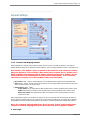
1 & 2. Contact/Lead Mapping Defaults
Default mappings to be used when data is mapped in Stage1 from the input file to the fields in Salesforce. Once fields are
mapped, individual settings can be updated on a field by field basis. There are separate defaults for Leads vs. Contacts/Accounts.
Best Practice: The "Update" option is checked as the default for both Leads and Contacts
when the application is first installed. Many users prefer to update this to "Update Only if
Blank" and then when mapping fields in Stage1, manually change this is "Update" only for
those fields where the incoming data should overwrite existing data. This is especially
important for Company and or Account Name fields, and Owner fields.
●
●
●
Show in Grid: Default - checked. Checked displays the current Salesforce data for that field in the Final Results Grid
Insert: Default - checked. Checked ensures that the data from the incoming spreadsheet will be inserted into the field in
which it is mapped during a new record creation
Update Options: Default - Update
❍ Do Not Update: Do not update Salesforce data with data from the incoming spreadsheet when a match is found
❍
❍
Update: Always update the Salesforce data with data from the incoming spreadsheet when a match is found
Update Only if Blank: Only update Salesforce data with the data from the incoming spreadsheet if the field
in Salesforce is blank
When mapping fields in Stage1, there will also be an option to merge for long area text fields, multi-select pick list fields and
boolean (true false checkbox) fields. This will merge the value in the incoming spreadsheet with the existing value in Salesforce.
Merge CANNOT be selected as a default setting and must be specified on a field by field basis when mapping fields in Stage1.
Note: For customers that upgraded from 1.X to 2.X, where "Merge" had previously been
selected as a default mapping setting, the default has now been changed to "Update".
3. Auto Login
PeopleImport
25 . Options, Proxy Settings & Sandbox Settings
●
●
●
When checked, will bypass the login screen using the username and pwd supplied when auto login was first checked
If Salesforce login credentials change and auto login is turned on, PeopleImport will automatically clear the login
information and return the user to the login screen.
If proxy information has changed such that the user can no longer login, the following utility can be run to remove the auto
login: http://www.crmfusion.com/datafiles/PIAutoLogin.zip
4. Expand Mapping Options
●
When checked, detailed mapping options will show under the field that has been mapped.
On
Off
5. Use Salesforce to View Objects
●
Checked opens a record directly in a Salesforce window when selecting a record link in the final results grid, uchecked
provides a "quick" view of the record.
6. Trigger User Emails (via assignment rules)
●
●
Checked triggers user emails to be sent based on a Salesforce Lead assignment rule used for new Leads in Stage3
The assignment rule in Salesforce must be set up to send user emails, and emails will ONLY be triggered if this option is
checked.
●
Checking this option will NOT trigger emails for tasks.
●
There is no option for triggering emails for tasks, but reminders can be set when creating the task.
7. Prepend Long Text Merges
●
Checked prepends vs. appends new data when selecting "merge" for text area or long area text fields in mapping.
8. Show Help Icons
●
Checked displays the help icons,
, on all the screens. Unchecked hides the icons from view.
9. Update/Insert Batch Size
●
●
●
To speed processing and optimize Salesforce API calls, PeopleImport sends data through the Salesforce API in batches of
100 by default.
The batch size can be increased as high as 200, and can be set as low as 1.
Lowering the batch size to 1 will use 1 API call per record being inserted and updated, and also for any campaign links or
tasks being created
❍ There is a limit imposed by Salesforce on how many API calls are allowed in a 24hr period.
❍
Batch size should only be lowered if there is an APEX trigger that has not been optimized for batch processing such
that "Too Many SOQL Errors" are generated during the import process. Ideally, the trigger code should be updated
to avoid this error and allow a batch size of 100.
10. Salesforce Timeout (in Minutes)
●
The amount of time PeopleImport will wait for a query request to be accepted but the Salesforce API before timing out
●
Default setting is 2 minutes
●
Can be increased as high as 10 minutes
PeopleImport
Options, Proxy Settings & Sandbox Settings . 26
●
May need to be increased for large queries that are receiving "Error accessing data. The operation has timed out" errors as
seen in the logfile
11. Show Save/Load Local Scenarios
●
●
Checked enables the option to save/load scenarios locally from/to the user's PC
Allows easier re-use of scenarios across different organizations e.g.:
❍ Consultants working on different Salesforce Organizations
❍
●
Sharing Scenarios between production and sandbox
Allows users to backup their own scenarios locally
12. Download All User Types
●
Checked allows new Leads/Contacts/Accounts to be assigned to a Partner User by mapping over the user ID
❍ After checking the box WILL NEED TO LOGOUT AND BACK IN TO PEOPLEIMPORT for the option to take
effect
❍
●
Unchecked: Users will receive an error that the input value could not be converted to an owner ID when attempting
to assign owners to a Portal User
■
"Converting Alias or Name to ID",,,,,,,"The input value of 005A0000001MTZ8 could not be converted to an
owner ID. The current Users ID was used"
If Partner Portal is not enabled on the Salesforce instance, checked/unchecked will have no effect
13. Relogin Session Time
●
PeopleImport will "ping" Salesforce at the specified interval to avoid losing the Salesforce API session due to a Salesforce
Session Time Out
●
Can be set to 15 minutes, 30 minutes, 1 hour, 2 hours, 4 hours or 8 hours
●
Chosen interval should be less than or equal to the users Salesforce Session Timeout value
●
Default setting is 2 hours
14. Default Restore File Extension
●
Restore files are created for any Leads, Contacts and/or Accounts that are updated
●
This setting specifies the file types for the restore files
●
Options include xls, xlsx, csv and mdb
●
csv is the default
Note: Keep in mind that xls files can only handle 65,536 rows, so use with caution if
uploading files with 65,536 or greater input rows in case more than 65,536 Leads,
Contacts or Accounts will be updated (will not get restore files in that case)
15. Proxy Settings
●
Select this button to update proxy information or to change the "Custom Endpoint" setting (used to access the Sandbox)
●
Proxy Settings are also accessible from the login screen (upper right hand corner)
See also
File Paths
PeopleImport
27 . Options, Proxy Settings & Sandbox Settings
Home > Options, Proxy Settings & Sandbox Settings > PeopleImport Options > File Paths
File Paths
●
●
Allows each user to select where PeopleImport Files are saved
By default files are saved either in the users "MyDocuments" folder if running Windows XP or "Owner\Documents" folders if
running Windows Vista
❍ A "PeopleImportData" folder is created when the application is installed. For users upgrading from an earlier
version of PeopleImport, where these files were previously saved in C:\Program Files\PeopleImport, any new log
and restore files will now be created and saved in the new directories.
❍
●
Replace lists are MOVED to the new location.
To change a file location, either type in the new file path or click
on the right and browse for the new
location
❍ If changing a file location be sure to create the folder for the data and include the \ at the end of the folder name
❍
This feature is helpful for allowing multiple PeopleImport users to have access to Log Files, Restore Files and
ReplaceLists (just change the path to a central network drive)
1. Restore File Directory
●
●
●
Restore files containing a before image of the records prior to any changes are generated for any records that were
updated
Restore files an be used to "undo" the import
A Final Results file is also created which contains a copy of the grid AFTER the import completes
❍ The Final Results file will now be populated with any new ID's created for inserted records and the Status field will
indicate if the update/insert was successful
❍
❍
If the word "Error" appears in an ID field this indicates that that particular record was not inserted, refer to the log
file for details as to why the insert failed
If Status indicates that an update was unsuccessful, refer to the logfile for details as to why the update failed
2. Log File Directory
●
●
●
When the import completes a results screen will be displayed with a count of any errors encountered during the import
along with a link to the log file
If the import completes with errors, refer to the log file as to the source of the errors
One log file is created per day
❍ The most recent information is at the bottom of the log file, so if the import was attempted multiple times during the
same day, scroll to the bottom of the log file for the most recent information
PeopleImport
Options, Proxy Settings & Sandbox Settings . 28
3. Organize Log Files and Restore Files by Salesforce Organization ID:
●
●
Unchecked by default
Will organize files by the Salesforce Organization ID
❍ Will separate Production and Sandbox files, as these have different organization ID's
❍
Helpful for consultants who may be working on multiple organizations at one time
4. Replace List Directory
●
●
Specifies the location of the "replacelist.xml" (for use with Cleaned Account Name mapping type) and NameReplaceList.xml
(for use with FirstName mapping type)
If also using DemandTools, the directory can be pointed to the DemandToolsData\ReplaceList directory such that both
applications are utilizing the same replace lists (avoids having to make updates to both places)
See also
General Settings
PeopleImport
29 . Options, Proxy Settings & Sandbox Settings
Home > Options, Proxy Settings & Sandbox Settings > Proxy Settings
Proxy Settings
●
The Proxy Settings can be accessed in two ways:
❍ From the Login Screen
❍
●
●
From the Options menu on the lower left side in the application:
In most cases network settings do not need to be adjusted to use PeopleImport on your local computer. If you experience
problems logging into PeopleImport (but do not have problems logging in to Salesforce using the same login ID and
Password) you may be required to use a proxy server to access Salesforce via PeopleImport:
Proxy server information must be obtained from the users IT department as the settings are specific to your organization
Here is some additional information regarding communicating with our authentication servers, that may be helpful in diagnosing
general connection issues.
●
●
Communications:
All communication is done to the Salesforce servers (salesforce.com) and an initial authentication is done to
the PeopleImport authentication servers (peopleimport.com) via SSL on port 443. If you are bypassing salesforce.com on
your proxy you will have to bypass peopleimport.com also in order to authenticate. Ensure that communication can be sent
to, and accepted from our servers.
Proxy Settings:
Proxy settings can be accessed by selecting the “Proxy Settings” button on the login screen. These settings are global and
PeopleImport
Options, Proxy Settings & Sandbox Settings . 30
will work for your communications to Salesforce and to the CRMfusion authentication servers.
See also
PeopleImport Options
Sandbox Settings
PeopleImport
31 . Options, Proxy Settings & Sandbox Settings
Home > Options, Proxy Settings & Sandbox Settings > Sandbox Settings
Sandbox Settings
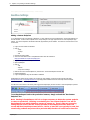
Adding a Custom Endpoint:
To use PeopleImport with a test instance of Salesforce, a custom endpoint must be specified and the "Use Custom Endpoint" box
must be checked. To add a custom endpoint click on "Proxy Settings" in the upper right hand corner of the PeopleImport login
window. The custom endpoint is the Salesforce API URL (https address) for the sandbox. See below for full instructions on how
to access this.
●
●
●
●
Login to the test instance of Salesforce
Click on:
❍ Setup
❍
Develop
❍
API
Generate the Partner WSDL
At the end of the WSDL locate a "soap:address location" URL that is similar to:
https://test.salesforce.com/services/Soap/u/23.0
●
Copy the URL (it is case sensitive)
●
Open PeopleImport
●
Click on:
❍ Edit
❍
Options
❍
Proxy Server Settings
●
Paste the URL in the Custom Endpoint box, check the box "Use Custom Endpoint" and Click "OK"
●
Restart PeopleImport
●
Login to PeopleImport using the test instance credentials
PeopleImport may prompt for the creation of a trial account. If this happens, create the trial account and email either
[email protected] or [email protected] requesting that the sandbox account be made fully functional. Multiple
sandboxes are permitted for one production instance.
The status bar on the bottom of the screen (when logged into PeopleImport) will show the URL in which PeopleImport is pointed.
To set PeopleImport back to the production instance, simply uncheck the "Use Custom
Endpoint" box.
Note: Starting in PeopleImport 2.X it is no longer necessary to delete the custom endpoint
to return to production. Checking or unchecking the "Use Custom Endpoint" box will let
PeopleImport know which Salesforce servers to connect to. There is also now a warning
letting the user know if the API version specified in the endpoint does NOT match the
current API that PeopleImport was built on. Earlier or later API's can typically be used, but
occasionally problems may arise with a particular API, therefore it is also best to have the
PeopleImport
Options, Proxy Settings & Sandbox Settings . 32
API in the custom endpoint match the API that the current PeopleImport is built on.
Linking Production and Sandbox Instances
Sandbox org ID's can be linked to Production such that scenarios created on one or the other can be run on either org
●
●
To link 2 Salesforce org's together, a request must be made via CRMfusion technical support by emailing
[email protected]
Keep in mind that whenever an existing sandbox is refreshed the old Salesforce org ID is deleted and a new org is created,
so a request to relink the new sandbox will required
More information on scenarios can be found in Scenarios.
See also
PeopleImport Options
Proxy Settings
PeopleImport
33 . Step by Step Instructions
Home > Step by Step Instructions
Step by Step Instructions
What is PeopleImport?
PeopleImport is a stand alone Windows based program that is designed to allow the end user to develop customized import
scenarios. These scenarios include customized passes to ensure duplicates are not created, but rather that existing Leads,
Accounts or Contacts are updated.
The application steps the user through various stages to take a spreadsheet of "People", map the input data to the fields in
Salesforce for Leads, Contacts and Accounts, compare to existing data based on customized matching techniques and ultimately
import the list, updating existing records and only importing new records. In addition Campaign links and Tasks can be attached
to any of the records as part of the import process.
Note: Although Accounts can be inserted or updated during the import process, they
cannot be manipulated independently. Contact data must be present in your input
spreadsheet, as Accounts are only affected based on the Contacts they are associated with.
Articles in this section
Stage 1 - Mapping
Stage 2 - Compare
See also
Welcome
Tutorial Video
Release Notes
Installation
Best Practices
Options, Proxy Settings & Sandbox Settings
Scenarios
PeopleImport Restore Instructions
FAQ
PeopleImport
Stage 3 - Matching
Stage 4 - Global
Stage 5 - Results and
Campaigns and Tasks
Processing
(optional)
Step by Step Instructions . 34
Home > Step by Step Instructions > Stage 1 - Mapping
Stage 1 - Mapping
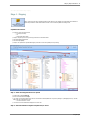
Stage 1 is where the input file is selected and fields from the data source are mapped to the appropriate fields in Salesforce.
Options are provided as to which fields should be inserted on new records and updated on existing records.
Capabilities & Features:
●
Support for various input data sources
❍ xls & xlsx (excel 2007)
❍
csv
❍
mdb & accdb (access 2007)
●
Ability to compare input source to just Leads, just Contacts or Leads and Contacts
●
Field level mapping customization
●
Field auto-map capability
●
Ability to scan input data for possible data integrity errors and fix errors when possible prior to processing
Step 1: Select Incoming Data Source for Upload
●
Select the file by clicking Select File
●
Browse to find the file and click Open
●
●
If an excel or access file has been chosen the user must select the worksheet/table name to process by clicking on it (will highlight in blue). Click the
Use on the right or double click to select
❍ This is not needed for .csv files
The number of records loaded will be displayed in red on the left
Step 2: Select the Salesforce Objects to Update and/or Insert
PeopleImport
35 . Step by Step Instructions
●
●
●
Select the appropriate radio button for which objects the input file should be compared to
❍ Leads only
❍
Contacts only
❍
Leads and Contacts
Lead fields will be displayed on the left
Contact and Account fields will be displayed on the right
❍ Contact fields appear first
❍
Scroll down to see Account fields (displayed in blue)
Step 3: Manually Map or AutoMap Input Columns to Salesforce Fields
●
Select
❍
to map the input columns to the fields in Salesforce
An attempt is made to match the columns from the spreadsheet to the fields in the tables selected
❍
Auto-Map does NOT require an exact match of column name to field name
❍
Since this is an "intuitive" mapping, always confirm fields were mapped correctly
❍
When electing to compare to Contacts, auto-mapped fields will map to BOTH Contact AND Account fields, and one input field can map to multiple
fields
●
Fields can be manually mapped by left clicking on the column and dragging and dropping under the correct field
●
A flag to the left of the column name indicates that a column was mapped
●
Fields MUST be mapped to "Show in Grid" and be used in Matching (Stage3)
●
To remove an unwanted mapping, right click on the mapped field and select "Remove Mapping"
Field Mapping Controls: Mappings can also be saved/loaded independently from a full scenario
●
This option is only available if a mapping has been setup and then saved for future use
●
Mapping should NOT be saved until Step 4 is followed below to adjust mapping options, but can be loaded once the input data file has been loaded
●
To save a mapping click Save Mapping, name the file and save it to a location on the local PC
●
Clear Mapping can also be selected to clear ALL existing mapping and start over
Step 4: Adjust Mapping Options as Needed
●
Overall Mapping preferences can bet set in Options,
, accessible in the lower left hand corner of PeopleImport
❍ Separate default mapping preferences for Leads vs. Contact/Accounts
❍
Option to prepend vs. append text area fields when electing to "Merge" the new data with the existing data
●
When a field is mapped, a box is displayed with various matching options on a field by field basis
●
Show in Grid: Checked displays the current Salesforce data for that field in the Final Results Grid
●
Insert: Checked ensures that the data from the incoming spreadsheet will be inserted into the field in which it is mapped during a new record creation
●
Update Options:
❍ Do Not Update: Do not update Salesforce data with data from the incoming spreadsheet when a match is found
❍
PeopleImport
Update: Always update the Salesforce data with data from the incoming spreadsheet when a match is found
Step by Step Instructions . 36
❍
❍
Update Only if Blank: Only update Salesforce data with the data from the incoming spreadsheet if the field in Salesforce is blank
Merge: This option only appears on applicable field types; long area text fields, multi-select pick list fields and boolean (true false checkbox)
fields. This will merge the value in the incoming spreadsheet with the existing value in Salesforce
Note: Merge CANNOT be set as an overall mapping default in PeopleImport Options and must be specified on a
field by field basis.
Best Practice: Owner fields and Company/Account Name field mapping should be reviewed carefully and may
want to change to "Do Not Update" or "Update if Blank" (since these fields are never blank they will not be
updated)
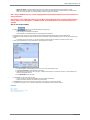
Step 5: Run the Check Utility
●
●
●
●
Select the
button to scan input data for possible data integrity errors
❍ Check for standard required fields
❍
Verify formatting of email addresses and websites
❍
Confirm that data in the spreadsheet adheres to the field type definition in Salesforce
Depending on the type of error, the record may NOT be inserted/updated (badly formatted email addresses, required fields missing)
PeopleImport may fail completely and close when processing due to "mismatched" data types (attempting to insert a text value into a number or date
field)
❍ For example, trying to insert a range, e.g. 100-500 into Number of Employees field, when Salesforce is expecting an actual number
When errors are identified they can be corrected directly in the PeopleImport user interface
1. Error Message Details: Details regarding the nature of the error (current value displayed in red)
2. Can Copy Current Value to the edit window to make changes
3. Update the data in the edit window to the correct value. If missing data is detected for a required field, "Unknown" or "Not Supplied" can be
entered as a placeholder if desired
4. Select Update Value to save the change
●
Click the Error -> button to access the next error
❍ Continue until all errors are fixed, and select OK to save all the changes in PeopleImport
❍
Changes are updated in data cache (not made directly to the input file)
●
The Record buttons reviews the rows with errors, either before or after fixed (e.g. review the changes made)
●
If multiple errors are found, it is best to update the data directly in the spreadsheet and then reselect the input file
See also
Stage 2 - Compare
Stage 3 - Matching
Stage 4 - Global Campaigns and Tasks (optional)
Stage 5 - Results and Processing
PeopleImport
37 . Step by Step Instructions
Home > Step by Step Instructions > Stage 2 - Compare
Stage 2 - Compare
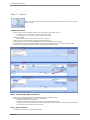
Stage 2 is where the user decides if the input file should be compared to all records in Salesforce of just a subset of Leads,
Contact, or Accounts.
Capabilities & Features:
●
Ability to compare the incoming spreadsheet to all Leads, Contacts and Accounts or just a subset of records
❍ For strategic reasons, e.g. only compare to records with a particular record type
❍
●
For volume reasons, e.g. only compare to records in a particular state or country
Multi-Table join capability
❍ Only compare to "Customer" Contacts (where the Account.Type = Customer)
●
Defaults to "Use All" - compare input data to ALL Leads, ALL Contacts and ALL Accounts
●
If NO limiting conditions need to be specified, click Next in the bottom right to move directly to Stage3 - Matching
●
A particular section may be greyed out based on whether the input data is being compared to just Leads, just Contacts or Leads and Contacts
●
Account matching only used when specifiying New Contact - Existing Account matching steps in Stage 3
Step 1. Select the Field to Base a Condition On
●
●
All fields from the particular table and related tables, including custom fields, are available for selection
To access fields in a related table select the "+" to the left of the table name
❍ This will display the fields from the related table
❍
❍
Multi-table join is available for Parent tables only, based on foreign key relationships between tables
For example, the Account table can be accessed from within the Contact table, because the Account ID is physically stored on the Contact table,
but the Contact table is NOT accessible from the Account table.
Step 2. Select the Operator
●
Available operators will change based on the type of field selected
PeopleImport
Step by Step Instructions . 38
●
"!=" represents "not equal to"
●
When using dates, operators will include "Today", "Yesterday", etc.
●
For date and number fields, additional operators are included for specifying blank values (see below for specifying blanks for text fields or empty values
for picklist fields)
❍ Dates: "Empty Date" & "Not Empty Date"
❍
Numbers: "Equals Null" & "Not Null"
Step 3. Specify a Value(s)
●
Text Fields: Type in the value
❍ Multiple values for the same field can be separated by commas. DO NOT PUT A SPACE AFTER THE COMMA.
■
e.g. State = ma,nh,me will be translated to State = ma or State = nh or State = me
■
❍
●
Picklists: Select the value from the specified list
❍ Multiple values can be selected and will be translated as "or"
❍
Only valid picklist values are shown (as defined in Salesforce)
❍
Right click the list of values to bring up additional selection options:
■
●
Values entered are not case sensitive
To specify a blank value, leave the value box empty
Add Value To List - Allows for the addition of a value for selection purposes only
■
This will not add a value as an active option to the picklist in Salesforce
■
Filter List - Allows for easy searching a long picklist based on a character string to quickly find a value(s)
■
Reset - Will strip all filters and added values and reset to the values in your Salesforce instance
Dates: The current date will default in the value window. Click the arrow on the right to access a calendar and select a specific date.
❍
❍
To isolate a specific day, regardless of time for a date/time field (e.g. created date), specify 2 conditions to isolate the 24hr period
■
e.g. Created Date >= Jun 01 2010 00:00 AM, Created Date <= Jun 01 2010 11:59 PM
The value is ignored when using an operator such as "Today" or "Yesterday"
Step 4. Add Condition(s)
●
Select Add Condition to add the condition to the list of current conditions
●
By default all conditions are "AND'd" together. To create "OR" groups see Step 5
●
To delete one condition from the list, click the box to the left to highlight the condition and press the delete key on the keyboard
Step 5. Creating "OR Groups"
●
●
To create "OR" groups, check Expert Mode
Change the "OR Group" number for specific conditions (click on the number on the right and adjust up or down). All conditions WITHIN a group (e.g.
have the same group number) are AND'd and BETWEEN groups are OR'd. For example:
Reads as:
PeopleImport
39 . Step by Step Instructions
(MailingState=ma AND LeadSource=External Referral) OR (MailingState=ny AND LeadSource= Trade Show)
●
Unchecking Expert Mode will cause all conditions to be and'd once again
See also
Stage 1 - Mapping
Stage 3 - Matching
Stage 4 - Global Campaigns and Tasks (optional)
Stage 5 - Results and Processing
PeopleImport
Step by Step Instructions . 40
Home > Step by Step Instructions > Stage 3 - Matching
Stage 3 - Matching
Stage 3 is where the user decides how the incoming data will be compared against the Leads and/or Contacts
already loaded in Salesforce. The user can select from a near unlimited (within reason) number of Lead and Contact
matches and they can be performed in any order. The Match Steps act as a filter on the incoming data, if
successfully matched in one of the Steps, then the updates from Stage 1 are processed.
If no match is found to an existing Salesforce record, then a new record can be created.
Capabilities & Features:
●
●
●
●
●
●
●
Ability to create filters, matching steps, to match data from incoming spreadsheet to Salesforce records to determine which records will be
updated vs. inserted
Various techniques are available to find non-exact, but similar matches, for Company/Account Names, First Names, Phone and Address data
❍ Customizations can also be made to the Account Cleaning List to specify how the Cleaned Account Name mapping type identifies
duplicate Account or Company names
The user has complete control over which fields should be included in the matching steps and can create as many matching steps as desired
in order to create a multi-pass strategy all IN ONE IMPORT PASS
New Contacts can be created ONLY if the Account exists, and Leads created if neither the Contact nor the Account exists all IN ONE IMPORT
PASS with the addition of New Contact - Existing Account matching steps
When new Contacts AND new Accounts are are being added, criteria can be specified to match Account fields WITHIN the input file to avoid
creating duplicate new Accounts
❍ e.g. multiple new Contacts can be linked to one new Account
Tasks and Campaign Links can be created and assigned to records that matched in a specific step
❍ If all records in the input file should be assigned to the same campaign or should get the same task, then these options in Stage 3
should be left unchecked and assigned globally in Stage 4
Campaign ID's and Status can be pulled from the input file such that input records can be assigned to different Campaigns ALL IN ONE PASS
Articles in this section
Setup Matching
Criteria
Final Matching
Conditions
Campaigns and Tasks
Mapping Types
See also
Stage 1 - Mapping
Stage 2 - Compare
Stage 4 - Global Campaigns and Tasks (optional)
Stage 5 - Results and Processing
PeopleImport
41 . Step by Step Instructions
Home > Step by Step Instructions > Stage 3 - Matching > Setup Matching Criteria
Setup Matching Criteria
Step 1. Develop Filters for Duplicate Searching
●
Specify criteria to match data from incoming spreadsheet to Salesforce to determine updates vs. inserts
●
Two Match Steps and Final Matching Conditions are always created
●
One matching step per object (Leads and/or Contacts) is required
●
Additional Matching Steps can be added by selecting the appropriate button at the top of the screen
●
Existing Steps can be cloned for ease in making minor mapping changes, e.g. clone an existing step for first name, last name and email and delete
the match for first name so the resulting step matches on just last name and email
❍
To clone a step, highlight the step and select
on the right
●
If only one step is desired, the second step will need to be deleted
●
Steps are evaluated in order, more RIGID matches should be performed first
❍
●
●
To delete a step, highlight the step and select
on the right
The order of Match Steps can be changed by selecting the
buttons on the right
❍ May want to move Contact Step(s) before Lead steps in case the same "person" is duplicated in Salesforce as the first one it finds is the only
one that will be updated
Final Matching Conditions applies to all records that DID NOT match in one of the Matching Steps, these are the NEW records that will be inserted
More information on Final Matching Conditions can be found in Step by Step Instructions -> Stage 3 - Matching -> Final Matching Conditions.
Step 2. Select Field Matching Criteria
PeopleImport
Step by Step Instructions . 42
1. Add Match Condition: Select to add a new matching condition
2. Field to Match: Select field to match from drop-down list of fields mapped in Stage 1
❍ When picking fields for New Contact - Existing Account Match steps, only fields mapped to Account fields will be available
3. Match Category: Typically left as "All" to display all the Mapping Types available in step 4
4. Mapping Type: Various techniques are available to find non-exact, but similar matches
5. Fuzzy, Transpose & Alpha Clean: Optional to further "loosen" match
❍ Match Blank: Check this box to match blank values from the spreadsheet to blank values in Salesforce (will match where both are
populated and the same or both blank)
More information on Mapping Types/Options can be found in Step by Step Instructions -> Stage 3 - Matching -> Mapping Types.
●
Repeat steps 1-5 until all matching criteria has been entered for this particular Step
●
ONLY records where the mapped fields are populated will be used for comparison (except if match blank is selected for a particular field)
●
To match a blank to a non-blank, remove the field from mapping altogether (will also find matches where the field is different)
●
To remove one matching item click the box on the left to highlight, and select "delete" on your keyboard
●
All fields listed in a step must match for the record to be considered a match for that Step
❍ Conditions are AND'd not OR'd
Step 3. Rename Steps (optional)
●
By default Steps are numbered and "Named" for the object being compared to, but the name can be customized
1. Highlight the step to be renamed and click
2. Enter the new name in the pop-up box
❍ It is recommended that the Object Name be included in the Step Name for clarity
3. Click OK to save
❍ New name will now display on the left and in the actual step
Step 4. Add Additional Matching Steps (optional)
●
Select the appropriate button at the top to add an additional step by object
1. Adding Lead or Contact Match Steps
PeopleImport
43 . Step by Step Instructions
●
New Steps are always added after all existing Lead and Contact steps, but can be moved up or down in sequence
2. Adding New Contact - Existing Account Steps
●
●
●
Steps will always be added AFTER Lead and Contact match steps as the purpose of this step is to add a NEW Contact to an EXISTING Account
❍ Steps can be moved up or down in sequence within existing Account Matching Steps only
Fields available for matching will be any fields mapped to Account fields in Stage 1
An option to Match Account Ownership is available - located just below Add Match Condition
❍ If the Owner of the matching Account is inactive, then the Contact will be owned by the current user as a new Contact cannot be inserted
with an inactive owner
Step 5. Manipulating Steps
●
●
Steps are evaluated in order and one record from a spreadsheet will ONLY match to one record in Salesforce (Lead or Contact)
Move a step up or down to change the order of evaluation
❍ Rigid steps should precede looser steps
❍
●
●
May want to move Contact Step(s) before Lead steps in case the same "person" is duplicated in Salesforce as the first one it finds is
the ONLY one that will be updated
Delete any empty Match Steps
Clone existing steps for ease in making minor mapping changes
❍ e.g. clone an existing step for first name, last name and email then delete the match for first name so the resulting step matches on just last
name and email
❍
Cloned steps are added after existing steps, but can be moved
Step 6: Final Matching Conditions
●
●
If no match is found in any of the object matching steps, the record can be inserted using either Create New Lead, Create New Contact/New
Account, or Do Nothing can be selected to just ignore the new record
This step should always be reviewed to ensure that the appropriate action is taken for the new record
❍ If matching to just Leads or Leads and Contacts, the default setting is to create a new Lead
■
An option to Use Lead Assignment Rule is available when adding a new Lead, but is NOT checked by default
❍
If matching to just Contacts, the default setting is to create a new Contact and new Account
■
A new Account needs to be created so that the Contact can be associated with an Account
■
Mapping can be specified such that duplicate new Accounts will not be created
■
e.g. One new Account can be created with multiple new Contacts
More information on Final Matching Conditions can be found in Step by Step Instructions -> Stage 3 - Matching -> Final Matching Conditions.
PeopleImport
Step by Step Instructions . 44
Review and Update Cleaning Lists
●
Click on the appropriate button to edit
●
Add common Punctuation/Suffixes/Prefixes specific to your industry, or common nicknames
●
Additions are added to the end of the list
●
Lists invoked when using "Cleaned Account Name" and "FirstName" mapping types
More information on mapping Types/Options can be found in Step by Step Instructions -> Stage 3 - Matching -> Mapping Types.
See also
Final Matching Conditions
Campaigns and Tasks
Mapping Types
PeopleImport
45 . Step by Step Instructions
Home > Step by Step Instructions > Stage 3 - Matching > Final Matching Conditions
Final Matching Conditions
●
●
If no match is found in any of the object matching steps, the record can be inserted using either Create New Lead, Create New
Contact/New Account, or Do Nothing can be selected to just ignore the new record
This step should always be reviewed to ensure that the appropriate action is taken for the new record
Create New Lead
When matching to just Leads or Leads and Contacts, the default setting is to create a new Lead
●
●
If New Contact - Existing Account steps have been added to the matching criteria, then a new Lead will only be created if neither the
Contact or Account existed
When creating a new Lead, a Lead Assignment Rule can be selected to assign Lead Ownership
❍ Check Use Lead Assignment Rule and pick the assignment rule to be used
■
Default is NOT to use an assignment rule
❍
●
●
If left unchecked, then the Leads will be assigned to the owner specified in Stage 1 mapping
■
If no owner field mapped in Stage 1 the Leads will be assigned to the current user that is logged into PeopleImport
Active assignment rules are listed first in the drop down list, but inactive rules can also be selected
❍ If an inactive rule is selected, Salesforce will use the inactive rule to assign the Leads
To trigger user emails for new Leads assigned using an assignment rule, go to Options and check Trigger User Emails
Create New Contact/New Account
When matching to just Contacts, the default setting is to create a new Contact and new Account
●
●
If matching to Leads and Contacts, Create New Lead is selected by default but can be switched to Create New Contact/New Account
If Create New Contact/New Account is selected a NEW ACCOUNT WILL ALSO BE CREATED to link the new Contact to
❍ Assuming "New Contact - Existing Account" match steps were specified, then this action would only apply where neither the
Contact nor Account existed
New Account Settings (optional)
This option can be used to avoid creating duplicate NEW Accounts by matching fields on the incoming spreadsheet.
PeopleImport
Step by Step Instructions . 46
NOTE: This option DOES not look for existing an account to add the new Contact to, that is done using the "New
Contact - Existing Account" matching steps.
1. Limit New Account Duplicates by Field
●
●
Unchecked: One new Account will be created for every new Contact
Checked: Matching criteria can be specified to look for duplicate NEW Accounts in the input data, so that only one new
Account will be created with multiple new Contacts linked to it
2. Specify Account Matching Criteria
●
The matching will take place on the rows in the incoming spreadsheet
●
Match Conditions are created the same as in Matching Steps
●
If fields match, the result will be one new Account with multiple new Contacts
Do Nothing
●
Do Nothing will ignore all records that could not be matched - no action will be taken for these records
See also
Setup Matching Criteria
Campaigns and Tasks
Mapping Types
PeopleImport
47 . Step by Step Instructions
Home > Step by Step Instructions > Stage 3 - Matching > Campaigns and Tasks
Campaigns and Tasks
Matched records can optionally be assigned to existing Campaigns, and/or Tasks can be created.
●
Creating Campaigns or Tasks in a particular Step allows specific Campaigns/Tasks to be broken out by Object Type (Leads vs.
Contacts) and/or by operation (Update vs. Insert)
❍ A Task to "Offer a free product sample" can be assigned in "Final Matching Conditions" only, such that it will apply just to
new records
❍
●
A global task to "Offer a thank you gift" could then be specified in Stage 4 which will be applied to ALL records that were
not assigned a Task in one of the "Matching Steps", e.g. the existing records
If all records in the input file should be assigned to the same Campaign or get the same
Task, then leave unchecked and assign globally in Stage 4
More information on Creating Campaign Links and Tasks can be found in Step by Step Instructions -> Stage 4 - Global Campaigns and
Tasks.
Creating Campaign Links (Campaign Member Records)
1. Pick a Campaign
●
●
Check if a specific Campaign should be assigned to this group of matched records
Pick desired Campaign from the drop down list
❍ Only active Campaigns are listed
❍
Or, Access Campaign ID from input file
■
Only Campaign ID's, not Campaign names, can be mapped from an input source
2. Select Member Status
●
Select a Campaign Member Status to assign
❍ A drop down list of valid statuses is provided for Campaign selected from the drop down list
❍
If Campaign ID is specified from input file a Status must also be selected from the input file
■
If the Status is not valid for that Campaign the default campaign member status will be assigned
instead
Note: Use a column header of "Campaign Member Status" for this field instead of just "Status"
as the API name for the standard Lead Status field is "Status". If "Status" is used for the
campaign member status column, and fields are auto-mapped in Stage#1 then this field will
map to the Lead Status field, which will result in incorrect data in this field.
Creating Tasks
●
Check if a specific Task should be assigned to this group of matched records
●
Fill in the Task fields listed
●
When assigning due dates use specified timetables (Today, Tomorrow, Next Week, 15 or 30 Days) or pick the icon to the right
to switch to calendar mode
PeopleImport
Step by Step Instructions . 48
●
Emails cannot be sent for Tasks but Set Reminder can be checked to create a pop-up reminder in Salesforce
●
By default tasks are assigned to the Object owner, ownership overrides can be specified in Stage 4
See also
Setup Matching Criteria
Final Matching Conditions
Mapping Types
PeopleImport
49 . Step by Step Instructions
Home > Step by Step Instructions > Stage 3 - Matching > Mapping Types
Mapping Types
Match Categories
●
All - All Categories
●
Alpha - Techniques for text
●
Contact - Techniques specifically for dealing with Contact names
●
CRM - Techniques for Customer Relationship Management Categories
●
Geo - Techniques for address information
●
Internet - Techniques for domain information
●
Numeric - Techniques for dealing with number based matches
Mapping Types
Type Description:
The
Found in
Category:
All, CRM
Acronym mapping type can be used to create an acronym for a Company/Account Name by using the first letter of every word in the name.
Note: If the Company/Account Name contains only 1 word and the word is 5 letters or less, it will be considered to be
an acronym already.
Example:
International Business Machines -> I.B.M. -> IBM
The Acronym (Cleaned Name) mapping type can be used to create an acronym for a Company/Account Name AFTER applying the Account Cleaning List. See
the "Cleaned Account Name" mapping type below for more details regarding the Account Cleaning List.
All, CRM
Example:
The Hewlett Packard Company -> H.P. -> HP -> Hewlett Packard Limited
All, CRM
The Cleaned Account Name mapping type uses the built in Account Name Cleaning List. To access the Cleaning list tool select
the upper right hand corner of Stage 3 - Matching.
in
This list is saved locally on the users PC as a .xml file in the \PeopleImportData\ReplaceList\ directory (replacelist.xml). To share this list across multiple PeopleImport
users refer to the following solution available from our public knowledgebase: Sharing Cleaned Account & Nickname List Among Users
The cleaning list standardizes abbreviations, ignores common punctuation and removes common business prefixes and suffixes. These lists are customizable for
language(s) and/or line of business.
We recommend that customers review these lists and customize as needed for better matching.
1. Default values included in the list when PeopleImport is installed
2. Values manually added in this example
3. Click here to type in more customizations
4. Click "Save" to save any changes
Three tabs are provided for customization:
●
Replace: Anywhere it finds the "existing value", replace with the "new value" for matching purposes only
❍ Used to ignore common punctation and match common abbreviations to the corresponding long form
❍
❍
●
The "long" form of a word should always be listed first to avoid replacing a "portion" of a word with the new value
■
e.g. If "ctr -> center" is specified the word "electric" becomes "elecenteric" and will not match correctly
An existing value will be ignored if the new value is left blank (e.g. for common punctuation)
Suffix removal: Ignore suffix(s) at the END of the name
PeopleImport
Step by Step Instructions . 50
❍
●
Will ignore multiples, e.g. Co., Inc.
Prefix removal: Ignore prefix at the BEGINNING of the name (not shown above)
❍ Existing values include "The" and "Dept of"
Note: The lists are NOT case sensitive and punctuation SHOULD NOT be included in abbreviations (replacements),
suffix or prefix lists (since common punctuation is already ignored in the replace list).
The Country Match mapping type is used to standardize field values for the recognized countries of the world. It will recognize the long name of a country, the 2
digit ISO short form, the 3 digit ISO short form and the numeric ISO country value as possible matches of each other.
All, Geo
All,
The Domain mapping type is used when mapping web pages and/or email addresses. It allows for the independent analysis of the domain information contained
Internet
within the URL or the email address. For email addresses it uses any information to the right of the @ sign. For web pages it parses the XXXXX.com portion. This
mapping types allows for easy comparison of web page field vs. web page field or email field vs. email field. It also allows for the comparison of email addresses to web
pages and vice versa.
See also
Relaxed Domain for a looser domain match (matches the word before the period).
The Exact mapping type is a 100% match of every character, assuming no additional mapping options apply (see Fuzzy, Transpose & Alpha Clean at the end of this
document)
The First Name mapping type uses the built in Nickname List. To access the Nickname list select
3 - Matching.
All, Alpha,
Numeric
All,
in the upper right hand corner of Stage Contact
The Nickname list will see Bill, William and Billy as potential duplicates/matches of each other. This list is also customizable by the end user for localization or for non
contact substitution on any field by replacing the nickname list with synonyms.
The First XX Letters mapping type is used to compare the first XX characters in a field. When selected a pop up box will appear in order to specify the number of All, Alpha
characters on which to match. Applicable to text fields only.
The First XX Words mapping type is used to compare the first XX words in a field. When selected a pop up box will appear in order to specify the number of words All, Alpha
on which to match. Applicable to text fields only.
All,
The Numeric mapping type is used to compare only the numeric values in a field. All other characters, such as spaces or punctuation, will be ignored by the deduper.
Numeric
A field with a value of "Apt # 31" is seen by the deduper as the numeric characters "31", ignoring "Apt #". Numeric is also commonly used with phone numbers when
you JUST want to ignore punctuation and all alpha-characters and just look at the full series of numbers.
Note: When used on a text field that contains numbers, leading zeros will be ignored. If leading zeros should NOT be
ignored, then use EXACT as the mapping type and check "alpha-clean" as an additional matching option.
All, CRM
The Relaxed Address Match mapping type parses the street address to the lowest common denominator. Based on North American standards it has also
proved effective with most country address formats.
Example:
123 NW Pavillion Ave
123 Pavillion St, Suite 400
123 Pavillion Avenue, Fl 4
123 Pavillion
123 Pavillion Rd.
Are all seen as "123 Pavillion"
Note: If there no street designator (e.g. St, Rd, Ave etc.) then the address will not be parsed into its individual components. In this case the street
address is returned with no changes for matching.
New in version 2.10.10! The Regular Expression Y/N mapping type returns a Yes or No value if the data passes the Regular Expression vs. returning the
matchng value or a blank like the standard Regular Expression mapping type.
All, Alpha
Example: Create a Regular Expression to see if a field was 5 digits, blank or 5 chars:
23232 = Yes
232323 = No
= Yes
Aabbc = Yes
PeopleImport
51 . Step by Step Instructions
Bob = No
New in version 2.1! The Regular Expression mapping type can be used to create custom mapping types for any text field. Knowledge of regular expressions is All, Alpha
required to use this mapping type and customers are responsible for building their own expressions. There are several free regex tutorial websites online that users may
want to reference to learn more.
Regular Expression mapping will use the first match located in the string:
Example:
Regular Expression: [0-9]+
Input data: 123 S Main St
Filtered result: 123
Input data: 45 E. Center
Filtered result: 45
New in version 2.10.10! The
All,
Internet
Relaxed Domain mapping type matches top level domains for websites by matching the word before the period.
www.crmfusion.com
crmfusion.com
http:\\www.crmfusion.com
crmfusion.co.uk
www.crmfusion.com\demandtools\downloads
Are all seen as "crmfusion"
Helpful for email to website matches
The Relaxed NA Phone Match mapping type removes all non-numeric characters and spaces, leading 0's and 1's, area codes and extensions on the back end, All, CRM
returning the 7 primary digits of the phone number. If just 7 digits are left use those 7 digits, else just return digits 4 - 10. It will not match the "Phone-word" values and
will trim off the "SPOT" in the phone number and only look at the numeric portion.
Example:
+1 879 555 1212 ext 500
(879) 555 1212
1.879.555.1212 ext 408
Are all seen as "5551212"
Note: This is based on a 10-digit North American phone number. Although it can be used with international phone
numbers (will just return 7 digits in the middle), the Numeric mapping type is the recommended mapping type to be
used with international phone numbers.
Since this mapping type IGNORES AREA CODES and returns just the "555-1212" portion of the phone number IT
SHOULD NOT BE USED BY ITSELF (only use when additionally matching on other fields to avoid updating the wrong
record).
The
All, CRM
Salesforce.com ID Match mapping type is used to match any Salesforce.com objects 15 digit ID to its 18 digit equivalent ID and vice versa.
The Street Address Match mapping type is a slightly more rigid criteria than the Relaxed Address Match mapping type. The deduper will ignore the differences
in street type short forms such as crescent - cres, road - rd, street - st, etc. and match all standard abbreviations in the street address to their long forms (e.g. South>S, Floor ->Fl etc). In order for an address to match though, all the components of the address need to be in both records (e.g. if one has "North" the other needs at
least "N", if one has a "Suite 100" the other needs at least "Ste 100").
New in version 2.10.10! The
State Match mapping type matches US State and Canadian province abbreviations to their long names
All, CRM
All, Geo
MA -> Massachusetts, CA -> California, ON -> Ontario
The
Zip 5 and 9 mapping type will automatically match USPS 5 and 9 digit zip codes without the need to standardize them to a common number of digits.
All, CRM
Additional Mapping Options
Option:
Description:
Fuzzy
Phonetics engine capable of analyzing words for how they sound when pronounced. Through a technique of removing vowels and analyzing the
remaining consonants the fuzzy engine works well for matching fields with spelling mistakes.
Applicable
Mapping
Types:
Cleaned Account
Note: Fuzzy will IGNORE numbers when matching, as numbers do not have a phonetic equivalent,
Name
therefore, Girl Scout Troop 100 and Girl Scout Troop 780 will be considered a match if fuzzy was checked. Exact
DO NOT USE for matching phone numbers or other fields that contain numeric characters that you do not FirstName
wish to ignore (e.g. street addresses).
Transpose The transpositional engine allows for fields to appear as duplicates even when there are differences in their word order. For example, "Jones, Smith
and Jackson" will appear to be a duplicate of Jackson, Smith and Jones.
AlphaClean
Cleaned Account
Name
Exact
FirstName
Street
The alpha cleaner extends some of the capabilities of the account name cleaner to other fields for easier matching. The alpha cleaner is used for ascii Cleaned Account
(North American) data to ensure that the only characters that are analyzed are the 26 characters of the English alphabet and the numbers 0-9. Any
Name
other character that the field may contain will be ignored by the deduplication matching algorithms.
Exact
FirstName
Numeric
Street
PeopleImport
Step by Step Instructions . 52
Zip 5 and 9
See also
Setup Matching Criteria
Final Matching Conditions
Campaigns and Tasks
PeopleImport
53 . Step by Step Instructions
Home > Step by Step Instructions > Stage 4 - Global Campaigns and Tasks (optional)
Stage 4 - Global Campaigns and Tasks (optional)
Stage 4 is where Campaign links and Tasks can be created globally for all records in the input file, or any records
that were NOT linked to Campaign or assigned a Task in any of the matching steps in Stage 3. This step is optional
and can be skipped if no Campaigns or Tasks need to be assigned in the import.
Capabilities & Features:
●
●
●
Ability to create Campaign Links and up to two Tasks for each record in the input file
When assigning Campaigns, can pick one Campaign to apply to all records, or use a Campaign ID and Status from the input file
❍ The ability to assign the Campaign ID from the input file allows different records to get assigned different Campaigns
When creating Tasks, reminders can be set for Task owner
1. Create Global Campaign Links (Campaign Member Records)
Note: If the selected Campaign already exists on a record that was flagged as update, the existing
Campaign Member link will be updated to the status selected.
Option 1: Select a Campaign From the Drop Down List
1. Check Assign object to campaign to begin
2. Pick desired Campaign from the drop down list
❍ Only active Campaigns are listed
3. Select a Campaign Member Status to assign
❍ A drop down list of valid statuses is provided for the Campaign selected
Option 2: Select Campaign ID From the Input File
PeopleImport
Step by Step Instructions . 54
1. Check Assign object to campaign to begin
2. Check Access Campaign ID from input data to display the fields from the input file
3. Select the Campaign ID field
❍ Only Campaign ID's, not Campaign names, can be mapped from an input source
❍
No checking is done to ensure that the Campaign is active (or that the ID is valid)
■
A Campaign Member Record will be created if the Campaign is inactive
4. Select a Campaign Member Status field
❍ If the status is not valid for that Campaign the default campaign member status for that Campaign will be assigned instead
Note: Use a column header of "Campaign Member Status" for this field instead of just "Status" as the API
name for the standard Lead Status field is "Status". If "Status" is used for the campaign member status
column, and fields are auto-mapped in Stage#1 then this field will map to the Lead Status field, which will
result in incorrect data in this field.
2. Creating Tasks
1. Check Create Task if a Task should be created
2. Type a Subject for the Task
3. Type in Comments (optional)
4. Select the Case Status. Default "Not Started"
❍ Click the arrow on the right to show all valid case statuses
5. Select the Case Priority. Default "Normal"
6. Specify a Due Date. Default "Today"
❍ When assigning due dates use specified timetables (Today, Tomorrow, Next Week, 15 or 30 Days) or pick the icon to the right to switch to
calendar mode
7. Set Reminder can be checked to create a pop-up reminder in Salesforce. Default not checked
Note: Emails cannot be sent for Tasks
3. Additional Task Creation (optional)
●
Can create an additional Task for all records in the input file
●
For users who do not utilize Campaigns, this can be used to create a completed Task on all records, e.g. "Attended Trade Show"
●
This Task will be created for ALL records in the input file
4. Task Ownership Overrides
PeopleImport
55 . Step by Step Instructions
●
By default all Tasks are assigned to the Lead or Contact owner
●
Options to assign Tasks to someone other than the Lead or Contact Owner
●
A drop down list of active owners is provided for owner selection.
●
Since Tasks cannot be assigned to a group, queue, or an inactive owner, it is recommended that at least the last 2 boxes be checked and a specific
user selected to own those Tasks. If left unchecked and:
❍ The owner is a group or a queue Task creation will fail
❍
The owner is inactive, the Task will not fail, but instead will be inserted with the current user as the owner
1. Check this box if all Tasks should be owned by a specific user
2. Check these boxes to assign Tasks to a user for Leads owned by a group or a queue, and updated Leads/Contacts owned by an inactive owner
See also
Stage 1 - Mapping
Stage 2 - Compare
Stage 3 - Matching
Stage 5 - Results and Processing
PeopleImport
Step by Step Instructions . 56
Home > Step by Step Instructions > Stage 5 - Results and Processing
Stage 5 - Results and Processing
Stage 5 is where the search for duplicates is intitiated. The results can then be reviewed and verified, and ultimately committed
to Salesforce.
Capabilities & Features:
●
●
Ability to group the results for easier review
Individual records can be checked or unchecked for processing
❍ If results are grouped, entire groups can be checked or unchecked for processing
●
Counts provided as to how many records of each type will be updated vs. inserted
●
Links to matched records are provided to review the matched record directly in Salesforce
●
An option to show specific fields from the matched records in Salesforce is provided
❍ Will display all data from the matching Salesforce record for fields checked as Show in Grid in Stage 1 Mapping
❍
Matched fields will be highlighted for easier review
●
An option to Export Grid Data is provided to export the results to a spreadsheet
●
Restore Files are created after processing for all updated records which can be used to "undo" an import if needed
●
Two Final Results files are created after processing that contain all the fields from the grid and the Salesforce ID's for all the inserted/updated Leads,
Contacts and Accounts.
❍ Formatted xml file that looks just like the grid, and a raw data file
❍
❍
Serve as a summary of what took place during the import
Raw Data file also contains the Owner ID's for all the Leads, Contacts and Accounts
■
Can be used as input to another application (e.g. DemandTools) to mass insert additional objects (e.g. Opportunities, Custom Objects,
Custom Tasks etc.)
Step 1: Finding Matches
●
Select
❍
in the lower left hand corner to begin the search
A status screen is displayed showing the download progress
PeopleImport
57 . Step by Step Instructions
●
●
●
Once the search is complete a results grid is displayed
The results grid displays how data in the spreadsheet matched to data in Salesforce
❍ The grid is initially organized based on the row order in the spreadsheet, but the results can be grouped for easier review (see Step 3 below for
instructions on grouping the results)
Grid Headings
1. Use: Checked indicates that this record should be processed
2.
Object: The object, Contact or Lead, to be updated or inserted
3.
Action: Will the record be updated or inserted
■
Update: A matching record was found and will be updated
■
■
■
New Contact - Existing Account: A matching Account was found, but no matching Contact
New Contact - New Account: "Create New Contact/New Account" was selected in Stage 3 Final Matching, and neither the Contact NOR
the Account was found
New Lead: "Create New Lead" was selected in Stage 3 Final Matching
4.
Step: Specifies the step from Stage 3 the record "matched" in
5.
Match: Blank if "New", Salesforce id of matching record if update
■
This is an active link that check selected will bring up the record within Salesforce for review
6.
Parent Account: If Contact update or New Contact - Existing Account then will contain the Salesforce Account ID for the matching Account
■
This is an active link that check selected will bring up the record within Salesforce for review
7.
All the input columns on the spreadsheet
■
A scroll bar is provided at the bottom of the screen to scroll to the right to see all the fields from the input file
Step 2: Grouping Grid Results
●
Results can be grouped by column for easier review
❍ It is recommended that this be reorganized by Action and then Step within action
●
Drag the appropriate columns to the top of the screen to organize the results
●
Once grouped, entire groups can be checked or unchecked, expanded or collapsed by right clicking on the group heading
PeopleImport
Step by Step Instructions . 58
Step 3: Reviewing Results
●
By default all records are pre-checked for processing
❍ Matches should be reviewed to confirm that records were matched correctly
■
Entire groups can be unchecked if it seems that a particular Step matched records incorrectly
■
Individual records can be checked/unchecked by clicking the Use checkbox
Note: Any records that have been unchecked will NOT be processed when
is selected in the
bottom right hand corner to process the import. In other words, records that HAD been flagged as updates, will
NOT be added as new, but instead will not be processed at all. Although an entire step can be unchecked, if it
seems that Step was finding more mismatches than matches, it may be best to go back to Stage 3, remove that
step altogether, and refind the matches. That way, these records will be added as new. This could result in
some duplicates being created (if a few had matched but most did not), but it is better to potentially create a
few duplicates than update the wrong record.
●
Clicking the blue ID field will bring up the complete record in Salesforce
●
●
The record can be opened in a Salesforce window, or a "quick" view based on whether Use Salesforce to View Objects is checked in the
PeopleImport Options
Clicking the + next to a row will reveal the matching fields from a step and any fields with a check for Show in Grid in Stage 1
❍ Fields are listed in alphabetical order and matching fields are highlighted
Step 4: Grid Control Options
1. Buttons provided to check or uncheck records based on specified Action or as a whole
2. Export Data will create a spreadsheet with grid data
❍ Data can be exported as a "Formatted XLS file" (looks like the grid) or a "Data File" (regular excel file with no formatting or grouping)
❍
A copy of the grid is also written out to a formatted xls file AFTER processing the import (Final Results File) which will include any new ID's that
were created, as well as updating the Status column, so it is not necessary to export the grid results at this stage unless required for review offline
3. Counts provided with a breakdown by object of how many records will be updated or inserted in Salesforce
❍ If "New Account Settings" were provided to avoid creating Account Duplicates in Stage 3, then the Account insert count will indicate how
many UNIQUE new Accounts will be created
❍
The number of Updated Accounts is based on Contact Update records as the existing Account is updated along with the Contact, and "New Contact
- Existing Account" records
Step 5: Process Checked Objects
●
●
When ready to process the import select
in the lower right hand corner
An auto-check is performed to ensure that no bad data still exists in the spreadsheet which could cause records to not be updated/inserted or possibly
cause the entire import to fail and PeopleImport to shut down
❍ If bad data is detected, options will be provided to fix the data, cancel the import, or ignore bad data and import anyway
PeopleImport
59 . Step by Step Instructions
More information on how to "Check and Fix Errors" can be found in Step by Step Instructions -> Stage 1 - Mapping -> Step 5 (Note: Will not need to go
back to Stage 1 and select the "Check" button as selecting "Check and fix errors" will initiate the check process)
●
When the import completes a results screen will be displayed
1. Indicates if any errors occurred during the import
2. Link to the Logfile that was generated
■
If the import completes with errors, refer to the logfile as to the source of the errors
3. Restore files are generated for any records that were updated
■
Restore files will contain a before image of the records prior to any changes and can be used to "undo" the import
■
■
■
There will be one restore file for each object type, Lead and/or Contact that was updated
For Accounts there can be up to 2 files, one (AccountRestore) will contain restore info for all the Accounts that were updated in conjunction
with a Contact "Update", and another (AccountUpdateRestore) for all Accounts updated in conjunction with a "New Contact - Existing
Account".
■
If a restore is needed ALWAYS process the AccountRestore file PRIOR to the AccountUpdateRestore just in case the same account
was updated in conjunction with "New Contacts - Existing Account" AND a "Contact Update" (new records inserted prior to performing
updates to existing records).
A Default Restore File Extension (e.g. csv, xls, xlsx, mdb) can be specified in PeopleImport Options.
4. A FinalResults file is created which contains a copy of the grid AFTER the import completes
■
The Final Results file will now be populated with any new ID's created for inserted records and the Status field will indicate if the
update/insert was successful
■
■
If the word "Error" appears in an ID field this indicates that that particular record was not inserted, refer to the log file for details as to why
the insert failed
If Status indicates that an update was unsuccessful, refer to the logfile for details as to why the update failed
5. A FinalResultsDump file is created which contains all the grid data, but is a raw data file vs. a formatted xml file and additionally contains the
Owner ID's for all the Leads, Contacts and Accounts that were inserted or updated.
■
The file type will be the same as that specified for the restore files.
■
●
●
Since this file contains ALL the input data, Match ID's, and Owner ID's, it can be used as input to DemandTools MassEffect to mass upload
"custom" Tasks or any other objects that cannot be added using PeopleImport (e.g. Opportunities, custom objects etc.).
■
Be sure to include columns in the input file that will be needed to create these objects in the subsequent insert via DemandTools (ALL
fields that are on the input file - even unmappped fields - will be included in both of the Final Results files).
The blue links for the log and restore files are all live links and will pull up the files directly in excel.
Log and restore files are saved directly to your hardrive so they are accessible even after clicking OK in the completion message
❍ The exact locations of the files is specified in the File Paths tab in PeopleImport Options
Note: Instructions on how to "undo" an import can be found in PeopleImport Restore Instructions.
See also
Stage 1 - Mapping
PeopleImport
Step by Step Instructions . 60
Stage 2 - Compare
Stage 3 - Matching
Stage 4 - Global Campaigns and Tasks (optional)
PeopleImport
61 . Scenarios
Home > Scenarios
Scenarios
Scenarios can be created and then saved for future use for imports that use a standard
template and matching criteria for importing data.
Capabilities & Features:
●
Saved on a central server by Salesforce Organization ID for future use
❍ Commonly used for weekly webinar lists, standard purchased lists etc.
●
Sandbox Org ID's can be linked to Production such that scenarios created on one or the other can be run on either org
●
Saved Scenarios will include mapping, along with all the other settings in subsequent stages
Saving a Scenario
Once Stages 1 through 3 are complete a scenario can be saved by selecting
at the bottom of the screen.
1. Save Scenario as: Specify a unique scenario name
2. Category: Specify a Category to organize scenarios by (similar to a "folder")
❍ Scenarios can be grouped by Category or any other column
3. Click Save
❍ Will be prompted to "replace" if a scenario with the same name exists
●
Scenarios are saved on a central server by Salesforce Organization ID, NOT on the local PC.
●
All the information from each stage is saved in the scenario, including mapping
●
If a saved mapping was loaded before the scenarios was loaded (or fields were manually mapped and then a scenario was loaded), this mapping will
take precedence over the mapping saved in the scenario
❍ A pop-up warning will be displayed if field mapping is different in the loaded mapping from what was in the saved scenario
NOTE: If a mapping error occurs, be sure to double-check the matching fields in Stage 3 in case this field was
listed as a field to match on, as it will have been removed from the matching step also.
Loading a Saved Scenario
Select
PeopleImport
at the bottom of the screen to load a presaved scenario AFTER selecting an incoming data source.
Scenarios . 62
●
When loading a scenario the Salesforce Org ID that the user logged in on will be displayed at the top of the screen.
●
Scenarios can be grouped/organized by dragging any of the column headers to the upper left hand side of the Scenario Screen.
●
Select Load to load the scenario from the server
●
Select Delete to delete the scenario from the server
❍ Deleted scenarios cannot be restored
Linking Production and Sandbox Instances
●
When loading a scenario can select the Linked Scenarios tab to access scenarios saved on a linked organization (e.g. sandbox)
❍ To link 2 Salesforce org's together, a request must be made via CRMfusion technical support by emailing [email protected]
❍
❍
Keep in mind that whenever an existing sandbox is refreshed the old Salesforce org ID is deleted and a new org is created, so a request to
relink the new sandbox will required
Once a scenario has been tested in the Sandbox, it is best to resave it on the Production org, so it can be accessed even when an old sandbox is
deleted (refreshed)
Clearing a Scenario
Select
to clear mappings, all selections in Stages 2 - 4, and return all options to their default settings.
●
The selected input file will remain loaded
●
If matches had been found in Stage 5, these will be cleared also
See also
Welcome
Tutorial Video
Release Notes
Installation
Best Practices
Options, Proxy Settings & Sandbox Settings
Step by Step Instructions
PeopleImport Restore Instructions
FAQ
PeopleImport
63 . PeopleImport Restore Instructions
Home > PeopleImport Restore Instructions
PeopleImport Restore Instructions
Overview
If records were imported/updated incorrectly, the original Salesforce data can be restored to the state prior to the import.
Common reasons for a bad update include matching on just First Name and Last Name (e.g.
John Smith is in Salesforce at different companies - PeopleImport will update the first
record it matches to based on your criteria), matching on just email or just Account Name
when looking for a matching Account when inserting new Contacts.
The easiest way to do this is using DemandTools and MassEffect using the "Restore" files that are generated when the import
completes. These files are referenced in the completion dialog box, and are stored by default in the C:\"My
Documents"\PeopleImportData\Restore directory. The exact location for these files on your PC can be found in the File Paths tab in
PeopleImport Options.
Restore files are generated for each object that was updated, e.g. one file for Lead updates and a separate file for Contact
updates. For Accounts there can be up to 2 files, one (AccountRestore) will contain restore info for all the Accounts that were
updated in conjunction with a Contact "Update", and another (AccountUpdateRestore) for all Accounts updated in conjunction with
a "New Contact - Existing Account".
These files contain the Salesforce ID's of any records that were updated, as well as a before image of all the fields that were
mapped in Stage #1 prior to the update.
A "FinalResults" file is also generated which will contain a summary of the results from PeopleImport, and will contain any new
ID's for Leads/Contact/Accounts that were inserted. This can be used to MassDelete any new records that were created.
Once these files have been located (make sure to use the ones that are date stamped for the PeopleImport import that needs to
be undone). Use the following process in DemandTools MassEffect to "undo" the import:
Step 1: Undoing the Updates
1.
For each of the Restore files (Lead/Contact/Account), read the file into MassEffect update, and select your worksheet. Right
click on the table being restored and select "Auto-Map". This will auto-map all the fields from the spreadsheet back to the
appropriate fields in Salesforce.
2.
Select "Process Blank" on the right in the MassEffect Options. This will ensure that any fields that were blank before the
import (e.g. email/phone) will be set back to blank. If this is not checked, the blanks will be ignored.
3.
Select Process. Repeat for each object and twice for Accounts (if you have 2 restore files).
NOTE: Since new records are created BEFORE existing records are updated, the
AccountRestore file should be processed (restored) BEFORE restoring the
AccountUpdateRestore file in case the same Account was updated in both operations. This
will ensure that the original data in the Account, prior to ANY changes, is the LAST data
restored.
Records that were updated have now been restored.
Step 2: Deleting New Records (optional)
If new Leads, Contacts and/or Accounts were inserted, these can also be deleted if desired. Additionally, Campaign Member links
and Tasks that were added can also be deleted. Assuming these are the only records added by you on that particular day the
easiest way to do this is to use MassEffect's export option to find these records, and then use MassEffect to mass delete them.
1. Right click on the table(s) you inserted records for, and export all the records where the created alias = youralias, and the
created date = the date of the import (if it was today or yesterday use the keyword "TODAY" or "YESTERDAY" in the
operator section of conditions, if a specific date is needed, use 2 conditions ( "> the day before" and "< the day after" to
isolate that specific day as the created date is time sensitive).
2. Select in "Fields to Download" any fields needed to confirm that these are in fact the records to be deleted (e.g. Created
Date, Name etc.). It is not necessary to specify the id of the record as this will automatically be included in the output file.
3. Read this file back into MassEffect and select "Delete" as the operation. Map the id from the spreadsheet back to the id in
PeopleImport
PeopleImport Restore Instructions . 64
the table for which you wish to delete records, and select process.
Note: If "New Contacts - New Accounts" were processed in addition to "New Contact Existing Account", you should delete any new Accounts first, then export any remaining
new Contacts and delete those.
Repeat for CampaignMembers and Tasks, if added (additional conditions can be added to the export criteria to export only the
CampaignMembers for a particular campaign or Task subject if you added additional CampaignMembers/Tasks in Salesforce on
that same day other than just those for this particular PeopleImport).
You are now back to "square one". Before re-running the import, refine the matching
criteria and TEST, TEST, TEST before importing large volumes of records!
Remember: PeopleImport can be pointed to a Salesforce sandbox for testing.
More information on pointing PeopleImport to the sandbox can be found in Options, Proxy Settings & Sandbox Settings -> Sandbox
Settings.
NOTE: If you do not have access to DemandTools to perform the restore please contact us
directly and we can walk you through how to restore directly in PeopleImport. You can only
fix records that were updated incorrectly in PeopleImport and CANNOT replace blanks. You
will need to MassDelete records directly in Salesforce to back-out any inserts.
See also
Welcome
Tutorial Video
Release Notes
Installation
Best Practices
Options, Proxy Settings & Sandbox Settings
Step by Step Instructions
Scenarios
FAQ
PeopleImport
65 . FAQ
Home > FAQ
Articles in this section
General FAQ
See also
Welcome
Tutorial Video
Release Notes
Installation
Best Practices
Options, Proxy Settings & Sandbox Settings
Step by Step Instructions
Scenarios
PeopleImport Restore Instructions
PeopleImport
FAQ . 66
Home > FAQ > General FAQ
General FAQ
Index of Questions
We use Person Accounts, can PeopleImport be used to import Person Accounts?
Can I use a Salesforce Lead Assignment Rule to determine who should own newly inserted Leads?
My Salesforce Lead Assignment rule is set-up to send an email to the new owner but for some reasion this is not happening,
what am I doing wrong?
I have some notes/description data in my input file which I want to merge with the existing notes/description data in
Salesforce, but since the data in my input file is more recent I would like to show this first in the Salesforce record, can that be
done?
How do I separate multiple values for a multi-select picklist field in my input file so more than one value will be inserted? I
tried a comma but that does not seem to work?
I have the Owner full name in my input file, not the Owner ID, can I use that instead? And if so, what field do I map it to as I
do not see an Owner Name field?
My Contact and Lead first and last names are in one column in my input file, e.g. "Mary Thomspon". Do I need to break this
into two separate columns before importing?
HELP! I accidentally updated a bunch of records incorrectly and need to put the old data back. Is there a way to "undo" the
import?
Is it possible to use PeopleImport to map custom Campaign Member fields from an import file to Salesforce? I see it can be
used to specify the Campaign and Status.
Is it possible to use PeopleImport to create custom Tasks from an import file to Salesforce? I know I can "hardcode" Tasks,
but I need to be able to map over different subjects, descriptions, owners etc.?
Questions and Answers
We use Person Accounts, can PeopleImport be used to import Person Accounts?
No. PeopleImport CANNOT be used to import Person Accounts. It is only for Contacts and Leads and will always require that
an Account Name be mapped. The "Account Name" field in Person Accounts is a formula field which pulls the First and Last Name
fields to create the Account Name and as such cannot be directly inserted or updated.
However, the MassEffect module in DemandTools can be used to insert Person Accounts. When importing, will need to map over
the Person Account Record Type ID. The Discovery module in DemandTools can be used to determine if any of these records
already exist in Salesforce before inserting. A condition to only match to Accounts where the "ispersonaccount" field is TRUE (or
where recordtype = person account) will be needed when selecting which Accounts to match the input file to. The "Account Name"
field cannot be used in the matching, instead use the first and/or last name fields. This will also allow the option to use
the "FirstName" mapping type when matching on first names.
Can I use a Salesforce Lead Assignment Rule to determine who should own newly inserted Leads?
Yes. When choosing "Create New Lead" in Stage 3 -> Final Matching Conditions there will be an additional option to "Use
lead Assignment Rule" along with a drop down list from which the desired Lead Assignment Rule can be selected.
More information on using a Lead Assignment Rule can be found in Step by Step Instructions -> Stage 3 - Matching -> Final
Matching Conditions
My Salesforce Lead Assignment rule is set-up to send an email to the new owner but for some reasion this is
PeopleImport
67 . FAQ
not happening, what am I doing wrong?
In order to trigger user emails for new Leads assigned using an Assignment Rule, go to PeopleImport Options and check
"Trigger User Emails"
I have some notes/description data in my input file which I want to merge with the existing notes/description
data in Salesforce, but since the data in my input file is more recent I would like to show this first in the Salesforce
record, can that be done?
Yes. First be sure to select "Merge" as the update option when mapping the field in Stage 1. Then in PeopleImport Options
check the option to "Prepend Long Text Merges". If this option is unchecked then the new data will be appended to the existing
data.
How do I separate multiple values for a multi-select picklist field in my input file so more than one value will be
inserted? I tried a comma but that does not seem to work?
Multi-select picklist values should be separated by a semi-colon (;) in the input file. Also, be sure to select "Merge" as the
update option when mapping the filed in Stage 1 if you want to merge these with any existing values (vs. doing an update).
I have the Owner full name in my input file, not the Owner ID, can I use that instead? And if so, what field do I
map it to as I do not see an Owner Name field?
Yes. When mapping an Owner from an input source, the Owner Alias, Full Name OR Owner ID can now be used. Regardless
of which one is in the input file, the field should to be mapped to the Owner ID field.
My Contact and Lead first and last names are in one column in my input file, e.g. "Mary Thompson". Do I need
to break this into two separate columns before importing?
Yes. PeopleImport will not parse the single column of data. This will need to be done prior to importing. Then map to the
appropriate separate fields in Salesforce. Having these in separate fields also allows first and last names to be matched on
separately, e.g. email and last name only. Also, since first name can be mapped separately from last name, mapping options like
"FirstName" match and "First XX Letters" can be used.
HELP! I accidentally updated a bunch of records incorrectly and need to put the old data back. Is there a way
to "undo" the import?
Yes. Restore Files are created after an import completes which contain a before image of all the records that were
updated. These can be used to back our any changes made and restore the records back to their state prior to the import.
More information on how to "undo" an import can be found in PeopleImport Restore Instructions
Is it possible to use PeopleImport to map custom Campaign Member fields from an import file to Salesforce? I
see it can be used to specify the Campaign and Status.
No. Only the Campaign ID and Status can be mapped over from the input file in PeopleImport. However, when PeopleImport
completes a "FinalResultsDump" file is created which contains ALL the input data (even fields that were NOT mapped) and
also has the Salesforce ID's for all the Leads and Contacts affected during the import (inserted or updated). This file can be used
as input to DemandTools MassEffect to insert directly into the Campaign Member Table in Salesforce.
If custom Campaign Member records need to be created, then Campaign Links SHOULD NOT be created at all in PeopleImport and
instead use this "FinalResultsDump" file as input to DemandTools MassEffect (this file can be found in the ....My
Documents\PeopleImportData\Restore\ directory on your PC):
1. Sort the FinalResultsDump file by "CRMfusionField_Object" field, then break the Leads into one file and Contacts into
another file
2. Read in the Contact File as input to MassEffect
3. Select "Insert" as the operation on the right
4. Click the + sign to the left of the "CampaignMember" table to show the Campaign Member fields
5. Map the following fields:
PeopleImport
FAQ . 68
❍
CRMfusionField_MatchId -> Contact ID
❍
CampaignID -> Campaign ID
❍
Status -> Status
❍
Map the custom fields to the appropriate matching field in Salesforce
6. Process, and repeat using the Lead File this time mapping the CRMfusionField_MatchId -> Lead ID
Is it possible to use PeopleImport to create custom Tasks from an import file to Salesforce? I know I can
"hardcode" Tasks, but I need to be able to map over different subjects, descriptions, owners etc.?
No. However, when PeopleImport completes a "FinalResultsDump" file is created which contains ALL the input data (even
fields that were NOT mapped) and also has the Salesforce ID's for all the Leads and Contacts affected during the import (inserted
or updated). This file can be used as input to DemandTools MassEffect to insert directly into the Task Table in Salesforce.
If custom Tasks need to be created, then Tasks SHOULD NOT be created at all in PeopleImport and instead use this
"FinalResultsDump" file as input to DemandTools MassEffect (this file can be found in the ....My
Documents\PeopleImportData\Restore\ directory on your PC):
1. Read in the FinalResultsDump File as input to MassEffect
2. Select "Insert" as the operation on the right
3. Click the + sign to the left of the "Task" table to show the Task fields
4. Map the following fields:
❍ CRMfusionField_MatchId -> Contact/Lead ID - [whoid]
❍
❍
CRMfusionField_ParentId -> Opportunity/Account ID - [whatid]
■
This is optional and should only be done with Contact ID's as tasks created for Leads CANNOT have "related
to" fields populated. If the FinalResultsDump file contains BOTH Leads and Contacts and you wish to populate
the whatid field with the Account ID for the Contacts you will need to sort the input file
by "CRMfusionField_Object" field and break into 2 separate files (one with Leads and one with Contacts). DO
NOT map to this field for Leads, only Contacts.
CRMfusionField_OwnerId OR CRMfusionField_ParentOwnerId -> Assigned To ID [OwnerId]
■
This is optional, but if nothing is mapped to this field then all the new Tasks will be owned by user performing
the insert via MassEffect
■
■
❍
CRMfusionField_OwnerId: Owner of the Lead/Contact
CRMfusionField_ParentOwnerId : Owner of the Account (if the "matched" object was a Contact)
■
Will be blank if the "matched" object was a Lead
Map the custom fields to the appropriate matching field in Salesforce
See also
PeopleImport