1
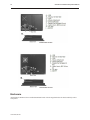
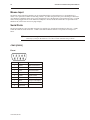
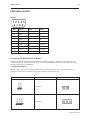
18 Gold Series Installation & Operation Manual Mouse Input Navigation on the Gold Series Panel PC can be accomplished either via the touchscreen or via attachment of a mouse. Two options are available for attaching a mouse - by either using the mouse port or attaching a USB mouse. Any Windows-compatible mouse device can be plugged into one of the Panel PC's keyboard/mouse ports, or a USB mouse can be plugged into one of the Panel PC's USB ports. Because Gold Series Panel PCs are pre-loaded with Windows XP, most mouse devices are plug and play. Serial Ports The PC215 and PC217 have four DE9 connectors for serial devices, and the PC108 and PC110 have two. COM1, COM3 & COM4 are fixed for RS-232. COM2 is selectable for RS232/422/485. The pinouts for each port are below. Restrict cable length to less than 500 feet (150m) for RS-422/RS485 devices and less than 50 feet (15m) for RS-232 devices in order to avoid communication problems. COM1 [RS232] Pinout Pin # Symbol Function 1 DCD Data Carrier Detect 2 RxD Received Data 3 TxD Transmitted Data 4 DTR Data Terminal Ready 5 GND Signal Ground 6 DSR Data Set Ready 7 RTS Ready to send output 8 CTS Clear to send 9 Not Used 1010-1020, Rev 00