1
SL BAR 660 RGBW LED Luminaires
Installation & User’s Manual
2. Connecting Power
Units can be powered in one of two ways:
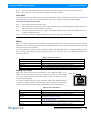
• Direct connection to a AC power source using an AC input cable. For wiring of AC input connector, refer to "Connecting SL BAR 660 RGBW LED Luminaires to AC Power" below.
• Connection from the AC output of another SL BAR 660 RGBW LED Luminaire. When using this method, it is
very important not to connect any other type of equipment device.
WARNING! Only connect other SL BAR 660 RGBW LED Luminaires to the AC Output (Thru) connector of a SL
BAR 660 RGBW LED Luminaire.
Connecting SL BAR 660 RGBW LED Luminaires to AC Power
If the unit is supplied with an AC input cable without an input connector installed. The input connector is a usersupplied accessory.
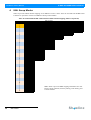
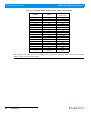
Table 2 on page 8 describes how to connect power to your SL BAR 660 RGBW LED Luminaire. Field wiring of the
SL BAR 660 RGBW LED Luminaire is straight forward. A total of 3 wires/conductors is supplied from the unit. The
following wiring scheme is used:
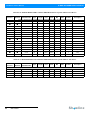
Table 2: SL BAR 660 RGBW LED Luminaire (IP20 Rated Models) AC Input Connections
Wire Color
Purpose
Brown
Main / Line (100 to 240VAC)
Blue
Neutral
Green/Yellow
Ground (Earth)
AC Input
AC Output
Bottom of Unit
AC Input Connector (on Unit)
AC Output Connector (on Unit)
Main /
Line
Neutral
AC Connector
(on side of unit)
Ground / Earth
Main /
Line
Neutral
AC Connector
(on side of unit)
Ground / Earth
Figure 4: SL BAR 660 RGBW LED Luminaire AC Input & Output Connections
8
INSTALLATION AND SET UP
Sh wline